sketchucation logo sketchucation
    • Login
    1. Home
    2. cotty
    3. Posts
    Oops, your profile's looking a bit empty! To help us tailor your experience, please fill in key details like your SketchUp version, skill level, operating system, and more. Update and save your info on your profile page today!
    ⚠️ Important | Libfredo 15.6b introduces important bugfixes for Fredo's Extensions Update
    Offline
    • Profile
    • Following 0
    • Followers 0
    • Topics 122
    • Posts 3,300
    • Groups 3

    Posts

    Recent Best Controversial
    • RE: Shortcut to ungroup

      @tig said:

      There are many commands that only appear in [context-]menus IF certain criteria are met

      Yes, I knew that, but I thought that in the general preferences there should be all possible entries independent of the model or the selection. So the general preferences are not as general as I expected... good to know 😉

      posted in Newbie Forum
      cottyC
      cotty
    • RE: Shortcut to ungroup

      @lecra said:

      People,

      I noticed the same!! In the shortcut menu 'Explode' is only available if you have already grouped an object! Maybe a bug.

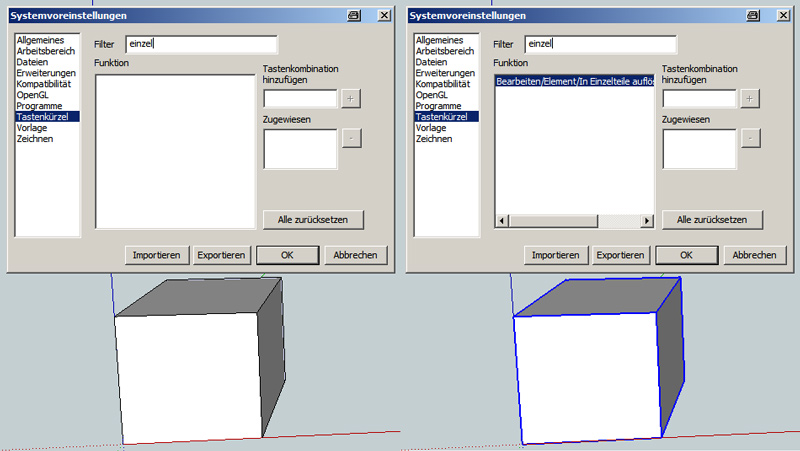
      In german it is called "In Einzelteile auflösen" and the possible bug is not in the contextmenu but in the preferences:

      • If no group or component is selected, the entry is not there (see picture)
      • If a group is selected, you can find the entry in the shortcut list

      shortcuts.jpg

      posted in Newbie Forum
      cottyC
      cotty
    • RE: Increasing Curve Segments on a scaled oval circle

      Is there a subdivision property in your render engine which smoothes the rendered mesh during export without changing the geometry itself?

      posted in Newbie Forum
      cottyC
      cotty
    • RE: The "Duh!" thread (aka the Doh! thread)

      My Duh! of the day was in this thread: http://forums.sketchucation.com/viewtopic.php?f=22&t=8046

      • Use the eraser tool to select some edges
      • Don't release the left mouse button
      • Click the spacebar
      • Release the left mouse button and the selection still remains without deletion
      posted in SketchUp Discussions
      cottyC
      cotty
    • RE: Holes in engineering drawing

      @oganocali said:

      Actually you can get it almost right in all views if you do

      view
      edges
      back edges
      profiles

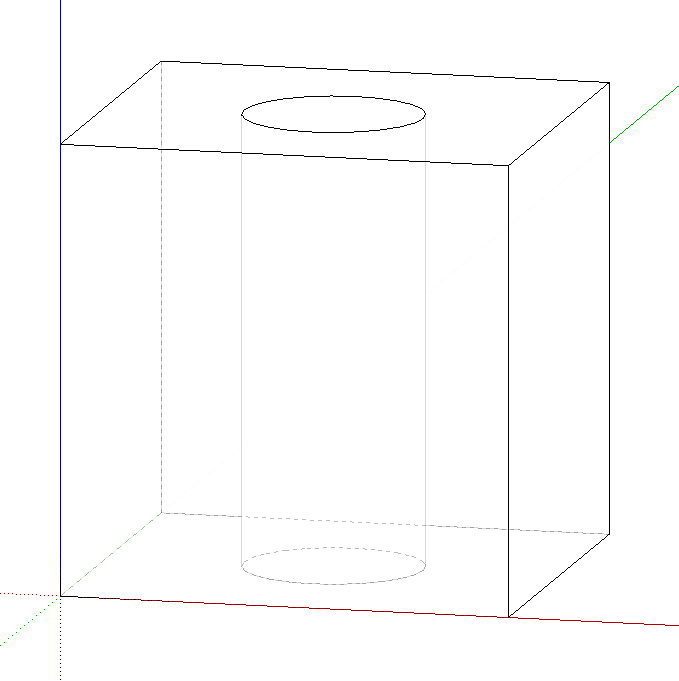
      set the transparency of the material around 70 %
      set the profile width from styles to 1

      With your technique and the face style "Hidden Line" the illustration is getting better (the vertical hole lines are not dashed...)


      hole3.jpg

      posted in Newbie Forum
      cottyC
      cotty
    • RE: Holes in engineering drawing

      Is this a task which can be solved by a ruby-plugin?

      loop through all geometry
      for all circles
      copy (viewdependent) the two hole lines which are furthermost
      paste on a new layer
      end
      end

      (...arcs?)

      posted in Newbie Forum
      cottyC
      cotty
    • RE: Holes in engineering drawing

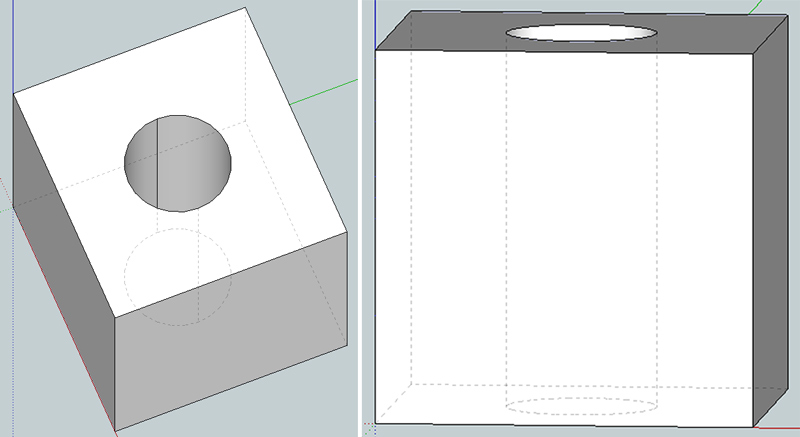
      Another way ist to unsmooth some of the hole lines (see picture), but this only works for one of the standard views naturally...

      EDIT: OK, some minutes to late 😉


      hole2.jpg

      posted in Newbie Forum
      cottyC
      cotty
    • Holes in engineering drawing

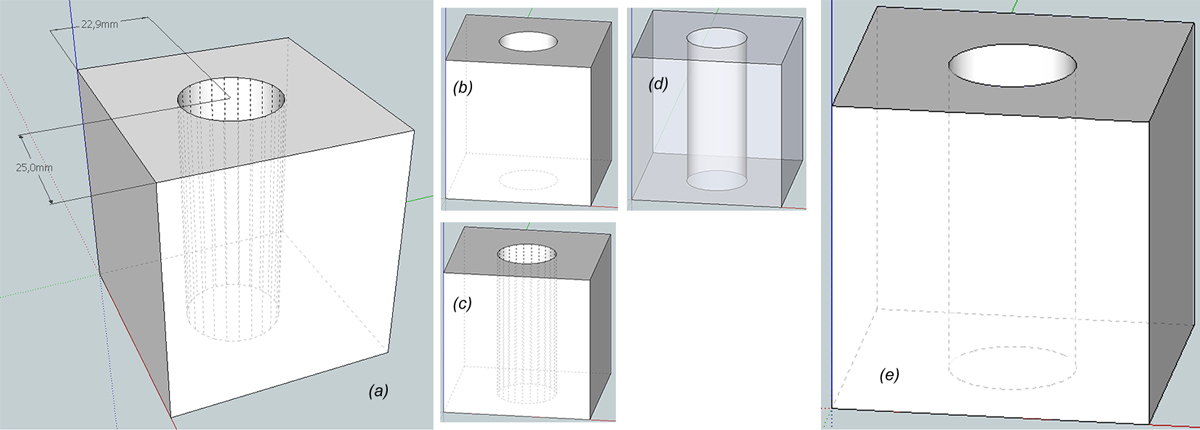
      Is there a way to show holes in a geometry (a) like shown in (e)? this illustration would be helpful for engineering drawings...

      I tried these ways but they didn't lead to the desired illustration:
      (b) show back edges
      (c) back edges and hidden lines
      (d) x-ray mode

      Thank you for helpful hints!


      hole illustration

      posted in Newbie Forum sketchup
      cottyC
      cotty
    • RE: IES files/lights

      I have tested some of these with the indigo renderer:
      http://www.indigorenderer.com/forum/viewtopic.php?t=4141

      posted in Gallery
      cottyC
      cotty
    • RE: Exercise for practicing rotate and move for beginners

      Here is another exercise for beginners to practice the tools rotate and move:
      http://bit.ly/xPWUSn


      rotatemove2.jpg

      posted in Newbie Forum
      cottyC
      cotty
    • RE: Five People Cover A Song Using Only One Guitar

      I miss the infinite loop button within youtube...

      posted in Corner Bar
      cottyC
      cotty
    • RE: Delete nested section cuts

      Thank you TIG for this one-liner which shows me that I have to learn ruby...

      posted in Newbie Forum
      cottyC
      cotty
    • RE: Delete nested section cuts

      Only if there is no native way to do this 😉
      (If there is a native way, it would be my Doh! of the day...)

      posted in Newbie Forum
      cottyC
      cotty
    • Delete nested section cuts

      Is there an easy way to delete all section cuts in a model at once even if they are nested in groups and components (e.g. for section cut animations)?

      posted in Newbie Forum sketchup
      cottyC
      cotty
    • RE: Find size of component

      Windows -> Components -> Select component in list of components in model (home button) -> change to panel Statistics
      (I don't know the exact translations of the menus, but I hope you will find it in your SketchUp)

      posted in SketchUp Components
      cottyC
      cotty
    • RE: Sharing with 3d pdf

      Another one with some examples: http://www.renderplus.com/wk/RPS_3D_PDF_w.htm
      I have never tried to make a 3D PDF, but I am interested in some experiences...

      posted in Plugins
      cottyC
      cotty
    • RE: Flip along axis is making me flip out!!

      Try the mirror plugin (http://forums.sketchucation.com/viewtopic.php?t=31410) or scale with a factor of -1 (+ Ctrl to retain the position).

      posted in SketchUp Bug Reporting
      cottyC
      cotty
    • RE: Bar Chair and other (updated 05.15)

      @jo-ke said:

      Absolutely great stuff.
      And thank you for showing the proxies. I'm learning a lot by looking at them.

      +1 ❗

      posted in Gallery
      cottyC
      cotty
    • RE: [Plugin] Slicer5

      @tig said:

      Some options are only available to 8-Pro users.

      Are these advanced options or are the basic functions affected?

      posted in Plugins
      cottyC
      cotty
    • RE: [Plugin] Slicer5

      I tried with the testmodel which didn't work for me with version 4, and no problems anymore!
      Thank you!


      slicer5.jpg

      posted in Plugins
      cottyC
      cotty
    • 1
    • 2
    • 161
    • 162
    • 163
    • 164
    • 165
    • 163 / 165