sketchucation logo sketchucation
    • Login
    1. Home
    2. cotty
    3. Posts
    Oops, your profile's looking a bit empty! To help us tailor your experience, please fill in key details like your SketchUp version, skill level, operating system, and more. Update and save your info on your profile page today!
    ⚠️ Important | Libfredo 15.6b introduces important bugfixes for Fredo's Extensions Update
    Offline
    • Profile
    • Following 0
    • Followers 0
    • Topics 122
    • Posts 3,300
    • Groups 3

    Posts

    Recent Best Controversial
    • RE: How come so few car modelers???

      @hellnbak said:

      Solo, you're the exception. Your models are in a whole galaxie apart from us regular modelers. The level of your work is completely unobtainable by people like me, so I don't feel threatened by them. Ok, sometimes I do bang my head against the wall, but I'm into pain so that's no problem.
      In other words, I wanna see your Ariel Atom and new Zonda models. I just patched my wall so I'm ready.

      +1 πŸ˜‰

      posted in SketchUp Discussions
      cottyC
      cotty
    • RE: [Plugin] On Screen Rolling Reel v1.1

      @unknownuser said:

      It lists the last 5 Tools used and their short-cut keys [if any]
      e.g. Select 'Space' , Line 'L' , Move 'M'

      Thank you for this nice plugin. The mentioned display of the respective short-cuts doesn't work for me, is there a known reason for this behaviour?
      forum_onscreen.jpg

      posted in Plugins
      cottyC
      cotty
    • RE: [Request/Idea] On-Screen Keyboard Input

      @unknownuser said:

      Onscreen rolling Reel

      Search the index for plugin by Rich O'Brien

      Thank you very much, I found it here. I searched osd, onscreen, ... but not "on screen" before πŸ˜’

      posted in Plugins
      cottyC
      cotty
    • RE: [Request/Idea] On-Screen Keyboard Input

      @tig said:

      Yes...
      You'd make a piece of screen-text [say 6 lines long] in one corner, that has an observer and when you change your current tool it recalculates the text - avoiding duplicating the current one if you are doing lots of moves for example.
      Adds a new top one and removes the last one in the list - it looks up the shortcut key for each tool listed [if any] and adds that to the tool's name as you suggest and adds it IF it has a shortcut...
      πŸ€“
      However, I can't see a big take up for this tool... so I won't be coding it any time soon... 😞

      I think I have read about a plugin like this recently but I am not able to find it anymore (perhaps wrong search words...). Does anyone know this plugin? It will be helpful for video tutorials...
      Thanks,
      Cotty

      posted in Plugins
      cottyC
      cotty
    • RE: Copy and paste image

      If there is no simple solution, maybe this is a point for the wishlist for SU9?!

      posted in Newbie Forum
      cottyC
      cotty
    • RE: How to get from 3D model to 2D construction plans?

      Maybe section cuts together with TIGs plugin SectionCutFace will help you.
      Often it is helpful to use parallel projection (menu -> camera) with the standard views (front, left, top, ...).

      posted in Woodworking
      cottyC
      cotty
    • Copy and paste image

      I use this fantastic Duh! from time to time and I often miss a copy-paste function to insert an image from the clipboard. Is there a simple workaround for this or maybe a plugin?

      posted in Newbie Forum sketchup
      cottyC
      cotty
    • RE: Su- rendered model on iphone/ipad in a real room

      The real furniture will never look as good as the rendered ones, so why put them in? Buy some 3d-glasses... 😎

      posted in Gallery
      cottyC
      cotty
    • RE: Bullion

      somewhat complicated, but possible...

      • Black & white image from coin
      • Matlab (or free clones?) to display as 3D surface
      • Export as STL
      • Import in SketchUp
      • Use as real 3D relief (if you have a faster computer than me πŸ˜• ) ...

      coin_3d.jpg

      posted in SketchUp Discussions
      cottyC
      cotty
    • RE: Honeycomb for material reduction

      @unknownuser said:

      Doesn't your 3D printer software provide this?

      On mine I can dictate the internal lattice work form.

      I don't have one, which one do you use?
      I have used an online print service some times and therefore I have to care about those things on my own (I think?) because I only upload a final STL- or collada-file ...

      posted in Newbie Forum
      cottyC
      cotty
    • RE: Honeycomb for material reduction

      May the force be with you (and your little gray cells) 😎

      posted in Newbie Forum
      cottyC
      cotty
    • Honeycomb for material reduction

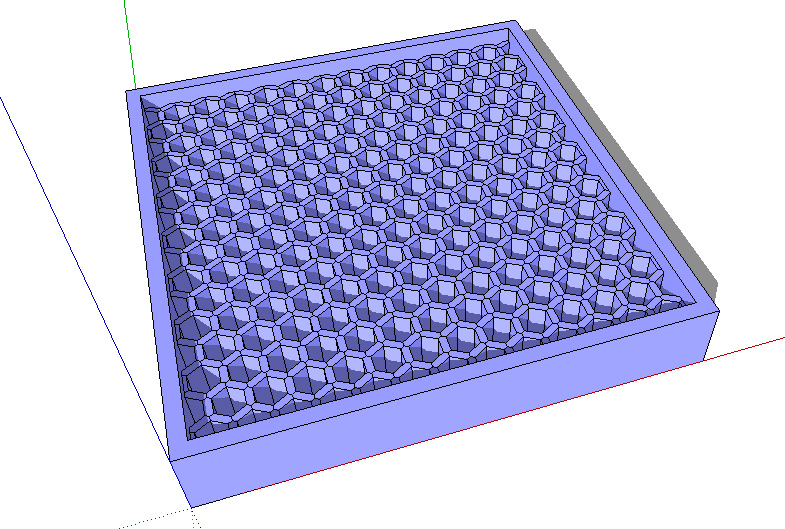
      Is there a plugin or a workflow to reduce material use within 3d printing like

      • inner parts of a solid as honeycomb structure (picture)
      • selective space structures
      • ?

      forum_honeycomb.jpg

      posted in Newbie Forum sketchup
      cottyC
      cotty
    • RE: Simple Artisan examples collection

      some more links...
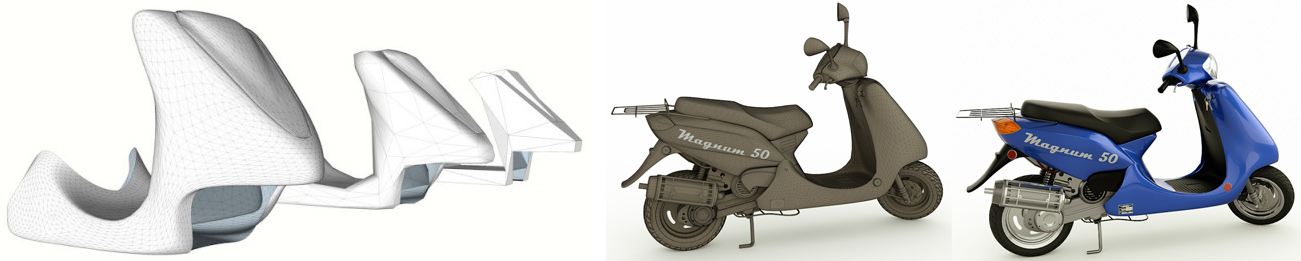
      scooter:
      http://forums.sketchucation.com/viewtopic.php?f=81&t=33226&p=293278&hilit=+sds2+available#p293000
      artisan_scooter.jpg
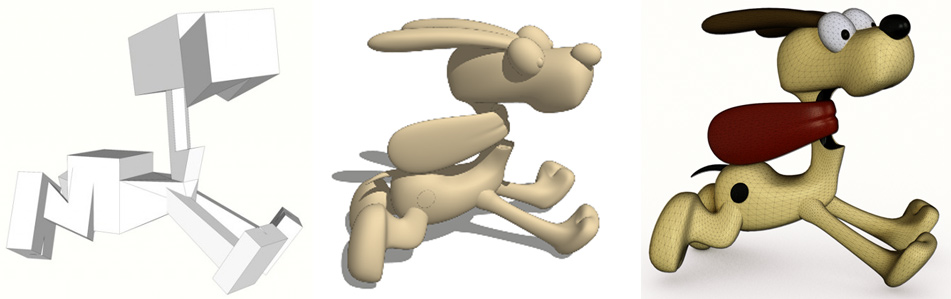
      dog (Odie):
      http://forums.sketchucation.com/viewtopic.php?f=335&t=33537&hilit=sds2+available#p295504
      artisan_odie.jpg
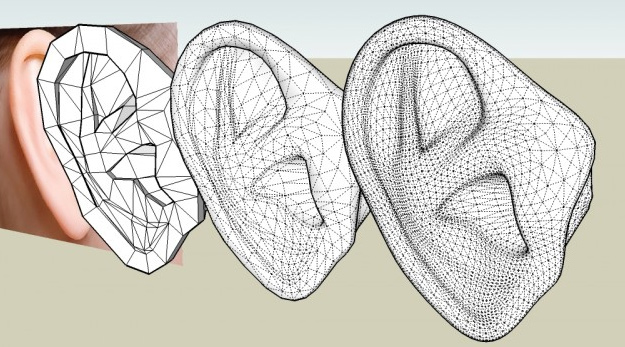
      ear:
      http://forums.sketchucation.com/viewtopic.php?f=335&t=33770&hilit=sds2+available&start=15#p297246
      artisan_ear.jpg
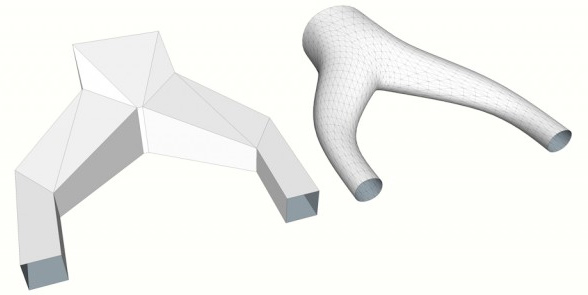
      tube splitting:
      http://forums.sketchucation.com/viewtopic.php?f=15&t=33735&p=296737&hilit=+sds2+available#p296737
      artisan_split.jpg
      sofa:
      http://forums.sketchucation.com/viewtopic.php?f=81&t=33367&p=294398&hilit=+sds2+available#p294398
      http://forums.sketchucation.com/viewtopic.php?f=81&t=33367&p=294398&hilit=+sds2+available#p294450
      artisan_sofa.jpg

      posted in Organic Modelling
      cottyC
      cotty
    • RE: Simple Artisan examples collection

      @hieru said:

      I'm no expert, but here's my humble contribution.

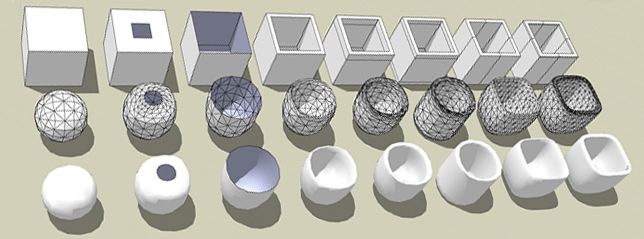
      Thank you. This thread should not (only) be one for experts but for those who wants to become an expert πŸ˜‰

      Here is another thread with similar motivation: http://forums.sketchucation.com/viewtopic.php?f=335&t=37589
      artisan_2nd.jpg

      posted in Organic Modelling
      cottyC
      cotty
    • RE: Simple Artisan examples collection

      A ring-thing (make use of TIGs new plugin SplitDonut😞
      proxy-ring.jpg


      proxy_ring.skp

      posted in Organic Modelling
      cottyC
      cotty
    • RE: [Plugins] TIG-splitTOOLS

      One little question and so useful plugins as reply 😍
      TIG, you wrote these plugins faster than I can read the topics, wow! Thanks a lot..l

      posted in Plugins
      cottyC
      cotty
    • RE: Follow me with extra lines

      TIG did a fantastic set of plugins, which are the direct answer to my initial question:
      http://forums.sketchucation.com/viewtopic.php?p=386658#p386658
      Thank you very much!

      posted in Newbie Forum
      cottyC
      cotty
    • RE: [Plugin] TIG.splitdonut

      Very helpful (e.g. for artisan proxy creation), thank you very much!

      posted in Plugins
      cottyC
      cotty
    • RE: Follow me with extra lines

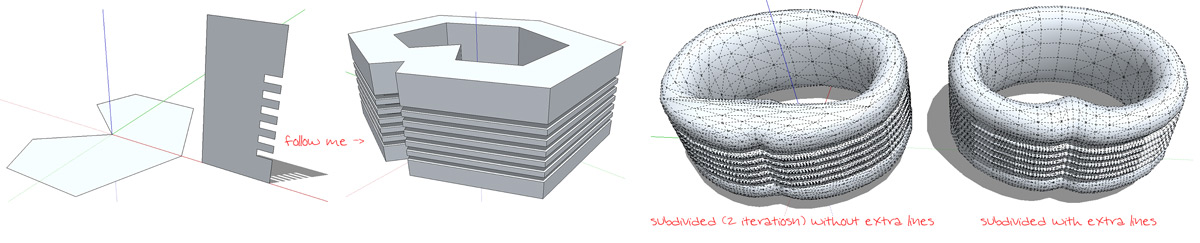
      Thank you all for the helpful hints. Most of them work fine for regular and simple geometries, but

      • draw in one corner and repeated rotational copy -> will not work for unsymmetrical follow me path
      • move up and down in z -> difficult for many loops (e.g. sawtooth)

      So I think the easiest way so far is the zorro-plugin (or knife from artisan) followed by the EEbyOffset (haven't tried yet)

      (I want to use the technique for (better) proxy creation for artisan, see part of picture)


      followmelines_2.jpg

      posted in Newbie Forum
      cottyC
      cotty
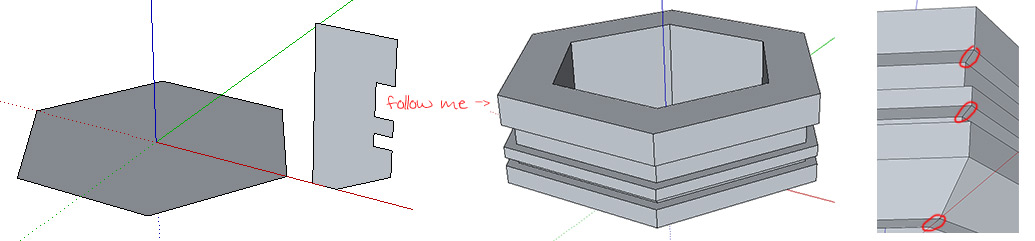
    • Follow me with extra lines

      Is there an easy way to use follow me (or a plugin) and get the red marked lines within the follow me action?


      followmelines.jpg

      posted in Newbie Forum sketchup
      cottyC
      cotty
    • 1
    • 2
    • 159
    • 160
    • 161
    • 162
    • 163
    • 164
    • 165
    • 161 / 165