That's why you have apprentices, or badly paid slaves, I made too many of them to think about.
Oops, your profile's looking a bit empty! To help us tailor your experience, please fill in key details like your SketchUp version, skill level, operating system, and more. Update and save your info on your profile page today!
🔌 Easy Offset | Offset selected faces in SketchUp in positive and negative offsets. Download
 Offline
Posts
-
RE: Working with wrought iron
-
RE: Working with wrought iron
@hellnbak said:
That really was cool. So tell me, I assume the bar was made up of four bars, so how was it made "solid" except for the section that was twisted?
A traditional basket twist is made from one solid bar.
You first have to heat the section you want to twist and cut it into four sections using a chisel.
This takes quite a while and a lot of reheating. Then knock the four new bars back into place and then do the twist. -
RE: Working with wrought iron
Sorry, didn't realise it was the thickness you wanted, Follow me as a native tool or Profile builder, http://www.smustard.com/script/ProfileBuilder might help.
-
RE: Is there a way to 'warp' a rectangle int a trapezoid
A very good point. Thanks
-
RE: Is there a way to 'warp' a rectangle int a trapezoid
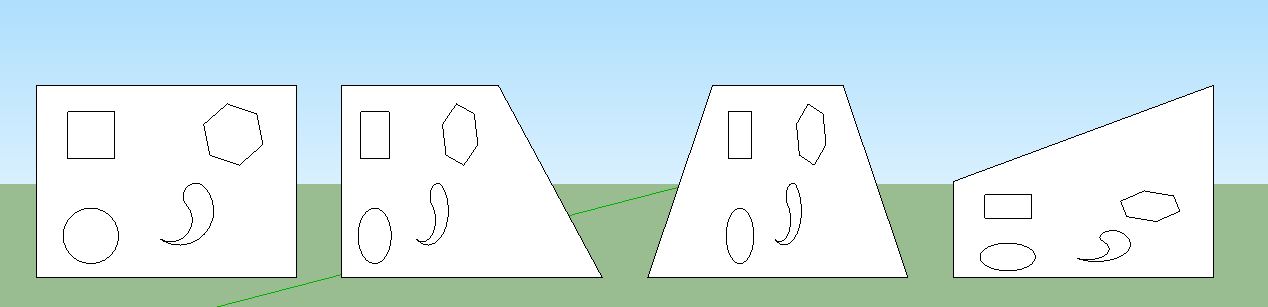
It can be done with native tools also.
Simply select the contents of the rectangle and one edge, not the actual face of the rectangle, and use the Scale tool.
-
RE: Help With Slide Using Follow Me Tool
Then laugh maniacally as the children fly off to their death on the first curve.
Oops Tig slipped in there to explain what I was referring to before I said it.
-
RE: Re: Some Funny Pics.
And a little test that combines all your masterful trumpeting abilities with your love of The Game.
-
RE: Line tool question
In the example you mention, Use the move tool.
Ctrl click the line and move it to the position you want. -
RE: Taking the piss outta urinating
Whatever you do for god's sake, Don't cross the streams!!!!!!!
-
RE: Who's up for a fight?
Hang on, before this kicks off in earnest,
is this the introductory fight or have you paid for the full half hour!?
-
RE: Rotating a cylinder parallel to a specific plane
You can also use the rotate tool without shift.
Click, hold and drag the tool, the protractor will change colour as you move it around, release the click when it is "Green", click again and rotate, click to finish.
This method allows you to select specific directions rather then just the colours, because you can click and drag to a specific part of your object so that it rotates along that axes.
For example: Draw a simple square, click on one corner, hold and drag to the corner diagonally opposite, release click, click again and rotate, then click to finish.
This rotates on the diagonal of the square rather than one of the edges as it would if it was a coloured axes. -
RE: Tool for laying groups/components flat for laser cutting?
Tig, I don't think he wants to unfold the individual components, I think it's more like Eclate_Displace.
Imagine a cube whose faces were separate components, click the cube and all faces/components are moved to the Z axes and laid out on their flat surface.
It would be a very handy tool, albeit with restrictions as it may be difficult for it to understand which is the flat surface in more complex shapes.
Much like the "Produce a flattened copy" option in slicer.Correct me if I'm wrong and this can be done in unfold/flattery.
-
RE: Rounding an edge
You are right, I didn't look close enough. Might be a good situation to only create half and mirror it. I wasn't directly questioning your post however, it was more the use of Curviloft that I was addressing. I must admit I am still trying to work out the intricacies of Curviloft, a wonderful plugin, but not always easy to understand.
-
RE: Rounding an edge
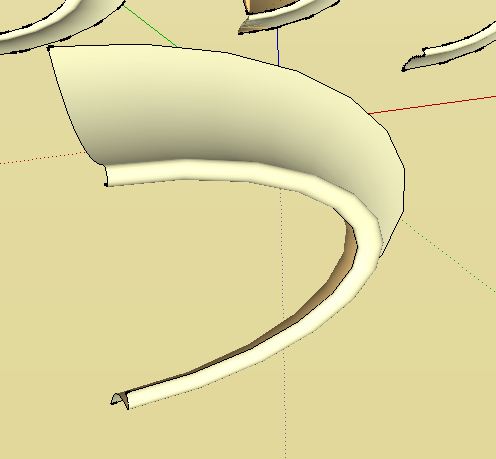
I may be misunderstanding the problem but EEBR seems to work perfectly.
Using the long curves as the profile and melding profile and the shorter ones as the Rails creates this in one go. Adding more segments to your curves will give a smoother effect.
-
RE: Copy + Scale?
Actually Tig, I linked to Jim's one.
This is Thomthom's one http://forums.sketchucation.com/viewtopic.php?t=39308
-
RE: Copy + Scale?
Simple shell will do it.
-
RE: Using DropBox and symbolic links with SketchUp.
Thanks Jeff, I guess I knew that, it just threw me reading it before my morning coffee.
By the way, I've used dropbox for years but never thought of this and it works brilliantly, I'd recommend it to anyone.