
sketchucation logo sketchucation
    • Login
    1. Home
    2. arail1
    3. Posts
    Oops, your profile's looking a bit empty! To help us tailor your experience, please fill in key details like your SketchUp version, skill level, operating system, and more. Update and save your info on your profile page today!
    πŸ”Œ Easy Offset | Offset selected faces in SketchUp in positive and negative offsets. Download
    Offline
    • Profile
    • Following 0
    • Followers 0
    • Topics 69
    • Posts 507
    • Groups 1

    Posts

    Recent Best Controversial
    • RE: SketchUp 2013 wish list

      @unknownuser said:

      @arail1 said:

      1. Ability to manipulate vertices directly

      you can already do this with the move tool.. or are you suggesting something different than what's already available?

      What I'm referring to is the ability to move (or edit) vertices separately from the lines or planes they're a function of. ThomThom's Vertex tools does exactly that but I think Trimble should buy the plugin from ThomThom and incorporate it into the base application as it's such an essential function in 3D work.

      And they should pay ThomThom handsomely for it because it's such a well designed, well thought out plugin.

      posted in SketchUp Discussions
      arail1A
      arail1
    • RE: SketchUp 2013 wish list
      1. Ability to zoom in to detail without clipping plane problems

      2. A way to organize the Layers panel into folders and categories

      3. Ability to manipulate vertices directly

      posted in SketchUp Discussions
      arail1A
      arail1
    • RE: Slice a large number of groups without exploding?

      Imagine you have a design for a 100'W X 12'H wall that has approximately 700 12" square tubes projecting out at random lengths from the wall. The obvious and easiest thing to do is to make a grid of the tubes longer than the longest projection and then move them in and out until you get the arrangement you want. But then you realize,of course, they're sticking out of the back of the wall and the model is ruined from all of those views. So you think - pot of coffee, work way past midnight to double click and select and slice every one of those things at the wall line.

      But then along comes Zorro2 and Slice! Slice! Slice on the Section! and Bam! you're done in 15 minutes. I may even watch some TV tonight.

      A hearty thanks to the creator of Zorro2 and those who pointed me in that direction! I'm going to find a lot of uses for this plugin going forward.

      posted in SketchUp Discussions
      arail1A
      arail1
    • Slice a large number of groups without exploding?

      Is there a way to slice a group of groups without exploding each group individually and then re-grouping? Imagine you have a field of trees and each tree is a group and you want to create a plane to intersect all of them at once and then cut the trees at the plane. Is there a way to do something like that without ungrouping each item, intersecting with the plane, deleting and then re-grouping?

      Thanks in advance

      posted in SketchUp Discussions sketchup
      arail1A
      arail1
    • RE: Move tool frustration

      Thanks for the quick replies.
      I wasn't aware of the bounding box centers and now that I go back to the model I see that the center of the object that I'm using to position is also the center of the bounding box - thus the difficulty I was having.
      Now, being aware of that feature, I can easily avoid it.
      Thanks again.

      posted in SketchUp Discussions
      arail1A
      arail1
    • Move tool frustration

      Every so often my Move tool insists on becoming a Rotate tool. I've never understood why the program is designed to combine those two tools - it doesn't seem to add any functionality that I can see.

      Is there a key command or trick to tell SketchUp that you just want to Move, not to Rotate - someway to lock the command to one function and not the other?

      posted in SketchUp Discussions sketchup
      arail1A
      arail1
    • RE: V-Ray for SketchUp on Lynda.com

      I finally got around to watching this tutorial. I'm only a quarter of the way through but so far I think it's an excellent overview. My rendering knowledge is spotty and inconsistent so I expect I'll come away with a much better grounding in V-Ray.

      I notice also that they've added a Twilight tutorial for those who are interested.

      Some comments on lynda.com for those who haven't used this service before (I'm not in any way affiliated - just a subscriber):

      lynda.com is a website that offers a very, very wide range of tutorials for many types of software. Subscription is $25/month and you can watch as many videos on as many subjects as you can cram into the month. They make it easy to unsubscribe. I think they expect you to subscribe and unsubcribe often depending on your needs.

      So a strong thumbs up for this one. Well worth the $25 and after the V-Ray video I think I'll have time to brush up on some of my modo skills, take a look at the Twilight video and maybe even scan through some of the SketchUp videos to see if there's anything new to me.

      posted in V-Ray
      arail1A
      arail1
    • RE: ....some further thoughts on the new SketchUp Logo!

      I've grown to like it. And if they hold true to their word and invest time and energy in upgrading and improving SketchUp then I will probably, over time, come to associate the logo with this new period of innovation. Fingers crossed.

      posted in SketchUp Discussions
      arail1A
      arail1
    • V-Ray for SketchUp on Lynda.com

      Anyone watched any of it? Useful?

      posted in V-Ray render plugins extensions
      arail1A
      arail1
    • RE: Trimble Version

      Are there any changes other than to the logo? I don't see anything obvious.

      I just downloaded and installed it and now I realize that was a bit of a mistake. I rarely ever read the disclaimers, I just Accept, but in this case I should have looked for any comments about our original license status and if it changes at all.

      posted in SketchUp Discussions
      arail1A
      arail1
    • RE: Is anyone following the Apple v Samsung battle?

      I'm not sure about this but I believe the basic premise of patents has changed over the last few decades. There was a time when it was assumed that patent infringement meant that you couldn't copy another company's (or individual's) methods but if you could achieve the same ends by a different route you were okay. So, for instance, you couldn't use another company's code but if you could write new code to achieve a similar result you were in the clear. Apparently not so now. Apple didn't 'invent' round corners and Samsung isn't in any way trying to confuse their customers into thinking they're buying an iPhone so why is there a case? Most of my original Palm Pilots had rounded corners and they preceded the iPhone by years.

      I wish copyright and patent laws were much tighter and were restricted to something you could prove was unique to you, invented by you, not in common use before you and the patent only applied to your particular means of achieving that particular end. 'Occupy Wall Street' is an example. The man who claimed a copyright on that slogan didn't invent it, create it, nor was his use of it unique in any way. But he was allowed to proceed with a copyright claim just because no one else had yet copyrighted the phrase. Imagine if this patent logic was common to the earlier part of the century - one company would have a patent on the steering wheel in cars and no other company could introduce a competing version if it was a round disc at the end of a column. And so on.

      Not a good idea.

      posted in Corner Bar
      arail1A
      arail1
    • Background image

      I can't seem to get a consistent background image.
      This is a wall panel that has a blown up image of an egg beater printed on metal.
      Notice how the image seems to be broken up into rectangles and some of the rectangles are lighter than others.
      I'm not sure what to do about this. The image is a JPG scanned out of a book and sent to me by the client so I have no control over that end of things.

      Any advice will be greatly appreciated.


      eggbeater render 1 July 16.jpg

      posted in V-Ray render plugins extensions
      arail1A
      arail1
    • RE: No success w/ crisp lines

      Thanks for the replies.

      I realize I've got to be systematic - set up some tests in SU and in Layout and work through all the advice in this thread, labeling everything as I go.

      I do wish it was more straightforward. I don't have to do anything to get a crisp print out of AutoCAD - it's not something I have to think about. I wish SketchUp was the same - hit print and get an acceptable result.

      posted in SketchUp Discussions
      arail1A
      arail1
    • No success w/ crisp lines

      I think I've tried everything - but I can't seem to get anything like acceptable crisp lines.

      This is the best that I can do and it's not nearly good enough. I make shop drawings in NYC and I'd like to start including 3D material from SketchUp but I keep coming up against this obstacle of line quality.

      Exporting directly out of SketchUp - I have anti-aliasing on, I've increased resolution to 300 per inch. I've tried JPG, PDF, PNG.
      I get essentially the same thing Exporting out of Layout.

      Any suggestions?

      Signed - Desperate in Sweltering NYC

      VSME Bra Salon P4a.pdf

      posted in SketchUp Discussions sketchup
      arail1A
      arail1
    • RE: Upgrade

      Thanks for the replies.
      I downloaded and all of the license agreements and other misc is still labeled Google.

      posted in SketchUp Discussions
      arail1A
      arail1
    • Upgrade

      I'm getting the There is a New Version of SketchUp (Layout). Would You Like to Download it Now? splash screen. When I click yes I'm taken to a page that has Trimble Sketchup at the top. But the download field for SketchUp 8 Pro is red (indicating that I've already downloaded it) so maybe there isn't a new version.

      Furthermore, I downloaded it (but didn't install) and the file in my Download folder is labeled GoogleSketchUp.

      Has anyone Downloaded (Upgraded) since The Change? And if so, any input?

      Thanks in advance.

      posted in SketchUp Discussions sketchup
      arail1A
      arail1
    • RE: If you were to make anything
      • 1 for Larry Niven's Ringworld
      posted in Corner Bar
      arail1A
      arail1
    • RE: Forums' Future ?

      I doubt Trimble has any interest in SketchUcation at all. Well run companies like to control everything and control emanates outwards from the center. Having some kind of quasi business relation with an entity like SCF that's not firmly in their stable would be unlikely.

      posted in SketchUp Discussions
      arail1A
      arail1
    • RE: Circles and arcs from AutoCAD

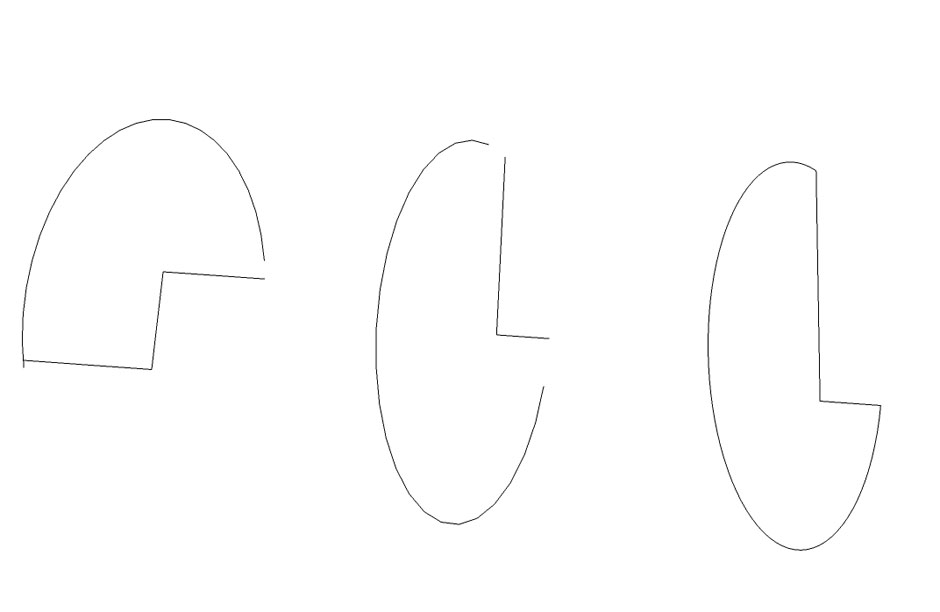
      The bezier plugin solution is accurate for complete ellipses but not partial ellipses. Or, more accurately, SketchUp isn't accurate - partial ellipses come in missing sections for some reason. Then the bezier plugin works on what remains but there's no accurate way to complete the ellipse. The two figures on the left were complete in AutoCAD but are missing parts once Imported into SketchUP. The ellipse on the right was transformed to a spline in AutoCAD before importing into SketchUp


      Untitled.jpg

      posted in SketchUp Discussions
      arail1A
      arail1
    • RE: Circles and arcs from AutoCAD

      Thanks for that.

      Yes, I'm aware of that Plugin - and of course you can stretch and flatten a circle in SketchUp. But ellipses are complex objects. Defining their end points will not guarantee that the shape of the ellipse will be the same from one program to another because the foci can be in different positions. That's why I generated the solution that I did. Very often the information is coming to me as a DWG and I have no latitude to change it so I had to devise a solution that would create exactly the same ellipse as the DWG

      posted in SketchUp Discussions
      arail1A
      arail1
    • 1 / 1