sketchucation logo sketchucation
    • Login
    1. Home
    2. arail1
    3. Posts
    Oops, your profile's looking a bit empty! To help us tailor your experience, please fill in key details like your SketchUp version, skill level, operating system, and more. Update and save your info on your profile page today!
    πŸ”Œ Easy Offset | Offset selected faces in SketchUp in positive and negative offsets. Download
    Offline
    • Profile
    • Following 0
    • Followers 0
    • Topics 69
    • Posts 507
    • Groups 1

    Posts

    Recent Best Controversial
    • RE: Lynda.com

      lynda.com is a site that offers tutorials for a very wide range of software (Photoshop, Illustrator, etc.) for a fee of $25/month. Their tutorials are somewhat basic but thorough. Generally they run anywhere from 6 hrs to 12 or more. They're well produced and broken down into segments of several minutes each so you can choose to watch the whole tutorial or go right to subjects that you want to know about.

      I have looked at the tutorials on chaosgroup and I think they're okay but alternatives never hurt.

      posted in V-Ray
      arail1A
      arail1
    • Lynda.com

      Some time ago I made a number of requests for a modo tutorial on lynda.com and encouraged others on the modo forums to do the same. Finally we got a good basic 7 hr modo tutorial.

      I just sent in a request for a V-Ray for SketchUp tutorial. Hopefully others will also send in requests.

      posted in V-Ray render plugins extensions
      arail1A
      arail1
    • RE: Tree shadows

      @ben ritter said:

      Thanks everyone. I have the problem solved.

      It's a good idea to explain how you solved your problem so someone who is following this thread or finding it by Searching will know what the solution is.

      posted in V-Ray
      arail1A
      arail1
    • RE: How to edit vray sphere

      Well that's weird. I assumed anything V-Ray gave me in that category was a light. Why do they have a sphere? What's it's purpose? If a sphere, why not a cube? I had to make a chandelier with 120 bulbs. I thought the V-Ray spheres were meant to be bulbs.

      Not really a problem. I can do a white glow in post.

      Thanks, as always, for your reply(ies).

      posted in V-Ray
      arail1A
      arail1
    • RE: V-Ray doesn't save my settings

      1.49.01

      I wonder if it has to do with my opening the scene on a computer that doesn't have V-Ray. I have V-Ray on my home computer but the company that I work for doesn't have a license. So I model at work then render at home in the evening. Not sure if that's causing the screw up but it's a PIA. I have to write down all the settings and double check before I render.

      Thanks for your replies.

      posted in V-Ray
      arail1A
      arail1
    • V-Ray doesn't save my settings

      V-Ray doesn't save all my material settings. I've got a concrete floor that has a Reflection layer and a bump map but when I open the scene in the morning the Reflection layer is gone and there's nothing in the bump category. I think this is happening to several other materials also.

      Anyone have any advice about this? Thanks.

      posted in V-Ray render plugins extensions
      arail1A
      arail1
    • How to edit vray sphere

      I'm making a chandelier using vray spheres. Normally, to edit a vray light I right click and then click on V-Ray for SketchUp at the bottom of the right click list. But that line doesn't show up when I click on the spheres. I think I'm using 1.49.

      Thanks in advance for any help ya got.

      posted in V-Ray render plugins extensions
      arail1A
      arail1
    • RE: Script to convert Sketchup into Autocad?

      No, but I sure would like such a script.

      What the OP is talking about - imagine a 12 line grid in AutoCAD (12 lines vertical crossing 12 lines horizontal). In AutoCAD that's 24 lines. If you export it into Sketchup every line that crosses a line becomes a separate segment (12 X 12 + 12 X 12)= 288 lines.

      Or imagine you draw a wall with doors and door casings in AutoCAD - the floor line is one line segment. But when you open the drawing in SketchUp the floor line becomes many, many separate lines for every point that a vertical meets a horizontal.

      I go back and forth between SU and AC all the time and use the Join command but it's a bit of a pain. I've asked about a script that would automatically join all contiguous lines into one line segment on the AutoCAD forums and I was told that a macro could be easily done but I never followed up on it.

      posted in Extensions & Applications Discussions
      arail1A
      arail1
    • RE: Not sure what machine to buy?

      i7-2600K
      GTX570
      16G RAM

      posted in Extensions & Applications Discussions
      arail1A
      arail1
    • RE: What is your favorite Photorealistic Renderer?

      V-Ray

      posted in Extensions & Applications Discussions
      arail1A
      arail1
    • RE: Asgvis dead - VrayFSU Dead too?

      It's getting better.
      Last week I tried to download a demo of V-Ray at the office I'm working at now (new job) but I received no download link, nothing.
      Today, I tried it again and was up and running in half an hour.
      So, a rocky start but I think (and hope) everything will be fine going forward.

      posted in V-Ray
      arail1A
      arail1
    • RE: Freelancers...

      Solo -

      Don't overlook Craigslist. Go to Craigslist > Your City (or anywhere else, this is a digital world) > Jobs > arch/engineering. I've gotten several good projects that way and I'm right now (somewhat unhappily) working at a full time gig that I got through Craigslist.

      Good luck.

      posted in Corner Bar
      arail1A
      arail1
    • RE: Version # ?

      Thanks for the replies. As expected it's 1.49.01

      posted in V-Ray
      arail1A
      arail1
    • Version # ?

      Can someone tell me how to determine the version number of my V-Ray license? I'm pretty sure it's 1.49 but I don't know where to get that info.

      Thanks in advance.

      posted in V-Ray render plugins extensions
      arail1A
      arail1
    • RE: Best Renderer?

      Solo is the best renderer

      posted in Extensions & Applications Discussions
      arail1A
      arail1
    • RE: Join lines

      Works great!
      I can't thank you enough!

      posted in SketchUp Discussions
      arail1A
      arail1
    • RE: Join lines

      I created a simple example that illustrates the problem and posted the SU file -

      I drew a circle in AutoCAD with a line intersecting the perimeter from the center.
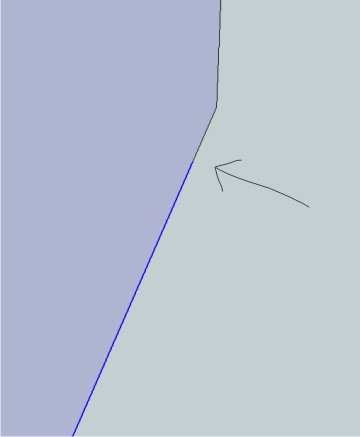
      I Imported into SketchUp and deleted the line. That left a very small fragment outside the faceted edge. I deleted the fragment. Now I have a faceted edge with two lines, not one. repair_broken_lines doesn't see the problem because the line isn't 'broken' - it's two lines with no intersection. (see photo) brokenline.jpg

      The problem for me isn't with SketchUp - SketchUp completes the face, the problem is when I export as OBJ - the errant vertexes flip my polys or create unwanted triangles. I design stairs so I move back and forth from AutoCAD with lots of circles and ellipses so this occurs pretty regularly in my work.


      broken line.skp

      posted in SketchUp Discussions
      arail1A
      arail1
    • RE: Join lines

      @unknownuser said:

      Do you have a model that I can try.

      I have actually a small plugin that remove lonely vertices.

      Fredo

      I'm away for the holiday weekend. When I'm back in NYC I'll post a model that exhibits some of the problems I mentioned.

      posted in SketchUp Discussions
      arail1A
      arail1
    • RE: Join lines

      @gaieus said:

      Have you looked at that "repair_broken_lines" plugin Jim linked to? Or as a matter of fact, TT's Cleanup plugin (which can do much more)?

      Yes, I tried repair_broken_lines and it seemed to heal some broken lines but definitely not all. I still had a healthy amount of cleanup to do on the other side of the export. I tried an early version of ThomThom's Cleanup plugin and that worked much better but not on the whole model. Some of my projects have 40 or 50 groups and opening each one was time consuming. I'm overdue to try out the most recent version with SU8.

      A lot of the broken line problems I mention are a consequence of importing DWG files, especially files that have circles or ellipses with intersecting or tangent lines. The way that SketchUp converts a circle or ellipse to a faceted object often leaves small fragments of lines at the point that a line touches the curve. If you zoom in very, very close you'll see that a line that originally went to the perimeter of the curve, now extends beyond the faceted edge by a very small amount. That small line fragment will break the faceted edge into two line segments and often when I delete the fragment I still have two lines rather than one.

      But, as I said above, I found that the List function in modo is any modo users best friend. It offers the global solution I was originally asking about.

      Thanks again for all the replies.

      posted in SketchUp Discussions
      arail1A
      arail1
    • RE: What will happen to the old Asgvis.com site?

      @thomthom said:

      @arail1 said:

      (odd that someone else has that site name), not Asgvis.

      You mean ChaosGroup - which are the ones that actually develop V-Ray. ASGVis just made the plugin to bridge SketchUp and Rhino with V-Ray.

      No. Chaos Group doesn't own the site name vray.com, that was the point I was making. It's owned by Visual Dynamics with a banner stating: "V-Ray is a trademark of Chaos Software LTD. This web site is not sponsored by, endorsed by or affiliated with Chaos Software LTD." I'm just surprised that Chaos Software didn't license the site name right at the beginning - rather a large oversight on someone's part.

      posted in V-Ray
      arail1A
      arail1
    • 1
    • 2
    • 11
    • 12
    • 13
    • 14
    • 15
    • 25
    • 26
    • 13 / 26