sketchucation logo sketchucation
    • 登入
    Oops, your profile's looking a bit empty! To help us tailor your experience, please fill in key details like your SketchUp version, skill level, operating system, and more. Update and save your info on your profile page today!
    ⚠️ Important | Libfredo 15.6b introduces important bugfixes for Fredo's Extensions Update

    SubD examples and models

    已排程 已置頂 已鎖定 已移動 SUbD
    renderpluginsextensions
    1.7k 貼文 81 Posters 1.0m 瀏覽 79 Watching
    正在載入更多貼文
    • 從舊到新
    • 從新到舊
    • 最多點贊
    回覆
    • 在新貼文中回覆
    登入後回覆
    此主題已被刪除。只有擁有主題管理權限的使用者可以查看。
    • BoxB 離線
      Box
      最後由 編輯

      @hornoxx said:

      your doodle has even material thickness 😲 how do you get that ? ! ?

      @ely862me said:

      That's why Fredo invented JPP !

      No JPP used. I simply started with a hexagonal doughnut. The whole model is an extrusion from that hexagon therefore creating a printable solid.

      1 條回覆 最後回覆 回覆 引用 0
      • BoxB 離線
        Box
        最後由 編輯

        This is the basic process I used, forgive the wandering mouse as I haven't had my coffee yet but this could be tweaked to any detail level you desire and done correctly will remain a solid with a suitable double skin. It is after all nothing more than a scaled tube.

        http://i155.photobucket.com/albums/s296/storeben/SU/Funnel.gif

        1 條回覆 最後回覆 回覆 引用 0
        • pbacotP 離線
          pbacot
          最後由 編輯

          That's nice. For some reason I didn't think you started with a solid in the first place!

          MacOSX MojaveSketchUp Pro v19 Twilight v2 Thea v3 PowerCADD

          1 條回覆 最後回覆 回覆 引用 0
          • ntxdaveN 離線
            ntxdave
            最後由 編輯

            @Box, another great tutorial for those of us who are trying to move further along with quad modeling. Between this and the other tutorial you share earlier today, I am getting the oicture clearer.

            The other aspect that I have seen in you instrument post that woul ge nice to see is how you achieved the curved sections.

            I have now downloaded the trial versions of the Subd and Vertex Tools plus the QFT plugins. I created one model so far. It has errors but I now have a better idea of where I should go. Will be trying some more tomorrow. It is not as big a mystery as it was before.

            Again, thanks for sharing you knowledge with the rest of us.

            Press F1...thank me later

            1 條回覆 最後回覆 回覆 引用 0
            • BoxB 離線
              Box
              最後由 編輯

              @ntxdave said:

              The other aspect that I have seen in you instrument post that woul ge nice to see is how you achieved the curved sections.

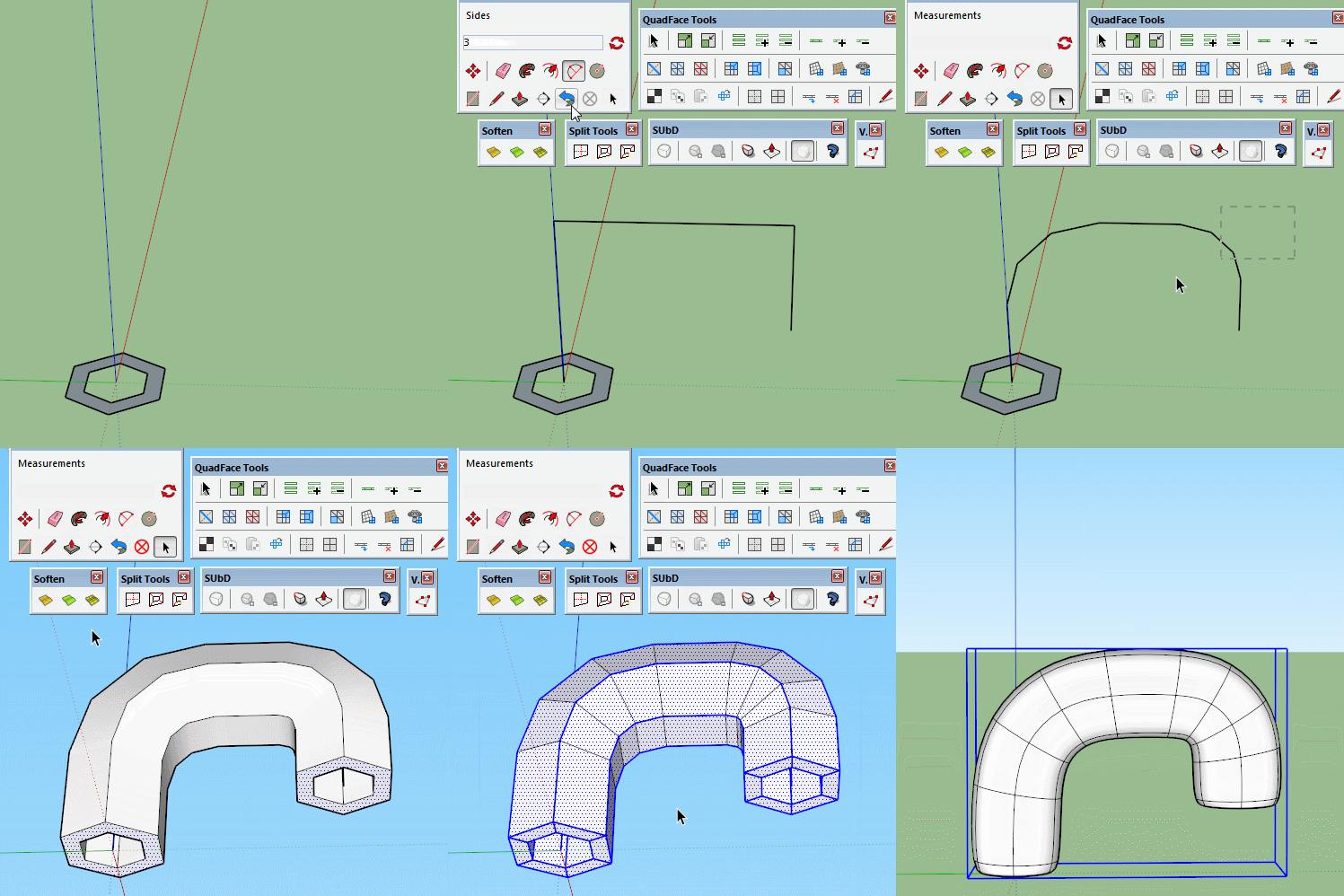
              It's all about segmentation, you can use follow me to create shapes but they don't need to be 'round'.
              Here I have used the arc tool set at 3 segments. You can use more or less depending on what you need. I used too many in the horn but it was an unplanned shape so just evolved. Tigs split tools are very handy too as you need everything split into quads. You can manually draw the edges in but Split tools speeds up the process.

              Curves.gif

              1 條回覆 最後回覆 回覆 引用 0
              • BoxB 離線
                Box
                最後由 編輯

                Another very quick doodle.
                How to make a passable sports bra from an empty box by moving a few vertices.
                I've added the proxy so you can make em as big as you want adjust them to fit.


                Sports Bra.gif


                Sports Bra.skp

                1 條回覆 最後回覆 回覆 引用 0
                • HornOxxH 離線
                  HornOxx
                  最後由 編輯

                  @box said:

                  Another very quick doodle...

                  Thanks Box for your great "Doodle"-Tutorial-Shorts here!!
                  like some others here - there is a lot to learn
                  👍 😄

                  never trust a skinny cook

                  1 條回覆 最後回覆 回覆 引用 0
                  • Rich O BrienR 離線
                    Rich O Brien Moderator
                    最後由 編輯

                    @box said:

                    Another very quick doodle.

                    😲

                    Download the free D'oh Book for SketchUp 📖

                    1 條回覆 最後回覆 回覆 引用 0
                    • pilouP 離線
                      pilou
                      最後由 編輯

                      I you make 2 holes you have very design glasses! 💚

                      Frenchy Pilou
                      Is beautiful that please without concept!
                      My Little site :)

                      1 條回覆 最後回覆 回覆 引用 0
                      • Bob JamesB 離線
                        Bob James
                        最後由 編輯

                        Considering all that you have already provided in the practical use of these new tools I feel somewhat guilty in asking you to do the same step-by-step tutorial for the creation of your sports bra. It may not seem so to you, but for numb-noses like me these tuts are REALLY, REALLY helpful.
                        I've spent so many years using SU with the native tools and Ruby plugins/extensions that I'm finding it more than a little difficult re-structuring my workflow. At this point it's not obvious that the quad workflow is better/faster. I'm trusting in all of you "quad guys" that, in the long run, the quad workflow is the "way of the future".

                        Thank you again for your great explanations.

                        @whaat
                        This is the stuff that has distracted me from the PB2 beta testing. It's not fair for these guys to dangle M&Ms in front of a chocoholic 😳

                        i7-4930K 3.4Ghz, 2x GTX780 6GB, 32GB DDR3-1600 ECC, OCZ Vertex 4 500GB, WD Black 3TB, 32TB NAS, 4x 27" Monitors, SpaceMouse Pro, X-keys XK-60

                        1 條回覆 最後回覆 回覆 引用 0
                        • BoxB 離線
                          Box
                          最後由 編輯

                          Bob there's not a lot I could add to that little bra number, all you are seeing there are the undo steps played backwards. Each of the movements are me selecting vertices and moving them with the Vertex Gizmo just like in the ones earlier. The creation of the lines around the faces is also shown above, but they could just be drawn in.
                          I'm also on my phone now so unable to work with it.

                          I think people need to realise that they shouldn't be frightened of quads, once you understand them you can easily work them into your normal workflow as necessary. They actually help you with selecting and manipulating edges even without thinking about the SubD aspect of them. Working with geometry that is a network of loops and rings rather than a tangled web of triangles is so refreshing.

                          1 條回覆 最後回覆 回覆 引用 0
                          • thomthomT 離線
                            thomthom
                            最後由 編輯

                            @box said:

                            Working with geometry that is a network of loops and rings rather than a tangled web of triangles is so refreshing.

                            I'm so happy to hear people say this. It also makes writing modelling tools and extensions easier if they can focus on dealing with quads.

                            That being said - these GIFs you made box are really nice. Exactly the kind I want to create for the new QFT site.

                            Thomas Thomassen — SketchUp Monkey & Coding addict
                            List of my plugins and link to the CookieWare fund

                            1 條回覆 最後回覆 回覆 引用 0
                            • ntxdaveN 離線
                              ntxdave
                              最後由 編輯

                              @thomthom said:

                              @box said:

                              Working with geometry that is a network of loops and rings rather than a tangled web of triangles is so refreshing.

                              I'm so happy to hear people say this. It also makes writing modelling tools and extensions easier if they can focus on dealing with quads.

                              That being said - these GIFs you made box are really nice. Exactly the kind I want to create for the new QFT site.

                              Having been one of those who was trying to get a grip on the whole quad modeling approach/environment, Box's GIF's would be a great collection to start a set of tools on how, and why, to use quads more in your approach to 3D modeling. I have downloaded them all as "quick reference" guides. I only wish that there was a way to pause a GIF so that I could go back and see what was just done (like what was clicked) without having to watch the entire video.

                              Challenge: Someone come up with a way to pause/play a GIF 💚

                              Press F1...thank me later

                              1 條回覆 最後回覆 回覆 引用 0
                              • thomthomT 離線
                                thomthom
                                最後由 編輯

                                @ntxdave said:

                                Having been one of those who was trying to get a grip on the whole quad modeling approach/environment, Box's GIF's would be a great collection to start a set of tools on how, and why, to use quads more in your approach to 3D modeling. I have downloaded them all as "quick reference" guides.

                                Yea - the quad-workflow was my main concern in releasing SUbD. Had this not been a spare-time project of mine I would have made sure to produce more content for QFT up front.

                                Btw, have you had a look at the links on the Quad section of the SUbD website?

                                Thomas Thomassen — SketchUp Monkey & Coding addict
                                List of my plugins and link to the CookieWare fund

                                1 條回覆 最後回覆 回覆 引用 0
                                • BoxB 離線
                                  Box
                                  最後由 編輯

                                  @ntxdave said:

                                  Challenge: Someone come up with a way to pause/play a GIF 💚

                                  Record the gif with any of the multitude of screen recorders that save as video, the ones we used before the gif ones were available.

                                  1 條回覆 最後回覆 回覆 引用 0
                                  • ntxdaveN 離線
                                    ntxdave
                                    最後由 編輯

                                    @thomthom said:

                                    Btw, have you had a look at the links on the Quad section of the SUbD website?

                                    Yes, but I am going to look at it again. I have also been reading the Blender for Dummies book. While I am not Blender's biggest fan and the book does not really teach you to use the software very well. It is a very good background for understanding the whole Quad environment and learning some of the terminology related to the quad/mesh environment.

                                    I did finally do my first quad model yesterday. Unfortunately I did it before Box's gif's so it has several mistakes but at least I did one.

                                    Here it is:

                                    QFT-Glass.png
                                    Everyone has to start somewhere and then learn from your mistakes.

                                    Press F1...thank me later

                                    1 條回覆 最後回覆 回覆 引用 0
                                    • pilouP 離線
                                      pilou
                                      最後由 編輯

                                      @unknownuser said:

                                      Challenge: Someone come up with a way to pause/play a GIF

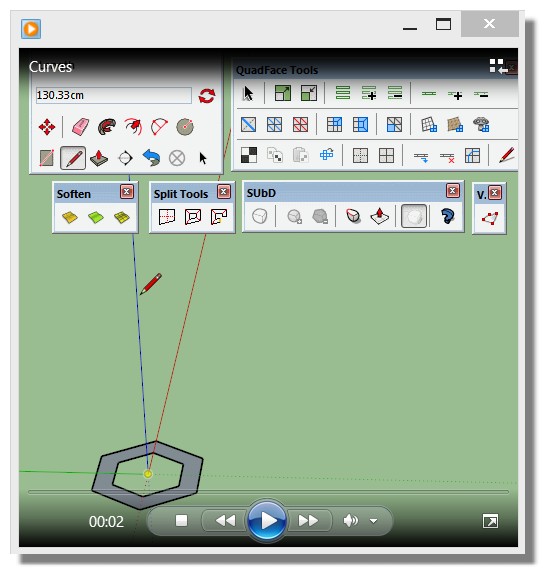
                                      Windows Media Player inside your Windows system
                                      can read these Gif with Stop button, Next, etc... 😉
                                      Image following is just an image, not an animation!
                                      win_media.jpg

                                      Frenchy Pilou
                                      Is beautiful that please without concept!
                                      My Little site :)

                                      1 條回覆 最後回覆 回覆 引用 0
                                      • thomthomT 離線
                                        thomthom
                                        最後由 編輯

                                        Aye. Quad-based workflow has a steeper learning curve than your normal SketchUp workflows. However, the long-term benefits are great.

                                        Thomas Thomassen — SketchUp Monkey & Coding addict
                                        List of my plugins and link to the CookieWare fund

                                        1 條回覆 最後回覆 回覆 引用 0
                                        • BoxB 離線
                                          Box
                                          最後由 編輯

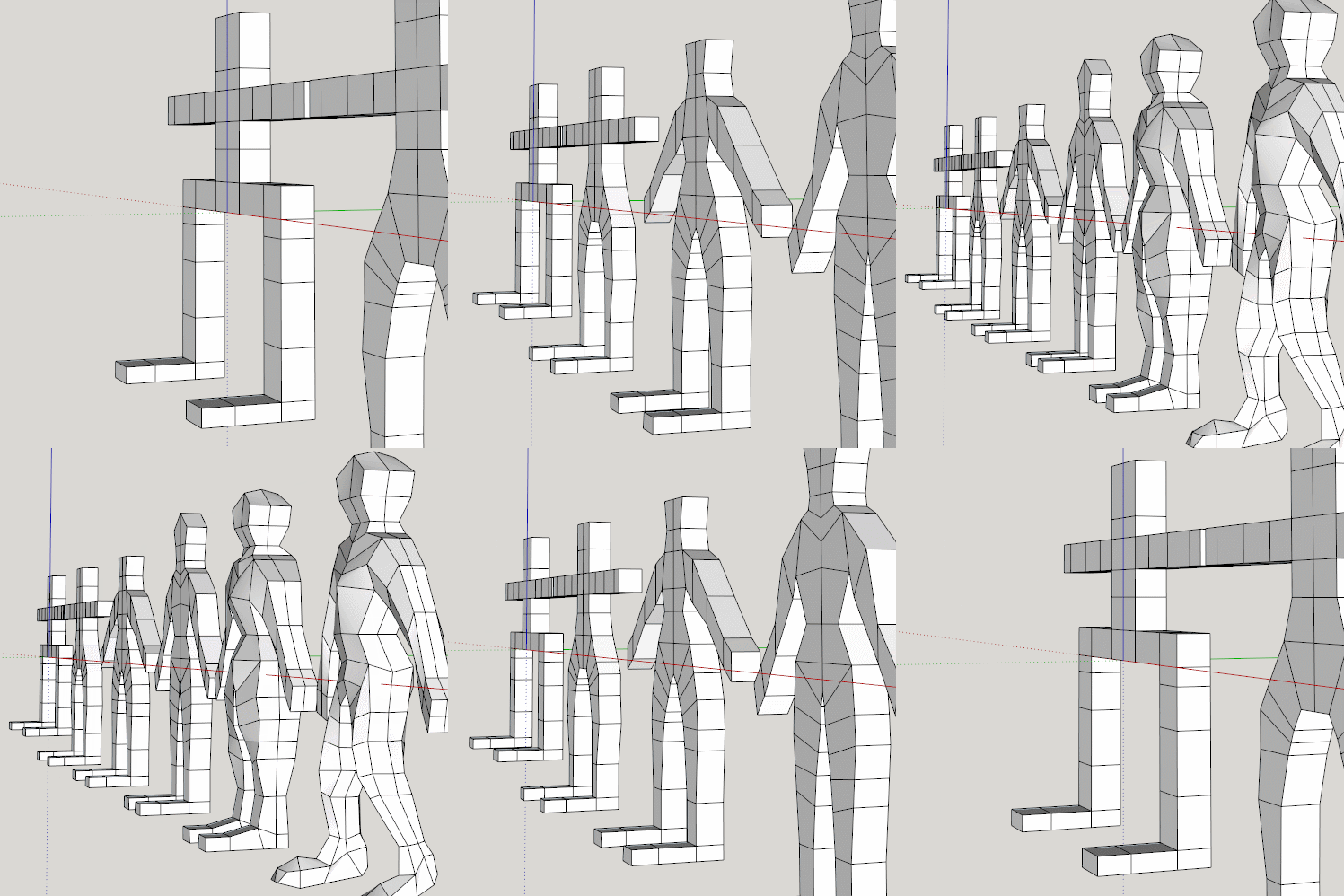
                                          Here's a little exercise to help people understand how a low poly proxy can become a complex structure.
                                          As you see I simply made a basic child's stick figure as a series of connected blocks. Then gradually refine the shape by moving the blocks around. This helps you to retain a quad structure.
                                          QFT lets you click to add or remove whole loops as you need them. As the level of detail increases you can refine the shape more and more while still having an easily navigable mesh to work with.

                                          Proxy progression.gif

                                          1 條回覆 最後回覆 回覆 引用 0
                                          • pilouP 離線
                                            pilou
                                            最後由 編輯

                                            😎

                                            http://www.mesnie.org/wp-content/uploads/2016/01/evolution.jpg

                                            Frenchy Pilou
                                            Is beautiful that please without concept!
                                            My Little site :)

                                            1 條回覆 最後回覆 回覆 引用 0
                                            • 1
                                            • 2
                                            • 79
                                            • 80
                                            • 81
                                            • 82
                                            • 83
                                            • 81 / 83
                                            • 第一個貼文
                                              最後的貼文
                                            Buy SketchPlus
                                            Buy SUbD
                                            Buy WrapR
                                            Buy eBook
                                            Buy Modelur
                                            Buy Vertex Tools
                                            Buy SketchCuisine
                                            Buy FormFonts

                                            Advertisement