sketchucation logo sketchucation
    • Login
    Oops, your profile's looking a bit empty! To help us tailor your experience, please fill in key details like your SketchUp version, skill level, operating system, and more. Update and save your info on your profile page today!
    Mac User? | Join the Rayscaper Beta for Mac Learn More

    Layout 2013 crashes on start

    Scheduled Pinned Locked Moved LayOut Discussions
    layout
    29 Posts 10 Posters 7.9k Views 10 Watching
    Loading More Posts
    • Oldest to Newest
    • Newest to Oldest
    • Most Votes
    Reply
    • Reply as topic
    Log in to reply
    This topic has been deleted. Only users with topic management privileges can see it.
    • TIGT
      TIG Moderator
      last edited by

      Try setting the Layout [and SketchUp etc] .exe file to 'run as admin' ... Properties > Compatibility
      This is a wild guess but it might be a permission issue.
      I also assume that all of your relevant folders also have full read/write permission for you ?
      These might need changing if it's a new install ??

      TIG

      1 Reply Last reply
      Reply Quote 0
      • Tyler MillerT
        Tyler Miller
        last edited by

        Hey Tim -

        Any chance that you have unicode characters in your username on the machine? We just found a bug yesterday where are xml parser is choking on file paths with unicode characters. We're working on a fix now.

        -Tyler

        1 Reply Last reply
        Reply Quote 0
        • T
          timurglobal
          last edited by

          @unknownuser said:

          Tim,
          Have you tried going through Sketchup to Layout.

          IE: File.....send to Layout.

          Not a fix, but perhaps you could work this way until time allows you to sort things out.

          Charlie

          Tried, no use((

          1 Reply Last reply
          Reply Quote 0
          • T
            timurglobal
            last edited by

            @tig said:

            Try setting the Layout [and SketchUp etc] .exe file to 'run as admin' ... Properties > Compatibility
            This is a wild guess but it might be a permission issue.
            I also assume that all of your relevant folders also have full read/write permission for you ?
            These might need changing if it's a new install ??

            Ran as admin, didn't help. Checked on read/write permission, no effect. Thing is, everything is working flawlessly, except for LO. Only LO is crashing.

            1 Reply Last reply
            Reply Quote 0
            • T
              timurglobal
              last edited by

              @tyler miller said:

              Hey Tim -

              Any chance that you have unicode characters in your username on the machine? We just found a bug yesterday where are xml parser is choking on file paths with unicode characters. We're working on a fix now.

              -Tyler

              I'm working on laptop, name is Tim-PC. Might dash be a problem???

              1 Reply Last reply
              Reply Quote 0
              • TIGT
                TIG Moderator
                last edited by

                Shouldn't be a problem, provided it's a standard ASCII character.
                By Unicode he means accented letters, foreign characters etc
                Using any of the possible characters from the normal full ASCII set shouldn't cause any issues...

                Have you really got FULL permissions for all of the relevant subfolders ?

                Have you got any odd custom LO templates loading ?

                Have you tried running a 'Repair' and after that fails [!] a 'Reinstall' ?
                Any of your 'custom files' [Plugins etc] should NOT be affected these changes...

                TIG

                1 Reply Last reply
                Reply Quote 0
                • T
                  timurglobal
                  last edited by

                  Just checked, full permiion whenever possible.

                  Did the repair and reinstall thing, pretty much a few times.

                  About custom templates, however, I do remember that in my last working session (on SU8) I've created a custom frame for A1 (just tweaked already existed one, added logo and stuff) If this affects LO, please, explain how to deal with it, I can delete this template, but not sure where to look for them.

                  1 Reply Last reply
                  Reply Quote 0
                  • TIGT
                    TIG Moderator
                    last edited by

                    @timurglobal said:

                    Just checked, full permiion whenever possible.

                    Did the repair and reinstall thing, pretty much a few times.

                    About custom templates, however, I do remember that in my last working session (on SU8) I've created a custom frame for A1 (just tweaked already existed one, added logo and stuff) If this affects LO, please, explain how to deal with it, I can delete this template, but not sure where to look for them.

                    I just answered that in another thread... http://sketchucation.com/forums/viewtopic.php?p=481944#p481944

                    In case it's somehow got corrupted I suggest you delete it and retry opening LO...
                    Clearly something is breaking LO as it starts and since it will 'load' the templates and your custom ones it seems like a possible suspect ?
                    Your AppData tree might be hidden from you, so you might have to change your Windows Explorer > Tools > Folder Options... to view hidden files/folders...

                    TIG

                    1 Reply Last reply
                    Reply Quote 0
                    • T
                      timurglobal
                      last edited by

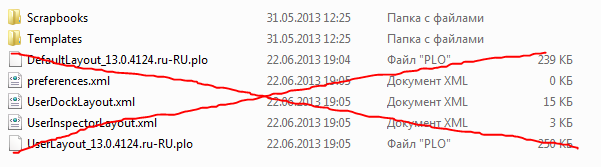
                      Now it is getting really weird. First, there is no custom templates to cause the crash, however there are several files like preferences.xml and other xmls. When I delete them LO starts just fine and after the session creates them again, which makes it start crashing again. Have some guesses but don't know how to fix it, is it my system? I snapped it on screen but can't upload the image here.

                      1 Reply Last reply
                      Reply Quote 0
                      • T
                        timurglobal
                        last edited by

                        @timurglobal said:

                        Now it is getting really weird...

                        When delete only preferences.xml LO works, other xmls don't affect LO crashes, only the preferences.xml... Weird

                        1 Reply Last reply
                        Reply Quote 0
                        • Dave RD
                          Dave R
                          last edited by

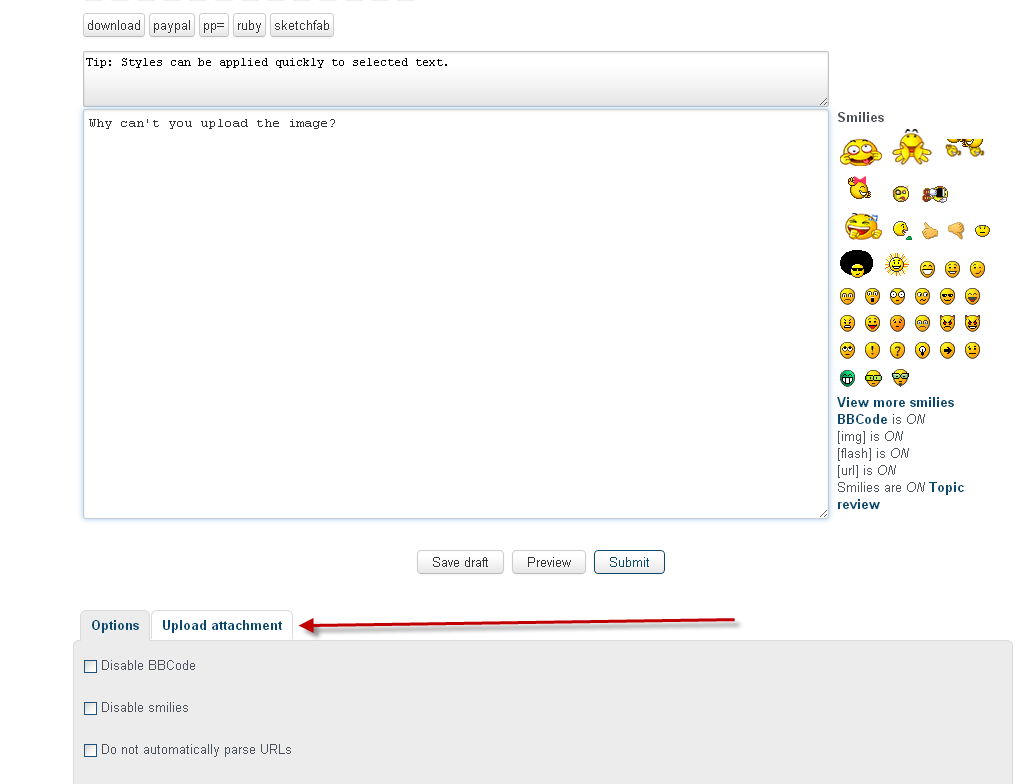
                          Why can't you upload the image?

                          Click on Upload attachment and upload it.
                          upload.png

                          Etaoin Shrdlu

                          %

                          (THERE'S NO PLACE LIKE)

                          G28 X0.0 Y0.0 Z0.0

                          M30

                          %

                          1 Reply Last reply
                          Reply Quote 0
                          • TIGT
                            TIG Moderator
                            last edited by

                            C:\Users\Username\AppData\Roaming\SketchUp\SketchUp 2013\LayOut
                            Contains several user specific 'preference-type' files that are used at the startup of LO ? [plo/xml etc]
                            These can all be deleted because they are recreated using the LO 'defaults' for any new users or when they are just 'missing'...

                            But something about your system causes some of these default files to get re-set inappropriately πŸ˜•
                            Baffled. 😞

                            Incidentally, to get all of the post options like attachments click on the long-form 'post a reply' rather than the 'quick-reply' ??

                            TIG

                            1 Reply Last reply
                            Reply Quote 0
                            • T
                              timurglobal
                              last edited by

                              I'm sorry guys, my bad, simply missed the button, a bit exited here, hehe πŸŽ‰ , will finish my project in time, wohoo

                              WTF.PNG

                              1 Reply Last reply
                              Reply Quote 0
                              • TIGT
                                TIG Moderator
                                last edited by

                                πŸ’­
                                Now I see you are 'RUssian'...
                                Are you sure there are no special characters in any of your Layout filepaths.
                                If your user-name etc, or even a custom template or scrapbook file-name contains some Cyrillic characters that could break things... πŸ˜•

                                TIG

                                1 Reply Last reply
                                Reply Quote 0
                                • T
                                  timurglobal
                                  last edited by

                                  @tig said:

                                  :idea:
                                  Now I see you are 'RUssian'...
                                  Are you sure there are no special characters in any of your Layout filepaths.
                                  If your user-name etc, or even a custom template or scrapbook file-name contains some Cyrillic characters that could break things... πŸ˜•

                                  Hehe, naah, I'm familiar with the problem you are referring to, I use latin in these situations. But double checking is always a good idea.

                                  Look at the size of the prefs.xml, 0 bytes? It creates a blank file all the time.

                                  1 Reply Last reply
                                  Reply Quote 0
                                  • T
                                    timurglobal
                                    last edited by

                                    Guess the problem has kinda resolved itself, however, great thanks for everyone who replied, that really helped, thank you guys.

                                    1 Reply Last reply
                                    Reply Quote 0
                                    • A
                                      adelgark
                                      last edited by

                                      Hi timurglobal, I got the same problem as you. LO 2013 works fine as long as these files are deleted but they appear every time you close the software and the bug splat screen shows up again. How do you keep these files from appearing again?

                                      Thanks!!!

                                      1 Reply Last reply
                                      Reply Quote 0
                                      • D
                                        Duqu
                                        last edited by

                                        I am having this problem as well. Is it possible to keep these files from popping up again after I have deleted them?

                                        1 Reply Last reply
                                        Reply Quote 0
                                        • TIGT
                                          TIG Moderator
                                          last edited by

                                          Ensure your user-name has no non-ASCII characters in it - i.e. no accented letters etc. πŸ˜•

                                          TIG

                                          1 Reply Last reply
                                          Reply Quote 0
                                          • La DuFL
                                            La DuF
                                            last edited by

                                            Hello, Tig !!

                                            @tig said:

                                            Ensure your user-name has no non-ASCII characters in it - i.e. no accented letters etc. πŸ˜•

                                            Mine has (FranΓ§ois) and this cannot be changed...

                                            Anything else I could try ?

                                            1 Reply Last reply
                                            Reply Quote 0

                                            Hello! It looks like you're interested in this conversation, but you don't have an account yet.

                                            Getting fed up of having to scroll through the same posts each visit? When you register for an account, you'll always come back to exactly where you were before, and choose to be notified of new replies (either via email, or push notification). You'll also be able to save bookmarks and upvote posts to show your appreciation to other community members.

                                            With your input, this post could be even better πŸ’—

                                            Register Login
                                            • 1
                                            • 2
                                            • 1 / 2
                                            • First post
                                              Last post
                                            Buy SketchPlus
                                            Buy SUbD
                                            Buy WrapR
                                            Buy eBook
                                            Buy Modelur
                                            Buy Vertex Tools
                                            Buy SketchCuisine
                                            Buy FormFonts

                                            Advertisement