sketchucation logo sketchucation
    • Login
    Oops, your profile's looking a bit empty! To help us tailor your experience, please fill in key details like your SketchUp version, skill level, operating system, and more. Update and save your info on your profile page today!
    ⚠️ Update | Sketchucation Tools 5.0.8 released with licensing improvements and bugfixes Download

    [Plugin][$] TopoShaper - v2.7b - 30 Jan 26


    Scheduled Pinned Locked Moved Plugins
    460 Posts 145 Posters 875.7k Views 144 Watching
    Loading More Posts
    • Oldest to Newest
    • Newest to Oldest
    • Most Votes
    Reply
    • Reply as topic
    Log in to reply
    This topic has been deleted. Only users with topic management privileges can see it.
    • P
      penumbra
      last edited by

      OK upon further inspection the errors above were causd by a conflict between toposhaper and the flux.io plugin for sketchup. Hope this is helpful for someone.

      1 Reply Last reply
      Reply Quote 0
      • array81A
        array81
        last edited by

        After created a terrain, is there a way to show the "grid" on it? I see only the surface but would be nice to see the points of the grid for editing.

        1 Reply Last reply
        Reply Quote 0
        • fredo6F
          fredo6
          last edited by

          Are you generating the terrain

          • from Isocontours
          • or from a point cloud ?

          And what is exactly the "grid" you mention. Is it the 'flat' horizontal grid used for projection ?

          Fredo

          1 Reply Last reply
          Reply Quote 0
          • S
            smhbrv
            last edited by

            Hi everyone.
            I am an architect in Turkey.
            I model my terrain but I dont put my road in my terrain.
            It gives an error. (Unable to triangulate road surface. Try using smaller max road Segment Lenght.)

            I try lots of times but it gives same error.

            http://1.1m.yt/z6LbBUo.jpg

            Please look at attachment. Pls help me.


            My project

            1 Reply Last reply
            Reply Quote 0
            • S
              smhbrv
              last edited by

              @smhbrv said:

              Hi everyone.
              I am an architect in Turkey.
              I model my terrain but I dont put my road in my terrain.
              It gives an error. (Unable to triangulate road surface. Try using smaller max road Segment Lenght.)

              I try lots of times but it gives same error.

              http://1.1m.yt/z6LbBUo.jpg

              Please look at attachment. Pls help me.

              Who can help me ?

              1 Reply Last reply
              Reply Quote 0
              • pilouP
                pilou
                last edited by

                Why not use the SandBox / Project ?

                sand_box.jpg

                Frenchy Pilou
                Is beautiful that please without concept!
                My Little site :)

                1 Reply Last reply
                Reply Quote 0
                • C
                  cyclefanatic
                  last edited by

                  Hello Fredo: I just started using Toposhaper. It works fine, but the dialog box text is so small I can hardly see the text. Is there a way to adjust the text size? I am using an iMac with Retina display.

                  Thank you for all your contributions...
                  Jim S

                  1 Reply Last reply
                  Reply Quote 0
                  • fredo6F
                    fredo6
                    last edited by

                    NEW RELEASE: TopoShaper v1.3a - 17 Jan 17

                    This is a minor release with SU2017 certification

                    See main post of this thread for Download.

                    Fredo

                    1 Reply Last reply
                    Reply Quote 0
                    • D
                      dvdstwrt
                      last edited by

                      I am having trouble installing the toposhaper extension in SUMaker2017 and get the following after restarting SU. Any suggestions would be appreciated

                      1 Reply Last reply
                      Reply Quote 0
                      • TIGT
                        TIG Moderator
                        last edited by

                        @dvdstwrt said:

                        I am having trouble installing the toposhaper extension in SUMaker2017 and get the following after restarting SU. Any suggestions would be appreciated
                        You seem to have missed off the error message ?
                        Have you also installed the needed LibFredo?
                        Also check that both Extensions are activated and restart SketchUp to ensure any changes/additions are fully integrated...

                        TIG

                        1 Reply Last reply
                        Reply Quote 0
                        • E
                          Einstein
                          last edited by

                          Fredo, your plugins are mindblowing!

                          1 Reply Last reply
                          Reply Quote 0
                          • john2J
                            john2
                            last edited by

                            Every time I start sketchup I am receiving the following pop up.
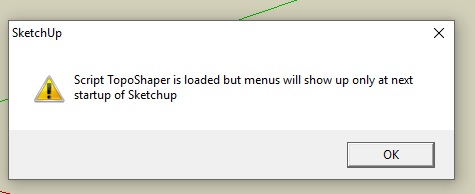
                            topo shaper.jpg

                            All my fredo plugins are updated. I checked it with the feature of fredo tools itself.

                            What should I do to resolve this issue?

                            Sketchup Make 2017 (64-bit), Vray 4.0 , Windows 10 – 64 bit, corei7-8750H, 16GB RAM, Nvidia GeForce GTX 1050Ti 4GB

                            1 Reply Last reply
                            Reply Quote 0
                            • TIGT
                              TIG Moderator
                              last edited by

                              Have you also installed the very latest LibFredo ?

                              TIG

                              1 Reply Last reply
                              Reply Quote 0
                              • john2J
                                john2
                                last edited by

                                @tig said:

                                Have you also installed the very latest LibFredo ?

                                Yes

                                Sketchup Make 2017 (64-bit), Vray 4.0 , Windows 10 – 64 bit, corei7-8750H, 16GB RAM, Nvidia GeForce GTX 1050Ti 4GB

                                1 Reply Last reply
                                Reply Quote 0
                                • pilouP
                                  pilou
                                  last edited by

                                  Have you re-launched SketchUp ?

                                  Frenchy Pilou
                                  Is beautiful that please without concept!
                                  My Little site :)

                                  1 Reply Last reply
                                  Reply Quote 0
                                  • john2J
                                    john2
                                    last edited by

                                    @pilou said:

                                    Have you re-launched SketchUp ?

                                    Yes. Every time I start sketchup, I am getting this dialogue box.

                                    Sketchup Make 2017 (64-bit), Vray 4.0 , Windows 10 – 64 bit, corei7-8750H, 16GB RAM, Nvidia GeForce GTX 1050Ti 4GB

                                    1 Reply Last reply
                                    Reply Quote 0
                                    • TIGT
                                      TIG Moderator
                                      last edited by

                                      Is the LibFredo activated in the Extension Manager dialog ?

                                      TIG

                                      1 Reply Last reply
                                      Reply Quote 0
                                      • john2J
                                        john2
                                        last edited by

                                        @tig said:

                                        Is the LibFredo activated in the Extension Manager dialog ?

                                        I am using Sketchup 2016 version. The libfredo is activated and I see a tick mark right next to its name in the list which I accessed by going to System preferences>extensions

                                        Sketchup Make 2017 (64-bit), Vray 4.0 , Windows 10 – 64 bit, corei7-8750H, 16GB RAM, Nvidia GeForce GTX 1050Ti 4GB

                                        1 Reply Last reply
                                        Reply Quote 0
                                        • fredo6F
                                          fredo6
                                          last edited by

                                          I think the best would be to have a snapshot of your Sketchup Plugins Directory. It looks like there is an old LibFredo6 somewhere.

                                          Fredo

                                          1 Reply Last reply
                                          Reply Quote 0
                                          • fredo6F
                                            fredo6
                                            last edited by

                                            WARNING: Potential issues in TopoShaper (IsoContour) with LibFredo6 7.7d.

                                            I will publish a fix in LibFredo6 v7.7e as soon as the Extension Ware House site works again.

                                            Fredo

                                            1 Reply Last reply
                                            Reply Quote 0

                                            Hello! It looks like you're interested in this conversation, but you don't have an account yet.

                                            Getting fed up of having to scroll through the same posts each visit? When you register for an account, you'll always come back to exactly where you were before, and choose to be notified of new replies (either via email, or push notification). You'll also be able to save bookmarks and upvote posts to show your appreciation to other community members.

                                            With your input, this post could be even better πŸ’—

                                            Register Login
                                            • 1
                                            • 2
                                            • 19
                                            • 20
                                            • 21
                                            • 22
                                            • 23
                                            • 22 / 23
                                            • First post
                                              Last post
                                            Buy SketchPlus
                                            Buy SUbD
                                            Buy WrapR
                                            Buy eBook
                                            Buy Modelur
                                            Buy Vertex Tools
                                            Buy SketchCuisine
                                            Buy FormFonts

                                            Advertisement