sketchucation logo sketchucation
    • 登入
    Oops, your profile's looking a bit empty! To help us tailor your experience, please fill in key details like your SketchUp version, skill level, operating system, and more. Update and save your info on your profile page today!
    🔌 Smart Spline | Fluid way to handle splines for furniture design and complex structures. Download

    Mini-challenge

    已排程 已置頂 已鎖定 已移動 SketchUp Discussions
    sketchup
    328 貼文 26 Posters 38.2k 瀏覽 26 Watching
    正在載入更多貼文
    • 從舊到新
    • 從新到舊
    • 最多點贊
    回覆
    • 在新貼文中回覆
    登入後回覆
    此主題已被刪除。只有擁有主題管理權限的使用者可以查看。
    • Dave RD 離線
      Dave R
      最後由 編輯

      Jason, how do you determine the where the diagonals hit the sides of the posts?

      Fredo's example does result in a narrower board. It could also be achieved with native tools by selecting one end of the board and moving that end up.

      Etaoin Shrdlu

      %

      (THERE'S NO PLACE LIKE)

      G28 X0.0 Y0.0 Z0.0

      M30

      %

      1 條回覆 最後回覆 回覆 引用 0
      • Dave RD 離線
        Dave R
        最後由 編輯

        If you measure .5m up and down the verticals, the board is not going to be .5m thick.

        Etaoin Shrdlu

        %

        (THERE'S NO PLACE LIKE)

        G28 X0.0 Y0.0 Z0.0

        M30

        %

        1 條回覆 最後回覆 回覆 引用 0
        • jason_marantoJ 離線
          jason_maranto
          最後由 編輯

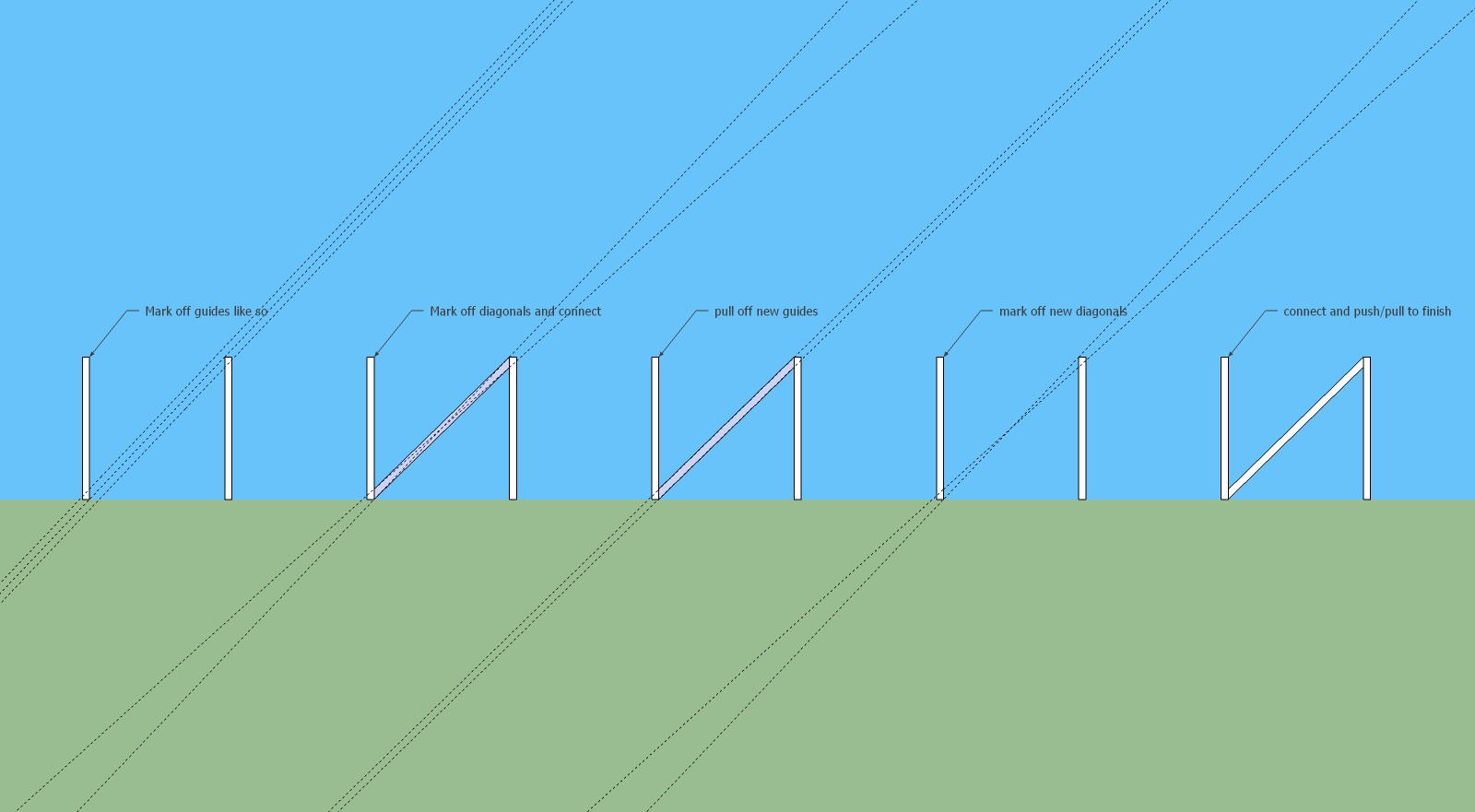
          The desired thickness is .5 meters -- so the first guides are each measured out to .5 meters from the main diagonal (the only one that is obvious and never changes).

          So the next Diagonal can be found at intersections at .5 m guide up on the left post and .5 m guide down on the right post -- from there you delete the original guides and connect the diagonals with the line tool.

          After that you pull off new guides to .5m from the bottom and top -- which again will give the corrected diagonal at the intersections on the left post and right post... the other diagonal has been known since the beginning(doesn't ever change).

          All I used was the line tool, tape measure tool, and push pull.

          Best,
          Jason.

          I create video tutorial series about several 2D & 3D graphics programs.

          1 條回覆 最後回覆 回覆 引用 0
          • fredo6F 離線
            fredo6
            最後由 編輯

            @unknownuser said:

            @Fredo

            Is your frame changing thickness? It does for me

            Ooops. I should have read the thread in details.
            Then, it just need a dedicated plugin, this won't be a conform transformation

            Fredo

            1 條回覆 最後回覆 回覆 引用 0
            • jason_marantoJ 離線
              jason_maranto
              最後由 編輯

              It is as I show in the updated file.
              challenge_final.jpg
              Best,
              Jason.

              I create video tutorial series about several 2D & 3D graphics programs.

              1 條回覆 最後回覆 回覆 引用 0
              • TIGT 離線
                TIG Moderator
                最後由 編輯

                A "plugin free" solution that is accurate to 0.009mm...


                DrawDiagonalRail.skp

                TIG

                1 條回覆 最後回覆 回覆 引用 0
                • thomthomT 離線
                  thomthom
                  最後由 編輯

                  @unknownuser said:

                  No need to change anything! 😎
                  With the fredo scale 😉
                  Just make the rotation on the top of the block! 💭
                  [attachment=1:1hqifa7e]<!-- ia1 -->yes.jpg<!-- ia1 -->[/attachment:1hqifa7e]

                  [attachment=0:1hqifa7e]<!-- ia0 -->yes2.jpg<!-- ia0 -->[/attachment:1hqifa7e]

                  That changes the width of the board, doesn't it?

                  Thomas Thomassen — SketchUp Monkey & Coding addict
                  List of my plugins and link to the CookieWare fund

                  1 條回覆 最後回覆 回覆 引用 0
                  • M 離線
                    mac1
                    最後由 編輯

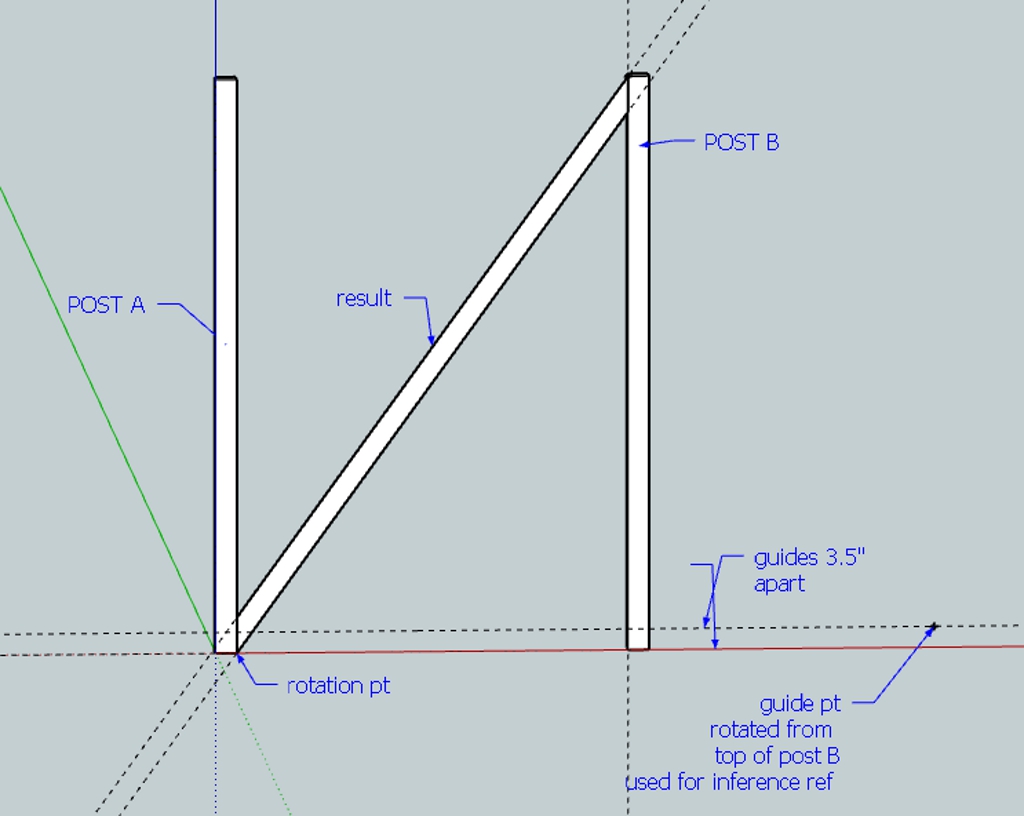
                    rail rotation.jpg

                    1 條回覆 最後回覆 回覆 引用 0
                    • pilouP 離線
                      pilou
                      最後由 編輯

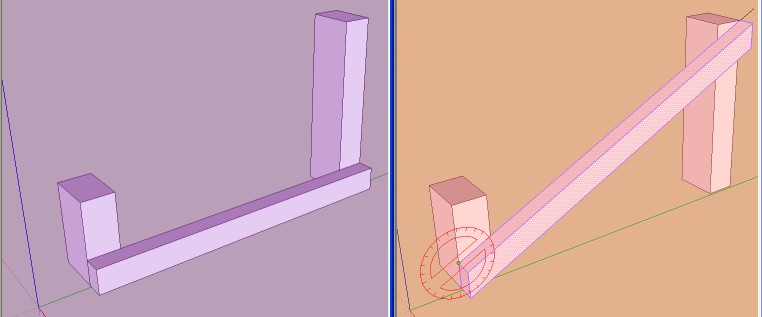
                      No need to change anything! 😎
                      With the fredo scale Planar Shearing shown previus! 😉
                      Just make the rotation on the top of the block! 💭

                      Perfect! 👍
                      yes.jpg

                      yes2.jpg

                      Frenchy Pilou
                      Is beautiful that please without concept!
                      My Little site :)

                      1 條回覆 最後回覆 回覆 引用 0
                      • thomthomT 離線
                        thomthom
                        最後由 編輯

                        When testing I recommend you put the posts further apart as with near square shape deviances might be so small that you think you have a correct solution.

                        Thomas Thomassen — SketchUp Monkey & Coding addict
                        List of my plugins and link to the CookieWare fund

                        1 條回覆 最後回覆 回覆 引用 0
                        • TIGT 離線
                          TIG Moderator
                          最後由 編輯

                          Mac1

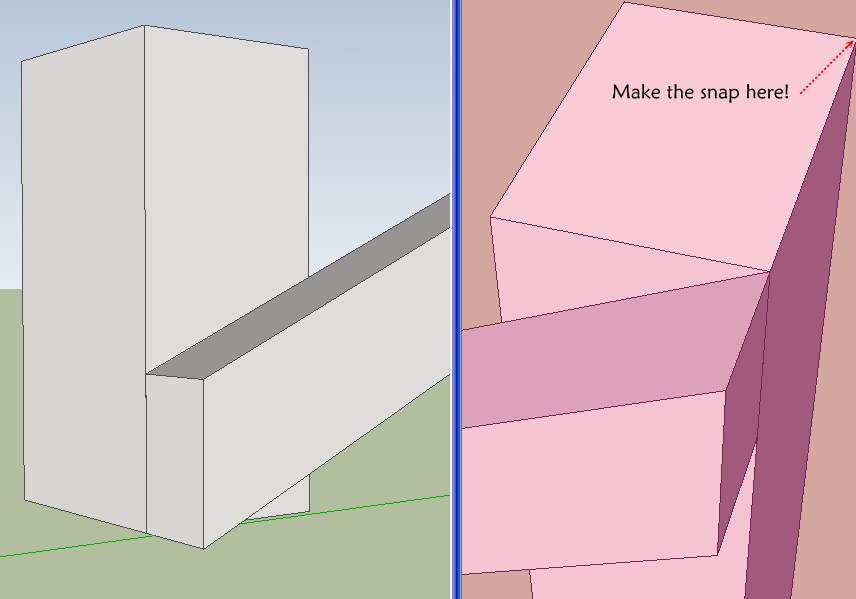
                          How do you get the rotated guide pt to snap exactly onto the horizontal top guideline ?

                          TIG

                          1 條回覆 最後回覆 回覆 引用 0
                          • pilouP 離線
                            pilou
                            最後由 編輯

                            @unknownuser said:

                            That changes the width of the board, doesn't it?

                            No nothing is changed 😄
                            You have just to draw the block box to modify on the ground, with any measures (just fit the 2 pilars )
                            Nno need to push cut anything! 👍

                            Frenchy Pilou
                            Is beautiful that please without concept!
                            My Little site :)

                            1 條回覆 最後回覆 回覆 引用 0
                            • Dave RD 離線
                              Dave R
                              最後由 編輯

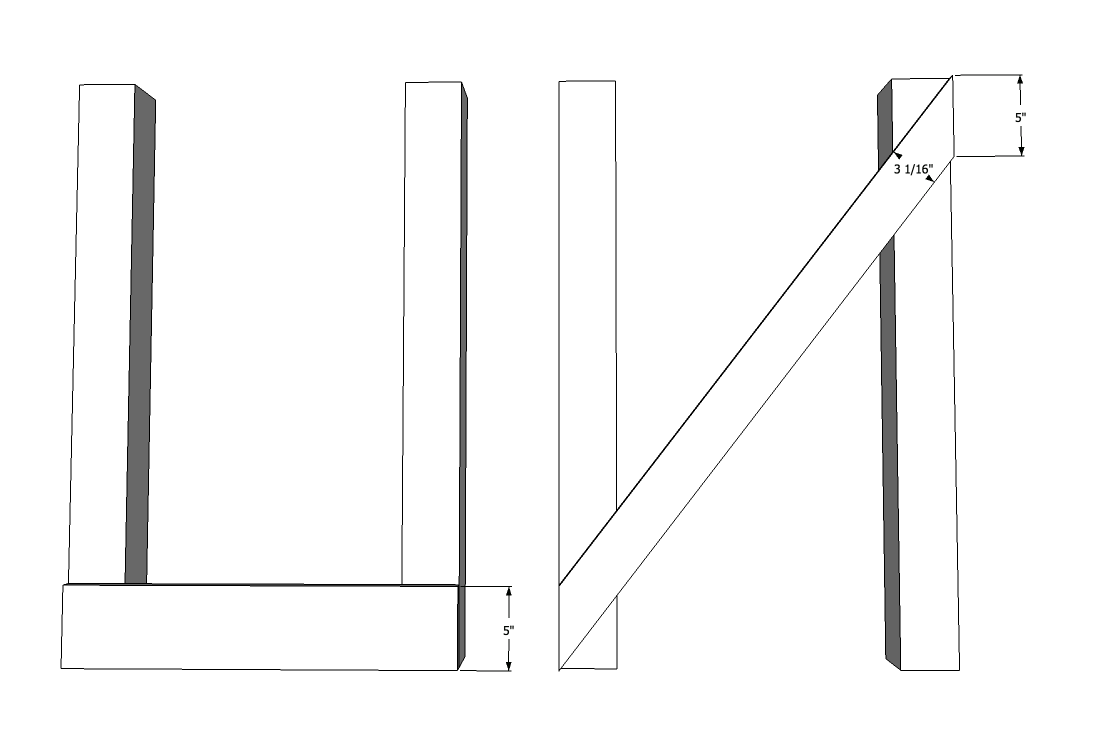
                              Pilou, when I used Fredo's method my board went from 5" wide to 3-1/16" wide. The length of the miter remained at 5", though. I'd say that's a change. Mac1's idea looks interesting.

                              diagonal.png

                              Etaoin Shrdlu

                              %

                              (THERE'S NO PLACE LIKE)

                              G28 X0.0 Y0.0 Z0.0

                              M30

                              %

                              1 條回覆 最後回覆 回覆 引用 0
                              • GaieusG 離線
                                Gaieus
                                最後由 編輯

                                Is this "close enough"?


                                PinkBoard-BlueBoard.png


                                PinkBoard-BlueBoard.skp

                                Gai...

                                1 條回覆 最後回覆 回覆 引用 0
                                • jason_marantoJ 離線
                                  jason_maranto
                                  最後由 編輯

                                  Absolute accuracy seems to be something that would be pretty easy since we know all of the measurements, including the first diagonal -- I would just rotate a copy of the diagonal around the midpoint to make the second diagonal, thus giving all 4 ending points for the shape... but I would need to calculate the specific degrees for the rotation, and I'm not well versed in that level of math.

                                  Definitely seems a plugin to make this is a need after all... if absolute accuracy is required.

                                  Best,
                                  Jason.

                                  I create video tutorial series about several 2D & 3D graphics programs.

                                  1 條回覆 最後回覆 回覆 引用 0
                                  • thomthomT 離線
                                    thomthom
                                    最後由 編輯

                                    @gaieus said:

                                    Is this "close enough"?

                                    Measurement.png

                                    Very close - but surely it should be possible for full accuracy..?

                                    Thomas Thomassen — SketchUp Monkey & Coding addict
                                    List of my plugins and link to the CookieWare fund

                                    1 條回覆 最後回覆 回覆 引用 0
                                    • GaieusG 離線
                                      Gaieus
                                      最後由 編輯

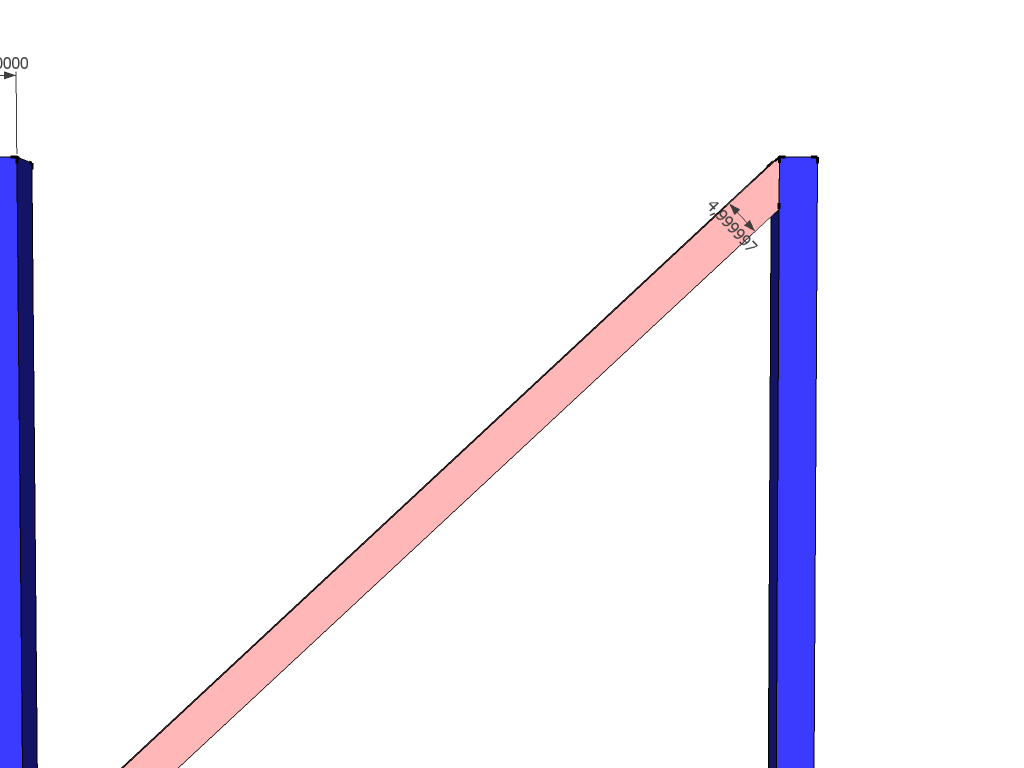
                                      I also noticed that if I crank up the decimals, I get an inaccurate measurement for that thickness (although a different one) 😕

                                      Now the very interesting thing is that I did not do any shearing but only worked with the rotate tool. So there could be inaccuracy but then it's Sketchup's tolerance when it merged two endpoints so close that I could see the electrons spinning. But then yes, I was indeed relying on this "tolerance" (just did not know how it will work).

                                      PinkBoard-BlueBoard.png

                                      Gai...

                                      1 條回覆 最後回覆 回覆 引用 0
                                      • jeff hammondJ 離線
                                        jeff hammond
                                        最後由 編輯

                                        @thomthom said:

                                        So how do you calculate it?

                                        the way i calculate it in the DC :
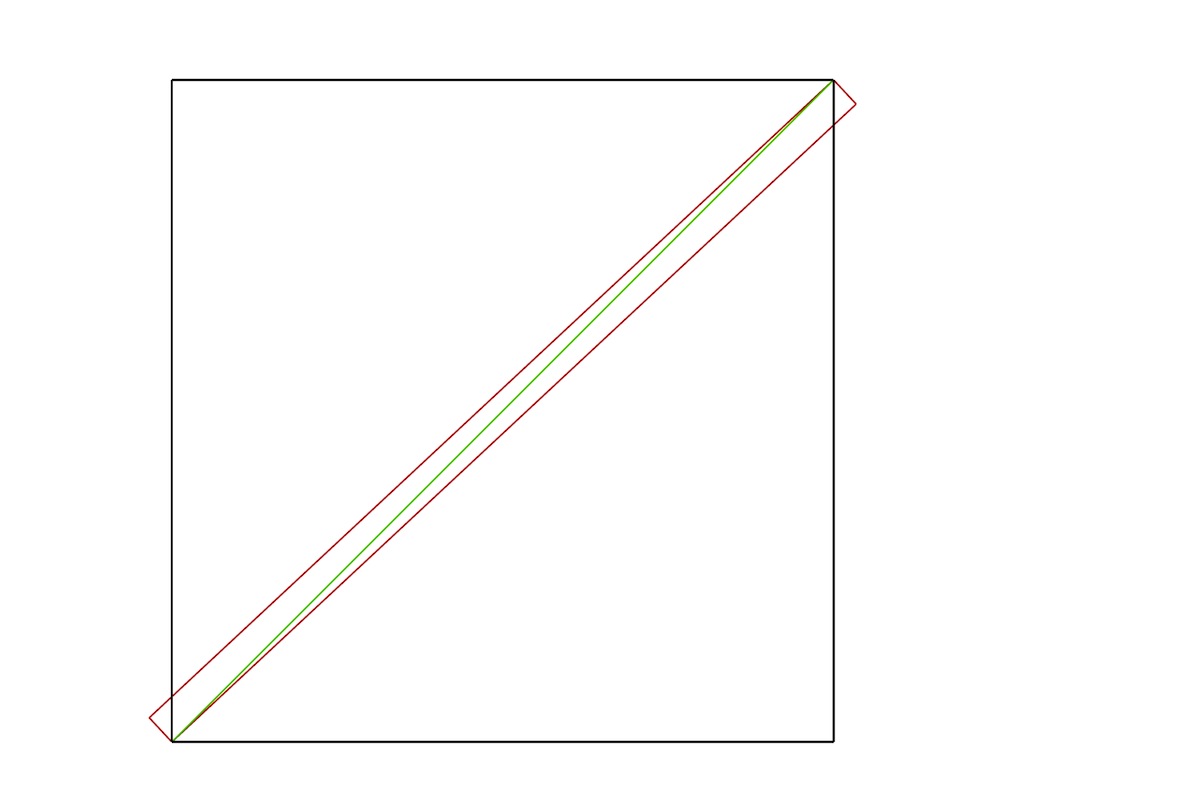
                                        mini4.jpg

                                        you can find all the info of the hypotenuse (green) in a variety of ways .. (for instance, a^2 + b^2 = c^2 to get its length.. you'll know a & b in this case… then trig for the angles)

                                        that hypotenuse is also the the hypotenuse of the un-trimmed board (red).. so you know the board width and the length of its hypotenuse which means you can get all other angles and lengths..

                                        the rotation of the original hypotenuse minus the long angle of the board's hypotenuse give the correct rotation angle..

                                        here's the DC i use (after i use 'component options' to enter the dimension of height, board width, and the space in between the two poles, i'll then trace the results and copy/paste it into my actual drawing.. not entirely ideal but it works..)

                                        DC_Xbrace.skp

                                        for whatever reason, i still think there might be a way to do it in sketchup itself.. maybe jean L can come up with something 😉
                                        so far, it's looking like true-tangents may be the key.. i haven't tried it yet in this circumstance but i imagine it will work.

                                        dotdotdot

                                        1 條回覆 最後回覆 回覆 引用 0
                                        • Dave RD 離線
                                          Dave R
                                          最後由 編輯

                                          Excellent, Jeff.

                                          Etaoin Shrdlu

                                          %

                                          (THERE'S NO PLACE LIKE)

                                          G28 X0.0 Y0.0 Z0.0

                                          M30

                                          %

                                          1 條回覆 最後回覆 回覆 引用 0
                                          • pbacotP 離線
                                            pbacot
                                            最後由 編輯

                                            @unknownuser said:

                                            @ecuadorian said:

                                            @andybot said:

                                            ... thus - for best accuracy, draw it in ACAD and import into sketchup 😒

                                            Amen. Trimble, if you're reading this, we need actual arcs and curves in SketchUp.

                                            i'm not quite sure they could give us true arcs in sketchup without entirely changing the way sketchup works.. (how would a cylinder be drawn if there were no segments in the arcs? a nurbs surface? )

                                            what they can give us, i feel, is 'guide arcs' …which would also allow us to rotate this thing and snap it into place very easily.

                                            .

                                            Someone at Trimble is saying "What? There aren't real circles? Oh crap! What have we done?"

                                            MacOSX MojaveSketchUp Pro v19 Twilight v2 Thea v3 PowerCADD

                                            1 條回覆 最後回覆 回覆 引用 0
                                            • 1
                                            • 2
                                            • 10
                                            • 11
                                            • 12
                                            • 13
                                            • 14
                                            • 15
                                            • 16
                                            • 17
                                            • 12 / 17
                                            • 第一個貼文
                                              最後的貼文
                                            Buy SketchPlus
                                            Buy SUbD
                                            Buy WrapR
                                            Buy eBook
                                            Buy Modelur
                                            Buy Vertex Tools
                                            Buy SketchCuisine
                                            Buy FormFonts

                                            Advertisement