sketchucation logo sketchucation
    • 登入
    Oops, your profile's looking a bit empty! To help us tailor your experience, please fill in key details like your SketchUp version, skill level, operating system, and more. Update and save your info on your profile page today!
    🔌 Smart Spline | Fluid way to handle splines for furniture design and complex structures. Download

    [Plugin] FredoTools - v4.5c - 24 Jun 24


    已排程 已置頂 已鎖定 已移動 Plugins
    463 貼文 123 Posters 710.9k 瀏覽 121 Watching
    正在載入更多貼文
    • 從舊到新
    • 從新到舊
    • 最多點贊
    回覆
    • 在新貼文中回覆
    登入後回覆
    此主題已被刪除。只有擁有主題管理權限的使用者可以查看。
    • K 離線
      KrisM
      最後由 編輯

      Feeling kind of dumb here but I can't see how to select both the front and back faces of an object while using ThruPaint. Most useful tool by the way.
      KrisM

      1 條回覆 最後回覆 回覆 引用 0
      • massimoM 離線
        massimo Moderator
        最後由 編輯

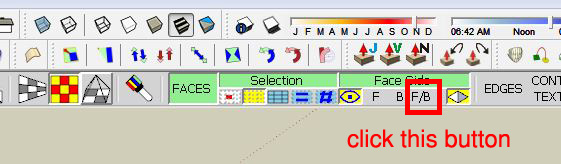
        If you mean painting both front and back faces at once then
        Cattura.JPG

        1 條回覆 最後回覆 回覆 引用 0
        • K 離線
          KrisM
          最後由 編輯

          Okay, fixed. The options bar wasn't showing up because it was behind a floating toolbar.
          KrisM

          1 條回覆 最後回覆 回覆 引用 0
          • fredo6F 離線
            fredo6
            最後由 編輯

            NEW RELEASE: FredoTools v2.6a - 25 Feb 15

            FredoTools 2.6a is a release for

            • FredoTools::AutoReverseFaces, which automatically align the orientation of faces in pseudo-solids
            • FredoTools::Convexify, which performs the Convex decomposition of 3D shapes

            Note: it requires to install LibFredo6 v6.7a

            See main post of this thread for Download.

            Fredo

            1 條回覆 最後回覆 回覆 引用 0
            • H 離線
              hajasulthan
              最後由 編輯

              hi how to fix the problem with thrupaint. its says more than 4 edges.

              1 條回覆 最後回覆 回覆 引用 0
              • Dave RD 離線
                Dave R
                最後由 編輯

                @hajasulthan said:

                hi how to fix the problem with thrupaint. its says more than 4 edges.

                It would be helpful if you could give some useful information about your model. Perhaps you could post an example that shows the problem. Or at least some screen shots.

                Etaoin Shrdlu

                %

                (THERE'S NO PLACE LIKE)

                G28 X0.0 Y0.0 Z0.0

                M30

                %

                1 條回覆 最後回覆 回覆 引用 0
                • massimoM 離線
                  massimo Moderator
                  最後由 編輯

                  @hajasulthan said:

                  hi how to fix the problem with thrupaint. its says more than 4 edges.

                  Most probably you've tried to apply a texture on surfaces which have more than 4 edges using the "Quadmesh UV" method. Try again by choosing a different method.

                  1 條回覆 最後回覆 回覆 引用 0
                  • fredo6F 離線
                    fredo6
                    最後由 編輯

                    NEW RELEASE: FredoTools v2.7a - 26 Apr 15

                    FredoTools 2.7a is a release for FredoTools::SolidVolume, which computes the volume of solids in the selection. This is an initial rudimentary version.

                    See main post of this thread for Download.

                    Fredo

                    1 條回覆 最後回覆 回覆 引用 0
                    • Rich O BrienR 離線
                      Rich O Brien Moderator
                      最後由 編輯

                      Thanks Fredo

                      Download the free D'oh Book for SketchUp 📖

                      1 條回覆 最後回覆 回覆 引用 0
                      • fredo6F 離線
                        fredo6
                        最後由 編輯

                        NEW RELEASE: FredoTools v2.7c - 27 Apr 15

                        FredoTools 2.7c is a release for FredoTools::SolidVolume v1.1b, which computes the volume and faces area of solids in the selection. In this second version, the volume and areas are shown in a persistent dialog box, allowing you to change the selection and use the outliner.

                        See main post of this thread for Download.

                        Fredo

                        1 條回覆 最後回覆 回覆 引用 0
                        • srxS 離線
                          srx
                          最後由 編輯

                          Now it works perfect! 👍

                          www.saurus.rs

                          1 條回覆 最後回覆 回覆 引用 0
                          • srxS 離線
                            srx
                            最後由 編輯

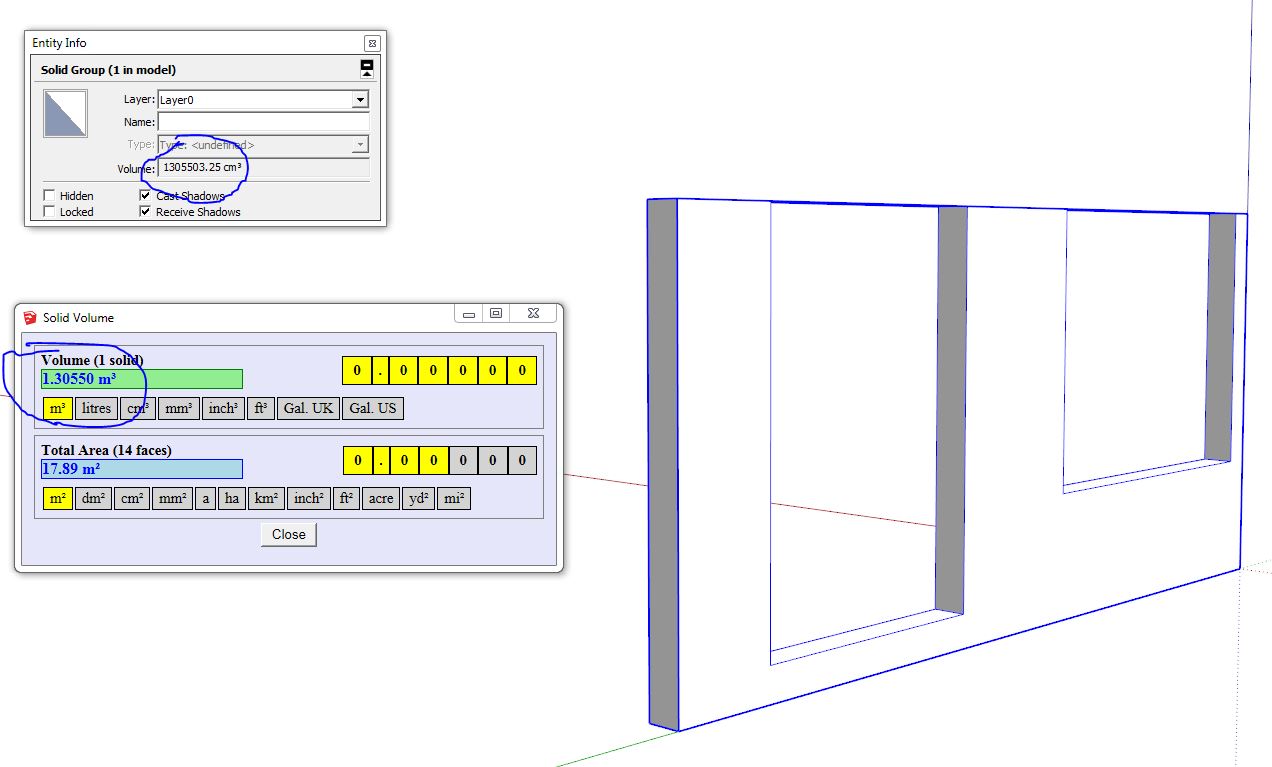
                            😕 It seems not so perfect. There is a problem when dealing with small faces I guess. Here is the example. Group is a solid, lines are ortho. Geometry is OK. The only thing is there is a small misalignment between the faces. But it could be made on purpose...To fix it I just moved one of the faces to meet another and erased the line, which made volume ok.
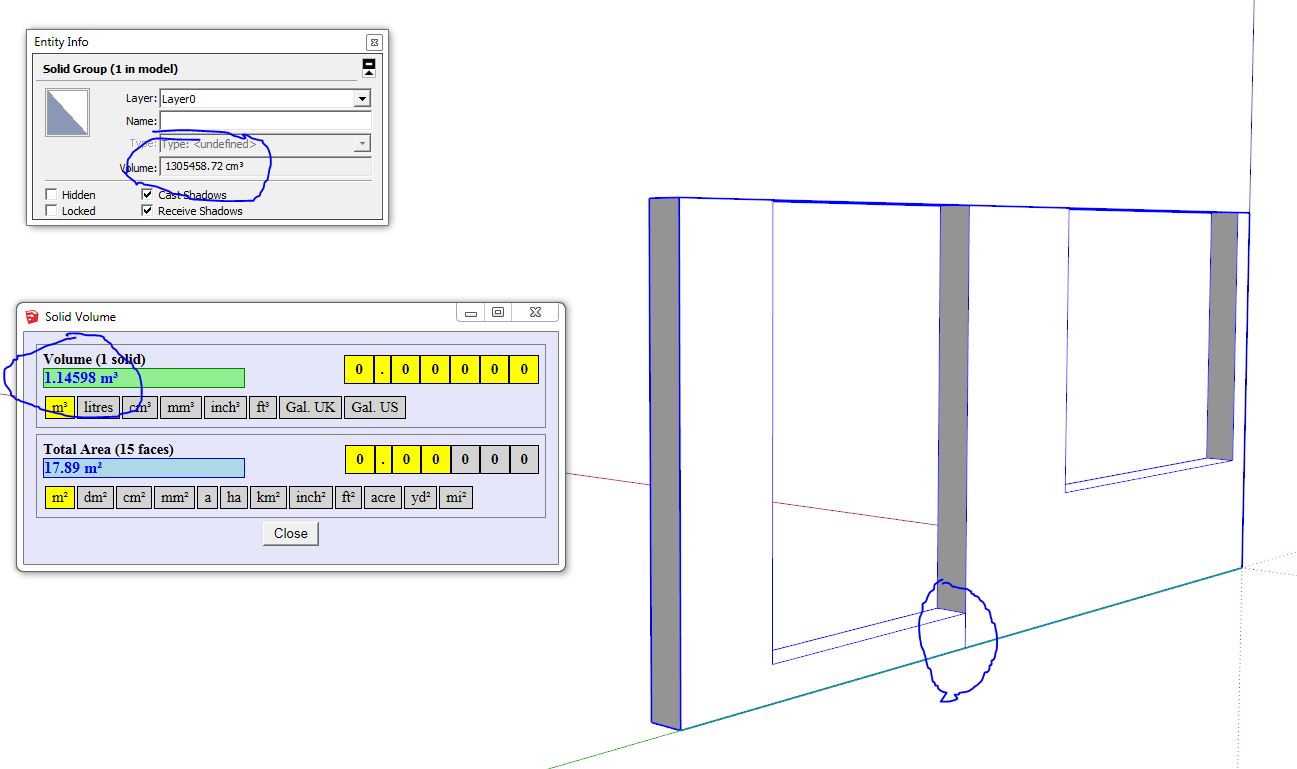
                            1 Wrong volume 2.JPG


                            2 Fixed small faces volume OK.JPG


                            Example of wrong volume 2.skp

                            www.saurus.rs

                            1 條回覆 最後回覆 回覆 引用 0
                            • fredo6F 離線
                              fredo6
                              最後由 編輯

                              Thanks for signaling.
                              This is actually not related to small faces.

                              I will republsih soon with the fix

                              Fredo

                              1 條回覆 最後回覆 回覆 引用 0
                              • fredo6F 離線
                                fredo6
                                最後由 編輯

                                NEW RELEASE: FredoTools v2.7d - 28 Apr 15

                                FredoTools 2.7d is a release for FredoTools::SolidVolume v1.1c, which computes the volume and faces area of solids in the selection. In this third version, the volume and areas are shown in a persistent dialog box, allowing you to change the selection and use the outliner. I also fixed bugs in the calculation of volumes.

                                See main post of this thread for Download.

                                Fredo

                                1 條回覆 最後回覆 回覆 引用 0
                                • JClementsJ 離線
                                  JClements
                                  最後由 編輯

                                  Should this appear in your update log?
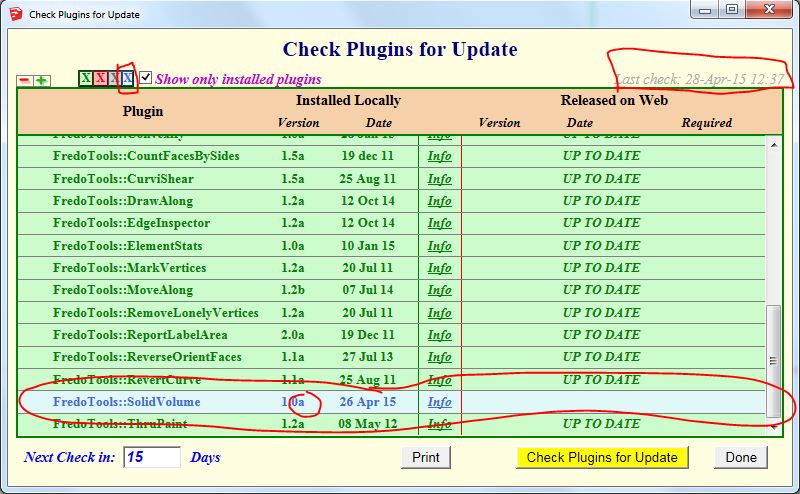
                                  Fredo Update Log

                                  John | Illustrator | Beaverton, Oregon

                                  1 條回覆 最後回覆 回覆 引用 0
                                  • fredo6F 離線
                                    fredo6
                                    最後由 編輯

                                    This should be OK now.

                                    Fredo

                                    1 條回覆 最後回覆 回覆 引用 0
                                    • JClementsJ 離線
                                      JClements
                                      最後由 編輯

                                      Looks to be operating properly now. Thank you.

                                      John | Illustrator | Beaverton, Oregon

                                      1 條回覆 最後回覆 回覆 引用 0
                                      • fredo6F 離線
                                        fredo6
                                        最後由 編輯

                                        NEW RELEASE: FredoTools v2.7e - 29 Apr 15

                                        FredoTools 2.7e is a release for FredoTools::SolidVolume v1.1d, which computes the volume and faces area of solids in the selection. This fourth version includes a fix for the correct display of the main dialog box.

                                        See main post of this thread for Download.

                                        Fredo

                                        1 條回覆 最後回覆 回覆 引用 0
                                        • P 離線
                                          ptma2008
                                          最後由 編輯

                                          Now it works perfect
                                          thank you

                                          1 條回覆 最後回覆 回覆 引用 0
                                          • A 離線
                                            arquimecho
                                            最後由 編輯

                                            great plugin, complete and really functional

                                            1 條回覆 最後回覆 回覆 引用 0
                                            • 1
                                            • 2
                                            • 15
                                            • 16
                                            • 17
                                            • 18
                                            • 19
                                            • 23
                                            • 24
                                            • 17 / 24
                                            • 第一個貼文
                                              最後的貼文
                                            Buy SketchPlus
                                            Buy SUbD
                                            Buy WrapR
                                            Buy eBook
                                            Buy Modelur
                                            Buy Vertex Tools
                                            Buy SketchCuisine
                                            Buy FormFonts

                                            Advertisement