sketchucation logo sketchucation
    • 登入
    Oops, your profile's looking a bit empty! To help us tailor your experience, please fill in key details like your SketchUp version, skill level, operating system, and more. Update and save your info on your profile page today!
    ⚠️ Important | Libfredo 15.8b introduces important bugfixes for Fredo's Extensions Update

    [Plugin] Normal Map Maker

    已排程 已置頂 已鎖定 已移動 Plugins
    43 貼文 21 Posters 57.7k 瀏覽 21 Watching
    正在載入更多貼文
    • 從舊到新
    • 從新到舊
    • 最多點贊
    回覆
    • 在新貼文中回覆
    登入後回覆
    此主題已被刪除。只有擁有主題管理權限的使用者可以查看。
    • TIGT 離線
      TIG Moderator
      最後由 編輯

      Didier's version says this quite clearly
      @unknownuser said:

      You'll find the command under the **File** menu -> Export normal map
      😒

      TIG

      1 條回覆 最後回覆 回覆 引用 0
      • T 離線
        Tuttlet
        最後由 編輯

        Great to find this Normal Map script. Thanks.

        I found that slows down if you have the Materials Windows open to "In Model" textures. So remember to have that closed.

        Was there any way to get a bump map from this ruby? I found some threads relating to bump mapping in Sketchup, but nothing conclusive, unless I missed it
        http://forums.sketchucation.com/viewtopic.php?f=180&t=18024&start=15
        http://forums.sketchucation.com/viewtopic.php?f=180&t=16660&hilit=plugin

        1 條回覆 最後回覆 回覆 引用 0
        • GaieusG 離線
          Gaieus
          最後由 編輯

          You can quite easily create bump maps from (raw) geometry if you project a greyscale image from one side and then export an image from the other side.

          Gai...

          1 條回覆 最後回覆 回覆 引用 0
          • Bob JamesB 離線
            Bob James
            最後由 編輯

            Just browsing through, got interested, and don't understand your reply.

            @gaieus said:

            You can quite easily create bump maps from (raw) geometry if you project a greyscale image from one side and then export an image from the other side.

            project (from what onto to what?) a greyscale image from one side (of what?)

            export an image from the other side (of what?)

            i7-4930K 3.4Ghz, 2x GTX780 6GB, 32GB DDR3-1600 ECC, OCZ Vertex 4 500GB, WD Black 3TB, 32TB NAS, 4x 27" Monitors, SpaceMouse Pro, X-keys XK-60

            1 條回覆 最後回覆 回覆 引用 0
            • T 離線
              Tuttlet
              最後由 編輯

              I believe this is the procedure:

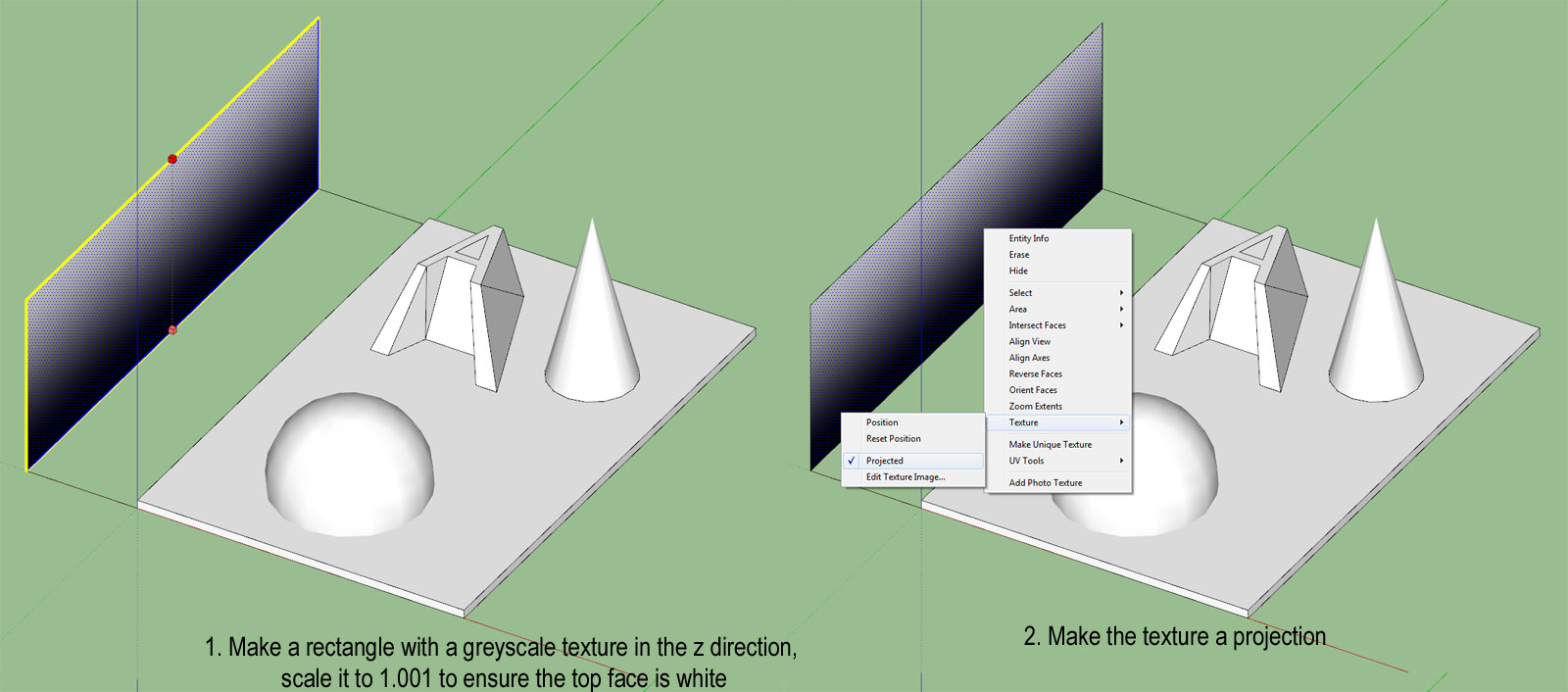
              1. Make a rectangle with a greyscale texture in the z direction, scale it to 1.001 to ensure the top face is white

              2. Make the texture a projection
                Bump12.jpg

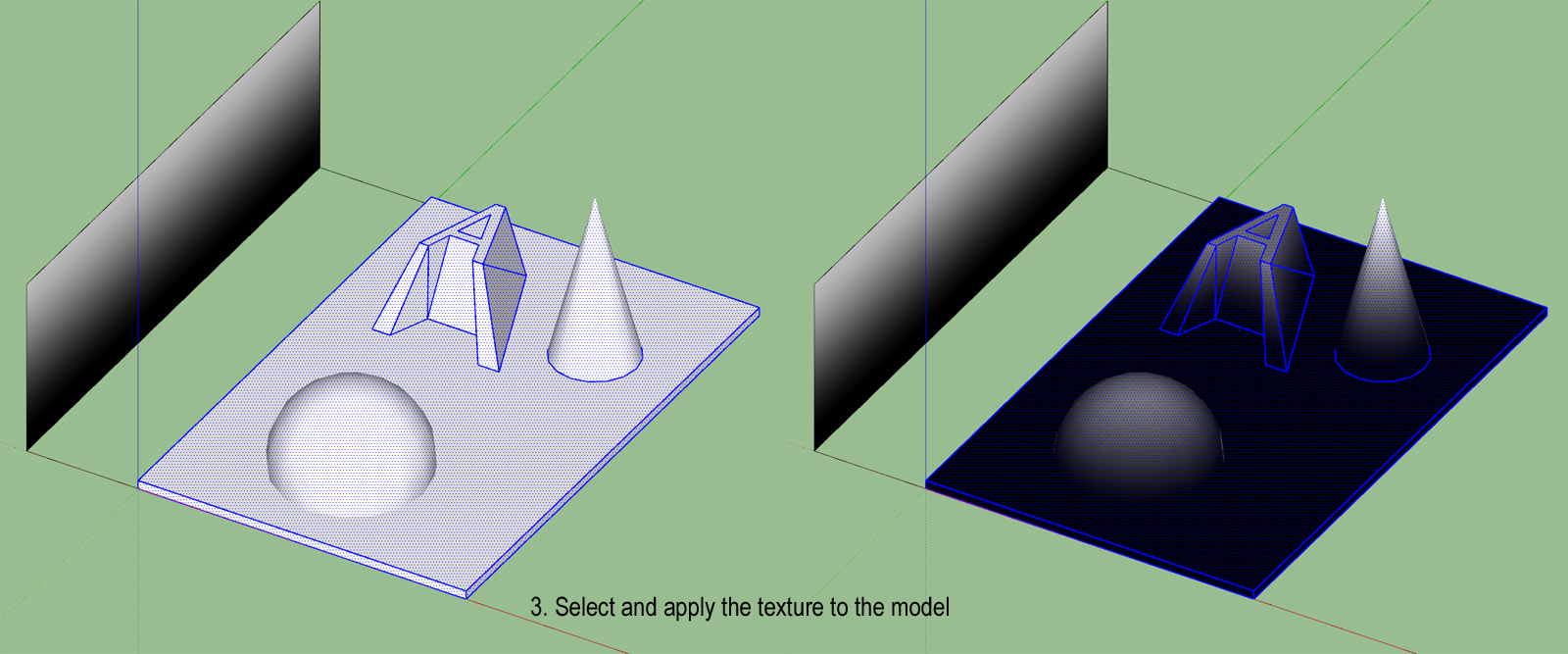
              3. Select and apply the texture to the model
                Bump3.jpg

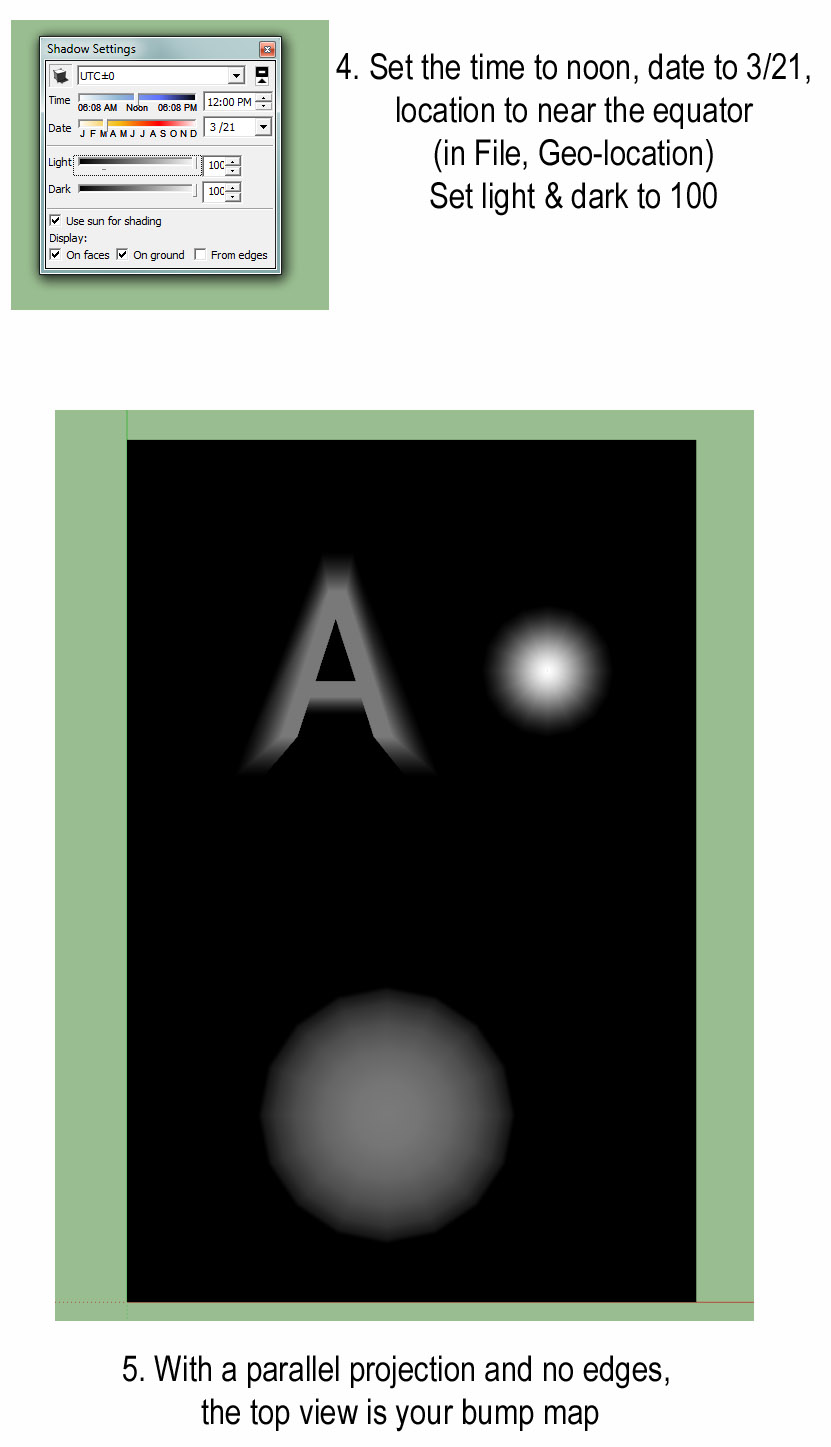
              4. Set the time to noon, date to 3/21, location to near the equator (in File, Geo-location). Set light & dark to 100

              5. With a parallel projection and no edges, the top view is your bump map
                Bump45.jpg

              1 條回覆 最後回覆 回覆 引用 0
              • thomthomT 離線
                thomthom
                最後由 編輯

                You can do the same without a texture, use white Fog on black geometry.

                Thomas Thomassen — SketchUp Monkey & Coding addict
                List of my plugins and link to the CookieWare fund

                1 條回覆 最後回覆 回覆 引用 0
                • T 離線
                  Tuttlet
                  最後由 編輯

                  @thomthom said:

                  You can do the same without a texture, use white Fog on black geometry.

                  Hey, that's even easier. Thanks.

                  But aren't white areas usually interpreted as higher than black. I seem to get the right result with black fog on white geometry.

                  1 條回覆 最後回覆 回覆 引用 0
                  • thomthomT 離線
                    thomthom
                    最後由 編輯

                    @tuttlet said:

                    @thomthom said:

                    You can do the same without a texture, use white Fog on black geometry.

                    Hey, that's even easier. Thanks.

                    But aren't white areas usually interpreted as higher than black. I seem to get the right result with black fog on white geometry.

                    Ah, yea - my logic is inverted this morning! 😄 😳

                    Thomas Thomassen — SketchUp Monkey & Coding addict
                    List of my plugins and link to the CookieWare fund

                    1 條回覆 最後回覆 回覆 引用 0
                    • sicksickisckS 離線
                      sicksickisck
                      最後由 編輯

                      great plugin and real deserves to update :]

                      ideas ;]
                      -read well smoothing groups!
                      -Z-grab [without the need of the selection of the polygons; works with components and groups]

                      • AO version hehe [dream:p]
                      1 條回覆 最後回覆 回覆 引用 0
                      • V 離線
                        v66995
                        最後由 編輯

                        May i ask if this works on Sketchup 2015(i am using window 10)?
                        I'm a total noob to sketchup , I've tried putting the rb file into sketchup tool folder, and it shows some error when i start up my sketchup ,so i downloaded the rbz file at extension warehouse.

                        I try to test the plugin with a simple cube. 1.jpg
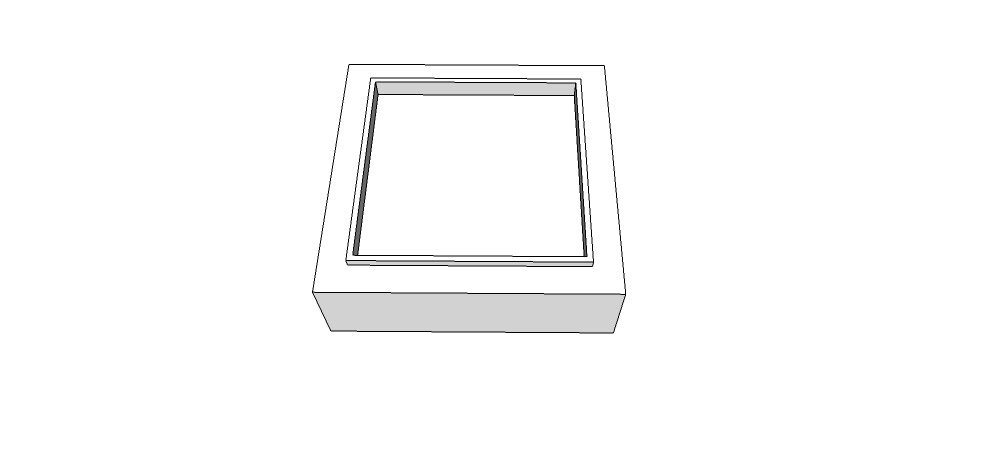
                        Then i select everything?->extension->Normal map maker-> export
                        After its done , i went check the file , it only shows a purple square cube without the depths of other colors like the youtube tutorial shown.

                        Normal.png

                        I did everything i can , things like : changing to parallel view/ top view first before activiating the normal map maker or applying material and then try again.
                        It didn't work. did i do anything wrong or ?

                        Please help /_\ ....

                        Thanks all..

                        Vic.

                        1 條回覆 最後回覆 回覆 引用 0
                        • pbacotP 離線
                          pbacot
                          最後由 編輯

                          You need some surfaces visible from above which are NOT perpendicular to the camera view.

                          MacOSX MojaveSketchUp Pro v19 Twilight v2 Thea v3 PowerCADD

                          1 條回覆 最後回覆 回覆 引用 0
                          • JQLJ 離線
                            JQL
                            最後由 編輯

                            Yeah, what pbacot said is basically that all surfaces you have there have the same normal, therefore the same color and so you have a flat normal on the map.

                            You should slitghtly taper your shape into truncated piramidal shapes.

                            www.casca.pt
                            Visit us on facebook!

                            1 條回覆 最後回覆 回覆 引用 0
                            • V 離線
                              v66995
                              最後由 編輯

                              Ohh ok ! i got it !
                              Thank you so much Pbacot and JQL for the help !

                              1 條回覆 最後回覆 回覆 引用 0
                              • 1
                              • 2
                              • 3
                              • 2 / 3
                              • 第一個貼文
                                最後的貼文
                              Buy SketchPlus
                              Buy SUbD
                              Buy WrapR
                              Buy eBook
                              Buy Modelur
                              Buy Vertex Tools
                              Buy SketchCuisine
                              Buy FormFonts

                              Advertisement