sketchucation logo sketchucation
    • 登入
    Oops, your profile's looking a bit empty! To help us tailor your experience, please fill in key details like your SketchUp version, skill level, operating system, and more. Update and save your info on your profile page today!
    ⚠️ Important | Libfredo 15.6b introduces important bugfixes for Fredo's Extensions Update

    [Plugin] Sculpt Tools v 1.0...

    已排程 已置頂 已鎖定 已移動 Plugins
    99 貼文 50 Posters 126.1k 瀏覽 49 Watching
    正在載入更多貼文
    • 從舊到新
    • 從新到舊
    • 最多點贊
    回覆
    • 在新貼文中回覆
    登入後回覆
    此主題已被刪除。只有擁有主題管理權限的使用者可以查看。
    • X 離線
      xrok1
      最後由 編輯

      SWEET!
      🤢 sorry got a little too excited 🤣

      “There are three classes of people: those who see. Those who see when they are shown. Those who do not see.”

      http://www.Twilightrender.com try it!

      1 條回覆 最後回覆 回覆 引用 0
      • majidM 離線
        majid
        最後由 編輯

        wowww it is unbelievable ...man... the only remaining thin is documenting the plugin... is there anyone here ,so experienced, to do that?

        My inspiring A, B, Sketches book: https://sketchucation.com/shop/books/intermediate/2612-alphabet-inspired-sketches--inspiring-drills-for-architects--3d-artists-and-designers-

        1 條回覆 最後回覆 回覆 引用 0
        • E 離線
          ENG. YASEEN
          最後由 編輯

          Wow It's working in SU Pro7 ..... That's Great 😍

          Thank u 👍


          Sculpt By SU Pro7

          My Website:

          http://xyz4studio.blogspot.com/

          1 條回覆 最後回覆 回覆 引用 0
          • boofredlayB 離線
            boofredlay
            最後由 編輯

            Is anybody using this in their work flow? If so how and to what success?
            I am surprised we have not seen a bunch of examples so far.

            http://www.coroflot.com/boofredlay

            1 條回覆 最後回覆 回覆 引用 0
            • majidM 離線
              majid
              最後由 編輯

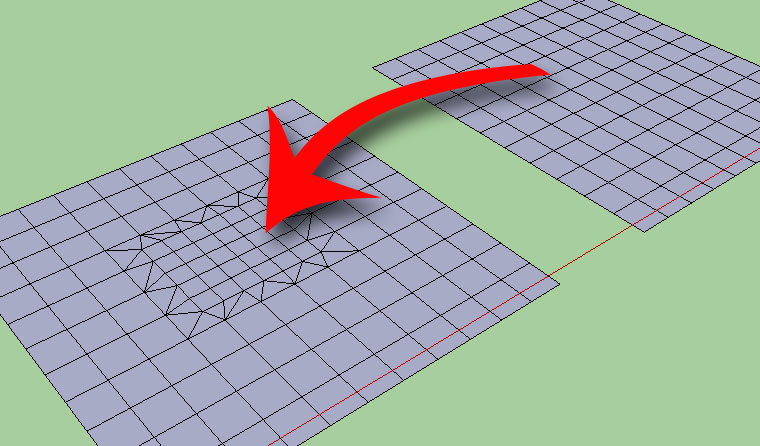
              I am wondering that if it is possible to have a tool for adding detail , or even reducing the details, while keeping the surface smoothness (if it is a curved surface).
              maybe something like the picture

              add-details.jpg

              My inspiring A, B, Sketches book: https://sketchucation.com/shop/books/intermediate/2612-alphabet-inspired-sketches--inspiring-drills-for-architects--3d-artists-and-designers-

              1 條回覆 最後回覆 回覆 引用 0
              • thomthomT 離線
                thomthom
                最後由 編輯

                Sandbox Tool->Add Details

                Thomas Thomassen — SketchUp Monkey & Coding addict
                List of my plugins and link to the CookieWare fund

                1 條回覆 最後回覆 回覆 引用 0
                • T 離線
                  troyhome
                  最後由 編輯

                  I wish sandbox did more thank only triangulation

                  IOviz.com
                  SU Pro 2024 PC

                  1 條回覆 最後回覆 回覆 引用 0
                  • majidM 離線
                    majid
                    最後由 編輯

                    sand box is not so smart tohave i.e. .6 size, rectangles, it just triangulates

                    My inspiring A, B, Sketches book: https://sketchucation.com/shop/books/intermediate/2612-alphabet-inspired-sketches--inspiring-drills-for-architects--3d-artists-and-designers-

                    1 條回覆 最後回覆 回覆 引用 0
                    • A 離線
                      aea
                      最後由 編輯

                      Missing a tutorial to sculpt tools .

                      1 條回覆 最後回覆 回覆 引用 0
                      • C 離線
                        chakal82
                        最後由 編輯

                        I installed this plugin and ı tried to use push or bulge controls but nothing happens.I can see blue circle but when ı trried to click on the face nothing happens also when ı checked the ruby console there is no movement.
                        what will ı do? please help.

                        1 條回覆 最後回覆 回覆 引用 0
                        • D 離線
                          Dsmelcer1234
                          最後由 編輯

                          Can anyone get planar lock to work on su 7.1? I've tried every different way I can think of and nothing ever gets locked. Tried use, use + show, dont use, turned on every different option, drawn the three point horiz to the mesh, vertical to the mesh, put the three point plane in a the mesh component, exploded it, selected the mesh then drew the three points, draw the plane in the center of the mesh, on the edge, etc etc... Every time the tools move the vertices as if I never used planar lock. Any body got any ideas?

                          1 條回覆 最後回覆 回覆 引用 0
                          • B 離線
                            BTM
                            最後由 編輯

                            @unknownuser said:

                            Can anyone get planar lock to work on su 7.1? I've tried every different way I can think of and nothing ever gets locked. Tried use, use + show, dont use, turned on every different option, drawn the three point horiz to the mesh, vertical to the mesh, put the three point plane in a the mesh component, exploded it, selected the mesh then drew the three points, draw the plane in the center of the mesh, on the edge, etc etc... Every time the tools move the vertices as if I never used planar lock. Any body got any ideas?

                            Planar lock is far from perfect, but the way it should work is that any vertices (points) that happen to sit on the same plane as the rectangle it draws are locked to that plane, and can move around on it but can't leave the plane.

                            On another note, I hope to start on a v.2 of sculpt tools some time in the next few months. v.1 was made just after I learned to code, and can be simplified an improved quite a bit; plus I never got around to adding the flatten or inflate features in the finished product.

                            1 條回覆 最後回覆 回覆 引用 0
                            • X 離線
                              xrok1
                              最後由 編輯

                              v2? nice to hear! 😄

                              “There are three classes of people: those who see. Those who see when they are shown. Those who do not see.”

                              http://www.Twilightrender.com try it!

                              1 條回覆 最後回覆 回覆 引用 0
                              • Bob JamesB 離線
                                Bob James
                                最後由 編輯

                                @unknownuser said:

                                On another note, I hope to start on a v.2 of sculpt tools some time in the next few months. v.1 was made just after I learned to code, and can be simplified an improved quite a bit; plus I never got around to adding the flatten or inflate features in the finished product.

                                Bring it on 🎉

                                i7-4930K 3.4Ghz, 2x GTX780 6GB, 32GB DDR3-1600 ECC, OCZ Vertex 4 500GB, WD Black 3TB, 32TB NAS, 4x 27" Monitors, SpaceMouse Pro, X-keys XK-60

                                1 條回覆 最後回覆 回覆 引用 0
                                • K 離線
                                  KXI System
                                  最後由 編輯

                                  Hey guys sorry to crash your party buuuuut.....

                                  Its going wack in V8. Can anyone look into this?

                                  Getting the perfect sig is hard...

                                  Google it!

                                  1 條回覆 最後回覆 回覆 引用 0
                                  • thomthomT 離線
                                    thomthom
                                    最後由 編輯

                                    @kxi system said:

                                    Hey guys sorry to crash your party buuuuut.....

                                    Its going wack in V8. Can anyone look into this?

                                    It'd help if you can be most specific to what happens. "going wack" could mean anything...

                                    Thomas Thomassen — SketchUp Monkey & Coding addict
                                    List of my plugins and link to the CookieWare fund

                                    1 條回覆 最後回覆 回覆 引用 0
                                    • B 離線
                                      BTM
                                      最後由 編輯

                                      @kxi system said:

                                      Hey guys sorry to crash your party buuuuut.....

                                      Its going wack in V8. Can anyone look into this?

                                      I haven't gotten around to testing it in su8 yet, sorry. One thing that might cause a problem is that I used the constant E without declaring which class it was part of. It worked in v.7, but in 8 it would have to be replaced with Math::E. If there are any other problems, feel free to let me know.

                                      As for a v.2 of sculpt tools, it still might come around, but I haven't been using sketchup that much recently. Unity 3 has been taking up a lot of my attention 😉

                                      1 條回覆 最後回覆 回覆 引用 0
                                      • S 離線
                                        stevenwoodhouse
                                        最後由 編輯

                                        Thanks BTM 😄

                                        1 條回覆 最後回覆 回覆 引用 0
                                        • D 離線
                                          davecoopstl
                                          最後由 編輯

                                          I concur...these tools (v1) do NOT currently work with SketchUp 8. Too bad, because they look amazing!

                                          1 條回覆 最後回覆 回覆 引用 0
                                          • peter_shawP 離線
                                            peter_shaw
                                            最後由 編輯

                                            can someone confirm that it doesnt work in SU8? because the plugin does load in SU8 for me, and you can manipulate meshes, but its really slow?! not sure if im using it wrong or if its not working, havent used it before..

                                            edit: ok i just saw this video http://www.screencast.com/t/FOl5w6XE , it defenitely doesnt work like this 😞

                                            1 條回覆 最後回覆 回覆 引用 0
                                            • 1
                                            • 2
                                            • 3
                                            • 4
                                            • 5
                                            • 3 / 5
                                            • 第一個貼文
                                              最後的貼文
                                            Buy SketchPlus
                                            Buy SUbD
                                            Buy WrapR
                                            Buy eBook
                                            Buy Modelur
                                            Buy Vertex Tools
                                            Buy SketchCuisine
                                            Buy FormFonts

                                            Advertisement