sketchucation logo sketchucation
    • 登入
    Oops, your profile's looking a bit empty! To help us tailor your experience, please fill in key details like your SketchUp version, skill level, operating system, and more. Update and save your info on your profile page today!
    ⚠️ Important | Libfredo 15.6b introduces important bugfixes for Fredo's Extensions Update

    [Plugin] Sculpt Tools v 1.0...

    已排程 已置頂 已鎖定 已移動 Plugins
    99 貼文 50 Posters 126.1k 瀏覽 49 Watching
    正在載入更多貼文
    • 從舊到新
    • 從新到舊
    • 最多點贊
    回覆
    • 在新貼文中回覆
    登入後回覆
    此主題已被刪除。只有擁有主題管理權限的使用者可以查看。
    • mitcorbM 離線
      mitcorb
      最後由 編輯

      If you have downloaded the zip file and extracted it correctly, you should have a Folder [btm_Sculpt_Tools of 76.5kB] and a file [btm_Sculpt_Tools_Loader.rb] both located in your Sketchup 8 Plugins folder.
      I am having trouble with Winzip in my Windows 7 machine, so I simply copy pasted these two items from my Sketchup 7 Plugins folder.
      The attachment is a good faith attempt to show you it worked, but this is a Scene, not a screen capture, so I can't show you the icons toolbar. And it was very responsive. The mesh/grid was created on the top surface using the line tool and move/copy multiple in both x and y directions.
      EDIT: My copy of Sk8 is not fully loaded with all of the plugins I have collected through Sk7. So, I am just guessing some other plugin you have may be interfering? maybe not? or it is the problem with your original download and deploy?
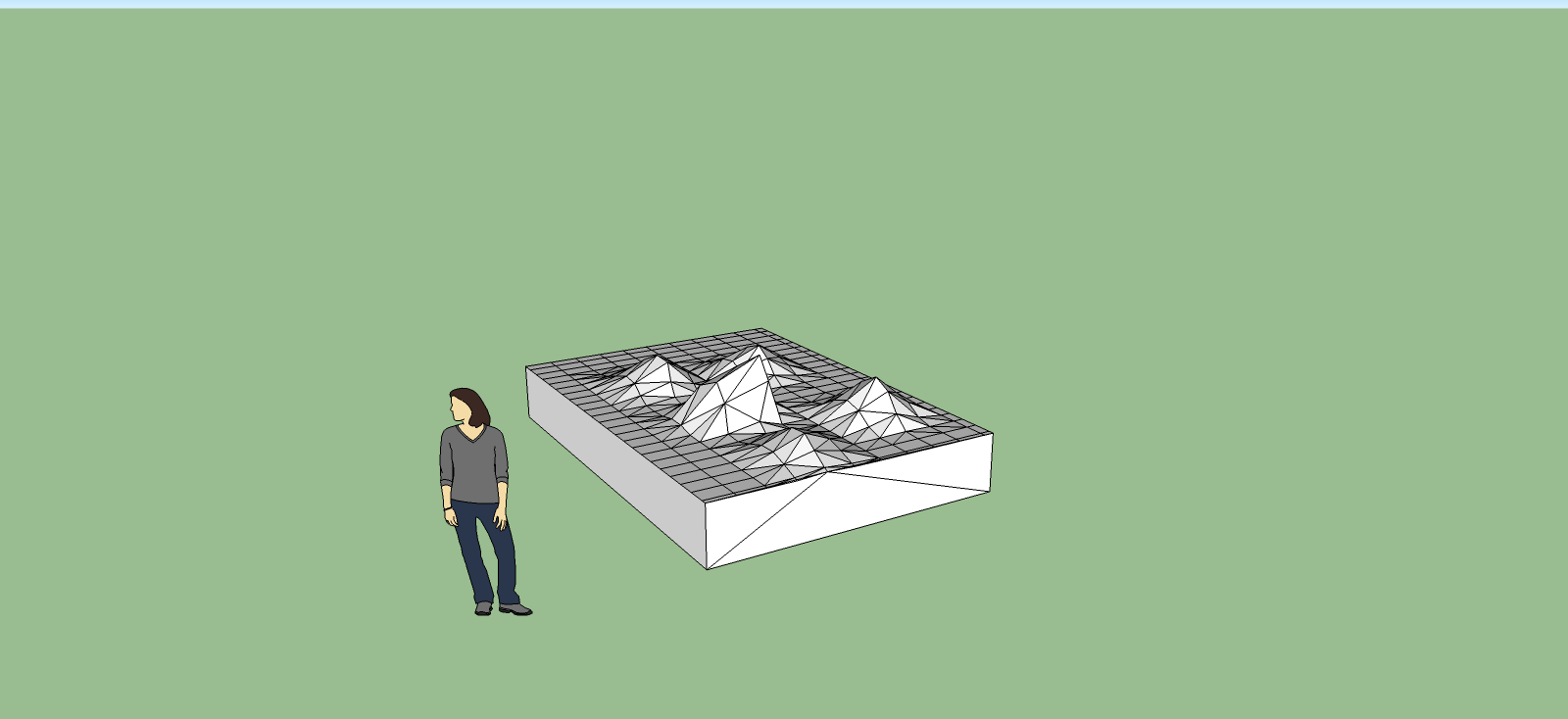

      sk8sculptscene.png

      I take the slow, deliberate approach in my aimless wandering.

      1 條回覆 最後回覆 回覆 引用 0
      • peter_shawP 離線
        peter_shaw
        最後由 編輯

        ok, i got it to work now! by deleting all my plugins and copying them again with a fresh download 😄

        1 條回覆 最後回覆 回覆 引用 0
        • irwanwrI 離線
          irwanwr
          最後由 編輯

          is this plugin still available to download and to use for current/latest SketchUp?
          it seems good to help making curvy surface i think.

          1 條回覆 最後回覆 回覆 引用 0
          • J 離線
            JuanV.Soler
            最後由 編輯

            I found this video which explains how to use the sculpt tools,
            drawing first from scratch in sandtools that I never knew ¡
            Though it is explained in Turkish, i think, it is clear enough .

            Cheers

            ,))),

            1 條回覆 最後回覆 回覆 引用 0
            • N 離線
              naginarch
              最後由 編輯

              This Plugin is great , thanks bro

              1 條回覆 最後回覆 回覆 引用 0
              • C 離線
                Christmended
                最後由 編輯

                Cool plugin. Working in Sketcup 2013.
                Thanks!!!!

                1 條回覆 最後回覆 回覆 引用 0
                • S 離線
                  SKYWAYS128
                  最後由 編輯

                  Got a bit of a problem using Sculpt Tools here, as I'm using Sketchup 8, which I've heard is supposedly incompatible with the plugin. After reading some earlier posts, it seems that I have to uninstall all my plugins and then reinstall them for Sculpt Tools to work.

                  Thing is, it loads just fine, but it does nothing when I select bulge/smooth/drag whatever. I tried left/right clicking and pressing the arrow keys. It does absolutely nothing.

                  Am I using it right, or do I have to uninstall and then reinstall my other plugins?

                  BTW, if I simply cut and pasted all my plugins from the Sketchup folder to a backup folder, installed Sculpt tools and then re-pasted the plugins back into Sketchup plugin folder, would that work?

                  Thanks in advance for any advice.

                  1 條回覆 最後回覆 回覆 引用 0
                  • S 離線
                    Sauronbloo
                    最後由 編輯

                    @skyways128 said:

                    Got a bit of a problem using Sculpt Tools here, as I'm using Sketchup 8, which I've heard is supposedly incompatible with the plugin. After reading some earlier posts, it seems that I have to uninstall all my plugins and then reinstall them for Sculpt Tools to work.

                    Thing is, it loads just fine, but it does nothing when I select bulge/smooth/drag whatever. I tried left/right clicking and pressing the arrow keys. It does absolutely nothing.

                    Am I using it right, or do I have to uninstall and then reinstall my other plugins?

                    BTW, if I simply cut and pasted all my plugins from the Sketchup folder to a backup folder, installed Sculpt tools and then re-pasted the plugins back into Sketchup plugin folder, would that work?

                    Thanks in advance for any advice.

                    I have the same issue in SU2014, is this plugin outdated now? The only other free sculpt tool I can find seems to only work with pro (DM_artisan). It seems quite hard to browse the plugin wh, as people may use different terms, languages, or even misspellings to classify their work. Can anyone point me to a plugin that is similar, or how to get this to work with SU 2013 or (preferably) 2014? thx

                    1 條回覆 最後回覆 回覆 引用 0
                    • J 離線
                      Jim
                      最後由 編輯

                      I would say it is outdated. Last updated in 2009, and the author hasn't added to this thread since Oct 2010.

                      Has anyone tried to contact the the author?

                      Hi

                      1 條回覆 最後回覆 回覆 引用 0
                      • S 離線
                        Sauronbloo
                        最後由 編輯

                        @jim said:

                        I would say it is outdated. Last updated in 2009, and the author hasn't added to this thread since Oct 2010.

                        Has anyone tried to contact the the author?

                        So, what does everyone use to sculpt? I need to make a bush/hedge. I don't want it to be all boxy, what can I use?

                        1 條回覆 最後回覆 回覆 引用 0
                        • mitcorbM 離線
                          mitcorb
                          最後由 編輯

                          Many use Artisan by whaat, or ThomThom's Vertex Tools. These are both very reasonably priced, and, I think Artisan has a demo offer.

                          I take the slow, deliberate approach in my aimless wandering.

                          1 條回覆 最後回覆 回覆 引用 0
                          • S 離線
                            Sauronbloo
                            最後由 編輯

                            @mitcorb said:

                            Many use Artisan by whaat, or ThomThom's Vertex Tools. These are both very reasonably priced, and, I think Artisan has a demo offer.

                            TT's vertex has a trial, thx. Waanna learn how to use these things, and see if they will work for me/my project before paying $40, and I had problems getting artisan to do anything, it just stayed grey like i had already used up the trial. I'm gonna try Vertex tools, which I had no idea were similar to artisan

                            1 條回覆 最後回覆 回覆 引用 0
                            • S 離線
                              Sauronbloo
                              最後由 編輯

                              While looking for directions on the use of vertex tools, I realized that the sandbox tools seem to be at least a minimal version for doing this type of work. Anyone like me, that didn't know this, use the free and native tool by enabling it in window/preferences/extensions, then enable the toolbar in view.

                              1 條回覆 最後回覆 回覆 引用 0
                              • mitcorbM 離線
                                mitcorb
                                最後由 編輯

                                The Sandbox tools work only in the Z direction. But you can do your "sculpting" on the ground group, then tilt it up when you need to.

                                I take the slow, deliberate approach in my aimless wandering.

                                1 條回覆 最後回覆 回覆 引用 0
                                • B 離線
                                  bwantedstar
                                  最後由 編輯

                                  the Sculpt Tools plugin is in .rb, but sketchup pro can't install it. It seems that I can only install .rbz...
                                  Can anyone teach me how to install .rb file in sketch up pro? Thanks a lot!

                                  1 條回覆 最後回覆 回覆 引用 0
                                  • BepB 離線
                                    Bep
                                    最後由 編輯

                                    @bwantedstar said:

                                    the Sculpt Tools plugin is in .rb, but sketchup pro can't install it. It seems that I can only install .rbz...
                                    Can anyone teach me how to install .rb file in sketch up pro? Thanks a lot!

                                    Change the .zip extension into .rbz ,then install it

                                    "History is written by the winners"

                                    1 條回覆 最後回覆 回覆 引用 0
                                    • B 離線
                                      bwantedstar
                                      最後由 編輯

                                      @bep said:

                                      @bwantedstar said:

                                      the Sculpt Tools plugin is in .rb, but sketchup pro can't install it. It seems that I can only install .rbz...
                                      Can anyone teach me how to install .rb file in sketch up pro? Thanks a lot!

                                      Change the .zip extension into .rbz ,then install it

                                      Installed successfully!! Thank you very much!!

                                      1 條回覆 最後回覆 回覆 引用 0
                                      • free agentF 離線
                                        free agent
                                        最後由 編輯

                                        Does anyone know if there is a script that works like the smooth tool in this, almost like a relax brush? i use this alot but its non responsive in 2015 😞

                                        http:i167.photobucket.comalbumsu143FreeAgent84bug.gif

                                        1 條回覆 最後回覆 回覆 引用 0
                                        • BoxB 離線
                                          Box
                                          最後由 編輯

                                          Artisan
                                          Not free but well worth the money.
                                          http://sketchucation.com/plugin/828-dm_artisan

                                          1 條回覆 最後回覆 回覆 引用 0
                                          • free agentF 離線
                                            free agent
                                            最後由 編輯

                                            Thanx

                                            http:i167.photobucket.comalbumsu143FreeAgent84bug.gif

                                            1 條回覆 最後回覆 回覆 引用 0
                                            • 1
                                            • 2
                                            • 3
                                            • 4
                                            • 5
                                            • 4 / 5
                                            • 第一個貼文
                                              最後的貼文
                                            Buy SketchPlus
                                            Buy SUbD
                                            Buy WrapR
                                            Buy eBook
                                            Buy Modelur
                                            Buy Vertex Tools
                                            Buy SketchCuisine
                                            Buy FormFonts

                                            Advertisement





