sketchucation logo sketchucation
    • 登入
    Oops, your profile's looking a bit empty! To help us tailor your experience, please fill in key details like your SketchUp version, skill level, operating system, and more. Update and save your info on your profile page today!
    ⚠️ Important | Libfredo 15.6b introduces important bugfixes for Fredo's Extensions Update

    [Plugin] Sculpt Tools v 1.0...

    已排程 已置頂 已鎖定 已移動 Plugins
    99 貼文 50 Posters 126.1k 瀏覽 49 Watching
    正在載入更多貼文
    • 從舊到新
    • 從新到舊
    • 最多點贊
    回覆
    • 在新貼文中回覆
    登入後回覆
    此主題已被刪除。只有擁有主題管理權限的使用者可以查看。
    • D 離線
      dacad
      最後由 編輯

      Thanks a lot for this .BTM 😄
      Right now i can't fully play with it because i've got a lot of work to do but as soon as i get time i'll be back to sculpting and post something (if it turns out i'm a good sculptor and is woth posting...😛).
      Again Thanks!!

      David

      1 條回覆 最後回覆 回覆 引用 0
      • C 離線
        chango70
        最後由 編輯

        Wow this works very well! Great effort and great idea. Now I have to think about how I am going to use this new feature.

        1 條回覆 最後回覆 回覆 引用 0
        • S 離線
          silver_shadow
          最後由 編輯

          can i make a suggestion...if its possible
          can you maybe look into if one press the right mouse button and drag it, that the brush size gets resized. I am not sure if this is possible, but it would be awesome if you can. Great job on what you have achieved in this. Without all these plugins, where would we ever be. Great job.

          1 條回覆 最後回覆 回覆 引用 0
          • J 離線
            justry
            最後由 編輯

            Amazing plugin, really!! You guys are taking sketchup to another level!!

            I was just wondering, is there a tutorial of a help file maybe, because I'm not really sure what all the tools do or how exactly they work so... a help file would be really useful!!

            Thanks and keep up the awesome work!!

            1 條回覆 最後回覆 回覆 引用 0
            • I 離線
              ideas_arte
              最後由 編輯

              Many many thank you very much,

              SU7 tested on Mac OSX 10.5.7 and it works 100%

              Greetings! 😄

              1 條回覆 最後回覆 回覆 引用 0
              • CadFatherC 離線
                CadFather
                最後由 編輯

                Thank You BTM - i got some proper time to play with it.. this plugin is truly amazing... you get great organic stuff done and.. all in the old 'sketchup way' ..fantastic

                ..i made a pillow so good i could sleep on it tonight 😄

                [also confirm it still works with soap-skin]

                1 條回覆 最後回覆 回覆 引用 0
                • McGyverM 離線
                  McGyver
                  最後由 編輯

                  This is one amazing plugin!!! This has to be one of the best ideas I've seen in a long time and has the potential to bring SketchUp to a new level of versatility!! I was recently talking to someone who had just tried SU for the first time and was telling them all the great things it can do and about the great rubies available, the only thing I said it CAN'T do is what this plugin of yours DOES do... Thank you for proving me wrong and for sharing this really wonderful tool!!! I've gotten it to work, but at the moment my efforts are hit and miss as I'm not sure what to do to get the results I want. I can see it does work and is a very powerful and infinitely useful tool! Any hints and tips more advanced users could provide would be greatly appreciated! Thank you BTM! And BTW the gargoyle looks great! 😍

                  I don't know if this is of any help with your zip file issues, I am a Mac user also and have found YemuZip to be a reliable windows friendly archiver.... I use it for zipping up my freebie models on ShareCG and so far so good. you can get it here:
                  http://www.yellowmug.com/yemuzip/
                  and it's free too!

                  [Visit My ShareCG Freebie Gallery](http://www.ShareCG.com/pf/full_uploads.php?pf_user_name)

                  1 條回覆 最後回覆 回覆 引用 0
                  • M 離線
                    markitekt
                    最後由 編輯

                    This a fantastic plugin! It really works great with SketchUp's sandbox tools. There's so much more I need to explore with this. It really opens the door to more organic forms. I look forward to its future development and tutorials.
                    Thanks!
                    Mark P.

                    1 條回覆 最後回覆 回覆 引用 0
                    • X 離線
                      xrok1
                      最後由 編輯

                      i'd love to see pictures of some of the things people have made with this plugin. 😄

                      “There are three classes of people: those who see. Those who see when they are shown. Those who do not see.”

                      http://www.Twilightrender.com try it!

                      1 條回覆 最後回覆 回覆 引用 0
                      • majidM 離線
                        majid
                        最後由 編輯

                        does any one is going to make a document please?
                        or does anyone knows how that "lock" feature works?

                        My inspiring A, B, Sketches book: https://sketchucation.com/shop/books/intermediate/2612-alphabet-inspired-sketches--inspiring-drills-for-architects--3d-artists-and-designers-

                        1 條回覆 最後回覆 回覆 引用 0
                        • D 離線
                          dacad
                          最後由 編輯

                          does anyone know how to make the "planar lock work"?
                          Thanks

                          David

                          1 條回覆 最後回覆 回覆 引用 0
                          • J 離線
                            Jim
                            最後由 編輯

                            BTM,

                            Just my opinion here, but it might be better to have a single entry in the Extensions list that toggles the tools as a set instead of having an entry for each tool in the set. Same with your Merge tools.

                            Hi

                            1 條回覆 最後回覆 回覆 引用 0
                            • majidM 離線
                              majid
                              最後由 編輯

                              @unknownuser said:

                              does anyone know how to make the "planar lock work"?
                              Thanks

                              David

                              me 2 😄

                              My inspiring A, B, Sketches book: https://sketchucation.com/shop/books/intermediate/2612-alphabet-inspired-sketches--inspiring-drills-for-architects--3d-artists-and-designers-

                              1 條回覆 最後回覆 回覆 引用 0
                              • B 離線
                                BTM
                                最後由 編輯

                                @majid said:

                                @unknownuser said:

                                does anyone know how to make the "planar lock work"?
                                Thanks

                                David

                                me 2 😄

                                It should work by clicking 3 times to make the face which defines the plane (an infinite face), and then when you use a sculpt tool, any vertices on that plane are 'locked' to it, and cannot move from it.

                                1 條回覆 最後回覆 回覆 引用 0
                                • C 離線
                                  CPhillips
                                  最後由 編輯

                                  Welcome back BTM! Awsome plugin.

                                  1 條回覆 最後回覆 回覆 引用 0
                                  • mitcorbM 離線
                                    mitcorb
                                    最後由 編輯

                                    I would like to repeat an earlier post:
                                    [Question-- Is the "lagline" setting in the dialog a selection of a visual cue? If it is, I have not seen it.] Meaning I could not get it to work.
                                    mitcorb

                                    I take the slow, deliberate approach in my aimless wandering.

                                    1 條回覆 最後回覆 回覆 引用 0
                                    • B 離線
                                      BTM
                                      最後由 編輯

                                      @mitcorb said:

                                      I would like to repeat an earlier post:
                                      [Question-- Is the "lagline" setting in the dialog a selection of a visual cue? If it is, I have not seen it.] Meaning I could not get it to work.
                                      mitcorb

                                      It's not a visual cue. It's a feature to allow sculpting even if there's a lot of lag; when you sculpt, it will affect not only the vertices around the cursor, but also around the line between the cursor and the last cursor position:
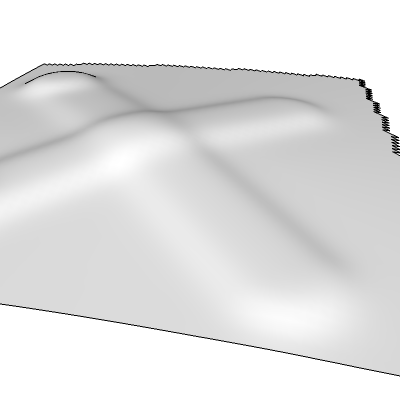
                                      You can draw fast with lagline on.

                                      1 條回覆 最後回覆 回覆 引用 0
                                      • mitcorbM 離線
                                        mitcorb
                                        最後由 編輯

                                        Thanks -BTM:
                                        I think I understand what you mean.
                                        As for drawing fast, that would be when I get a new desktop system. My current machine has a Pentium 4 with 1.6Ghz.

                                        I take the slow, deliberate approach in my aimless wandering.

                                        1 條回覆 最後回覆 回覆 引用 0
                                        • W 離線
                                          wsms
                                          最後由 編輯

                                          thanks for everybody who build this plugin!
                                          i am just trying to sculpt something out~
                                          the only problem is the speed of my computer...

                                          1 條回覆 最後回覆 回覆 引用 0
                                          • B 離線
                                            BTM
                                            最後由 編輯

                                            ok, I'm starting work on sculpt tools again; a new tool I'm probably going to add in the next release is flatten. I've got it working, but It's not finished yet.

                                            It flattens nearby points to the plane they best fit. If you hold shift, it will keep the previous plane, so you can create a flat surface. It has a setting which allows it to not affect points on the other side of the plane, so you can sculpt somewhat hard surfaces in the model, like in this image.
                                            ( though, with sketchup, it's admittedly not very useful)
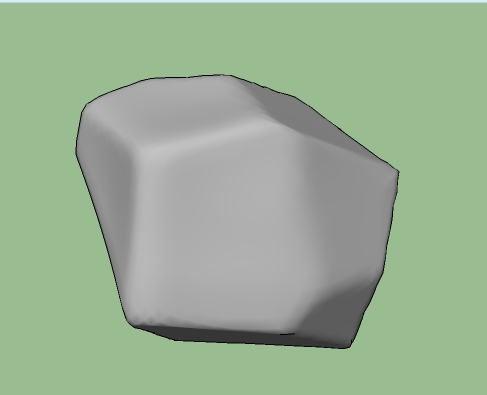
                                            an 'icosphere', with flatten used in different places.

                                            I'll see if I can get an inflate/ deflate tool in the next release alswell.

                                            1 條回覆 最後回覆 回覆 引用 0
                                            • 1
                                            • 2
                                            • 3
                                            • 4
                                            • 5
                                            • 2 / 5
                                            • 第一個貼文
                                              最後的貼文
                                            Buy SketchPlus
                                            Buy SUbD
                                            Buy WrapR
                                            Buy eBook
                                            Buy Modelur
                                            Buy Vertex Tools
                                            Buy SketchCuisine
                                            Buy FormFonts

                                            Advertisement


