sketchucation logo sketchucation
    • 登入
    Oops, your profile's looking a bit empty! To help us tailor your experience, please fill in key details like your SketchUp version, skill level, operating system, and more. Update and save your info on your profile page today!
    🔌 Smart Spline | Fluid way to handle splines for furniture design and complex structures. Download

    [Plugin][$] FredoScale - v3.6a - 01 Apr 24


    已排程 已置頂 已鎖定 已移動 Plugins
    1.1k 貼文 345 Posters 2.4m 瀏覽 342 Watching
    正在載入更多貼文
    • 從舊到新
    • 從新到舊
    • 最多點贊
    回覆
    • 在新貼文中回覆
    登入後回覆
    此主題已被刪除。只有擁有主題管理權限的使用者可以查看。
    • N 離線
      noseno002
      最後由 編輯

      Bundle of 8 plugins are compatible with SketchUp 2025?
      I'm interested in the Fredo scale, RoundCorner, and others.

      Dave RD 1 條回覆 最後回覆 回覆 引用 0
      • Dave RD 離線
        Dave R @noseno002
        最後由 編輯

        @noseno002 yes. They all work with SketchUp 2025.

        Etaoin Shrdlu

        %

        (THERE'S NO PLACE LIKE)

        G28 X0.0 Y0.0 Z0.0

        M30

        %

        1 條回覆 最後回覆 回覆 引用 0
        • E 離線
          elfis @NetJaro
          最後由 編輯

          I'm using this plugin for ears, but this has always been the case. It's not a big problem—when the cursor highlights the edge like in your video, just press it, and the bounding box will align.

          @NetJaro said in [Plugin][$] FredoScale - v3.6a - 01 Apr 24:

          @fredo6 Hi!

          The problem with area of the object is only when I use a FredoScale.

          Below I include a longer video with problem.

          Image 002.mp4

          Thanks!

          1 條回覆 最後回覆 回覆 引用 0
          • E 離線
            elfis
            最後由 elfis 編輯

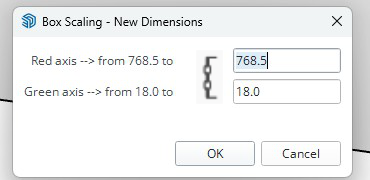
            I have problem, divide do not work on sketchup 2025 I'm alone with this ?
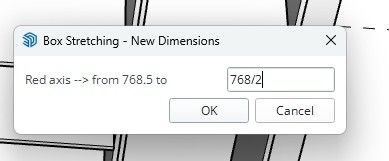
            divide.jpg
            Are you planning to make any changes, upgrades, or new features?

            • A new UI, like the Flip tool
            • Displaying the size of the selected object when the tool is active
            • Upgrading the stretch target
            • Holding proportions when scaling
              scale.png
            Dave RD 1 條回覆 最後回覆 回覆 引用 0
            • Dave RD 離線
              Dave R @elfis
              最後由 編輯

              @elfis said in [Plugin][$] FredoScale - v3.6a - 01 Apr 24:

              divide do not work on sketchup 2025 I'm alone with this ?

              Well, it works for me in SketchUp 2025.
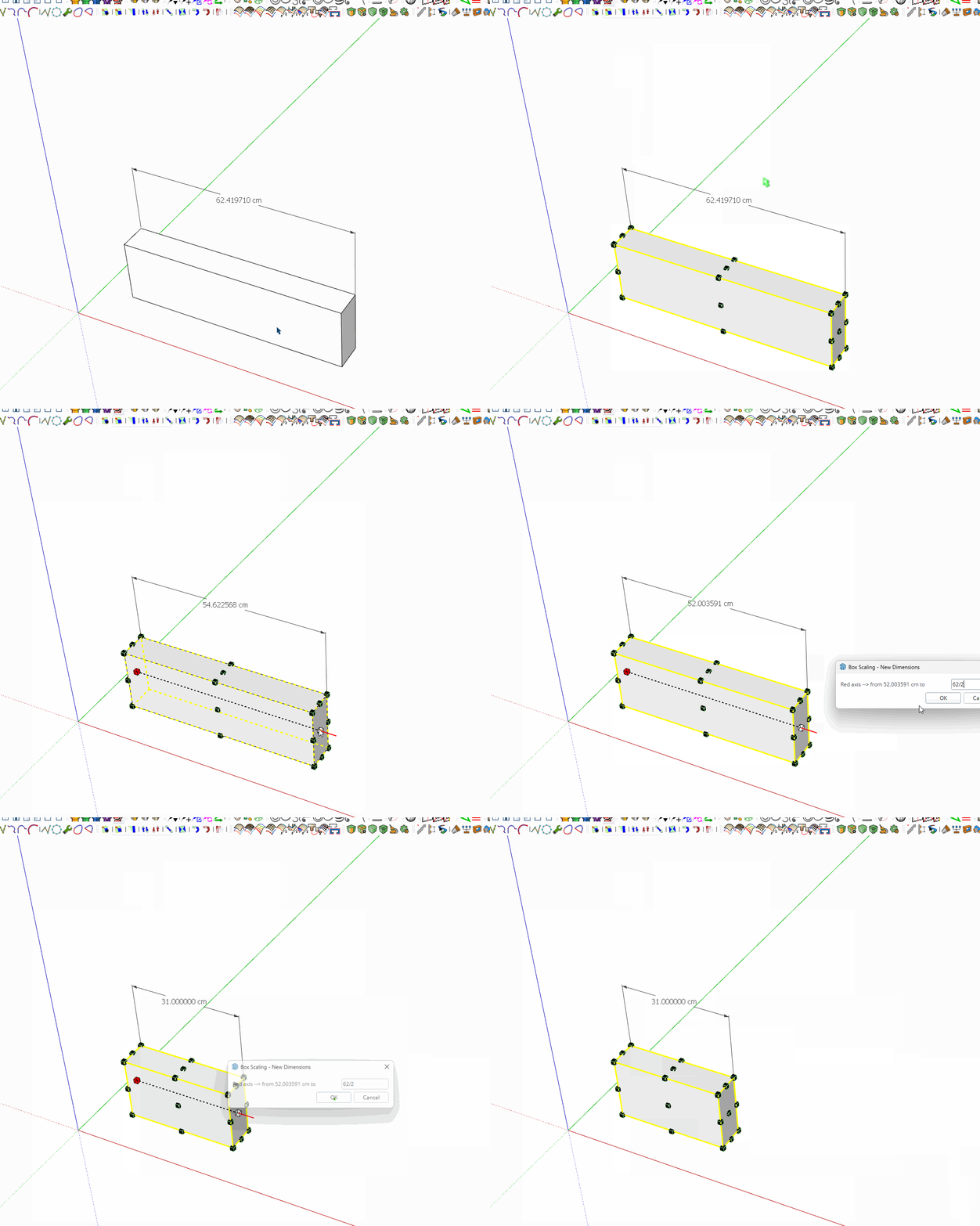
              box.gif

              Etaoin Shrdlu

              %

              (THERE'S NO PLACE LIKE)

              G28 X0.0 Y0.0 Z0.0

              M30

              %

              1 條回覆 最後回覆 回覆 引用 2
              • K 離線
                kaas
                最後由 編輯

                Question;
                I use a custom quick menu and I would like to launch FredoScale-boxstretch. On this webpage (documentation section) the suggestion is to use this ruby command. See https://sketchucation.com/plugin/1169-fredoscale

                F6_FredoScale.launch_action(action_code)
                

                my action would be :StretchB
                so the command is

                F6_FredoScale.launch_action(:StretchB)
                

                I'm getting an error though

                F6_FredoScale.launch_action(:StretchB)	
                #<NameError: uninitialized constant F6_FredoScale::StretchBTool>
                (eval):1:in `launch'
                

                etc etc.
                Any thing I'm missing? Code has changed?

                I'm using
                Platform: x64-mswin64_140 - Ruby: 3.2.2, Sketchup: 25.0.634, LibFredo6: v15.1a, LibFredo6 Binary loaded, SCFLicense: v6.4a - 74, FredoScale v3.6a - licensed FULL

                1 條回覆 最後回覆 回覆 引用 0
                • fredo6F 離線
                  fredo6
                  最後由 fredo6 編輯

                  Use :Stretch_B

                  EXTERNAL API to launch FredoScale menus

                  Action code must be passed as a symbol

                  - :Scale_B --> Scale - Box mode

                  - :Scale_T --> Scale - Target mode

                  - :Taper_B --> Taper - Box mode

                  - :Taper_T --> Scale - Target mode

                  - :PlanarShear_B --> Planar Shear - Box mode

                  - :PlanarShear_T --> Planar Shear - Target mode

                  - :PlanarShear_A --> Planar Shear - Free mode

                  - :Stretch_B --> Stretch - Box mode

                  - :Stretch_T --> Stretch - Target mode

                  - :Twist_B --> Twist - Box mode

                  - :Rotate_B --> Rotate - Box mode

                  - :Rotate_A --> Rotate - Free mode

                  - :RadialBend_A --> Radial Bending - Free mode

                  - :MakeUnique_U --> Make Unique - Utility

                  K 1 條回覆 最後回覆 回覆 引用 1
                  • K 離線
                    kaas @fredo6
                    最後由 編輯

                    @fredo6 thanks Fredo, that works nicely

                    1 條回覆 最後回覆 回覆 引用 0
                    • B 離線
                      bedavisdesign
                      最後由 bedavisdesign 編輯

                      Hi Fredo. I've used so many of your creations over the years. I want to say I've used SU on and off since at least 2006. I just purchased SU2025 Pro and I'm also a member here on Sketchucation, though my membership here is of the free variety. I'm getting ready to purchase the Fredo6Bundle2022 through Sketchucation, but I want to make sure I'm good to go ahead and purchase. Under the "Requirements" you mention "Usage: Paid, Licensed under Sketchucation SCFLicense". I want to understand if this means I need to be a "Paid" member here on Sketchucation, or am I reading too much into that? I hope my inquiries are clear enough and thanks in advance for any clarifications you can provide. EDIT*: Or if anyone else can answer this question if Fredo isn't available, that we be great. THX!

                      Rich O BrienR 1 條回覆 最後回覆 回覆 引用 0
                      • Rich O BrienR 線上
                        Rich O Brien Moderator @bedavisdesign
                        最後由 編輯

                        @bedavisdesign

                        You can purchase using your free account. SCFLicense is packed into Sketchucation Tools which is also free.

                        Download the free D'oh Book for SketchUp 📖

                        1 條回覆 最後回覆 回覆 引用 0
                        • B 離線
                          bedavisdesign
                          最後由 編輯

                          @Rich-O-Brien Thank you so much for your reply and info.

                          1 條回覆 最後回覆 回覆 引用 0
                          • M 離線
                            Mattshiggins
                            最後由 編輯

                            Hi in SketchUp 2026 you need to tap tab multiple times to bring up the dimensions box. This appears to only happen on Windows, Mac is working as it should. Is there a workaround or fix?

                            Thanks.

                            1 條回覆 最後回覆 回覆 引用 1
                            • Rich O BrienR 線上
                              Rich O Brien Moderator
                              最後由 編輯

                              @Mattshiggins

                              You can right click and choose Enter Dimensions

                              But the TAB not firing on first click suggests something else is grabbing focus. That could be from a myriad of reasons like a dialog open or you clicked something in the tray.

                              I've not experienced myself on Windows but have seen a few mention it.

                              Download the free D'oh Book for SketchUp 📖

                              pilgerP 1 條回覆 最後回覆 回覆 引用 0
                              • pilgerP 離線
                                pilger @Rich O Brien
                                最後由 pilger 編輯

                                @Rich-O-Brien @Mattshiggins

                                I'm having the same issue here. I've tried uninstalling all other extensions and plugins and running Sketchup without any other apps in the background and I still get the same thing.

                                Is there a way to check what is getting focused when I press tab, maybe? To try and find what's stealing the focus?

                                EDIT: or maybe change that tab key to something else that doesn't cause the issue?

                                EDIT 2: updates here: https://community.sketchucation.com/post/1617927

                                1 條回覆 最後回覆 回覆 引用 0
                                • 1
                                • 2
                                • 42
                                • 43
                                • 44
                                • 45
                                • 46
                                • 56
                                • 57
                                • 44 / 57
                                • 第一個貼文
                                  最後的貼文
                                Buy SketchPlus
                                Buy SUbD
                                Buy WrapR
                                Buy eBook
                                Buy Modelur
                                Buy Vertex Tools
                                Buy SketchCuisine
                                Buy FormFonts

                                Advertisement