sketchucation logo sketchucation
    • Login
    Oops, your profile's looking a bit empty! To help us tailor your experience, please fill in key details like your SketchUp version, skill level, operating system, and more. Update and save your info on your profile page today!
    Urasik Extensions | Lots of new extensions to check out Learn More

    Rayscaper New Releases

    Scheduled Pinned Locked Moved Extensions & Applications Discussions
    rayscaperrender
    461 Posts 12 Posters 90.2k Views 13 Watching
    Loading More Posts
    • Oldest to Newest
    • Newest to Oldest
    • Most Votes
    Reply
    • Reply as topic
    Log in to reply
    This topic has been deleted. Only users with topic management privileges can see it.
    • Mike AmosM Offline
      Mike Amos
      last edited by

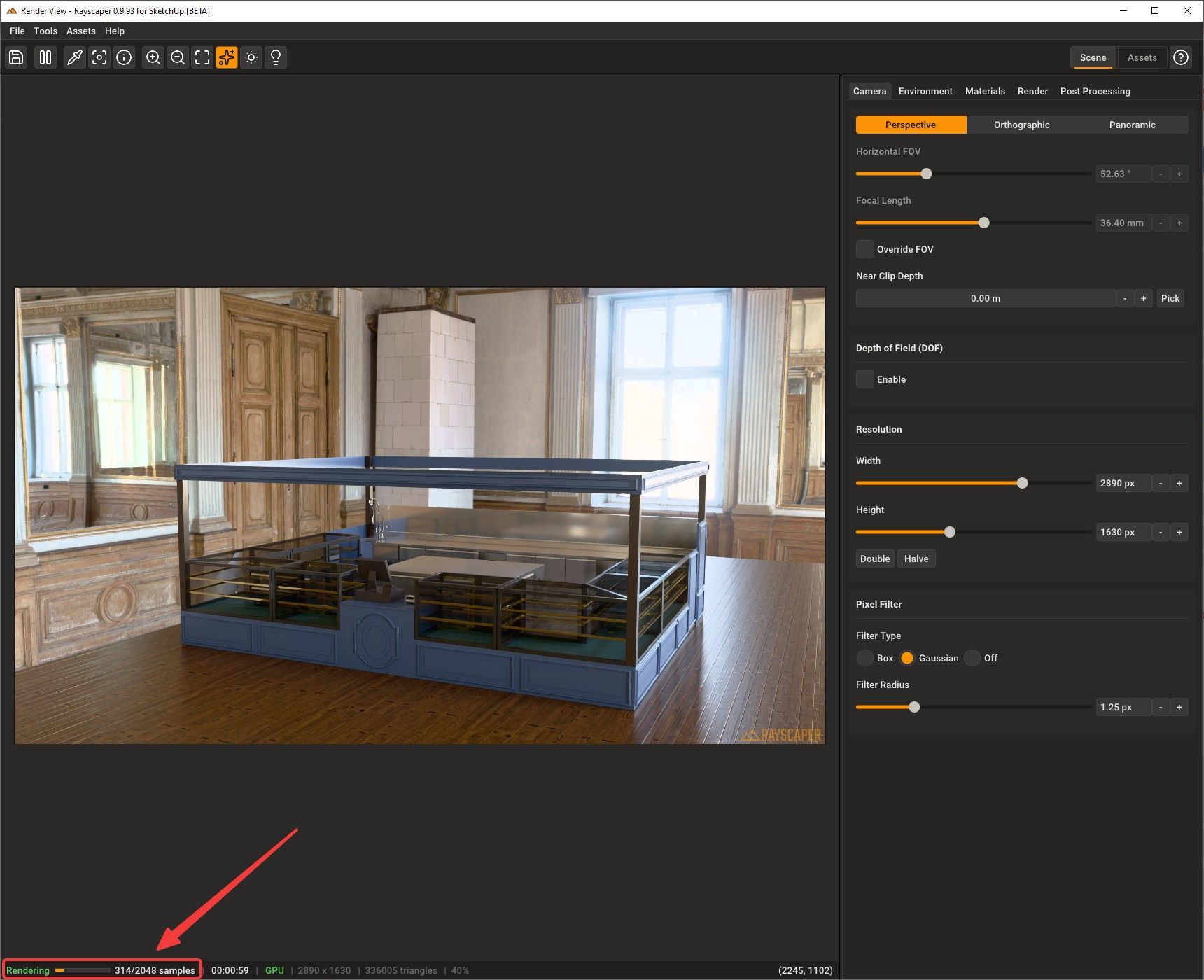
      The new build is good, when hiding the 'assets' panel the progress bar is also lost. Not a major issue as when it comes to labelling the render, unhiding the assets is doable.
      It would be useful when progress is slow as a stalled render is not so obvious when the progress bar is hidden.

      Absentia mortis praesentiam vitae probat, vita autem est argumentum constantiae.

      P 1 Reply Last reply Reply Quote 0
      • ntxdaveN Offline
        ntxdave @pixelcruncher
        last edited by ntxdave

        @pixelcruncher said:

        Rayscaper users, a heads up: I accidentally uploaded the previous 0.9.92 version to the SketchUcation Extension Store. If you installed Rayscaper in the last 4 days, you may have reinstalled the previous version. (@mike-amos Thanks for the heads up!).

        I’ve uploaded the latest 0.9.93 version now. If you download and install the extension again, it should install version 0.9.93 correctly.

        Apologies for the hassle.

        Happy Rendering!
        Thomas

        Is there a way within Rayscaper to update to the latest version? If not, is this something you could add to the ui?

        Press F1...thank me later

        Rich O BrienR 1 Reply Last reply Reply Quote 0
        • Mike AmosM Offline
          Mike Amos
          last edited by

          On a few occasions I have downloaded the latest build and used the sketchup extension manager. This it what I have used for rollback to last version to check behaviour.

          Absentia mortis praesentiam vitae probat, vita autem est argumentum constantiae.

          1 Reply Last reply Reply Quote 0
          • Rich O BrienR Offline
            Rich O Brien Moderator @ntxdave
            last edited by

            @ntxdave said:

            Is there a way within Rayscaper to update to the latest version? If not, is this something you could add to the ui?

            If you install extensions using Sketchucation Tools then it will prompt you to update. It has been that way for years.

            Download the free D'oh Book for SketchUp πŸ“–

            ntxdaveN 1 Reply Last reply Reply Quote 0
            • KrassK Offline
              Krass
              last edited by

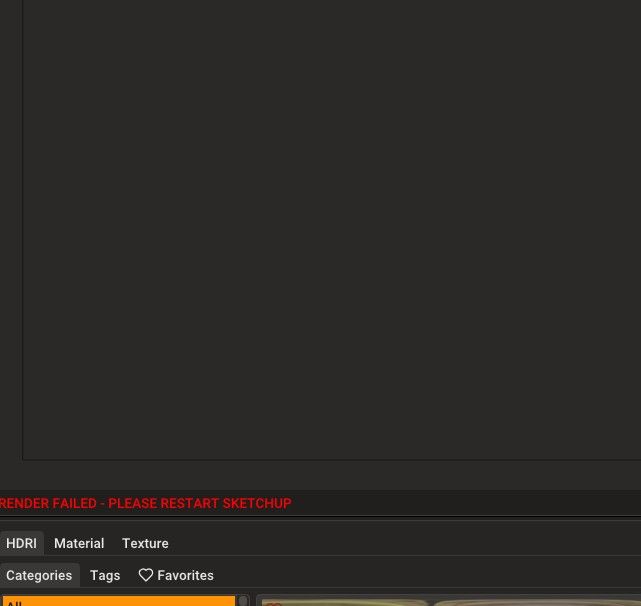
              hello, I'm trying this new version but I get a bugg, It doens't want to render anymore. I get this error message

              f6b58b7d-acb4-4db6-ba4d-a1bdc87ed29c-image.jpeg
              I will send you my log file

              Krass

              P 1 Reply Last reply Reply Quote 0
              • ntxdaveN Offline
                ntxdave @Rich O Brien
                last edited by

                @Rich-O-Brien said:

                @ntxdave said:

                Is there a way within Rayscaper to update to the latest version? If not, is this something you could add to the ui?

                If you install extensions using Sketchucation Tools then it will prompt you to update. It has been that way for years.
                I agree @rich-o-brien but when I went there yesterday it said it said all my extensions were up to date. I will look again today. That is what prompted my post.

                Press F1...thank me later

                Rich O BrienR 1 Reply Last reply Reply Quote 0
                • Mike AmosM Offline
                  Mike Amos
                  last edited by

                  There was an issue where the posted version of Rayscaper was incorrect, it had .92 as the latest. If you try again you will get .93 as the uploaded file has been corrected.

                  I can certify to this as I have now got the updated .93 installed.

                  Absentia mortis praesentiam vitae probat, vita autem est argumentum constantiae.

                  1 Reply Last reply Reply Quote 0
                  • Rich O BrienR Offline
                    Rich O Brien Moderator @ntxdave
                    last edited by

                    @ntxdave said:

                    when I went there yesterday it said it said all my extensions were up to date.

                    If you installed extensions manually. That is you grab the RBZ off the site and install it via Extensions > Extension Manager then don't expect Sketchucation Tools to flag an update.

                    If you install extensions via Sketchucation Tools dialog then we prompt you to install future updates

                    Download the free D'oh Book for SketchUp πŸ“–

                    1 Reply Last reply Reply Quote 0
                    • ntxdaveN Offline
                      ntxdave
                      last edited by

                      Not sure now how I originally installed the extension, but I feel pretty confident I have updated it before via SketchUcation Tools. When I go to the SketchUp Extension manager, it says I have 0.9.92. I would like to update to the 0.9.93 version. Does this mean I need to download the new version and install if "from scratch" or is there some way I can do it via SketchUcation Tools?

                      Press F1...thank me later

                      Rich O BrienR 1 Reply Last reply Reply Quote 0
                      • KrassK Offline
                        Krass
                        last edited by

                        I should point out that I initially succeeded with a project in version 93. Then this problem occurred.

                        Krass

                        1 Reply Last reply Reply Quote 0
                        • Rich O BrienR Offline
                          Rich O Brien Moderator @ntxdave
                          last edited by

                          @ntxdave said:

                          Does this mean I need to download the new version and install if "from scratch" or is there some way I can do it via SketchUcation Tools?

                          Open Extensions > Sketchucation > ExtensionStore

                          Search for Rayscaper and click install.

                          Download the free D'oh Book for SketchUp πŸ“–

                          ntxdaveN 1 Reply Last reply Reply Quote 0
                          • ntxdaveN Offline
                            ntxdave @Rich O Brien
                            last edited by

                            @Rich-O-Brien OK, got the latest version installed now.
                            I should have known this myself. DUH!

                            Press F1...thank me later

                            1 Reply Last reply Reply Quote 0
                            • G Offline
                              gabrielaher Newcomers
                              last edited by

                              How its takes to give the license via email???

                              P 1 Reply Last reply Reply Quote 0
                              • P Offline
                                pixelcruncher Extension Creator @Mike Amos
                                last edited by

                                Hey @Mike-Amos,

                                Could you provide a screenshot? Here's what I see when hiding the assets panel. As you can see I still have a progress bar, so I think we are talking about different things:

                                5be37c7f-3424-4f39-8a1f-b6389e7389a7-image.jpeg

                                I'm the developer of Rayscaper: https://rayscaper.com/ - Fast and easy rendering for SketchUp.

                                1 Reply Last reply Reply Quote 0
                                • P Offline
                                  pixelcruncher Extension Creator @Krass
                                  last edited by

                                  @Krass

                                  Thanks for the report, I can confirm the error with GPU rendering. Would you mind sending me the scene so I can try to reproduce the error?

                                  Thanks,
                                  Thomas

                                  I'm the developer of Rayscaper: https://rayscaper.com/ - Fast and easy rendering for SketchUp.

                                  KrassK 1 Reply Last reply Reply Quote 0
                                  • P Offline
                                    pixelcruncher Extension Creator @gabrielaher
                                    last edited by

                                    Hi @gabrielaher ,

                                    You can buy a Rayscaper license here (if you are logged in): https://sketchucation.com/purchase-smart.php?plugin=rayscaper

                                    To manage a license you already have, you can do that here: https://sketchucation.com/webshop/my-licences.php

                                    Let us know if you need more help.

                                    Regards,
                                    Thomas

                                    I'm the developer of Rayscaper: https://rayscaper.com/ - Fast and easy rendering for SketchUp.

                                    1 Reply Last reply Reply Quote 0
                                    • KrassK Offline
                                      Krass @pixelcruncher
                                      last edited by

                                      @pixelcruncher said:

                                      @Krass

                                      Thanks for the report, I can confirm the error with GPU rendering. Would you mind sending me the scene so I can try to reproduce the error?

                                      Thanks,
                                      Thomas
                                      Hello, it's done, I sent you the file

                                      Krass

                                      1 Reply Last reply Reply Quote 0
                                      • P Offline
                                        pixelcruncher Extension Creator
                                        last edited by

                                        Hey, Rayscaper users!

                                        Rayscaper 0.9.94 Beta is available. You can get it via:

                                        • The SketchUcation store.
                                        • Direct download: Rayscaper_Win_0.9.94_Beta.rbz.

                                        I recommend upgrading to the latest version.

                                        What Changed?

                                        • Fix occasional skewed or corrupted textures in renders.
                                        • Fix render failures when emissive materials are assigned to a group or component instance instead of directly to faces. (Cheers @krass for helping me find this bug!)

                                        Full release notes: rayscaper.com/manual/release-notes

                                        Help Me Build the Community πŸ‘

                                        If you like Rayscaper, please share your renders (final or work-in-progress, it doesn't matter)! This is motivating
                                        and helps me showcase its capabilities to new users.

                                        Follow me on X.

                                        Happy Rendering!
                                        Thomas

                                        I'm the developer of Rayscaper: https://rayscaper.com/ - Fast and easy rendering for SketchUp.

                                        1 Reply Last reply Reply Quote 0

                                        Hello! It looks like you're interested in this conversation, but you don't have an account yet.

                                        Getting fed up of having to scroll through the same posts each visit? When you register for an account, you'll always come back to exactly where you were before, and choose to be notified of new replies (either via email, or push notification). You'll also be able to save bookmarks and upvote posts to show your appreciation to other community members.

                                        With your input, this post could be even better πŸ’—

                                        Register Login
                                        • 1
                                        • 2
                                        • 20
                                        • 21
                                        • 22
                                        • 23
                                        • 24
                                        • 23 / 24
                                        • First post
                                          Last post
                                        Buy SketchPlus
                                        Buy SUbD
                                        Buy WrapR
                                        Buy eBook
                                        Buy Modelur
                                        Buy Vertex Tools
                                        Buy SketchCuisine
                                        Buy FormFonts

                                        Advertisement