sketchucation logo sketchucation
    • Login
    Oops, your profile's looking a bit empty! To help us tailor your experience, please fill in key details like your SketchUp version, skill level, operating system, and more. Update and save your info on your profile page today!
    Mac User? | Join the Rayscaper Beta for Mac Learn More

    [Plugin] TIG-Smart_offset

    Scheduled Pinned Locked Moved Plugins
    143 Posts 55 Posters 196.6k Views 54 Watching
    Loading More Posts
    • Oldest to Newest
    • Newest to Oldest
    • Most Votes
    Reply
    • Reply as topic
    Log in to reply
    This topic has been deleted. Only users with topic management privileges can see it.
    • TIGT
      TIG Moderator
      last edited by

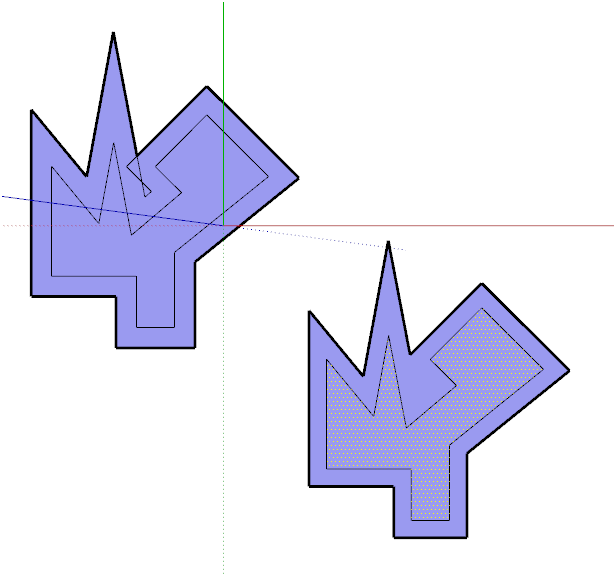
      Here's v1.1 http://sketchucation.com/forums/viewtopic.php?p=446462#p446462
      It's been made more robust.
      It now works on Pilou's problem shapes!Capture.PNG
      TIG

      1 Reply Last reply
      Reply Quote 0
      • D
        driven
        last edited by

        Hi Tig,
        I'll try the new one but something really odd is going on, and yes I'm on a mac.
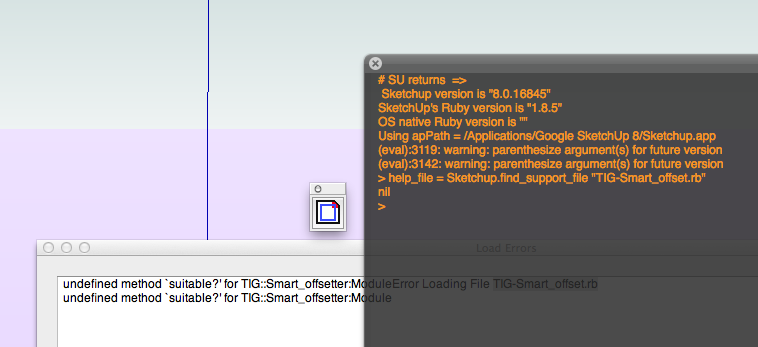
        2012-12-21 01.06.32 am.png
        I used SU to instal, and had line numbers then, so I removed it from 'plugins' to do again, but
        this has been uninstalled, moved to trash, emptied trash, restarted computer, but it still there and it works, as well as it did, although sketchup can't find the file.... it's crazy, I don't have hidden files either.

        I'll over write with the new
        john

        learn from the mistakes of others, you may not live long enough to make them all yourself...

        1 Reply Last reply
        Reply Quote 0
        • D
          driven
          last edited by

          found it, a new 'finder. replacement doesn't update instantly... bin that
          ok no errors. menu cmd works, context cmd work, toolbar cmd dosen't do anything

          It works if I split if the validation proc
          cmd2=UI::Command.new('TIG.Smart_offset'){self.dialog()} cmd2.small_icon=File.join(dir, 'TIG-Smart_offset.png') cmd2.large_icon=File.join(dir, 'TIG-Smart_offset.png') toolbar=UI::Toolbar.new('TIG.Smart_offset') toolbar.add_item(cmd2)

          john

          learn from the mistakes of others, you may not live long enough to make them all yourself...

          1 Reply Last reply
          Reply Quote 0
          • Mistro11M
            Mistro11
            last edited by

            You have no idea how many times I got frustrated doing an offset and have to get in there and clean up the shape. Thanks TIG!

            Structural Integrity is Not Just Physical...It's in the Design and Purpose

            1 Reply Last reply
            Reply Quote 0
            • jeff hammondJ
              jeff hammond
              last edited by

              i'm all greyed out (on two separate computers with different OS & different versions of sketchup on them).. will investigate more tomorrow
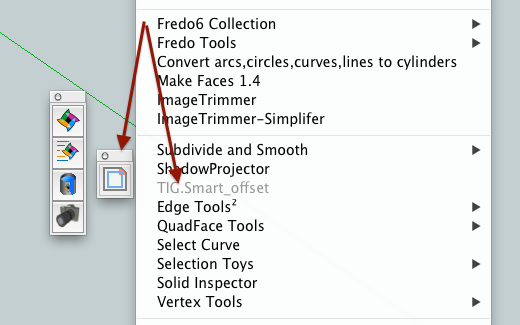
              (skindigo toolbar as reference to what the blue/blacks should look like)

              dotdotdot

              1 Reply Last reply
              Reply Quote 0
              • N
                notareal
                last edited by

                Merry Christmas to you too!

                Welcome to try Thea Render, Thea support | kerkythea.net -team member

                1 Reply Last reply
                Reply Quote 0
                • J
                  Jim
                  last edited by

                  in cmd.set_validation_proc (and other places) you want to give the full scope of the suitable? method since it is being called from SketchUp outside the scope of your module.

                  Also, combine the MF_ bits.

                  
                  cmd=UI;;Command.new('TIG.Smart_offset'){self.dialog()}
                  if TIG;;Smart_offsetter.suitable?()
                  MF_ENABLED
                  else
                  MF_DISABLED | MF_GRAYED
                  end


                  Hi

                  1 Reply Last reply
                  Reply Quote 0
                  • cottyC
                    cotty
                    last edited by

                    Nice gift! Thank you and Merry Christmas! (Are we allowed to use it before 24.12.?)

                    my SketchUp gallery

                    1 Reply Last reply
                    Reply Quote 0
                    • pilouP
                      pilou
                      last edited by

                      Yeeeeeeees! Works like a charm now! πŸ‘
                      You are the Ruby's king! 😎

                      And lucky because I can't more test your tricky plugin before the next year! πŸ˜„

                      Super_TIG.jpg

                      Frenchy Pilou
                      Is beautiful that please without concept!
                      My Little site :)

                      1 Reply Last reply
                      Reply Quote 0
                      • TIGT
                        TIG Moderator
                        last edited by

                        @jim said:

                        in cmd.set_validation_proc (and other places) you want to give the full scope of the suitable? method since it is being called from SketchUp outside the scope of your module.

                        Also, combine the MF_ bits.

                        
                        > cmd=UI;;Command.new('TIG.Smart_offset'){self.dialog()}
                        > if TIG;;Smart_offsetter.suitable?()
                        > MF_ENABLED
                        > else
                        > MF_DISABLED | MF_GRAYED
                        > end
                        > 
                        

                        Thanks, knew it was obvious... This only affected MACs though ???
                        This was collecting dust on a virtual dust, until Pilou reminded me that I'd written it, so sometimes things get 'forgotten'... πŸ˜’

                        TIG

                        1 Reply Last reply
                        Reply Quote 0
                        • TIGT
                          TIG Moderator
                          last edited by

                          Here's v1.2 http://sketchucation.com/forums/viewtopic.php?p=446462#p446462
                          Further robustness in enabling/disabling/graying and suitable? tests [thanks to Jim!].
                          Seems to be especially for MACs πŸ˜„

                          TIG

                          1 Reply Last reply
                          Reply Quote 0
                          • J
                            Jim
                            last edited by

                            @tig said:

                            This only affected MACs though ???

                            I am not sure - it was just a guess and I don't have a Mac. Did you try it? πŸ˜†

                            Hi

                            1 Reply Last reply
                            Reply Quote 0
                            • TIGT
                              TIG Moderator
                              last edited by

                              I don't have a MAC either. πŸ˜•
                              Driven's reported issue was on a MAC and Jeff had other issues on a MAC too...
                              Hopefully this recent v1.2 [...20121221b.rbz !] will address the suitable? check and MF_ issues with the menus/toolbar...
                              It still works fine on a PC, but then v1.1 did too πŸ˜• πŸ˜„

                              TIG

                              1 Reply Last reply
                              Reply Quote 0
                              • elmerE
                                elmer
                                last edited by

                                Nice Christmas gift Tig, thanks a lot, it works perfectly on my Mac.

                                1 Reply Last reply
                                Reply Quote 0
                                • alvisA
                                  alvis
                                  last edited by

                                  Thanx TIG

                                  1 Reply Last reply
                                  Reply Quote 0
                                  • guanjinG
                                    guanjin
                                    last edited by

                                    @tig said:

                                    Here's v1.2 http://sketchucation.com/forums/viewtopic.php?p=446462#p446462
                                    Further robustness in enabling/disabling/graying and suitable? tests [thanks to Jim!].
                                    Seems to be especially for MACs πŸ˜„

                                    TIG: Merry Christmas

                                    TIG.gif

                                    I come from China, is to learn

                                    1 Reply Last reply
                                    Reply Quote 0
                                    • jeff hammondJ
                                      jeff hammond
                                      last edited by

                                      @tig said:

                                      Here's v1.2 http://sketchucation.com/forums/viewtopic.php?p=446462#p446462
                                      Further robustness in enabling/disabling/graying and suitable? tests [thanks to Jim!].
                                      Seems to be especially for MACs πŸ˜„

                                      Hi Tig
                                      i'm still getting the same greyed out problem.
                                      is there anything i can type in the console or ?? to help figure out what the problem is?
                                      thanks

                                      dotdotdot

                                      1 Reply Last reply
                                      Reply Quote 0
                                      • TIGT
                                        TIG Moderator
                                        last edited by

                                        Is there no difference at all - if you have nothing preselected, or one edge preselected, or one face preselected, or lots of things [including some edges] preselected ?
                                        The menu/toolbar are only enabled if there's at least one face in the current selection.
                                        The context-menu only appears if there's at least one face in the current selection.

                                        Copy/paste+<enter> these into the Ruby Console and report the results:

                                        with nothing preselected TIG::Smart_offsetter.suitable?()
                                        with one edge preselected TIG::Smart_offsetter.suitable?()
                                        with one face preselected TIG::Smart_offsetter.suitable?()
                                        with lots of things [including some edges] preselected TIG::Smart_offsetter.suitable?()

                                        with one edge preselected TIG::Smart_offsetter.dialog()
                                        with one face preselected TIG::Smart_offsetter.dialog()

                                        πŸ˜•

                                        TIG

                                        1 Reply Last reply
                                        Reply Quote 0
                                        • jeff hammondJ
                                          jeff hammond
                                          last edited by

                                          oops 😳
                                          it actually is working now..
                                          it's just the toolbar that remains greyed out at all times but the menu item becomes available once an appropriate selection has been made..

                                          (which, for me personally, is fine.. i more likely than not wont want the toolbar anyway.. i think id use it with a modifier key added to my offset shortcut)

                                          dotdotdot

                                          1 Reply Last reply
                                          Reply Quote 0
                                          • jeff hammondJ
                                            jeff hammond
                                            last edited by

                                            here are these results.. (since you took the time to write them.. i better take the time to report πŸ˜‰ )

                                            @tig said:

                                            Copy/paste+<enter> these into the Ruby Console and report the results:

                                            with nothing preselected TIG::Smart_offsetter.suitable?()
                                            false

                                            with one edge preselected TIG::Smart_offsetter.suitable?()
                                            false

                                            with one face preselected TIG::Smart_offsetter.suitable?()
                                            true

                                            with lots of things [including some edges] preselected TIG::Smart_offsetter.suitable?()
                                            true (drew two squares and selected all)

                                            with one edge preselected TIG::Smart_offsetter.dialog()
                                            warning- PreSelect Face[s !]
                                            ruby - nil

                                            with one face preselected TIG::Smart_offsetter.dialog()
                                            (works as expected)

                                            dotdotdot

                                            1 Reply Last reply
                                            Reply Quote 0

                                            Hello! It looks like you're interested in this conversation, but you don't have an account yet.

                                            Getting fed up of having to scroll through the same posts each visit? When you register for an account, you'll always come back to exactly where you were before, and choose to be notified of new replies (either via email, or push notification). You'll also be able to save bookmarks and upvote posts to show your appreciation to other community members.

                                            With your input, this post could be even better πŸ’—

                                            Register Login
                                            • 1
                                            • 2
                                            • 3
                                            • 4
                                            • 5
                                            • 6
                                            • 7
                                            • 8
                                            • 2 / 8
                                            • First post
                                              Last post
                                            Buy SketchPlus
                                            Buy SUbD
                                            Buy WrapR
                                            Buy eBook
                                            Buy Modelur
                                            Buy Vertex Tools
                                            Buy SketchCuisine
                                            Buy FormFonts

                                            Advertisement