
sketchucation logo sketchucation
    • Login
    1. Home
    2. Wo3Dan
    3. Posts
    Oops, your profile's looking a bit empty! To help us tailor your experience, please fill in key details like your SketchUp version, skill level, operating system, and more. Update and save your info on your profile page today!
    ⚠️ Important | Libfredo 15.6b introduces important bugfixes for Fredo's Extensions Update
    Offline
    • Profile
    • Following 0
    • Followers 0
    • Topics 15
    • Posts 706
    • Groups 1

    Posts

    Recent Best Controversial
    • RE: Copy axes

      @genma saotome said:

      Make version of SU.

      Is there a simple copy axis from a to b plug-in anywhere? ......
      Any suggestions?

      No plugin needed to copy axes to use in another situation (even some levels deeper or higher).

      Create a scene saving only (see*) the axes position and orientation. Fromn there on you can "call" these axes
      any time you need them by clicking that specific scene tab. This doesn't interrupt the operation you are using.

      (*) Save the scene with only 'Axes Location' checked in the 'Scene Manager' window.

      If this isn't working for you, please provide an example to show your case.
      posted in Newbie Forum
      Wo3DanW
      Wo3Dan
    • RE: Ways to lock "Retc.on surface" to a pre-determined axis?

      @jean lemire said:

      ... Click in sequence on the scenes tabs of this SU file for another method.

      Hi Jean, I see only one scene tab when downloading > opening your file. Did you upload the correct example file? Just curious.

      posted in Newbie Forum
      Wo3DanW
      Wo3Dan
    • RE: Ways to lock "Retc.on surface" to a pre-determined axis?

      @intelcoreduo said:

      ....... I want to draw a rotated rectangle (meaning, the red and green axis is ignored, but the blue axis is not) which ends up horizontally flat even though the terrain below isn't flat. ....

      Yes, that's what I did.

      What if you position the tool where the first corner needs to be, not click -> releasing the mouse button yet, but click -> hold the mouse button down. Drag the cursor up till you see the protractor turning blue. Only then release the button. So you have your first corner located right and the first rectangle edge is going to be horizontal, whichever direction you draw it.
      Try taking it from there and see if you can manage to also get the second edge (perpendicular to the first) in he same horizontal plane. I've done it.

      posted in Newbie Forum
      Wo3DanW
      Wo3Dan
    • RE: Ways to lock "Retc.on surface" to a pre-determined axis?

      @intelcoreduo said:

      ...... Locking using the arrow key works in SketchUp 2016, which my company adopted last week, but not in 2015, as I just tested. Another great improvement. ....

      It works just fine for me, even in SketchUp 2015 with the 'Rotated Rectangle' tool, even without the [Shift] key to lock to blue, green and or red. Only by dragging at the appropriate time and the correct input value(s).

      p.s. this is above curved terrain without any axes in sight!

      posted in Newbie Forum
      Wo3DanW
      Wo3Dan
    • RE: Finding the center of circles

      @revelever said:

      ...... I need to find the center of all these circles so I can make squares based on that reference.

      How do I find the center of these circles ? ......

      The nomber of segments in your circles varies from 117 to 186. And per segmented "circle" the segment lengths arent all the same.

      In general (and per circle) you can draw two lines perpendicular to two segments, running from their respective midpoints. Where these lines intersect is the circle center.

      In your case you'll only get an appriximation of the center. probably due to the way shapes were imported, i.e. not as segmented circles but deformated segmented circles. Who knows?

      Oops, TIG beat me to it.

      posted in SketchUp Discussions
      Wo3DanW
      Wo3Dan
    • RE: Align to axes flips to view from below

      @ggunn said:

      ...... I go to tools > axes and align the red axis with the roof edge. Then I right click on an axis outside the geolocation image and select Align View. It flips the whole model upside down and looks at it from the bottom.........

      If you redraw the axes you not only need to redirect the red axis, you also need to tell SketchUp where green needs to go. You skipped doing so and now blue points down.
      When you right click on an axis in empty space and select 'Align View' green wiil always be pointing up on your screen. red to the right and blue towards you (perpendicular to the screen and out).
      This means that you look at your model from underneath. Pay more attention when redrawing the axes to not only draw red but also green.

      posted in SketchUp Discussions
      Wo3DanW
      Wo3Dan
    • RE: Pivot and rotational points

      @jp2009 said:

      ........ and need help in creating pivot and rotational points.
      How would I achieve setting the points?

      Maybe attached file will help. It involves rotating a group or component about one of its bounding box's axes by applying the 'Move' tool. groups and components have four grips per side.


      influencing the size of bounding box of component for rotations

      posted in SketchUp Discussions
      Wo3DanW
      Wo3Dan
    • RE: Objects on layers?

      @bobrsta said:

      Is there a way to know if there are any objects associated with a particular SU layer?......... I want to delete these but don't know if I have any geometry or objects on them. Any easy way to know? Aside from turning off all other layers, of which I have more than 100.

      Selecting all layers but Layer0 and that particular layer "m" (or whatever) is a matter of quickly selecting multiple layers in the Layers window.
      In this window see 'Details'(top right arrow) > Select All > then deselect Layer0 and layer "m" by holding down [Ctrl] while clicking these two layers in the Layers window.

      p.s. holding down [Shift] lets you select chunks in the column of layer names.
      and holding down [Ctrl] lets you add/subtract individual layers to/from this selection. Here [Ctrl] serves as a toggling key.

      posted in Newbie Forum
      Wo3DanW
      Wo3Dan
    • RE: Face-me Components Rotating Unexpectedly

      @slbaumgartner said:

      ....
      All this makes me suspect there really is a nasty corner-case bug in how the transformations for face-me components are managed.

      It´s a nightmare and almost as if having drunk too much when orbiting this model

      At first I thought it had something to do with mirrored components but correcting thad didn't do the trick.

      I haven´t found the exact cause of the issue but kept selecting malicious trees one by one > right clicking them > select Reset Scale and/or Reset Skew until all of them obeyed the orbit tool as should.

      I would sugguest to recreate the tree component from raw geometry (=explode>explode>explode....till raw) and replace all of these trees (through the 'Component' browser) by the new one.

      posted in SketchUp Discussions
      Wo3DanW
      Wo3Dan
    • RE: Extracting 2nd level components to 1st level

      @aris said:

      No, the point is that you want to keep the initial components interlinked so as to keep working on them.What I want is to unlink the "children-components" from their perspective "parent components
      while keeping them in place

      If it's about one parent component with a child component, 'Cut' and 'Pasted in Place' or the 'Outliner' would suffice. But to get the child out of all parent instances and keep them all in place you also need the 'Component' browser and its option to replace a selection of components by another component.

      1. Copy the parent =(A with child C) to the side.
      2. Make it unique =(B with child C) > Get C out of parent B's environment > Componentize (B) + (C) into component D =((B)+(C))
      3. Select all instances (A with child C) and via the 'Component' browser replace the selected components (A with child C) by component (D) > then explode (D) to get all instances (A) with all the respective instances (C) in place.

      It's quite fast, even with hundreds of instances (A with child C)

      posted in SketchUp Discussions
      Wo3DanW
      Wo3Dan
    • RE: Add Location/Geo location Issue

      @leeban said:

      ...Could you possibly explain what you mean by "partially paste" is that a different thing from normal paste.

      I see how my choice of words may have confused you. I just meant "paste the center part of the image of the screenshot", only the part that shows the correct building(s) without perspective, i.e. in and near the center. For all the other buildings not close to the center also do show unwanted perspective over their footprints.

      posted in Newbie Forum
      Wo3DanW
      Wo3Dan
    • RE: Add Location/Geo location Issue

      'Add Location ...' uses Google Earth's imagery.
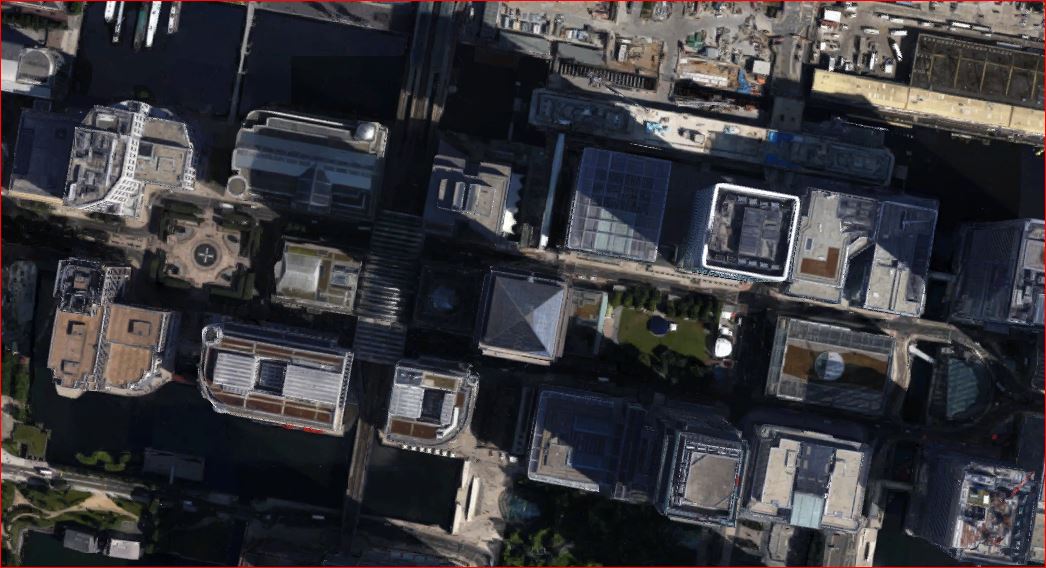
      Can't you take a screenshot of that specific part, "Canary Wharf Group", from Google Maps and partially paste it over the imported location from Google Earth? Google Maps lets you hover right over the building to get it centered with a much better footprint.


      Canary Wharf Group

      posted in Newbie Forum
      Wo3DanW
      Wo3Dan
    • RE: Projecting through a solid

      @dave r said:

      ........That works if you are applying the material to both sides of the same face but not if applying the material to the opposite end of a 3D shape, right Gerrit?

      How can I get out of this, 😲 and deny that you are right.

      Well, let's just face it, you are right Dave. I should have paid more attention when reading. 😳

      posted in SketchUp Discussions
      Wo3DanW
      Wo3Dan
    • RE: Projecting through a solid

      @ansenseale said:

      Is there a way to project an image through a solid shape so that it shows up on both sides?

      Before applying the texture to a face (still default on both sides!) just reduce the opacity from 100% to say 99%. Then sample it and paint default faces.
      Once done, raise opacity of the texture to 100% again if needed.
      Front shows normal oriented texture, back shows mirrored texture.

      posted in SketchUp Discussions
      Wo3DanW
      Wo3Dan
    • RE: Geometry size not consistent in SU 2015

      @s shepherd said:

      This model has many layers and some of those layers contain geometry that is not on the default layer. .....Shep

      Yes, many layers, and oly two (+Layer0) remain after purging the model. I wonder what all the other geometry (in the now empty layers) was about. I guess the model was imported from some other cad program and already contained lots of little errors that you wouldn't get that easy with just SketchUp unless you use geometry from elsewhere.

      I looked at the dwg imported floorplan and it has some thiny "off axis" errors.

      posted in SketchUp Discussions
      Wo3DanW
      Wo3Dan
    • RE: Geometry size not consistent in SU 2015

      @pbacot said:

      So if your object is not orthogonal it cannot have accurate dimensions? Really?

      That is not what I am saying.
      But working with some geometry that is slightly off means that you should be extra cautious when expecting to continue collinear or coplanar. The axes may draw new edges on axis

      Of course it is possible to model 'not orthogonal'.

      Also with geometry slightly off axis the 'Dimensiion' tool may indicate the ortoganal dimensions instead of the expected real edge lengths. Here again you can of course get the real edge lengths but SketchUp may trick you without bein noticed.

      Thing is that the original model wasn't accurate anymore, maybe due to moving some edges or faces.

      posted in SketchUp Discussions
      Wo3DanW
      Wo3Dan
    • RE: Geometry size not consistent in SU 2015

      There shouldn't be any issue with creating your geometry without ~ and to accurate dimensions.
      Dave already mentioned that (some) faces aren't on axes planes.
      At some stage you may have inadvertently moved some geometry slightly off axis.

      Use the 'Tape Measure' tool > disable the +sign by hitting [Ctrl] once > click on a large face with the tool to fix its starting point > orbit to get the axis color perpendicular to that face > now also hold down [Shift] and see how the values change when measuring locations on that face where they all should read 0.000000

      I recreated your geometry next to yours, only relying on SketchUp's inferencing engine and estimated (your model) lengths to input. See attached model.


      Component_134_duplicated.skp

      posted in SketchUp Discussions
      Wo3DanW
      Wo3Dan
    • RE: The "Duh!" thread (aka the Doh! thread)

      @pilou said:

      ....
      Power of the "<>"! 👍

      And \n for line feed

      So when you have a dimension value 2500mm, adding \nceiling height results in:
      2500mm
      ceiling height

      (plain text, not associated anymore with changes in geometry)
      But replacing 2500mm by <>\nceiling height becomes:
      2500mm
      ceiling height

      (text with value following changes in geometry)

      posted in SketchUp Discussions
      Wo3DanW
      Wo3Dan
    • RE: I believe I have a possessed model

      @hellnbak said:

      I appreciate all the input and suggestions, but no one seems to be addressing the fact that after I copy and paste the model to a fresh instance of SU, all problems are solved, it behaves perfectly normal until after a time it slowly starts to go bad again. I don't think anything that has been suggested so far would allow that to happen, the problem(s) would be just be copied along with the model.

      I don't claim to know that much about how SU works, but that seems logical to me. Maybe not Spock logical, but at least Steve logical

      With Box's suggestion to share the model here with a few other SU users they could at least rule out the fact that a copy gets skrewed up again after a while, .... or also for them the model gets "unstable", (so not your computer related).

      posted in SketchUp Discussions
      Wo3DanW
      Wo3Dan
    • RE: Locked groups move?

      @aureus said:

      .... No way through Windows Explorer like in old good times? 😄

      Security measures, I guess...

      This may help you finding plugins in newer (SU-2014 and 2015) versions:
      http://help.sketchup.com/en/article/38583

      posted in SketchUp Discussions
      Wo3DanW
      Wo3Dan
    • 1 / 1