If you have accidentally pressed K then back-edges might be 'on'.
Try pressing K again to toggle them 'off' ...
Oops, your profile's looking a bit empty! To help us tailor your experience, please fill in key details like your SketchUp version, skill level, operating system, and more. Update and save your info on your profile page today!
Urasik Extensions | Lots of new extensions to check out Learn More
 Offline
Posts
-
RE: Why Transparency
-
RE: AI generated subdivison plugin
I think you've trapped almost everything.
However in the self.loop_dynamic_purge_ghost_material method you look at ent and then manipulate its material if it's a face or a group or a component-instance.
But if those are no longer valid for some reason [I do suspect that could be an incredibly rare chance?] then it could throw an error and fall over.
A simple check at the start of the method's do-block that is searching through the model.entities e.g.
next unless ent.valid?
skips any invalid entIncidentally, without analyzing the whole code-set, firstly why not use model.active_entities which potentially reduces the list length, and secondly what about any faces within nested groups etc not inspected by this method that might still have that material ?
-
RE: AI generated subdivison plugin
Works well.
But I have a few observations from a non-AI view-point...
The Dynamic_Subdivide.rb file uses several
$xxx...global variables - these are frowned upon because they can pollute all other Ruby files [and are not acceptable in extensions submitted for review in the EWH].
It's a simple fix - replace them all with@xxx...variables that then work across methods in the same modules, but not 'globally' in unconnected scripts.That Dynamic_Subdivide.rb file also has potential trip-hazards as Rich pointed out -
e.g. in line#190 it's possible for it to reference an edge of a face that is no longer valid, as specified in an earlier line, so it falls over.
This not valid issue occurs when your operation does something to geometry that affects a previously made collection of things -
e.g. adding a new face [or edge] overwrites an existing face [or edge] so a reference to it is no longer valid.
Again it's a simple fix - add a 'skip' trap near the start of the block -
e.g. like this
faces.each do |face| next unless face.valid? ... end
which skips any invalid faces and so the errors are sidestepped.
You can do a 'find' in the code to add in similar traps like this for any non-valid face, edge, vertex etc.
Also note that the various blocks have an inconsistent format, swapping between
xxx.each { |e| ...xxx... }
to
xxx.each do |e| ...xxx... end
But editing either of them is possible with a little care.
Both forms are acceptable, but choosing to use just one for consistency is recommended... -
RE: SCFLicense: Extension Licensing on Sketchucation
@zmd
Also make sure you have the latest SketchUcation toolset installed for the licensing etc [>=5.0.5], it's version is shown in the top bar of its dialog.
If you update it restart SketchUp to sync everything...
As well as the latest versions of Fredo's extensions ensure you have his latest LibFredo6 too...
PS. Don't confuse Fredo's RoundCorner and FredoCorner extensions, they are separate tools, each needing their own license...
PPS. The current toolset requires >v2017 - what's yours ? -
RE: [Plugin]T2H_BuildingStructureTools2.2.4 in20141207
His tools are no longer supported.
Sadly he died some time ago...Suas ferramentas não são mais suportadas.
Infelizmente, ele faleceu há algum tempo... -
RE: [Plugin Library] LibFredo6 - v15.9b - 21 Apr 26
I'm sure @fredo6 will have more to say...
but the report your posted shows that although you have the latest versions of the 4 extensions installed,
you don't have the SketchUcation toolset installed - for the ExtensionStore and the required SCFLicensing files.
Without those all licensed extensions will not work.
Download the RBZ for the SketchUcation tools and use the Extension Manager dialog's Install... button.
Restart SketchUp to sync everything.
Now you will have the licensing set up.
You need to validate appropriate licenses for the 4 fredo extensions.
If you already have those use them, or get them from the appropriate page on this forum.
If you haven't already got a license then buy it.
Restart SketchUp after all of this to sync everything... -
RE: [Plugin Library] LibFredo6 - v15.9b - 21 Apr 26
@SunnyGee2017
Thanks, that might be helpful...
Now up to @fredo6 -
RE: [Plugin Library] LibFredo6 - v15.9b - 21 Apr 26
@SunnyGee2017
I think @fredo6 will need more details before he can fully look into the cause...
e.g.
Are there any error messages in the Ruby Console or message-boxes ?
What kind of 'crash' is it ?
If it's a BugSplat then what are its details, and have you send these reports into SketchUp ? -
RE: I am unable to download CameraKeyMaker
@harishkharai
On checking I see that although it's available in the PluginStore it won't download.
The ExtensionStore dialog also hangs installing it.
Perhaps @rich-o-brien or @Gábor can help... -
RE: [Plugin] ShadowProjector
You can do that by making a series of scene-tabs that use the same camera etc, but have a different time set.
Then go through each tab in turn and make its shadow-set... -
RE: Toposhaper fails installing on SketchUp 2026
I did a complete spring-clean removing everything TopoShaper and manually installed the RB & subfolder again from its RBZ.
On a restart it then reported as 'signed'.
This meant that something was different from the signed copy ?
Checking the previously installed set I found that all of the RBE files had RBS duplicates - dating back to the early versions 6 years ago - but because the RBE load in preference to the matching RBS files they should not break the checksum for the signing. And with those duplicates removed it would not raise an issue either.
BUT somewhere in the past [about two tears ago] a full copy of the subfolder had been created within itself.
Because its files aren't getting referred to or loaded by the 'real' files I wouldn't expect the problem.
BUT with the duplicated subfolder removed all is reported as signed and OK - and IF I add that subfolder back in the signing breaks again ! So it IS the culprit.
I don't know where the duplicate subfolder came from, it's not in the older RBZs I have but the copies I have probably don't go back far enough.In case @epix3d has a similar issue can I suggest the following house-keeping.
Close SketchUp.
Open your Plugins folder and find Fredo6_TopoShaper.rb and Fredo6_TopoShaper subfolder.
Move them out of Plugins.
In SketchUp use the ExtensionStore to install the latest version of TopoShaper.
Restart SketchUp and see if it loads and reports as signed in the Extension-Manager dialog,
Obviously if there are any error messages please let us know.
For completeness can you also check the old subfolder you set aside, to see if it contains any RBS files AND a duplicate subfolder copy of itself inside it... -
RE: Toposhaper fails installing on SketchUp 2026
@Dave-R
This is even more weird ! -
RE: Toposhaper fails installing on SketchUp 2026
@fredo6
Sadly this new version 'v1.7b' [it's actually v2.7b ??] also reports as having an invalid signature in the Extension-Manager.
So whatever you've done hasn't fixed this weirdness.
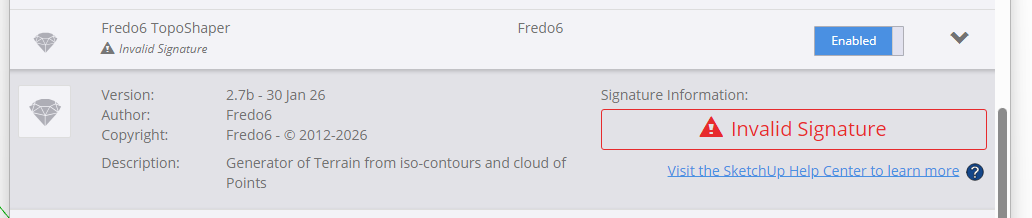
-
RE: TIG Workplane
Can you try to download the extension's RBZ from the forum's PluginStore,
then install that using the Extension-Manager dialog.
Does it install then ?
It installs from the ExtensionStore dialog just fine for me - so if you retry to do it with the Ruby Console open do you see any error messages ? -
RE: Beauties of Iran (other face of Iran)
Welcome back to the forum, safely I hope for you and yours...
-
RE: Toposhaper fails installing on SketchUp 2026
@fredo6
Everything else seems signed OK.
So something seems to have gone wrong with the TopoShaper RBZ ?
But for me it load OK when 'Unrestricted' so it's not faulty - just something have changed within it to mess with the checksum ?? -
RE: Toposhaper fails installing on SketchUp 2026
This is a very strange issue...
You haven't explicitly said it but I assume you've installed the other two extensions that I listed.
If you download a brand new copy of TopoShaper RBZ from our PluginStore and manually install it with the Extension-Manager do you still get the installation error message ?
https://sketchucation.com/pluginstore?pln=TopoShaper
I just installed it and it's fine, BUT I did notice its reported as 'unsigned' after the install. so perhaps @fredo6 needs to fix that.
Also, if your Extension-Manager Loading-Policy is set to anything other than 'Unrestricted' then that might be causing issues ? -
RE: Toposhaper fails installing on SketchUp 2026
@Epix3D said in Toposhaper fails installing on SketchUp 2026:
I used your method step by step TIG -still cannot find Toposhaper though the install says success. I did turn on and off SU for each step.
You need to read its usage instructions AND also install LibFredo6 [as well as SketchUcation tools] which contains supporting code.
Most of Fredo's extensions appear under the Tools menu, Fredo6 Collection > TopoShaper - It also has a Toolbar which you can activate... -
RE: FREDO ANIMATOR
Go to the PluginStore on this forum and download the RBZ for the SketchUcation tools, then install it using the native Extension Manager > Install... tool, then and use SketchUcation's ExtensionStore dialog to find and Auto-install the Animator Extension.
You'll also need the supporting LibFredo6 as well.
After the installs restart SketchUp to sync everything... -
RE: [Plugin] 2D Tools
To edit any existing 2D Text string in its modal input dialog you can single-click to select within the string [in the dialog], OR double-click on part of it [in the dialog], OR treble-click on it to select all of it [in the dialog] - that should then include all of the string including any spaces.
When you have what you want to change highlighted you can press the delete key to clear it or simply type in new text to overwrite it...
You type in new text as desired and then OK to go the the next step of placing it - OR if you have chosen to edit settings as second dialog opens before placement.
Initially new 2D Text always starts with '2D Text' in the dialog, followed by some spaces to ensure the box is a reasonable width.
This text-string should be selected as the dialog opens, so you typing new text should replace it, but if you click in it you are editing the string, as explained above.
Any subsequent 2D Text you make during that session defaults to the last used string, as do any other settings you have used.If you select a piece of existing 2d Text, then there is an item in the context-menu 'Edit 2D Text'
This opens a modal input dialog where you can edit the text string - all as outlined above - and/or choose to alter other settings if you wish, in which case a second settings dialog opens, much like when you make new 2D Text, except that in that one the Alignment setting is not available to change...