Todd Burch did something on it a while ago...
Oops, your profile's looking a bit empty! To help us tailor your experience, please fill in key details like your SketchUp version, skill level, operating system, and more. Update and save your info on your profile page today!
Check out Febhouse | New extensions for Shadow Analysis in SketchUp Download
 T
Offline
T
Offline
Posts
-
RE: Confusing method !
-
RE: Tapered Pipe Along Path?
Maybe moving the axes in one instance of the compo isn't enough. Try to move an instance to the required origin, then explode it and immediately remake into the same named compo - overwriting the original - hopefully then the 'base' compo has a fixed origin where you want it to be. I must admit that compos' origins etc are a bit of a mystery and there's not a lot of stuff about...
Let me know what happens...
-
RE: Tapered Pipe Along Path?
A component is scaled about its origin (axes). Move the compo's axes to the 0,0,0 origin and try again...
If you want the bits to 'join' after growing them edit the first one and and pushpull it up to the first copy, select the top face and scale about the centre so it should then match the bottom face of the first copy... Save the edit and you should now have a set of tapering compo's that 'join'. Explode them and re-group as desired, soften/hide edges as required...
-
RE: Calculation of Building Surface
Find my 'ComponentReporter+.rb' script. This extracts a list of all components in your selection/model and reports lots of stuff like areas, materials, layers etc into .csv spreadsheet files (txt is also possible). You can easily edit it to suit your needs... You just have to make components of the required pieces...
Simply extracting the surfaces of all (selected ungrouped/non-component) faces is also relatively easy...
Exactly what do you want to do and in what format do you need the output ?
-
RE: Tapered Pipe Along Path?
@jclements said:
My "Bend Distortion" posting got me thinking that a Tapered Pipe Along Path might accomplish something similar for cylindrical shapes.
I think this has been discussed before but not sure if it came to fruition.
TIG, could you make a hybrid of PipeAlongPath.rb?
Regards, John
Try playing with my Grow.rb script... Make a short cylinder component, scale one end then grow it, scaling the new bits as you go... adjust original in an edit and explode all and regroup...
-
RE: Round Corners Idea
Klaudius's k-tools.rb has long offered an 'L' command that's effectively a 'fillet'. You enter a radius and pick the edges (o radius extends/trims them at the same angle without a radius. However since this tool erases edges and replaces them with new shorter edges plus an arc you loose any faces... so I'd suggest that if the edges have a shared face then you draw the new arc and erase the then spare bits of edge that get left over - away from the arc circumference - so that the pre-existing face remains with its new perimeter...
No need to reinvent the wheel just rework Klaudius's ideas ? -
RE: [Plugin] Plugins help script
Here's my reworking of Didier's script for a dialog version. It makes an alphanumeric list of any plugins' help files. in the resulting window it displays the path in the top bar etc. It appears in the 'Help' menu, but it is easily changeable to appear in 'Plugins'. It is fast...
Thanks Fredo6 - must've hit a key between testing it and uploading it !!! corrected script re-uploaded !
-
RE: [Plugin] Plugins help script
@unknownuser said:
TIG,
There is an error, due to a missing closing brace '}' on line 22.
Otherwise, it seems to work, though I may prefer to have the menu / submenu version (one suggestion would be to build the submenus at first call, rather that systematically at load time).
Thanks a lot
Fixed it !
-
RE: [Plugin] Plugins help script
Your method fails to find 'help' files within the Plugins directory itself - only does sub-folders ? Should be easy enough to fix... BUT it is very slow at start up building the list. I still think a dialog solution that builds the list as you want it is better...
-
RE: Volume Calculator v2...
@sephodwyrm said:
Thanks for the quick reply.
I didn't know that you have to make the <<object>> into a <<component>> first before calculating the volume.
That is a very important step that I overlooked.
You may want to highlight that in the instructions that you have to <<componentalize>> before calculating the volume.It doesn't have to be a 'component'. It can also be a plain 'group'...
-
RE: [Plugin] Plugins help script
...{... if @ext.include? x.split(".")[1] }
works for files containing names IF you use this to strip off the suffix/extension
...{... if @ext.include? x.split(".").last }
-
RE: Optical Illusion
@mike lucey said:
One of my favourites. I wonder how it would work as
a building facade
Mike
I've had a few builders who [try to] do work like that !
-
RE: Optical Illusion
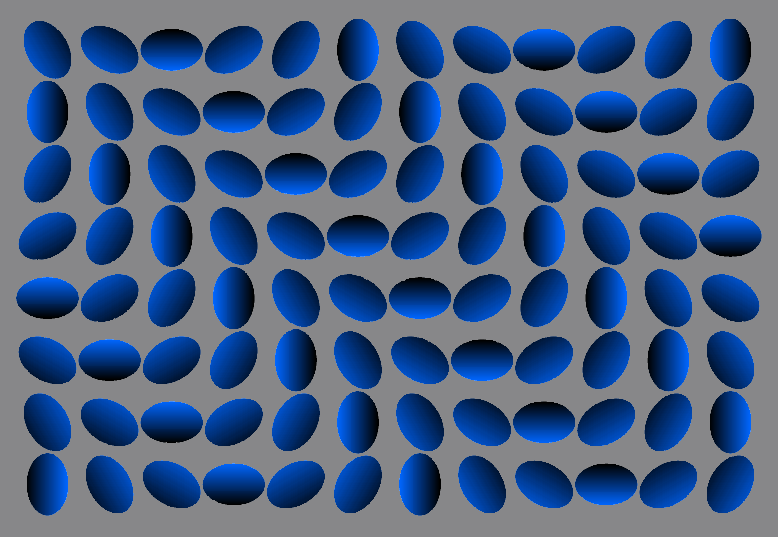
I had this as a wallpaper for a while... but it hurt...
It is a gif BUT it's NOT animated... try downloading it and turning it into something static like a jpg or a pdf and it STILL moves !!!
[I apologise about any copyright issues as I don't know where it came from long ago...]
-
RE: Volume Calculator v2...
@sephodwyrm said:
Erm, can't activate the volume calculator.
I can't really understand the instructions when I opened volumecalculator2.rb in notepad.Here is what the author said:
@unknownuser said:
First select a Group or Component that has faces that form a
volume, then use the right-click Context-Menu and choose 'Volume'.
If there is the Plugins Menu Item 'Volume' you can aso pick that.
(see the end menu section on how to activate that option...)
You can make multiple selections and they are processed in turn.None of that really worked.
I have a Plugins menu, saying Cost instead of Volume (probably from other plugins that came with the package).
The right click context menu also has no Volume to speak of.Scripts (xxx.rb) go in your SUp.../Plugins/ folder. Is it in there ? Is it still pure text with a.rb suffix - you didn't word-process it or save it as xxx.rb.txt ???
Volume Calculator's help says:
"First select a Group or Component that has faces that form a
volume, then use the right-click Context-Menu and choose 'Volume'."
You do NOT get a Plugins menu item unless you change the last part of the script as instructed (it involves removing ###'s so that that menu instruction becomes active. MOST people use the context-menu)...
To calculate a volume test... make a faced cube and then make a group of all of its geometry. Select just that cube-group and then right-click to get a context-menu... near the bottom you get an option 'Volume', choose it and you should then get a dialog asking for units etc... the volume is made and text added showing it ? -
RE: Material by Layer in Ruby
I wrote this work around a while ago... It does it by making an obj export of the model set 'material by layer' temporarily, and then using its mtl file to get the layers and colours... that's as good as it gets... You could use the data from the temp file rather than write a csv ? You could even export it all to a temp folder and delete that at the end if required ?
-
RE: What is unique about your city?
@will03 said:
is the Newcastle brewery nearby? I might have to pop by for a pint!
Unfortunately the Newcastle Brewery closed - it moved over the river to Gateshead briefly but I think that 'Scottish and Newcastle' have moved back to Scotland... Some debate about whether or not Newcastle Brown Ale can be a protected name when it's not made here any more...
On the plus side it does mean we are looking at converting their old corporate HQ into a smart hotel - next to St James' Park (home of 'The Toon' - NUFC). The rest of the large site to the west of the city centre is earmarked for a conference centre, Hilton Hotel, offices, science park etc - one of the few big bits of town that needs a big boost
-
RE: What is unique about your city?
Newcastle upon Tyne = Tyneside:
We are called "Geordies".
Wherever you go you'll find a Geordie...
Own language. Own culture.
Where England has almost stopped BUT Scotland hasn't quite started yet either...After 'Received Pronunciation' it's the most trusted 'accent' in the UK.
Way aye man ! [Of course.]
It's actually the bit of England that's so far north that in the UK it's called the 'North-East". It's much further north than Lancashire or Yorkshire - the bits that are thought of by most of UK and for that matter the World to be 'The North'... Even some southern 'Englanders' think that Newcastle is in Scotland !
-
RE: It's Official... I love you guys!
As someone once said...
@unknownuser said:
You choose your friends, but your enemies choose themselves...
We are all friends here.
Well done - we all look forward to many years of mutual benefit from this wholly correct outcome...
-
RE: POLL: Background color forums and topics
@unknownuser said:
Well if nobody wants to share an RGB I'm going to close this poll.
Try "off-white" R,G,B = 233,233,233
or any permuation of these +/- 13