Hazza, you are only really part way there.
Because you didn't create a new style to take into account the changes or update the global style and save thet to the template, every single time you use the template when you are adding scenes you are going to get a dialogue that asks you if you want to update the style of the scene, create a new one or do nothing. Even if you update the style, it will only stay updated within your current model. Next time you use the same template and add a scene it will ask you again. If you don't get the "update scene" concept under your belt, you may be very confused as to what change it could be referring to when it asks you if you want to update the style and save it to the scene tab, or to create a new style altogether.
Posts
-
RE: Start with out profiles! How? Template dosen't work.
-
RE: Scale Textures
The best way really: in the material browser, select the material from the "in model" icon and then click on the edit tab. Then from the edit window toward the bottom under the texture name, there is a texture size width and length.
It is telling you that width that a single tile represents. Play with that till you get the look that you want.There is another way. After you apply the material on a surface: right click on it and find the "texture" context menu. Select "positon" from the texture sub menu. Make sure you see the 'fixed pin" view. That is, you will see a series of greyed out tiles of the texture extending beyond your surface and there will be 4 pins situated at the corner of one of the tiles. The fixed pin mode shows 4 different coloured pins and the floating pins mode has 4 yellow ones. if you have the four yellow ones, right click and turn on the 'fixed pin" mode from the menu.
Choose the green fixed pin and carefully drag in an axis direction to scale your texture. You may wish to first place your cursor over the center of the tile and drag it down so that the edge of the tile meets the edge of your surface so that when you drag to make it larger you have an edge to inference to. the green pin also allows you to rotate and I personally have trouble making sure it doesn't rotate as I scale. that is why I prefer the first method -
RE: SketchyConferences
Thanks so much Jakob. I guess I will have to content myself with that since I have been "fired" as a customer.
Thank you all so very much for your help. -
RE: SketchyConferences
dik, I wouldn't post a clip that took 20 minutes to load.
He said 20 seconds. That isn't even a universal experience and is individual ISP provider and timing dependant. Not much one can do about that -
RE: SketchyConferences
Thanks so much guys. I can't do it in flash. It was recorded using the webinar software tools that I use and they do not provide a flash format that can be embedded into an html page. My web guy converted the mwv file to flash but he said the sound then became very tinny. Ah the trials and tribulations.
thanks so much again.
-
RE: SketchyConferences
Given that Dik has identified that the professional version is at least preferable in Firefox, I have replaced the link on the site with that version. There is now only a single link to test if you would all be so kind. Please and thank you.
http://www.entouragearts.com/webinar.html -
RE: SketchyConferences
Thanks for that Dik. They both work fine for me in Firefox.
Can you tell me if you are on Vista or XP?My pro basically washed his hands of this, not wanting to take more time.He coded it so it would require an external player. He originally gave me a link for a Plug In for Firefox that people would have to download first before opening my link but I think that is inefficient and was looking for an auto download from within the script. So looks like I'm stuck with the one with the external player.
-
RE: SketchyConferences
Okay,
Active on the site is my old code: http://www.entouragearts.com/webinar.htmlon a hidden page is the new professional code: http://www.entouragearts.com/webinarNorm.html
If I could ask you guys to try both and report to me any problems with either specifying the browser you are using? Many many thanks.
-
RE: SketchyConferences
Thanks much. I'll get on it.
I've temporarily replaced it with the old version, which does work
-
RE: SketchyConferences
I'm resurrecting this thread beacause I need a favour. BTW thanks Gai for the free advertising!
When I first launched my webinars I placed the sample video on my website and I wrote the html myself to run it. Now I don't know html formally and despite that I have been making corrections and changes to my webpages for 5 years. Sometimes I get into trouble, like potentially with this video demo page.
Most people had no problem running it but I did get reports, from this forum in fact, that some people wre unable to run it.
I have had a professional revise the code for me but we do need the page tested. If you would be good enough to test the page and report any issues, I would be very grateful. Thanks much guys. -
RE: Where is the Junior Forum?
Coen the pedophile thing is s a very serious issue but there are other forums on the internet for kids and they do advertise themselves and they do take other precautions. I can't see how you will get a decent membership. I think you might want to have it visible and only allow new members if another member known to you will vouch for them. But to not see it at all is going a little overboard.
Anyway. My son is 16 and a programmer and not overly interested in SketchUp. He was going to sigh up as a favour to me because:
I have created a SketchUp Kids CAMP curriculum which I am going to license out to various camps ( video training and unlimited support included) and I have already got a local camp that I am negotiating with. I want to get this out to camps wherever but I also wanted to kid test the program. I wanted to see the kinds of things the kids are discussing and working on to ensure that I have included the most up to date interests of the kids.
-
RE: SketchUp Junior Forums beta test
Hi Ron. Where in this thread do you see a link or a url for the junior forum?
I found this thread and I did refer to it but for the life of my I can't see an entry portal. -
RE: Where is the Junior Forum?
Now I'm really confused. If it really exists and I can't Google it and you can't see it unless your registerred, how the heck will you ever get new members? No one will be able to find it?
-
RE: Happy Birthay, Susan!!
thank you thank you thank you thank you.
Gee I wish the real world were like this.
-
Where is the Junior Forum?
It says up top that this is the home of it, but where is it. I see no sign.
I thought it would be great if my son joins but all I found when searching is a discussion dating back to February, and that is it. ???? -
RE: Creating water spray...
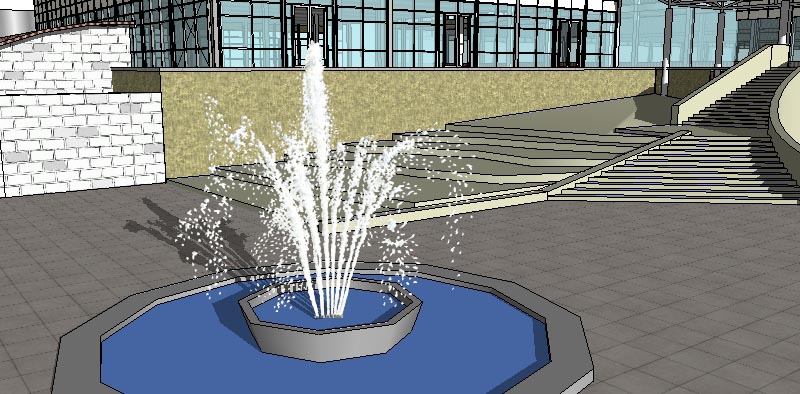
watercolour fountain available as an SKP face-me or as a High resolutin PNG.
http://www.entouragearts.com/shopexd.asp?id=1309
I grabbed an old incomplete SketchUp Model with a fountain in it and placed in the water fountain so you can see the the SKP one in action.
The spray will "tiwst and turn" about it's "origin" so if you want to cut this up and angle, just make sure you keep the origin centred in the middle of it's base as it is in this one. when you angle the fountain bit the origin will stay as is and it will angle with the rotation. It will pivot around that origin in that angle as needed.
-
RE: Creating water spray...
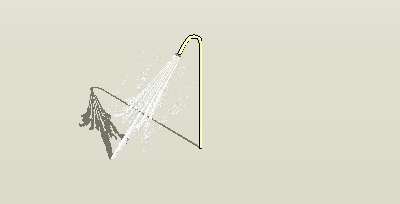
Yep, works. Sorry Alan, please forgive, I used your shower with my "fountain" stretched and squashed and rotated. The pivot point is at the original base of the fountain which is now positioned on an agle against the opening of the shower head. The whole thing rotates correctly as I orbit around the model pivoting around it's origin at the shower head on the same angle as it's z axis
-
RE: Happy Birthay, Susan!!
thanks so much guys.
My kids took me out for a spicy sausage from the local cart hot dog vendor. We got class.
