This is an interesting concept. I have been approached by someone in the health care field to see if I can design something in SketchUp that will allow Physicians to have a visual representation of the consequences of various decisions made in treatment. Because consequences of each decison lead off into various possible paths, my contact thought that using a 3D environment with a "walkthrough" that allows the doctors to keep site of the all of the paths at once would be neat.
What he envisions, unfortuneatly is something that allows a doctor to "click" on one Decision "OBjcet" which immediately takes him down a certain path. I explained that we don't have such "linking" ability from within SketchUP ( Hmm, wonder if Sketchy Physics might not be a way to go?)
Scene tabs would work but would get complicated if we had more than 2 paths. The doctor's arent expected to learn how to use SketchUp, so they are looking for something "canned" that can be easily used.
I have only very sketchy info at the moment, I will have more tomorrow, but I wonder if you guys have any brilliant ideas?
Posts
-
SketchUp for multi level Decision Trees
-
RE: The verdict is in...
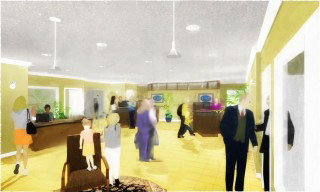
The Style is not the main issue for me. Tom. It is still the composition. I've attached a sample proposed adjustment. I'ms sure you can come up with something better and more in keeping with your style, but that huge space in the centre of the floor is killiing the composition. This might give you some food for thought.
But you may also want to give some thought as to what your subject is. Is it the space? If it is, then the space is not coming across as the most important item but the woman and child up front are. They are the centre of interest because they have the greatest degree of definition and contrast.
It may be more appropriate to make the desk area and person behind it more the centre of interest: After all that spells "BANK". You would need to change the sharpness and and increase the colour contrsst in that area then mute the people in the front. Put them in shadow, make the colours more muted and less differentiated. Certainly mute the carpet. On second thought get rid of the lady, armchair and kid altogether and use a rectangulr carpet pointing inward as a visual path ( on some nice diagonal)but make sure the pattern isn't too prominent,or maybe just use the shadows of some people we cannot see just outside the space, . You would need to juggle the midgroung people a little then perhaps. But still, I would make some "work area" within the space the centre of attention.
-
RE: The verdict is in...
I still think you need something in the big yellow expanse in the centre. There is too much of it for the eye to carry on and leap towards the next "thing".
At this size it looks a little "fuzzy/mushy" but maybe printed at full size it wouldn't be so. Also I only have one lens in my glasses so maybe that is affecting my vision.
-
RE: Changing default measurement dimensions?
SketchUp>Preferences>Template on a MAC
-
RE: Unfold.rb script: useful for UV-mapping?
OMG that's amazing. Thanl's a heap!!!
-
RE: Ultimate Unwrap 3D $59.95
I have the same problem. There are a number of tutorials on the Unwrap 3D site but they don't get to the crux of what I want to understand quickly enough. HEre is the link nonetheless
-
RE: Ultimate Unwrap 3D $59.95
That LithUnwrap is the precurser to the Ulbimate Unwrap ( same author) and works only on low poly items and it is only one piece of a puzzle. You need another free software to place the textures, it would appear.
http://files.seriouszone.com/download.php?fileid=198 -
RE: Unfold.rb script: useful for UV-mapping?
NO swapping is not currently passible for ane entire "group" of materials all at once, which is what I was requsting.
Say I have a car component and it has 17 materials assigned to different portions of the car. I want those 17 materials defined as a "set" and I want another set containing a different 17 to be swapped in in one go.
-
Ultimate Unwrap 3D $59.95
In view of all the discussion here regarding UV mapping and how it is missing from SketchUp, I came across this. It isn't pricey, looks intriguing and does export to a format that may be imported to SketchUp.
Anybody here working with it? -
RE: Unfold.rb script: useful for UV-mapping?
okay, I found a ruby script on Didier's site: Global material changer.
It is almost doing exactly what I want. It replaces any one or "ALL" of a the materials on an model/component. But your choices for replacing are only with a single default material or something from the existing list. So how difficult to modify this so that you can replace with a material set that has some built in- one to one relationship to the existing materials? Maybe same name with a numeric modifier? -
RE: Unfold.rb script: useful for UV-mapping?
Because I just recently became interested in this subject, I found this on a search and I'm resurrecting.
Further to the above speculations, I was thinking it would be great to be able to substitute a whole group of textures that are mapped to the subcomponents of a model,such as a person or a car for instance. That way, instead of providing the person or car in various colour verisons as an skp, all you need to do is substitute a material library on an existing model. If one must create a new skp for the same model, in a different colour, or maybe with some different detailing, when you create the variations you would have to go through mapping all the compoenets one by one again on the same model. Having a swap feature for the material "set" would be great.
-
RE: Things that really piss you off
Being messy is a whole other subject Gai. ( I confess to being messy too many times myself, but that is a quick and easy fix) I'm talking about things breaking down and needing repair and replacement. You think you are done with the thing. You own it now. You can go on to the next thing that you need or want, but no, the bloody thing wears out or breaks and you need to allocate scarce resources between what you already thought was a done deal and now needs more funding or the next thing that you were looking forward to allowing yourself.
But I have to admit that I could go on at length about cigarette butts and beer cans.
Ross, glad you understand.
@ross macintosh said:Perfection is hard work (or a lot of clear vinyl). To hell with perfection.
Regards, Ross
So are you saying that chipped paint in your house gets a "ho hum" from you? It doesn't drive you crazy? Does me. -
RE: More styles?
How odd, today it seems that there are 3 posts, each with the appropriate answert being: wait for Al Hart's Plug-IN: NPR tools, which will include: Sketchy Shadows.
Someone asked about it 3 or 4 days ago and now it seems there are a rash of questions that are looking for just that. -
RE: Exporting with a transparent background
I believe you can do this in the MAC. I'm not sure if Al Hart's RP tools does this currently. I think it may, but at any rate his NPR tools plug in will
-
RE: Coloured shadows?
Actually Al Hart is working on a Plug-In- NPR Tools, which will include the "Sketchy Shadows" feature. Not only will you be able to do sketchy shadows you will also be able to do coloured shadows. Stay tuned.
-
RE: Things that really piss you off
Entropy!
On a mundane level that is. You work and slave and put your last dime into making your home (or outfits or hair or whatever you want as the subject here) just so. Having spent all that money and all that elbow grease you finally arrive at the state where you think you are done and you can now relaxa and...:
- Weeds push themselves between the joins in your stone walkway
- The paint chips off on the mouldings where it is touched by a vacuum
- Parts of your fridge break off.
- You get stains on your couch and carpet.
- All things wear out and break and you have to start spending and fixing and replacing all over again. Totally pisses me off.
-
RE: The verdict is in...
Okay, here are some really really good links. The first one is a goldmine of information, goes on for 23 pages and it is FREE!
I tried to diversify so that there is input from a traditional artist and from a photographer. The final one is from a photographer who does bird photographs. Don't assume that he has nothing of relevance to say to you because you are not rendering birds. What he says applies universally to all compositions.
Hope you guys find this helpful.
http://photoinf.com/General/Johannes_Vloothuis/landscape_composition_rules.html
http://photoinf.com/General/Lee_Frost/The_Art_of_Composition_-_Landscape.htm
-
RE: Moving Component
I've posted this bug on the tester's forum. It is present with the rotate tool as well as the move tool. When a group or component is "selceted" you can't inference (click on) a point that is within the selection. It is particularly annoying in a rotate/copy or move/copy. This is not the way it was in older versions so it is definitely something that got broken in V6. I knnow they did pay attention to the bug and have it on the list to fix.
BTW, the bug works differently on different graphics cards I have found ( I teach across Canada and the same excercise behaves differently on different computers). With some Graphic's cards it works fine. With others, if you find the inference point first (touch it with your cursor) and only then select the component and then click on the inference point, SketchUp will remember the found point. On other graphics cards that doesn't work either and you need to draw a segment to the point ( outside of the group or component) and then you can find the inference when the component/group is selected. Bummer, but that is the way it is.
-
RE: The verdict is in...
Thanks Andrew.
Truthfully, composition with respect to placement of objects, colour values and a myriad of other things is something that is studied for years in art schools. Even the most proficient artist doesn't get it "right" everytime. Generally setting up a scene is done in a serious of scribbly thunbnails first just to test for best positioning and then colours are scribbled in to test for values. No good piece (well few) arrives into the world straight from one's stream of consciousness. Artists spend a lot of time preplanning before they approach the final view and start to paint ( render).
That being said, there are a lot of places where this stuff is condensed into lists of do's and dont's. All the good information is in the lists but I think for someone coming upon them for the first time, it may be difficult to assimilate it all. Three pages of do's and dont's represents countless generations of advancements on the subject and people tend to look at them and not really "see, hear, digest". In Bonnie Roskes' book "Mastering Piranesi" I contributed a chapter, the longest chapter in the book actually, on the principles of composition and a series of critiques with respect to those pricnciples. I have at one time suggested to Bonnie that it may be a good idea for her to publish just that chapter as a PDF for sale alone. I would do it but I believe I gave up the rights to Bonnie when I gave it to her for her book. I'll look into it though.
There is really a lot of very good stuff on the internet regarding compositon and colour theory. I'll see if I can dig some of it up for you guys in the meantime.