I also have this problem, for know what I do is I disable Lord of the toolbars with the sketchucation plugin manager tool, then I restart sketchup and set up the toolbars, then I enable it and restart sketchup, and it then stays.
@fredo6 do you have any ideas what is causing this?
Oops, your profile's looking a bit empty! To help us tailor your experience, please fill in key details like your SketchUp version, skill level, operating system, and more. Update and save your info on your profile page today!
Sketchucation Tools 5.0.7 | Licensing improvements and bug fixes Learn More
S
Offline
Posts
-
RE: problem with Lordofthetoolbars in sketchup 2025
-
RE: Rayscaper New Releases
@pixelcruncher Hello, I have downloaded sketchup 2025 and rayscaper doesn't work, it just says idle and doesn't render, (and do you have plans to incorporate sketchup's pbr materials into rayscaper's materials?) thanks
-
RE: [Plugin] Universal Importer - v1.2.6 - 30 July 2024
@samuel_t Any model I try doesn't work, but here is onejuggler.obj
-
RE: Best free substance painter for free?
@L-i-am I would recommend quixel mixer (https://quixel.com/products/mixer/win/2022.1.1), especially now that you can claim all megascans for free for now (https://forums.unrealengine.com/t/access-legacy-megascans-on-bridge-and-quixel-com/2142664).
-
RE: [Plugin] Universal Importer - v1.2.6 - 30 July 2024
@sashapepperspray
I have installed an older version of the plugin (1.1.9) and I now can do poligon reduction, but I can't import, I get the following error message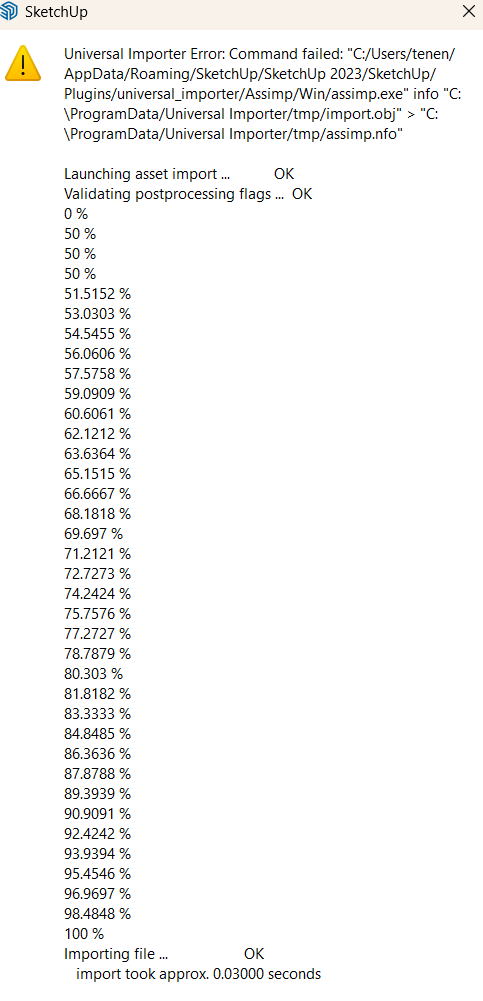
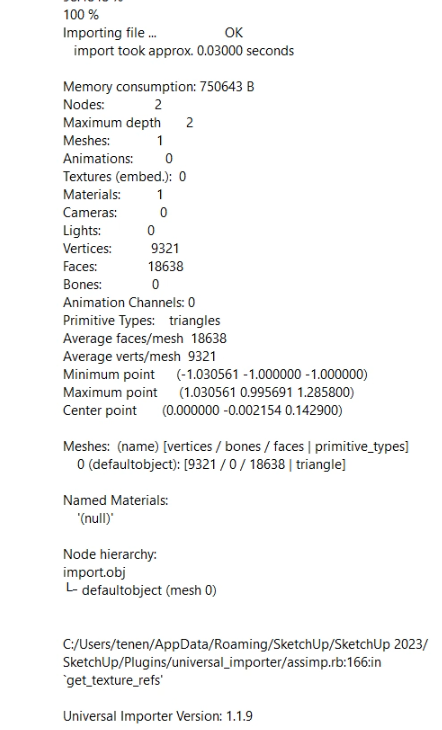
do you have any ideas? -
RE: Rayscaper New Releases
@pixelcruncher I just noticed an improvement I was hoping for: When you open rayscaper and you have the loading screen, it used to be on top of all the windows, so I had to pause whatever I was doing and wait for it to load, but now it functions as a regular window, that I can open another window on top of it. This works a lot better, so I am just saying thanks for this.
-
RE: [Plugin] Universal Importer - v1.2.6 - 30 July 2024
@samuel_t nothing happens, a screen pops up for half a second, but disappears, and that is it.
-
RE: [Plugin] Universal Importer - v1.2.6 - 30 July 2024
@samuel_t I have the laset visual c++ installed. Do you know how I could fix this security problem?
-
RE: [Plugin] Universal Importer - v1.2.6 - 30 July 2024
@samuel_t I am the administrator, and I have windows 11
-
RE: [Plugin] Universal Importer - v1.2.6 - 30 July 2024
@samuel_t It happens anytime I try any model, and also when I try importing models, I get this error
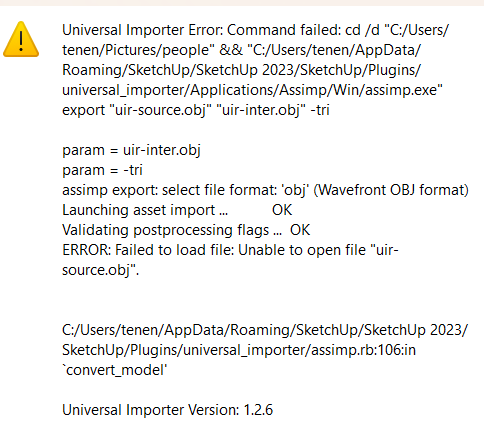
-
RE: [Plugin] Universal Importer - v1.2.6 - 30 July 2024
This is the complete error:
Universal Importer Error: Command failed: cd /d "C:/Users/tenen/AppData/Local/Temp/Universal Importer" && "C:/Users/tenen/AppData/Roaming/SketchUp/SketchUp 2024/SketchUp/Plugins/universal_importer/Applications/Assimp/Win/assimp.exe" export "export.dae" "export.obj" -tri
C:/Users/tenen/AppData/Roaming/SketchUp/SketchUp 2024/SketchUp/Plugins/universal_importer/assimp.rb:106:in `convert_model'
Universal Importer Version: 1.2.6
I have tried uninstalling and reinstalling microsoft visual runtime, and I still have the problem.
@samuel_t do you have any ideas about this? thank you
-
RE: [Plugin] Universal Importer - v1.2.6 - 30 July 2024
I have just updated the plugin and tried using it, and I get the following error:
Universal Importer Error: Command failed: cd /d "C:/Users/tenen/AppData/Local/Temp/Universal Importer" && "C:/Users/tenen/AppData/Roaming/SketchUp/SketchUp 2024/SketchUp/Plugins/universal_importer/Applications/Assimp/Win/assimp.exe" export "export.dae" "export.obj" -tri
I tried going to a previous version of sketchup, where I have an older version of the plugin, and I have the same error
Do you know what this error is, and how I could fix it? -
RE: Rayscaper New Releases
@pixelcruncher
thank you for this update, and putting back the noise/ mix/ checkerboard options. -
RE: Rayscaper New Releases
@pixelcruncher There is no option anymore to change the texture type (color or image or perlin noise). Was this purposely removed, or is this a bug. I found the perlin noise one especially to be useful (for roughness).
-
RE: Rayscaper is going Beta
@pixelcruncher thank you very much
-
RE: [Plugin] ClothWorks v1.8.0 - 28 Apr 2024
Is clothworks going to be updated to work with sketchup 2024?
(I get the following error when i try loading it
Error: NoMethodError (undefined method exists?' for File:Class) c:/users/tenen/appdata/roaming/sketchup/sketchup 2024/sketchup/plugins/ams_clothworks/extension_manager.rbe:71:in block in require_all’
c:/users/tenen/appdata/roaming/sketchup/sketchup 2024/sketchup/plugins/ams_clothworks/extension_manager.rbe:69:in each' c:/users/tenen/appdata/roaming/sketchup/sketchup 2024/sketchup/plugins/ams_clothworks/extension_manager.rbe:69:in require_all’
c:/users/tenen/appdata/roaming/sketchup/sketchup 2024/sketchup/plugins/ams_clothworks/main.rbe:746:in <main>' C:/Program Files/SketchUp/SketchUp 2024/Tools/extensions.rb:197:in eval’
C:/Program Files/SketchUp/SketchUp 2024/Tools/extensions.rb:197:in require' C:/Program Files/SketchUp/SketchUp 2024/Tools/extensions.rb:197:in load’
C:/Users/tenen/AppData/Roaming/SketchUp/SketchUp 2024/SketchUp/Plugins/ams_ClothWorks.rb:38:in register_extension' C:/Users/tenen/AppData/Roaming/SketchUp/SketchUp 2024/SketchUp/Plugins/ams_ClothWorks.rb:38:in module:ClothWorks’
C:/Users/tenen/AppData/Roaming/SketchUp/SketchUp 2024/SketchUp/Plugins/ams_ClothWorks.rb:7:in module:AMS' C:/Users/tenen/AppData/Roaming/SketchUp/SketchUp 2024/SketchUp/Plugins/ams_ClothWorks.rb:6:in <top (required)>’) -
RE: Rayscaper is going Beta
Any updates on when rayscaper will become compatible with sketchup 2024?
-
RE: NEW Forum Software Issues
What happened to private messaging? (and how can I see my old ones)?