The latest release of Rayscaper is here: https://sketchucation.com/forums/viewtopic.php?f=80&t=76658
Oops, your profile's looking a bit empty! To help us tailor your experience, please fill in key details like your SketchUp version, skill level, operating system, and more. Update and save your info on your profile page today!
⚠️ Important | Libfredo 15.6b introduces important bugfixes for Fredo's Extensions Update
P
Offline
Posts
-
RE: [LATEST] Rayscaper 0.7.3 Alpha
-
[OUTDATED] Rayscaper 0.8.0 Alpha
Hey folks,
You can get the test build for Rayscaper, Windows, version 0.8.0 Alpha here.
Remember this is alpha software.. Have a look here to see what that means.
Changes since the last build:
-
Add support for GPU rendering. Rayscaper supports NVIDIA boards with CUDA support and compute model 5.0 or higher. You can cross-check your video card specifications (https://developer.nvidia.com/cuda-gpus).
-
Add the option to toggle remapping of the values of the normal, dpdu, and dpdv render methods to RGB colors. Sometimes, it’s handy to display the raw values, which can be negative and will render black. Sometimes, it makes more
sense to remap to RGB so that negative values also get a color. -
Improve the display of filenames in the user interface. Instead of displaying the full path, which is illegible, display only the filename. The tooltip displays the full path.
-
Add swatches to the color selector.
-
Change how Rayscaper works when unlicensed. Instead of always requiring a license, you can use Rayscaper without one (i.e., for free), subject to the following limitations:
- You are not allowed to use the renders for commercial purposes.
- Watermarked renders.
- Resolution limited to 1000 by 1000 pixels.
-
Implement sending of anonymous usage statistics for Rayscaper. You can disable tracking via the global settings.
-
Fix the incorrect handling of filesystem paths with non-ASCII characters.
-
Display render errors in the viewport.
-
Add the capability to save materials in the asset library and reuse them in other projects.
-
Add a menu in SketchUp for Rayscaper (Extensions > Rayscaper).
-
Change the Rayscaper toolbar title from “Rayscaper for SketchUp” to “Rayscaper”.
-
Integrate Rayscaper with Sentry (https://sentry.io) for crash reporting.
-
Change the Rayscaper log file (
SUEX_Rayscaper.log) location from the user’s home directory to the application data directory (%APPDATA%/Rayscaper/SUEX_Rayscaper.log). -
Fix a crash when loading degenerate faces, i.e., faces without any vertices.
Quick Tips
- If this is your first time installing Rayscaper, have a look at our installation instructions.
- If you installed Rayscaper before, have a look at our upgrade guide.
- We also have a quick start guide with a free demo scene.
- The documentation is here. Documentation is a work in progress.
When you get stuck, have questions, or want to say hi, create a post in this forum (Extensions & Applications Discussions) or send me a private message. We have a documentation section on finding help..
Happy Rendering!
Thomas -
-
RE: Rayscaper Alpha Version Available
@sashapepperspray said:
is there a way to pan or zoom on the rendered image in the render viewport?
Not there yet, but it’s on the roadmap for the 1.0 release.
Cheers,
Thomas -
RE: Rayscaper Alpha Version Available
@majid said:
This is great that there are plenty of free materials available in Rayscraper, but wondering how may I change their scale or rotation. Am I missing a tutorial/description?
Hey Majid,
You are right. Documentation and tutorials still need to be added for Rayscaper.
There are two ways to change the placement of a texture on a material.
You can edit the UV transformation of the textures individually or use the global UV editor to edit all textures for a material in parallel.Edit individual textures
You can do this by opening the texture settings assigned to the slot, for example, in the below image for the Color slot. And then, modify the transformation; it updates in real-time, so you should be able to eyeball it.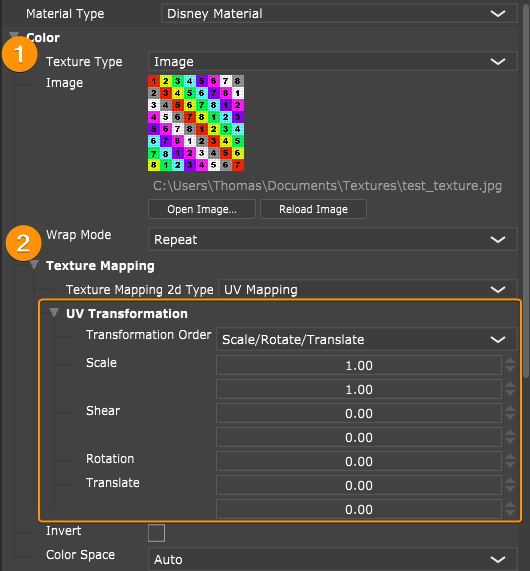
Edit all textures of a material
Or you can edit all textures for a single material simultaneously using the Global UV editor. This one can be opened via the edits menu at the top of the material.
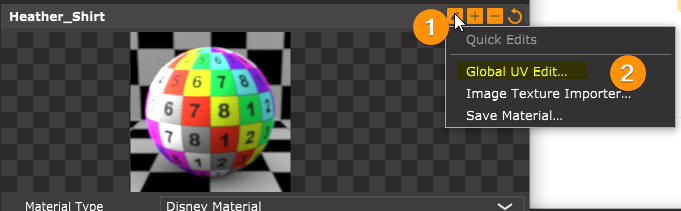
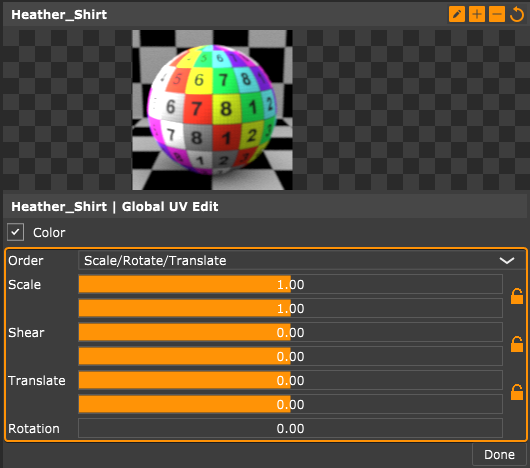
I hope this helps. Let me know if it's not clear, then I can make a quick video.
Better documentation and tutorials will arrive soon.
Cheers,
Thomas -
RE: Rayscaper Alpha Version Available
@sandraeli said:
Please keep us posted when the Mac OS version is out
I want to test it so badHey SandraEli,
Thanks for the interest! A Mac version is in the works, but the primary focus is to remove the alpha label and release a rock-solid Windows version.
I will keep you posted when the Mac version is out.
Cheers,
Thomas -
RE: Bike against wall Mark 3
@l i am said:
I managed to increase the shadow.
[attachment=0:2d2pjdb0]<!-- ia0 -->Cropped Sml jpeg.jpg<!-- ia0 -->[/attachment:2d2pjdb0]
Very nice, I like it a lot!
-
RE: Twilight Render Sunset
@l i am said:
I think it is about the state of play ATM. There are many renderers that have come on the market of late D5 and Twinmotion, they are agressivly improving. They have free odjects (Hundreds of thousands of them) and can animate, have real time and Raster or path tracing. The inerfaces are very simple. they have lots of other stuff like physics and lots of other little tricks. And they cost nothing, nothing. I would guess, and thats all it is, sadly this will cause the eventual dimise of low cost renderers, they simply cant compete, and it will not be getting any better in the future. Sadly that is the elephant in the room

No doubt, there are more recent, very high-quality engines like D5 and Twinmotion - and it takes a lot of work to get feature parity with those. Mainly because they are so heavily funded, Epic was giving it away for free for a very long time just to buy the market.
They are free, if you aren't doing any commercial work. They don't come cheap once you need them for commercial work. D5 starts at $360/year, Twinmotion at $749/year. I hope there are still users who want to use this commercially but want to pay less. Maybe the people who don't make renders as their full time gig but occasionally need to create a render but can't justify the high yearly subscription costs?
Another thing is the integration. I think Twilight Render feels more like an extension of SU than both Twinmotion and D5 Render do. It might be subjective, but I think some people prefer that tighter integration, i.e. like that the render engine is part of SketchUp.
Of course, I am very biased here, and the success of Rayscaper requires a demand for cheaper options in the render space. It's very hard to go head to head with the big guns (VRAY, D5, Twinmotion, Enscape, etc) as a bootstrapped company but I think having a diverse landscape of options out there is what makes this so interesting. For me personally, there's also the personal satisfaction, creating a render engine is just a lot of fun.
Regards,
Thomas -
RE: Twilight Render Sunset
@faust07 said:
After the Indigo renderer fell asleep now this...
What a pity!
What's happening with Indigo? Could you elaborate a bit? I thought with the Indigo RT release they have a very attractive option now to compete in the lower budget market.
Regards,
Thomas -
RE: Twilight Render Sunset
I contacted Chris & Fletch to see if they want to explore opportunities. Of course, it's speculative, and I am sure they have good reasons (which I'm not privy to) to sunset TR after 14 years.
Cheers,
Thomas -
RE: Rayscaper Alpha Version Available
@jo-ke said:
OK, I've found out: HDR has to be refreshed.
The tramwaymodel renders well exept the blue surfaces.
Thanks jo-ke for reporting. I can reproduce this bug locally and plan to have a release this week that fixes this bug, and the umlaut crash.
Regards,
Thomas -
RE: Rayscaper Alpha Version Available
@jo-ke said:
I reinstalled rayscaper on my notebook.
I reopend the test file, that I made yesterday, but most of material are lost.
The file is saved in my dropbox.
So this one worked after refreshing the HDRI? Still I think that’s a bug, Rayscaper shouldn’t have amnesia and forget about your configuration.
If this happens again, would you mind sending the log? That should give me a clue of why it failed to load the HDRI.
Thanks,
Thomas -
RE: Rayscaper Alpha Version Available
@majid said:
I am getting better at it.
Ooh very nice, always happy to see renders made with Rayscaper. Keep them coming!
-
RE: Rayscaper Alpha Version Available
@jo-ke said:
thank you Thomas:
one problem is solved:a 15 year old path with a "ü" inside was the problem.
I have to rename it.
I took the file to another folder and I can open it.
interseting: more textures are blue now, I have to refresh each texture to get rid of the blue color.
and the drawer is suddenly visible.
The file was able to save and this is my first result:
Hmm, you shouldn't reload everything by hand, so that's another bug. One thing I found interesting is that there are a ton of texture load failures when peeking at the log file you sent me just now:
Like for example:
2024-01-05 14:00:39.847 ( 156.978s) [PreProcessWorker] ImageLoader.h:73 ERR| Image 'C:\Users\KehlJ\Downloads\Fencing_Diamond_Mesh.png' does not exist.
2024-01-05 14:00:39.847 ( 156.978s) [PreProcessWorker] ImageLoader.h:73 ERR| Image 'C:\Users\KehlJ\Downloads\Translucent_Glass_Sky_Reflection_.jpg' does not exist.
2024-01-05 14:00:39.847 ( 156.978s) [PreProcessWorker] ImageLoader.h:73 ERR| Image 'D:\Dropbox\su\texturen\holzboden\22. R3107L Wiÿnia Hamilton 130 x130 cm Pfleiderer.jpg' does not exist.So it looks like Rayscaper has issues loading those files.
Regards,
Thomas -
RE: Rayscaper Alpha Version Available
@jo-ke said:
next problems:
I created a scene, that I ususally use for my customers.
1: the drawer is not visible in render
2: the renderfile is not saved.
3: when I reopen the file SU again crushed
4: it is not possible to recover the skp filereally not a good start...
If you want, I can send you the Skp
Do you mind sending the scene so I check why the drawer is not rendering?
-
RE: Stuido HENK chair
@majid said:
If it is possible to have a "scrubby zoom" within the render view?
How may I create frosted glass and foliage? Do you mind adding "templates" instead of material settings for lazy people like me, plz?
What about "hair and fur" for grass?
Are those "checker" textures needed?
Do you mind please re-mapping | or re-scaling some adjustments such as normal-map or camera focus (Lens radius) strengths? they are too strong now.Hey Majid,
Thanks for the inputs.
What is "scrubby zoom", could you explain or point me to some documentation from another engine?
I feel your pain, I will provide a materials library so you can drag and drop example materials and then tweak them to achieve the look you want. It's very high on my TODO list as well.
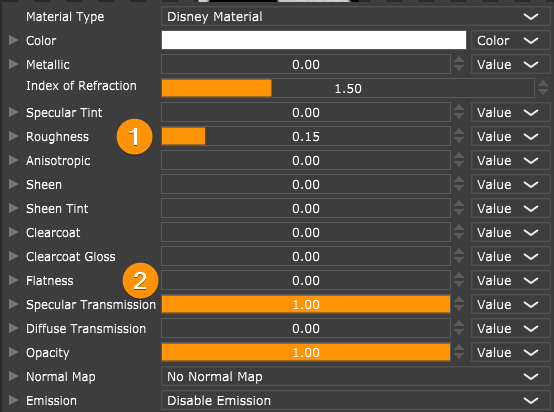
One way to create frosted glass is via the Disney material. Increase the roughness for a more frosty look, set the specular transmission all the way to 1.
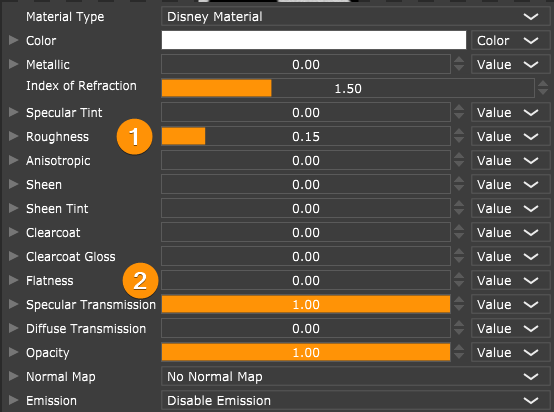
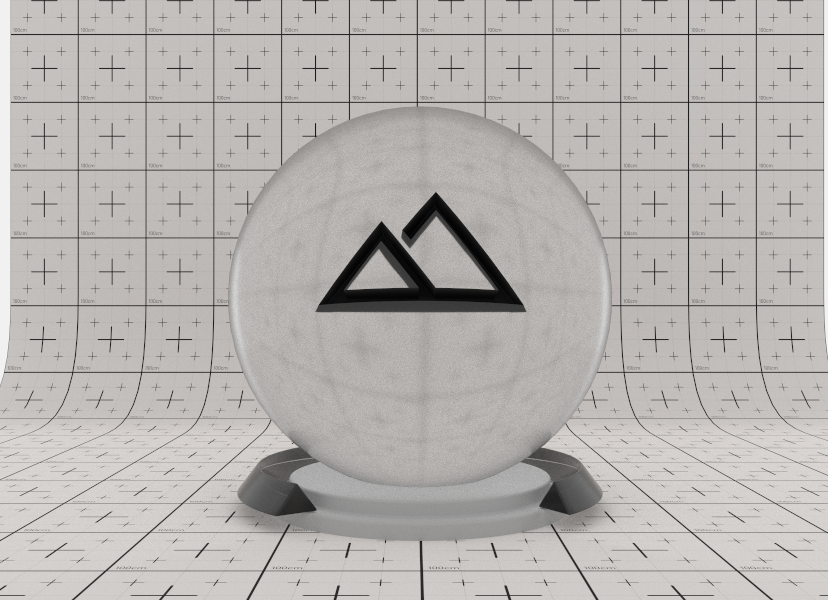
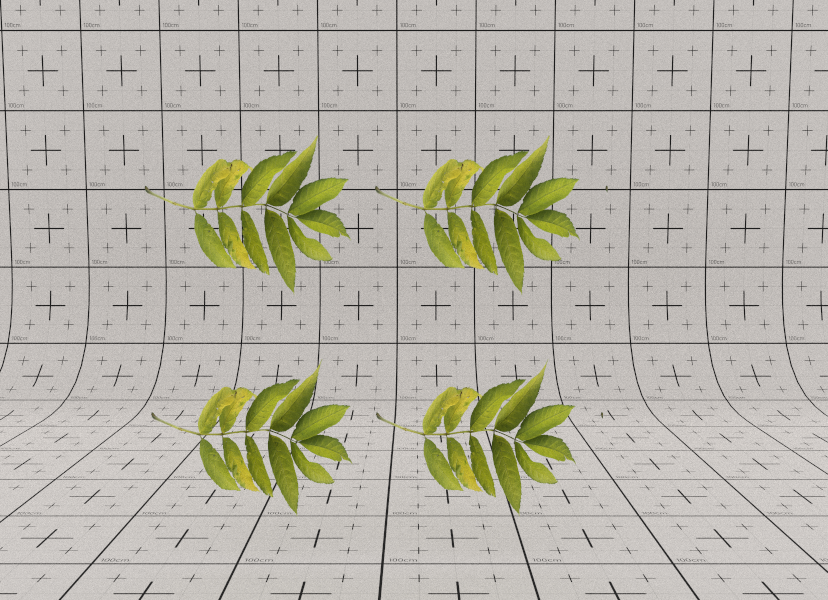
The quickest way to create some foliage right now is to put texture on a plane, and use the same texture for opacity. Like for example below, is that what you were looking for?
A hair & fur material isn't planned yet for the first 1.0 release. I have to draw the line somewhere.
You don't like the checkers
 - I'm not an artist, so I use them myself often to quickly create some background or ground plane texture. I like glass spheres on checkerboards!
I made notes to remap the lens radius / normal map ranges. Are you having issues getting it right after picking for focus?
Regards,
Thomas
-
RE: Rayscaper Alpha Version Available
Thanks for sharing the log!
Based on the PC specs I see in the log, Rayscaper should just work fine for your laptop. Also from the logs it looks like the application runs fine for 109 seconds and then just exits, so no crash (note: I'm not disputing it's not crashing on your laptop, just that it seems like it didn't crash based on this log file).
A couple of questions:
- Does SU crash for you immediately if you start up, or if you load a specific file, or if you start rendering that file?
- Does it work for any other files, or for the default empty scene?
- Do you mind reproducing the crash again and sending me another log file?
Appreciate your help!
Cheers,
Thomas -
RE: Rayscaper Alpha Version Available
@jo-ke said:
I installed your app at my notebook at home.
unfortunately sketchup is crashing after using your plugin...
maybe my notebook is to old...
everytime i load a file worked with your app sketchup crushes.
I removed your plugin and fortunately sketchup works again.
so I have to ry tomorrow in the office.
Yikes, that's not good! Sorry about that.
- Rayscaper creates a log file under your home directory named SUEX_Rayscaper.log (e.g., C:/Users/Thomas Loockx/SUEX_Rayscaper.log). Do you mind getting me that file?
- What version of SU are you using?
-
RE: Rayscaper Alpha Version Available
@jo-ke said:
is it possible to do an emitter with textures? like in my example the sign of the tramway?
This is also planned for one of the upcoming releases but it's not there yet.
@jo-ke said:
why can't I get rid of the blue textures? they are textured in SU and all faces are frontfaces
Hmm, this usually means that the face doesn't have a material assigned to it. Or the image textures couldn't be found.
Can you select the material in the Rayscaper viewport with the material picker?

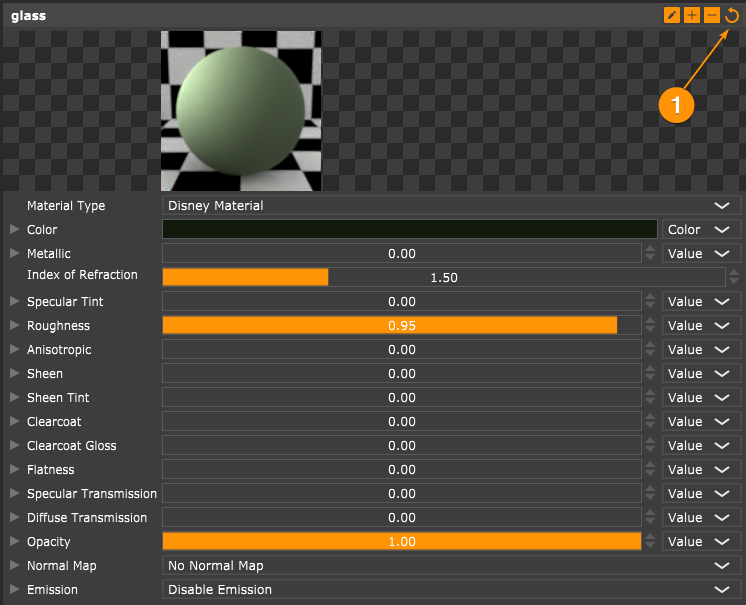
Once, selected can you try to reload the material via the reload button? This will refresh the material, resetting it to the latest changes made in SketchUp.
If all that fails, can you send me the scene? You can zip up the scene with all Rayscaper settings and textures using the following button on the Rayscaper toolbar:

You can either send me a private message or send it to thomas@rayscaper.com.
I appreciate your patience!
Cheers,
Thomas -
RE: Rayscaper Alpha Version Available
@unknownuser said:
emitter not. with "blackbody emission" I don't get the submenu
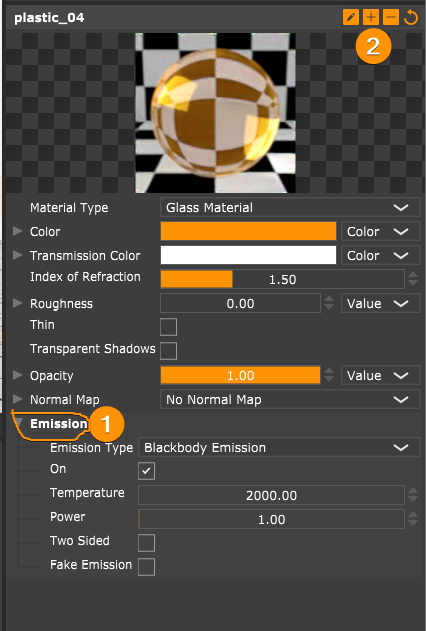
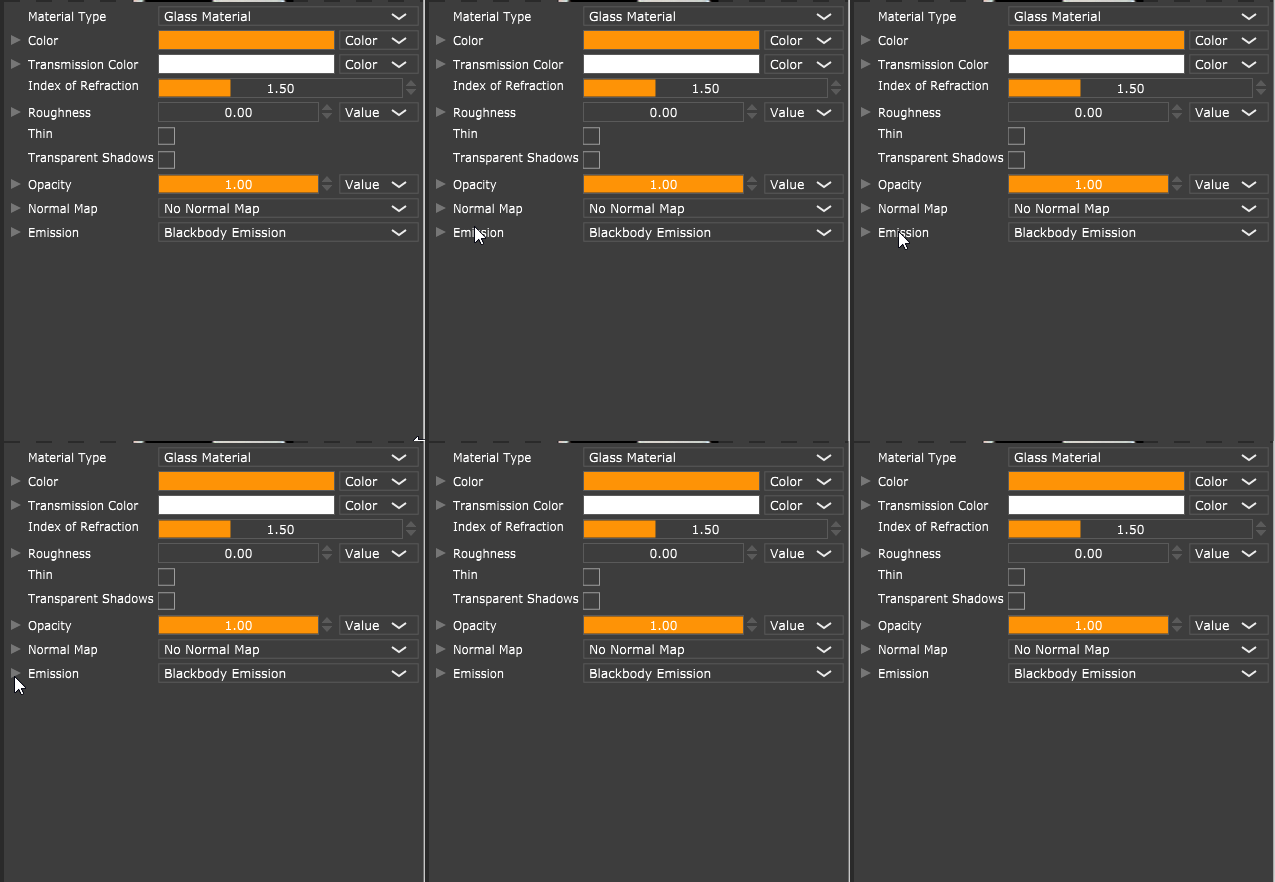
You should be able to to open the submenu by clicking the chevron or text (1). You can expand everything by clicking the plus button (2):
@unknownuser said:
also hidden layers are rendered. how can I avoid this?
Hidden objects / tags / layers isn't supported yet in the alpha version. It will be there for the 1.0 version.
Cheers,
Thomas