please see attached movie..
https://www.dropbox.com/s/wxxtp8xkwj6q8fl/COPY%20-%20PASTE%20LAYOUT.AVI?dl=0
Oops, your profile's looking a bit empty! To help us tailor your experience, please fill in key details like your SketchUp version, skill level, operating system, and more. Update and save your info on your profile page today!
Urasik Extensions | Lots of new extensions to check out Learn More
P
Offline
Posts
-
RE: BACKSPACE
-
RE: BACKSPACE
I really do not believe I am grabbing the carraige return. What's interesting is that the label tool in SketchUp does not have this glitch.
-
RE: BACKSPACE
Right........but apparently it IS giving me an unwanted carriage return. Oh well, I am only trying to save keystrokes.
-
RE: BACKSPACE
I am double-clicking an existing label's text area and copying the highlighted text.
-
RE: BACKSPACE
When the dark blue text box appears during the placement of a new label, and I press ctrl + v, the contents of my clipboard gets pasted. However, the blinking bar jumps to a new row, as if expecting me to continue typing new text. Since I don't need any additional text, I complete the job by clicking out of the box. But the box, although transparent, remains unnecessarily tall - unless I hit backspace, or escape key before clicking out of the operation. In AutoCAD, the blinking 'I beam' also jumps to a new line, but the box shrinks back properly.
-
BACKSPACE
Why must I press the backspace key whenever I paste text into a label?
-
RE: SketchUp 2016 is here....
thanks!
(Isn't it fun using a mouse to write words on a clipping tool's screen cap?)One thing I noticed with the materials tray - when you strike the B key, the tray does not automatically pop open.
-
RE: SU 2016 LAYERS TRAY
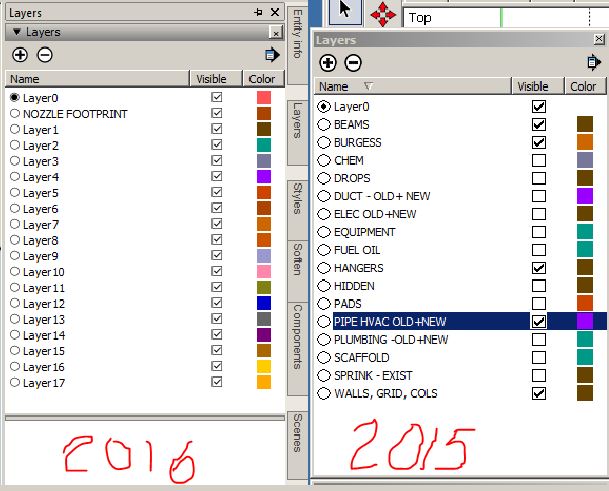
Trimble-----if you are reading this----PLEASE enlarge the Layers text, or, space the lines further apart, or, enlarge the check boxes.
-
RE: DOCUMENT UPDATE
the behavior i expect is for the scenes to update to the sketchup model that i just revised and saved. i expect the tool bar button mentioned above to act the same way as when i go to file>document setup...>references>update. or i expect it to work the same way as when i right click in a viewport and pick 'update model reference'. i would prefer the toolbar button as it would save me the navigation of the first method and the unlocking of the viewport in the second method. when i click the toolbar button, the cursor becomes an hourglass and blinks for a several seconds, but the scenes do not update. you mentioned rendereing - but i have no need or care to render since i use basic styles and no shadows and very few materials such as brick.
-
RE: SketchUp 2016 is here....
Not sure how to hide trays, like Paul did, so just their tabs are displayed. All I can manage to do is dock them with the help of those blue and white arrow glyphs that pop up when I drag a tray around the screen.
-
SU 2016 LAYERS TRAY
Can the spacing / text size / pick box size be enlarged? When you have a dozen or more layers, and you are constantly picking them, it's a bit tough to zero-in. Especially when your hand is jittery from too much caffeine. "Use large tool buttons" is checked under preferences.
-
RE: Unstable viewports
OK ......Well, let me see if things improve with the 2016 version, that I just installed, in the coming weeks.
-
RE: Unstable viewports
I always create scenes in SketchUp for the purpose of having them shown in LayOut's viewports. There comes a time, however, when I need to double-click a viewport and use the pan tool to get the objects better composed or centered. Are you suggesting that should be avoided? That I should go back to SketchUp to recompose the scene instead?
-
Unstable viewports
Why do some of my viewports change style, scale, view or scenes after I set everything up perfectly and save the LayOut file? For example - it tells "last saved sketchup view". It happens when I switch back and forth between SketchUp and LayOut. Very frustrating - especially after I annotate.
-
RE: DISPLAY OF SECTION CUTS
my reply to Krisidious:
'finicky' is an understatement. But I have to tell you, I always get positive remarks from engineers and architects who review my shop drawings. They ask if I use BIM or Revit. They are astonished to learned I used a 500 dollar program. And the tradesmen who build from my drawings are pleased as well. We are not talking about 'rinky-dink' work environments either. This is 'big time' NYC construction.
-
RE: DISPLAY OF SECTION CUTS
Q: Your answer to my first question indicates the section does work, so I am confused.
A: Sorry - I said, "the portion of the model on one side of the section cut disappears".
What I should have said was, "the portion of the model on one side of the section cut disappears - but it is not supposed to disappear.Your comment: And my second question remains. Just make another scene for use in LayOut. Keep the first shaded scene for use SketchUp.
My response to your comment: That is an excellent idea - I shouldn't have to do it - but it solves the issue.
-
RE: DISPLAY OF SECTION CUTS
Q: You don't say what is happening exactly. Does the section cut disappear? I suspect everything is going white (including back faces) and you can't see the section as clearly.
A: If I switch styles in LO, the portion of the model on one side of the section cut disappears. In this case, the section plane is, shall we say, plumb, or, 90 degrees with the screen.Q: Why not set the style you want (hidden line) in SU, saving with the scene?
A: I do. But in the model I need a shaded style and in LO I need hidden line.Bottom line - if you are eager enough to get the correct display in LO, you keep playing with the variables and you keep looking at previous successful LO files and you read stuff in Sketchucation and on YouTube and you will get the result eventually. And I give YOU credit for helping me with this tricky subject matter.
Ref - MP-SM-1 Intercontinental Hotel
-
DISPLAY OF SECTION CUTS
Is there a method that controls the visibility of section planes in LayOut's Hidden Line style? No problem with Construction Document Style. I have the scenes properly set up in the Sketch Up Model in which some scenes display section cuts and others do not. (the style used in the Model is Construction Document) When these scenes are loaded into the various viewports in LayOut, they display properly. However, if I try to switch to Hidden Line style in LayOut, the section cuts in the viewports do not behave as expected.