sketchucation logo sketchucation
    • Login
    1. Home
    2. pipingguy
    3. Posts
    Oops, your profile's looking a bit empty! To help us tailor your experience, please fill in key details like your SketchUp version, skill level, operating system, and more. Update and save your info on your profile page today!
    🚨 Skimp | 25% Off until March 30 Buy Now
    P
    Offline
    • Profile
    • Following 0
    • Followers 0
    • Topics 124
    • Posts 398
    • Groups 1

    Posts

    Recent Best Controversial
    • RE: Cannot drag some styles in the Styles Inspector window

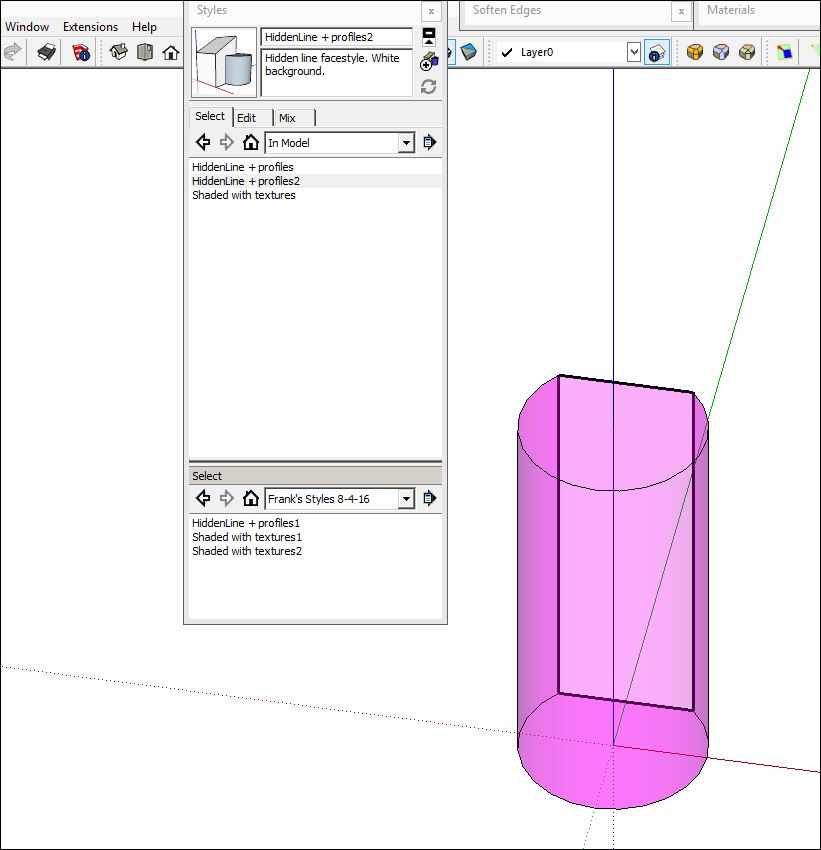
      I think i got it. To generate a new style and then add it to a custom library folder on the C drive - start with an existing one; click the create button; edit it's properties; rename it in the uppermost field of the box; <enter>; click the update icon; drag it down to the lower pane.

      Plus sign seems to be acceptable.

      PS - allowable symbols in names for COMPONENTS (per my test):
      ~ !@ $ % ( ) ` - { } '
      posted in SketchUp Discussions
      P
      pipingguy
    • RE: Cannot drag some styles in the Styles Inspector window

      How many styles do you have in the destination library? 3

      When they get dropped in, they are automatically put into alphabetical order. Is it possible you're just not seeing it drop in? no

      Have you tried putting a folder in the Documents folder and adding the style there? yes

      Does that work? no

      see attached please. and take note that my intention is to rename them, once i have all 6 styles loaded into the custom folder. is that possible?


      3 styles will not drag into custom folder.JPG

      posted in SketchUp Discussions
      P
      pipingguy
    • RE: Cannot drag some styles in the Styles Inspector window

      it weird because as i drag a style thru the upper pane, the glyph resembles a circle with a diagonal line thru it, as expected, and then, also as expected, it turns into a rectangle - albeit grayed-out, as the cursor crosses into the lower pane. when i release the mouse button, it evaporates

      posted in SketchUp Discussions
      P
      pipingguy
    • RE: Cannot drag some styles in the Styles Inspector window

      i created my own folder in the c drive

      posted in SketchUp Discussions
      P
      pipingguy
    • Cannot drag some styles in the Styles Inspector window

      why am i unable to drag some styles from the upper pane to the lower pane when attempting to create a custom library? I do not think it's because they are factory generated since one of them is named 'HiddenLine + profiles2'. And even if they are factory styles - i should be able to assemble them into a custom library.

      posted in SketchUp Discussions sketchup
      P
      pipingguy
    • RE: Unable to authorize sketchup pro 2015

      ok - got it!

      posted in SketchUp Discussions
      P
      pipingguy
    • RE: Unable to authorize sketchup pro 2015

      trimble should at least explain that as you go crazy re-pasting the numbers into the licensing fields. all you get is an ''oops'' message.

      posted in SketchUp Discussions
      P
      pipingguy
    • RE: Unable to authorize sketchup pro 2015

      OK thanks.

      posted in SketchUp Discussions
      P
      pipingguy
    • Unable to authorize sketchup pro 2015

      i downloaded and licensed sketchup pro 2016 into new laptop and then copied sketchup pro 2015 installation file from prior laptop. however, i am having trouble authenticating 2015 - even with serial no. and authentication number from 2015 license. i thought i read somewhere that this blockage was being planned by trimble - as if we are being forced to only use 2016.

      posted in SketchUp Discussions sketchup
      P
      pipingguy
    • RE: FUZZY TEXT LABELS

      wow - pretty cool dave r.!

      note to whomever is interested - dropbox is useful for retrieving previous versions of your models. a copy is automatically stored to the cloud every time a save is made - all the way back to the beginning of the model creation.

      posted in SketchUp Discussions
      P
      pipingguy
    • RE: FUZZY TEXT LABELS

      ''So did you try what I told you to do?''
      yes - eneroth RTV works

      and i already know how to release text label arrows ONE AT A TIME

      ps - maybe eneroth can add a relative bottom view someday

      posted in SketchUp Discussions
      P
      pipingguy
    • RE: FUZZY TEXT LABELS

      OK i get it now. the skewed axes in the animation were throwing me off. i should have just stuck with reading her narrative.

      posted in SketchUp Discussions
      P
      pipingguy
    • RE: FUZZY TEXT LABELS

      i want to drag the annotations from the viewport area off to the side then pick and choose items from that batch for new drawing. maybe smarter to use scrapbook. just wanted to know if there was a way to to break the grip of several text callouts in one move vs individually

      posted in SketchUp Discussions
      P
      pipingguy
    • RE: FUZZY TEXT LABELS

      why temporary? - because i need to capture the view for a scene

      eneroth gives me a plan view in various rotations- but does not keep the axes square

      remember - i don't want to rotate the model - i want to rotate the plan view camera instead - but in 90 degree increments

      posted in SketchUp Discussions
      P
      pipingguy
    • RE: FUZZY TEXT LABELS

      How can I release the text label arrow tips when dragging annotations? See attached image.


      LO TEXT LABEL RELEASE.JPG

      posted in SketchUp Discussions
      P
      pipingguy
    • RE: FUZZY TEXT LABELS

      QUESTION - how can i get a temporary model plan view - but rotated 90 degrees from normal?

      posted in SketchUp Discussions
      P
      pipingguy
    • RE: FUZZY TEXT LABELS

      i think making raster text bold helps a bit.

      posted in SketchUp Discussions
      P
      pipingguy
    • RE: FUZZY TEXT LABELS

      For some small sketches - SKP text labels are faster and easier that layout labels; and faster to paste a screencap of my model scene onto Word and convert that into a pdf. But for full size shop drawings I always use LO. (although I will sometimes export a 2d graphic to cad and use that program's annotation tools.)

      posted in SketchUp Discussions
      P
      pipingguy
    • FUZZY TEXT LABELS

      Any ideas why some text labels appear fuzzy while others appear sharp in the same model? Zooming in will sharpen them, but that does not help when the scene is set-up already. This is not to be confused with LayOut text.


      fuzzy and sharp text labels on same screen.JPG

      posted in SketchUp Discussions sketchup
      P
      pipingguy
    • RE: Pipe-along-path

      OK
      Thanks!

      posted in Newbie Forum
      P
      pipingguy
    • 1
    • 2
    • 11
    • 12
    • 13
    • 14
    • 15
    • 19
    • 20
    • 13 / 20