sketchucation logo sketchucation
    • Login
    1. Home
    2. pbacot
    3. Posts
    Oops, your profile's looking a bit empty! To help us tailor your experience, please fill in key details like your SketchUp version, skill level, operating system, and more. Update and save your info on your profile page today!
    Urasik Extensions | Lots of new extensions to check out Learn More
    Offline
    • Profile
    • Following 0
    • Followers 0
    • Topics 213
    • Posts 6,759
    • Groups 1

    Posts

    Recent Best Controversial
    • RE: Dark interior rendering

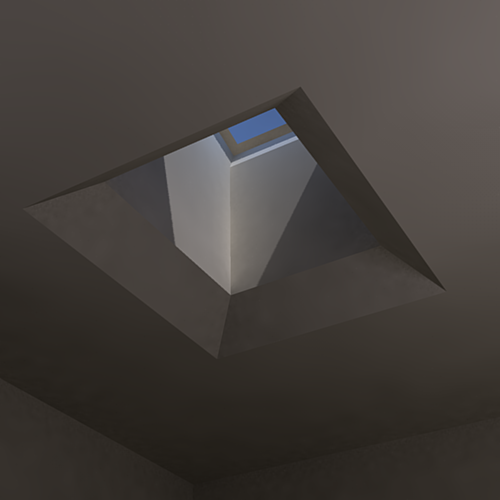
      Solo, so the skylight glass is LEM? Just enough to lighten it up? Seems that the sun is still dominant-yet somehow unable to light the room. I find I can take your picture and raise the exposure and a few other tweaks but the sunlight itself still is like it's in a Siberian winter.

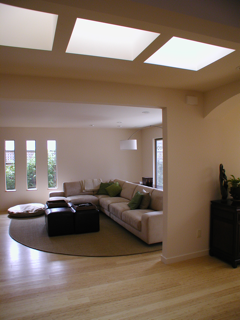
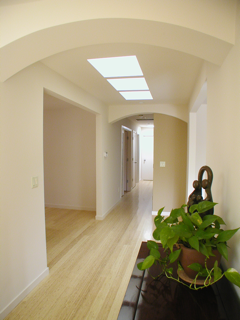
      Let's consider a real picture of a skylight. actually two. So much brighter, but the ceiling can seem dark. Is more serious post-processing needed to get that look?


      over exposed perhaps.


      more detail, dark ceiling.

      posted in Newbie Forum
      pbacotP
      pbacot
    • RE: Apartment floorplan

      Very nice. Thanks for the light info. I have to admit I get vertigo looking down into a small perspective plan.

      posted in Gallery
      pbacotP
      pbacot
    • RE: SketchUp Illustrations Spotted "In the Wild"

      Do you get the same great service as the airlines? certainly looks like the concept of personal space is similar. Wow it could be like the 50's and cement Tipis. You'll be driving down the highway and there's a jumbo jet motel! Only getting it to the site is an issue...

      posted in Gallery
      pbacotP
      pbacot
    • RE: Dark interior rendering

      Thank you again, Solo. That's nice. It seems that the edges are more softened like I'd expect from light bouncing about.

      Purge?

      So the sun is not as good as using a light. Is this just in Podium? I'll review the model and return later. Need to get back to some working drawings now, but I appreciate your help. (Not able to bill for the modeling as yet!)

      posted in Newbie Forum
      pbacotP
      pbacot
    • RE: Dark interior rendering

      Thanks Solo, that is much better. I guess what I need is to look for other profiles, found at Podiums site I guess. And get some decent textures.

      I used "default" of course LOL. I guess that is the preset...

      Not to be picky but it seems dark still, when I see nice warm renderings of interiors by others, lit by sun coming in. Wouldn't you think that although this tells the story, a homeowner would be put off by the gray nature of the image? Just trying to figure out whether it's just me, or Podium. Post-processing required?

      posted in Newbie Forum
      pbacotP
      pbacot
    • RE: Dark interior rendering

      Here's a screenshot


      Screenshot_3.png

      posted in Newbie Forum
      pbacotP
      pbacot
    • RE: Dark interior rendering

      Well I am having trouble uploading more than one file.

      skylight.skp

      posted in Newbie Forum
      pbacotP
      pbacot
    • Dark interior rendering

      Why are my renderings in Podium so dark? This is about the best I could do with the profiles that come with the demo. I turned up the quality because this is a mock-up of a skylight style so very few polygons. I colored everything a very light color, almost pure white. There is a large window flooding sunlight into the room as well. Turned up the sun and dark values (does that matter?)

      thanks!


      skylight view

      posted in Newbie Forum sketchup
      pbacotP
      pbacot
    • RE: Apply an image to a curve

      Dave,

      Nice example. Say I notice some peoples' screens in the videos, looks like a completely different program. So many icons! Where do they all come from? Extensions? Really it seems SU grows with your ability and needs. I just have a couple plugins no extra icons.

      Peter

      posted in SketchUp Discussions
      pbacotP
      pbacot
    • RE: Lecture Hall...

      Like the wet one but depends on what you need to demonstrate.

      What is that in the corner on the floor? Looks like an SOS box. The ghost people are a bit weird.

      posted in Gallery
      pbacotP
      pbacot
    • RE: SU Drawing Output

      @unknownuser said:

      is anyone aware of a plugin being developed to produce more quality drawings from SU with line weight variation and better dimensioning.

      I think this would be a great plugin for SU. I wonder if something could be developed that reads projections and profile, in relation to the camera, and orientation (a way to read the difference between things like overhangs and inside corners) and relation to light. We have "profiles" but it is out of control, and many don't like to use it.

      Otherwise a process whereby one can quickly go over a view and adjust line weights.

      As for dimensions for preliminary presentations, Layout should be the answer here but it seems to have a ways to go.

      Putting it all together in one program, which I guess is the point of REVIT is simply going to require a more complex interface and not a fast learning curve. Since early days of CAD it seems that architects, especially the Principals who don't do as much CAD, have been looking for the be-all, end-all program. CAD hasn't been around that long. Someday we'll have ONE interface that one can gesture and wink at to get a building design. Right now that's still called a "draftsperson".

      I think the immediate answer would be just what you are asking for, without asking one program to do it all. It would probably be a "renderer" for SU.

      In the meantime I find having an intuitive graphic 2d program like PowerCADD, is a great help. It's easy to learn for people who draw for both presentations and CDs, And if I were so inclined I could export a view (hidden line) to PowerCADD and then click lines giving them various weights (wysiwyg), then superimpose on a SketchUp.png inside PowerCADD.

      I looked at VisualArq and Spirit. Can't say I found enough at the websites to draw a conclusion from. Spirit "Gallery" is empty and "Spirit in Action" is under construction etc.

      posted in Newbie Forum
      pbacotP
      pbacot
    • RE: You have to laugh (or you would cry).

      Original clip. This one woman, obviously undereducated, didn't know much about geography, but the kids knew it.

      The US does indeed have a poor educational system, but this clip doesn't reflect it as much as showing how some people will be willfully ignorant. I think it has more to do with filling your head with nonsense, rather than knowing something about the world. Some people have little curiosity about anything outside their neighborhood, it seems. I don't understand it. Since I was a kid I loved maps and stories about far away places. Jay Leno's man-on-the-street segments are funnier.

      Euros on the otherhand can't turn around without tripping on another country. It's definitely a different mindset.

      posted in Corner Bar
      pbacotP
      pbacot
    • RE: Just Nature !

      That looks really great. A couple questions from the curious. When you say the leaves are face me, what is this element? All the leaves of the tree are one image/polyon, clumps of leaves?

      posted in Gallery
      pbacotP
      pbacot
    • RE: First Post - Modern Curved Lowrise

      Interesting design. Like a stadium. Hope there's a football pitch in the center! Seriously it is interesting to find out how such a space is perceived and used by the intended tenants and community.

      posted in Gallery
      pbacotP
      pbacot
    • RE: Smart scaling components

      As for something like windows, I too looked for a stretch points function. In 2d CAD a special command is used to essentially stretch lines etc. based on moving their points. Well it took me a while to realize that to resize a window (keeping the frame the same) one simply selects the edges of the frame and glass that are to be moved. Use the move tool and "stretch" is achieved by the stickyness. More complex objects and moves probably will be found that will not respond well, but for me this solves my immediate use.

      The parametric side of things is a different worthy issue.

      posted in SketchUp Feature Requests
      pbacotP
      pbacot
    • RE: Sculpture

      Interesting sculpture. Original, if I can say from my meager exposure. I'd love to see it in person. Where do you start with creating such a thing?

      T'would be great to have a sculpture garden, a 3d environment in SU where one can place a sculpture and view it in some context from all sides. I guess any well developed room would be a start. Then others can see it in 3d.

      I think the base is interesting. It is developed like the rest of the sculpture but is squarish. the flowing forms come out of the rectilinear one. It seems to deny this sculpture is a form independent of sitting on it's base for display. It says "Yes I am a sculpture. I sit right here for this purpose alone."

      Your Sunday-driver art critic.

      posted in Gallery
      pbacotP
      pbacot
    • RE: Can't find resize-option

      Hi,

      I have used CAD for years. At first I thought SU was inexact but I just needed to learn how to use it--and for architectural work it's fine. Also I've seen extensive mechanical engineering work on it.

      Use the measuring tape tool, protractor, snapping and inferences. There's demos on these. Try Aidanchopra.com videos.

      For some things commonly done in CAD it will not be as efficient. Big thing in CAD is effective dimension and text tools. Actually spend a lot of time on that side of things for working drawings and SU is limited there.

      It is not a CAD program, designed for making working drawings and such. I've seen it incorporated in a CAD workflow. But it is not a toy if you use it right for modeling. Just check out the Gallery. I've heard mention of one person trying to use exclusively SU for working drawings.

      Try using in conjunction with a simple CAD 2d program that can export DXF or DWG. I actually don't know of a cheap one, or if that would be reliable enough for you.

      posted in Newbie Forum
      pbacotP
      pbacot
    • RE: Hello, Yes I am a newbie, please help me anyways. :)

      The double shelves are on the wrong side.

      Just kidding! Good Work. Make sure it is attached to the wall with a strap etc.

      I like all the stuff in it. I have those box drawers too, but not modeled.
      Have fun.

      posted in Newbie Forum
      pbacotP
      pbacot
    • RE: Layer management problem

      Yeah but...

      Anyway this seems to be why Outliner was invented. Maybe don't use layers but use Outliner to control visibility?

      posted in Newbie Forum
      pbacotP
      pbacot
    • RE: Layer management problem

      I was just having a similar problem after getting the word to draw on layer 0, then group parts of the model as I draw.

      It's just that It seems parts of groups (usually edges, those rascals) seem to go onto other layers or outside their group. It's hard to explain. I had one layer that I was not using in this part of the work at all. I had another layer with a group of all my house walls. It was fine. I was doing other work not even on the house walls. Then I noticed the walls had lost edges. Eventually I found them on the unused layer. But it is hard to tell if they were outside the original group or what. I could have the house wall layer hidden and see an outline for the group with only some edge lines. It was hit-and-miss getting them back inside the group on the right layer. Like herding cats.

      I really think this is a pitfall in SU. If this sort behavior makes more advanced work possible, so be it, but it seems there should be protection for simple modeling. Put something in a group,shouldn't the darn thing stay put? Isn't there a way to "lock" geometry? Also it is weird that you can select things on hidden layers--when all you see is the highlight surface dots.

      Sorry for the long-winded note, but I spent a long time fixing this last night. Then I saw this post. And it is hard to describe.

      posted in Newbie Forum
      pbacotP
      pbacot
    • 1
    • 2
    • 334
    • 335
    • 336
    • 337
    • 338
    • 336 / 338