sketchucation logo sketchucation
    • Login
    1. Home
    2. mac1
    3. Posts
    Oops, your profile's looking a bit empty! To help us tailor your experience, please fill in key details like your SketchUp version, skill level, operating system, and more. Update and save your info on your profile page today!
    ⚠️ Important | Libfredo 15.6b introduces important bugfixes for Fredo's Extensions Update
    M
    Offline
    • Profile
    • Following 0
    • Followers 0
    • Topics 7
    • Posts 872
    • Groups 1

    Posts

    Recent Best Controversial
    • RE: Healing Multiple Bezier Curves

      @edyuyu said:

      Hi Mac1,

      thanks a lot for your help.

      i seem to have trouble opening Sketch Mac1A. could you please resend it?
      I understand the procedure and it would be applicable, for tapering the model, i mean. The trouble is the tapering has to be specific in terms of dimension, from 5m to 3m. I saw that yours was approximately right in the 1B file you sent. but i need it to be exact. I just can't seem to work it! also, how do I render a face as a wireframe? thanks

      Update for you:
      Remember the cutting plane in that original mac1B model was too small to cut the total extent of your model. Therefore when you make that plane bigger the high side cut gets higher and the lower gets lower. Based on you model extent the cutting plane angle must be arctan (2/d) where 2 is you height differential and d is distance
      between those two points. Instead of trig you can set construction points or ref lines and then rotate the plane untill it goes those two. I would use trig since it is so easy. Note make sure you make the plane a group else you will get a sticky geometry issue.
      May quick check indicates the present plane is 7.595 degs but you need 6.874 degs
      . You have 590 vertices in that curve and that is WAY too many and makes setting accurate point difficult

      Update 19 Feb 2012:
      Update 20 Feb 2012:

      Re-looked at the issue of problem getting the 5 and 3 m elevation values. The problem is the asymmetric surface will have those values occurring ~1 or at ~ most two places in the model. You can set either one very accurately, but you have to find where the fore mention points occur by inspecting you model to ID the verticals. You can use the text tool to find the max extents of the model to ID those points. I have not found a work flow that yields the 3m exact for a 5 m exact. The best I have done is [*][b]3.01390892m now ( 3.009330837m)with an angle of [*]6.76116898 degs now (6.776825767 degs)cutting plane slope and a ( point separation => L )value of 664.163112". These numbers change because I failed trig 101,. The angle should be now Asin( d/L) not Atan(d/L)
      There are some very good modelers commenting to your post and hope they find what I am doing wrong. This maybe be a 32bit single float precision issue. [/b]

      posted in Newbie Forum
      M
      mac1
    • RE: Healing Multiple Bezier Curves

      @edyuyu said:

      Oh by the way, what's this cubic spline interpolation you always refer to? Sorry I ask so many questions. I'm really new at this. i had also assumed layering in sketchup would work the same way it does in autocad. apparently not!

      There are many YouTube videos for SU. I use the philosophy: Some times it is best to slow down to hurray up. IMHO you would be better served to spend some time with those to get a very basic understanding of SU ops vs the piecemeal learning process you are going through now.
      Sorry for the use of the buzz words( cubic spline interpolation) but I was addressing your original topic ( Which we seem to be straying from now) of "Healing Multiple Bezier Curves". Instead of trying to explain here I suggest you do a search. Basically it is a robust method to estimate the value of a data between given data points. Look at the surface curve in some of my post compared to your early original and you will note mine are much smoother than yours.

      Here is viewing for you http://www.youtube.com/sketchupvideo, https://sites.google.com/site/sketchupvideo/Home/google-sketchup-techniques. There are 100s of these so for a specific question do a search. I can almost assure you there is no question you can ask that has not been answered before.

      posted in Newbie Forum
      M
      mac1
    • RE: Healing Multiple Bezier Curves

      @edyuyu said:

      Hi Mac1,

      thanks a lot for your help.

      i seem to have trouble opening Sketch Mac1A. could you please resend it?
      I understand the procedure and it would be applicable, for tapering the model, i mean. The trouble is the tapering has to be specific in terms of dimension, from 5m to 3m. I saw that yours was approximately right in the 1B file you sent. but i need it to be exact. I just can't seem to work it! also, how do I render a face as a wireframe? thanks

      1) Mac1A is from one of your first posting . It is stored and is not like e mail. I checked and still opens and looks ok to me. You are probably beyond the time frame of needing it but if you do please state what trouble opening means? Usually you will get some indication by what error message you get:
      2) The Mac1B file is just a copy of what you posted. If the dimensions are not correct then that error was in the orginal file

      3) Wire frame is a render mode you can select from the tool bar if you have that view set. If you go to view , tool bar and select styles then it will sow in the tool bar. It is just what the name states all you get is a line drawing of your model. When you do that then the cutting plane is very easy to select , but follow my steps to make it bigger to get the correct intersect. If you don't make it a group its geometry will stick to other parts of you model and distort it when you make it bigger

      posted in Newbie Forum
      M
      mac1
    • RE: Healing Multiple Bezier Curves

      ebyuyu
      Your last model indicate to me you are not quit familiar with how SU handles Layers and I think it contributes to some of your problems. Layers in Su only control visibility and not geometry separation. Separation is controlled by components and or groups. Take for example your dxf plan view form the second model post back. It is a component but it was not assigned to a layer. Create a plan layer , select entity info for it and then assign to that layer. You can then turn on and off plus you have the geo separation. In addition that same post had layer 0 not active. All primitive geometry is drawn on layer 0 for SU and that is always the active layer and never have any other the active layer.
      BTW the approach I explained to you in my first post also works for that model
      Here again is the extrusion of that surface. Note: I did the cubic spline interpolation again to smooth : had to flatten also and put all layers back the 0 except for the dxf plan view.
      Gallery Plan sketchmac1A.skp
      Here is an approach for the intersect:
      Gallery 1_mac1B.skp

      posted in Newbie Forum
      M
      mac1
    • RE: Healing Multiple Bezier Curves

      @edyuyu said:

      Thanks, Mac.

      I guess I have to recheck the model. I looked it over a thousand times for any gaps but found nothing, and weld wouldn't work.
      'd have to check it again.
      And don't worry about the size. Not event eh tallest building is that tall. And I'm not looking for a Guinness. LOL. This was supposed to be the rough sketch.
      I believe the extraneous geometry you're referring to is the portion where I pulled one of the section - is that what they're called? - but I just left it there. Didn't think it would affect anything.

      No I did not. I deleted all the extruded model and just keep the top surface curve. The extra geo comes form the fact the arc on the top surface did not intersect properly with the surface curve. IE was not tangent.

      posted in Newbie Forum
      M
      mac1
    • RE: Healing Multiple Bezier Curves

      Here is may results. One additional step was to use cubic spline interpolator to smooth the curve some.Brush c-section mac1.skp

      posted in Newbie Forum
      M
      mac1
    • RE: Healing Multiple Bezier Curves

      @edyuyu said:

      I have. here's what it looks like now. Sorry about the ginorme!

      Not complete though. I had fone through all the motions - and finally imported a spline CAD drwg to extrude.

      I do want to remodel using the bezie curves. Does this mean that at the correct size and with the elimination of errors, wweld can close the cuves. Because I have like 6 or so cuves, and I use each start/end points in order to create the loops. Some blog says weld only works for converting edges to polylines. Any plugins or ways to do this if that is true?

      I just deleted all expect the top surface and fix the errors and was able to weld and extrude at the present size. Did I miss something?

      posted in Newbie Forum
      M
      mac1
    • RE: Healing Multiple Bezier Curves

      Check your model there is some extraneous geometry at the first loop on the back edge. Fix that then you can weld and extrude like TIG states. Also check for stray lines, there is a small snippet in the top face and should remove just to make model clean.

      posted in Newbie Forum
      M
      mac1
    • RE: Modeling space frame

      Maybe this would be a good place for info also. https://groups.google.com/forum/?fromgroups#!forum/geodesichelp

      posted in SketchUp Discussions
      M
      mac1
    • RE: Question: Celtic braid in 3D

      Take a look at shape bender plugin http://forums.sketchucation.com/viewtopic.php?t=18210
      In addition you could use a photo editor like GIMP to detect edges ( Not necessary here since you have drawn the profile ) and then a raster to vector converter like WinTopo to convert to a vector( So you make it a SU model then. Probably have to go dxf then SU). The results will depend on the quality of the photo.

      posted in Organic Modelling
      M
      mac1
    • RE: Previous version installation help

      Quote from: John Bacus
      " The Free installer will overwrite any Pro installs that you have– it isn't possible to install both Free and Pro side-by-side on the same system. We have implemented a new system to support offline use of network licenses (which I think you'll like) but you'll need to add to your network license if you've got more users than your current license allows. Use the link below for more help on that or other network license-relates issues with SU8M2."
      This is from the Sketchup help forum

      posted in Newbie Forum
      M
      mac1
    • RE: Architecture in Components Browser

      Some other reports of same issue. https://groups.google.com/a/googleproductforums.com/forum/#!search/author:me/sketchup/QYI9Gd4a9Zk/NPp3ExC7eXEJ

      posted in SketchUp Bug Reporting
      M
      mac1
    • RE: Previous version installation help

      I move my plugin folder around all the time . Take the one you want to save and copy to desk top. I then jut rename the one I want to replace from say plugin to old plugin and then move the one you saved back to the plugin location. Have not done this with the template file but it should work the same way. If you really have the old installer just move them to a differnt loaction and they will not get over written. The over writing is done you you install the program. Be aware for m2 Google has changed the way pro works. It will not austomatically revert to free so you have to download the free version. If you want to install those older versions I would delete m2 and start fresh. Make sure you have check for updates unchecked. I have xp so hope Win 7 x64 is not too different. I wolud not install any plugins until the issue of crashing is resolved.
      Not sure this addresses the crashing issue??

      posted in Newbie Forum
      M
      mac1
    • RE: Lead Based Paint

      For everyone's info the EPA has implemented rules you should read if you plan renovations or selling especially if your home was built before 1978. This is covered in US code Tile 40 section 745 titled "Lead-based paint poisoning prevention in certain residential structures".

      posted in Corner Bar
      M
      mac1
    • RE: Weird triangulation of faces

      I still have simple question.
      Why do you have the need to run the clean up multiple times? I think everyone has given a rational explanation of the "auto fold" lines so if your model does not require cleanup don't run it.Cleanups can be damaging so only run as really needed and then some time you have to plan some repairs. You can usually get away with deletion of null faces, duplicate vertices, unreferenced vertices and duplicate faces but further that that ( say like merge close vertices, deletion of self intersecting faces, non manifold edges etc)) you can expect some repairs. The work flow should be:" If it ain't broke don't fix it"
      Just some thoughts for you.

      posted in SketchUp Discussions
      M
      mac1
    • RE: Layers. Yes or no?

      When you create a component the primitive geometry is still on layer 0. If you make a simple entity ,say a rectangle, make it a component, create a layer called rectangle, click on the component and use the entity info dialog you can assign it to the rectangle layer and turn the visibility on / off. If you now double click on that component , select a line and check its entity info it will report layer 0.
      Hope that makes sense ❓

      posted in Newbie Forum
      M
      mac1
    • RE: [Plugin] CleanUp

      clean layer text.jpg
      Layer text did not disply wee. Hope this is better.

      posted in Plugins
      M
      mac1
    • RE: [Plugin] CleanUp

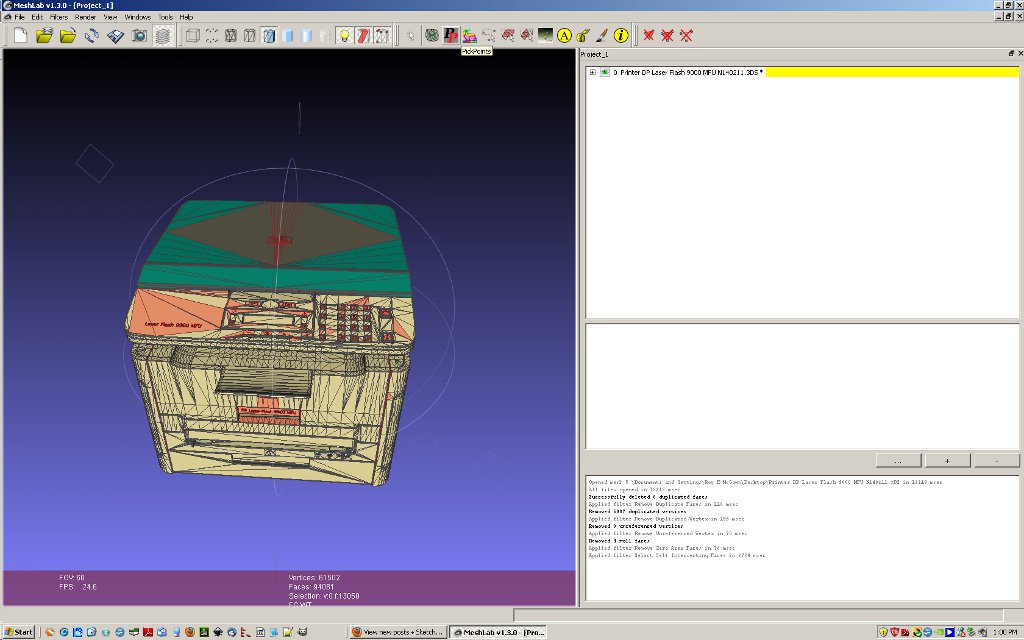
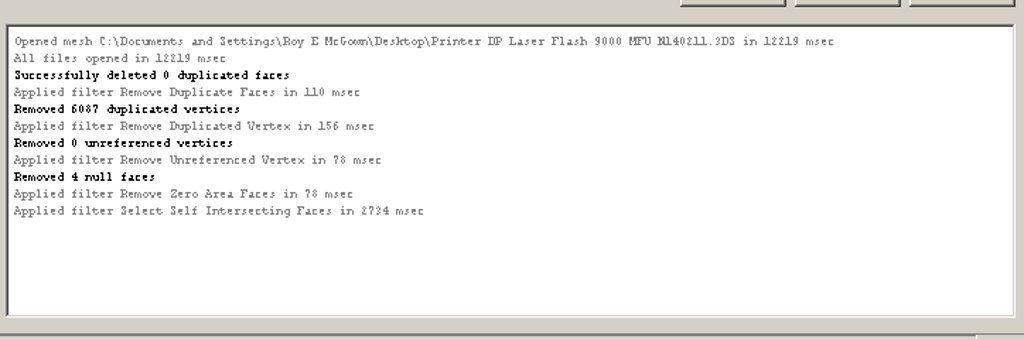
      mosel clean.jpgWould like to suggest one item at a time be "cleaned". The results you get can be a function of the action and its sequence and the model may not be good to start with. I imported the printer to mesh lab ( 3ds) and note the things cleaned on the right side ( it corrected some of the bad faces to start) and the jpg shows the self intersecting faces. Deleting those can be destructive to the model and I did not do that. In the past I have had that problem and have not been able to figure out if it is MeshLab or SU.
      Just some thoughts

      posted in Plugins
      M
      mac1
    • RE: Heaviest SU model??

      http://forums.sketchucation.com/viewtopic.php?f=15&t=39401

      posted in SketchUp Discussions
      M
      mac1
    • RE: Trouble with push/pull and follow me

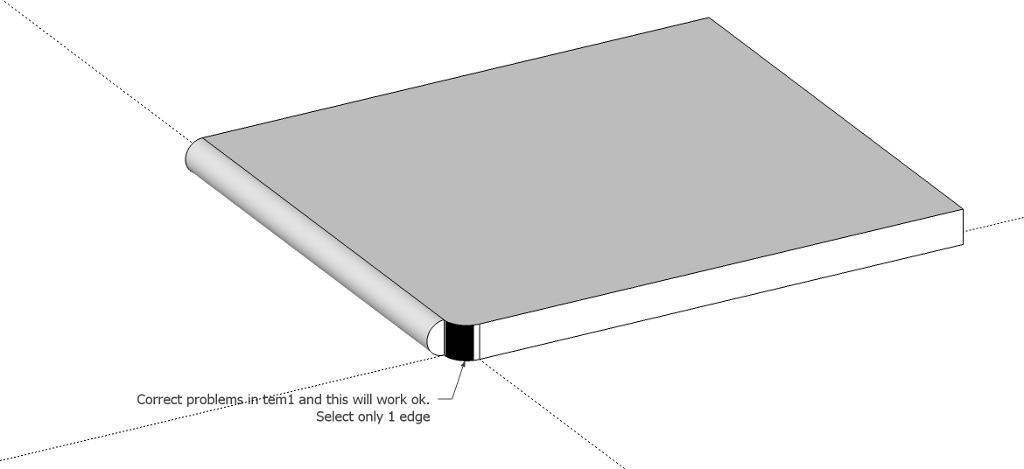
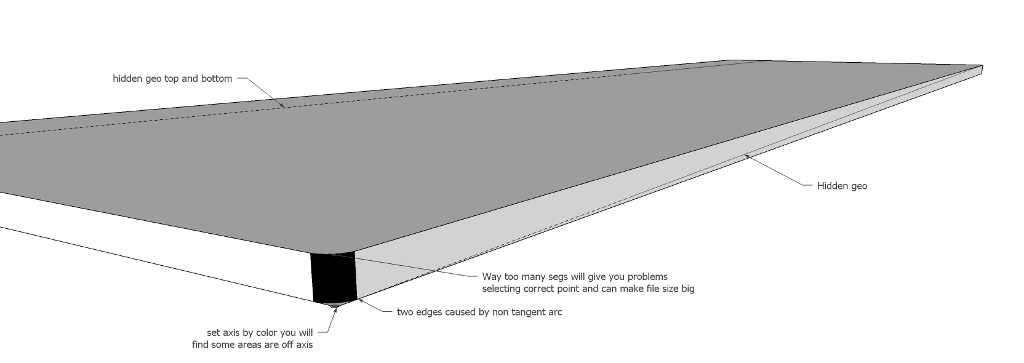
      This is what was indicated above;

      temp2.jpg

      temp1.jpg

      posted in SketchUp Discussions
      M
      mac1
    • 1 / 1