Thanks again box 
Oops, your profile's looking a bit empty! To help us tailor your experience, please fill in key details like your SketchUp version, skill level, operating system, and more. Update and save your info on your profile page today!
Urasik Extensions | Lots of new extensions to check out Learn More
L
Offline
Posts
-
How to save scenes 2017
OK I admit it I am having issues with 2017.How do you save a scene in 2017? I normally use Window/scenes. I just did a search and it also says Window/scenes. Can somebody assist please.
-
RE: 2017 how to import image
Thanks guys I think I am one of those people that are no very open to change. Drag and drop
-
2017 how to import image
Hi guys, I am trying to import a Jpeg into Sketchup 2017. As a default it seems 2017 imports it as a texture only. Can I import a Jpeg into 2017?
My experience with 2017 makes me think Sketchup is not in good hands.
-
RE: Soft furnishing models
Thanks Rich, cant wait to have a go with Artisan.
-
Soft furnishing models
Hi all, I am reasonably competent in sketchup but I am always amazed by renders of soft furnishings.They look so good with the creases, folds, imperfection and surface compliance with amazing textures. could anyone give me some hints on how I may get a grasp of it?
Thanks
-
RE: Can and how can this be done?
I think that can all be done with taking more care with the follow me tool. The top surfaces of the model (where you want the red objects to be) could be selected and copied and given another material. Then put that back in place. When rendering make that new material Grass or fur (modified of course) or alternatively give that surface a material like sandpaper and give it heaps of bump.
Should work in theory. -
Metal materials (how to)
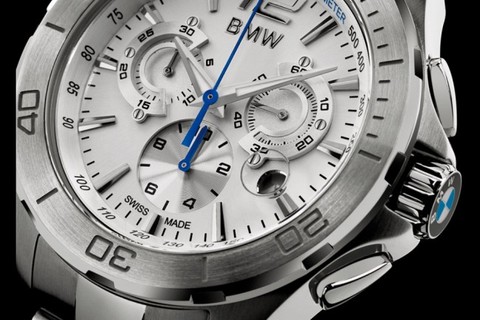 Hi all, I mostly until now have dealt with Landscape Architecture in my modelling and rendering. I do not have too much experience with metals. I just tried to render from the standard Sketchup materials metals and the results were not good.I have attached an image of the type of result I would like to get in the attached watch image with brushed metal and polished metal etc.
Can anyone point me in the right direction with how to get mor control over rendering materials?Cheers
-
RE: Drawing Tensile Structure / Stretch Tent
If you created the Lines as filibis did, you would simply have to do one section at a time as pbacot suggested you simply have to use create "terrain in" in "sandbox" That tensile skin could be easily be reproduced in native sketchup. I just tried it and it was not at all as dirty as i expected it to be.
-
RE: Raylectron renderer
Hi Frenchy, sorry I have absolutely no idea
 Could you clarify?
(Edited) I have never used it as stand alone only inside Sketchup.
-
RE: Tool sandbox dialogue box inoperable 2017
Thanks guys, mine has started working again. Considering all the other "tool tips" (Thanks Rich) work I would call that a "Bug":)
-
Tool sandbox dialogue box inoperable 2017
In 2017 the tool dialogue box does not pop up when you hover over any of the sandbox tools that names the tool and explain its function, as normally happens with any other tool.
-
What other 3D file extensions can I convert to Skp?
Hi all, I need to get a 3D file other than SKP into SKP. It will probably originate from solid works. Can anyone suggest what file extension I should request. Is there anything else I should be aware of?
Thank you
-
Raylectron renderer
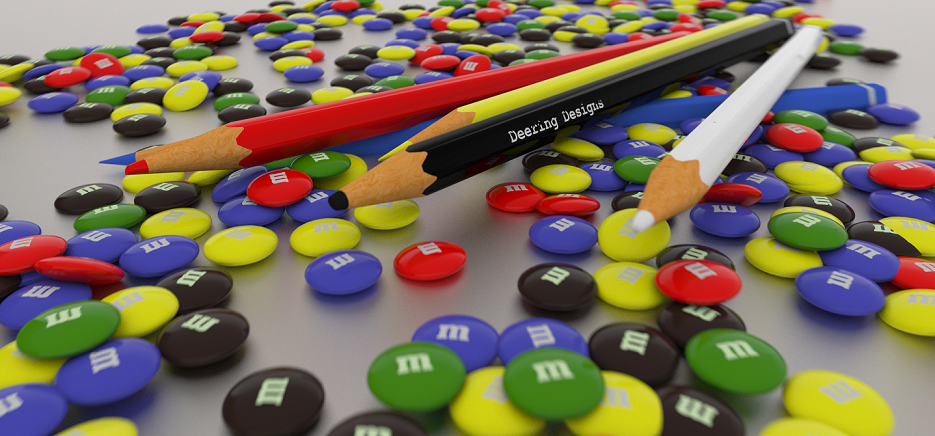 Hi Guys, I tried a rendering program a number of years ago (raylectron) version 2 was terrible. Recently I downloaded the new version 4 and had a few issues. What was amazing was the support, they got back to me with assistance in about the same time it takes to get assistance on sketchucation. I suggested that the Sun was difficult to navigate and that having a button "set sun behind camera" within half a day they sent me a version update with that button installed
  It is now a permanent feature. Anyway I find this program extremely good. Caveat: I have only used a couple of rendering programs prior. The interface is very easy to get onto.
I have attached an image rendered in Raylectron for your perusal -
RE: Plane of nothing
Thank you, Gentlemen
Do you think this issue is solvable in theory? What I mean by that is, do you think there would be a day where this issue may disappear by Trimble tweaking the program or is it inherent. I am sure I am not the only one that finds this problematic.
I ask the question but think that if a fix was possible it would have been fixed already
-
Plane of nothing
I am sure this has been discussed many times but I do not know where to look. Does anyone know how to get rid of the problem where as you zoom in to edit something the "plane of nothing" apears hiding the part of the model you are trying to edit...........it is infuriating
 Does anyone know how to ameliorate this issue?
Thanks
-
RE: Bugsplat when i try to complete a line on a suface
Thanks Kass and Dave. You are right about the segments but don't know how they happened. I was looking for about 90 segments for the whole circle because anything less showed segmentation on a render when I chose a reflective metal. Over the whole circle its actually 4000 segments which is crazy
Thanks for checking it out for me -
Bugsplat when i try to complete a line on a suface
Hi, I am getting repeated bugsplats when i try to complete a line on a surface. I have purged, 'fix problems' put the model on a thumb drive and opened it on another computer.........'Bugsplat' when I try to complete the line in the image. I can draw circles etc, on that surface but as soon as soon as i try to draw a line from edge to edge.....Bugsplat!
I have attached an image and an Skp file if anyone cares to have a look and maybe offer a fix. It seems to have started after I tried to do a "round corner operation but not sure. The model has no "round corners" as I abandoned the idea of using it.
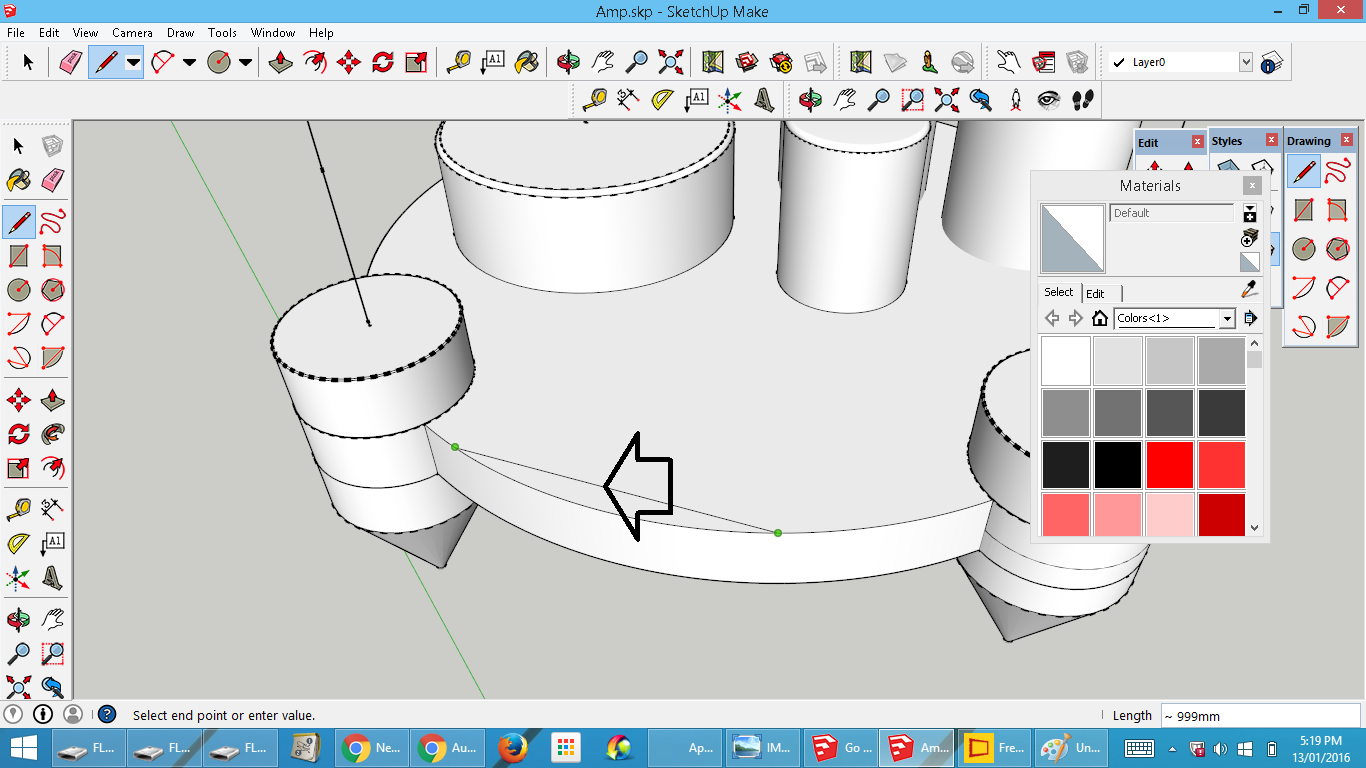 Amp.skp
 -
Reverse engineering a render file back to SKP
HI, I "lost" an SKP file for whatever reason, however I still have the .Rof file (this is the file extension for raylectron) I asked the question on a forum and received the following reply:
"We've never attempted to do this but I think it can be done. The data in the ROF file is text, so it can be read, converted and stored as an OBJ where you can load the OBJ into SketchUp using a third party plugin"
Is anyone able to talk me trough this?
Cheers
-
RE: Model size limits
When I say frustrated its just that everything goes so slow. I have always wondered what it is like to control a mars rover with control delay.
I could not believe selecting a texture, and hitting the delete button does not work at all any more. I have to right click and "erase" and wait about 7 seconds for it to go. Moving a texture or even something small is almost impossible. So frustration was expected and experienced. Loading the model into the renderer (8.2 million faces)takes about 6 minutes so about 12 minutes from hitting the render button to getting the first frame render. Strangely though the renders only take about 5 minutes to cycle to a good standard. I followed as much of the advice I was kindly given from this forum, and the computer I use is of a high spec so I think this is about the limit of shetchup. So basically it is just a very big model. It did test my patients though.