sketchucation logo sketchucation
    • Login
    1. Home
    2. ken28875
    3. Posts
    Oops, your profile's looking a bit empty! To help us tailor your experience, please fill in key details like your SketchUp version, skill level, operating system, and more. Update and save your info on your profile page today!
    Sketchucation Tools 5.0.7 | Licensing improvements and bug fixes Learn More
    K Offline
    • Profile
    • Following 0
    • Followers 0
    • Topics 23
    • Posts 774
    • Groups 1

    Posts

    Recent Best Controversial
    • RE: Another rainy day...

      Very nice renders, Tom.

      Keep them coming.

      Cheers!

      _KN

      posted in Gallery
      K
      ken28875
    • RE: The Library

      Nice staircase, Khai.

      Can't wait to see the final model.

      Best,

      _KN

      posted in Gallery
      K
      ken28875
    • RE: Nikon

      Great job, Jon. πŸ‘ πŸ‘

      Have a nice day!

      _KN

      posted in Gallery
      K
      ken28875
    • RE: [Plugin] View Direction (1.0.0) β€” 13 March 2010

      Cool plugin, Thomas.

      Thanks! πŸ˜„

      _KN

      posted in Plugins
      K
      ken28875
    • RE: Farnsworth - New Vray

      Great renders, Adam!

      Mr. Mies van der Rohe would give πŸ‘ πŸ‘

      Have a terrific day.

      _KN

      posted in Gallery
      K
      ken28875
    • RE: [Request] Edge loop Selection

      @earthmover said:

      Fredo's Hover Select has an option to "Extend selection to cofacial and aligned edges". It works to do a loop select on clean quads. Another option would be a script that I think Jim or TIG helped me with a while back called Select Edges by Z. You can pick an edge and run the script and it will pick all other edges on that Z coordinate.

      Hey Adam,

      Thanks for the tips. I tried it but did not work so well as my model is quite complex and has lots of details.

      Take care,

      _KN

      posted in Plugins
      K
      ken28875
    • RE: [Request] Edge loop Selection

      @tig said:

      It's pretty easy to switch to wire-frame or Xray mode and position your camera to view 'side on' and then use select by fence with left-right drag so only things that are wholly inside the fence get picked [as opposed to right-left drag fence making which selects everything that has just a part of itself inside the fence]
      Voila! you have the loops edges selected in 'one foul swoop'.
      If you do select something that's not wanted then remove it from the selection-set by holding down shift+ctrl and re-picking it... ❓ πŸ’­

      Hi TIG,

      Yes, that's a method I use sometimes, but it works on simple shape like the example I showed or on model with a few details. I was hoping for a plugin that will quickly help select edge loops on complex models.

      Thanks though.

      Have a great day! β˜€

      _KN

      posted in Plugins
      K
      ken28875
    • RE: [Request] Edge loop Selection

      @ken28875 said:

      Hi TIG,

      You're correct, "ThomThom's Selection Toys only selected face loops, that is loops composed of faces".

      Oops, I meant to reply to mitcorb, not TIG. πŸ˜„

      posted in Plugins
      K
      ken28875
    • RE: [Request] Edge loop Selection

      Hi TIG,

      You're correct, "ThomThom's Selection Toys only selected face loops, that is loops composed of faces".

      Hopefully someone will manage to figure out a script for that plugin.

      Thanks,

      _KN

      posted in Plugins
      K
      ken28875
    • [Request] Edge loop Selection

      Hi there,

      Does anyone know if there is a plugin that will allow me to select edges that loop around the model?

      Thanks!

      _KN

      1 - select one edge
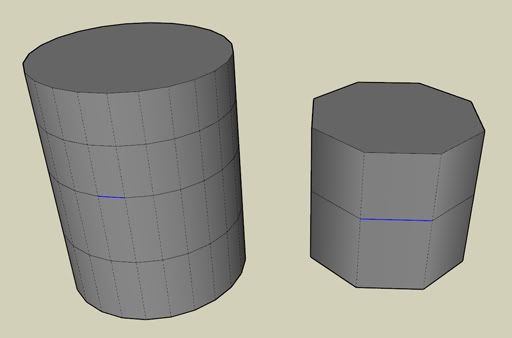
      http://i593.photobucket.com/albums/tt12/ken28875/edges_loop_2.jpg

      2-apply plugin and the edge loop is selected
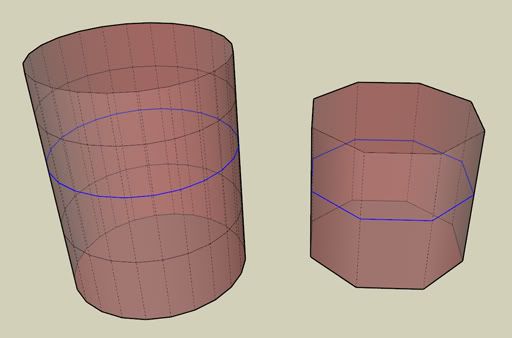
      http://i593.photobucket.com/albums/tt12/ken28875/edges_loop_3.jpg

      posted in Plugins
      K
      ken28875
    • RE: Castle Howard

      Wow, awesome model! πŸ‘ πŸ‘

      I would suggest you play with the camera/field of view to get some more interesting/dramatic views.

      Have a nice one!

      _KN

      posted in Gallery
      K
      ken28875
    • RE: [REQ] PushPull Rotation

      TIG is the man! Can't wait for EEbyLathe2 to come out. πŸ‘

      posted in Plugins
      K
      ken28875
    • RE: Helix profile on a Column [TUTORIAL]

      @charly2008 said:

      Hi Ken,

      the columns in the second image i did with Draw Helix and TIGs EE by Face. Sorry for my late answer.

      Cool, thanks. πŸ‘

      posted in SketchUp Tutorials
      K
      ken28875
    • RE: [Plugin] ExtrudeTools - Full Set

      @ayan13 said:

      I have no words to say!!!Great man!!!!You make our life better!!!!:)

      I second that! πŸ˜‰

      posted in Plugins
      K
      ken28875
    • RE: Need a plugin to offset from adjacent non-coplanar faces

      @gaieus said:

      Something like Fredo's Tools on Surface? πŸ‘

      Yes!

      I do have it, but did not remember that "offset contour on surface" was in there.

      Thanks for the reminder, Gaieus. πŸ‘

      Have a great day! β˜€

      _KN

      posted in Plugins
      K
      ken28875
    • Need a plugin to offset from adjacent non-coplanar faces

      Hi everyone,

      If you know an existing plugin to offset from adjacent non-coplanar faces, could you please give me the link to download it?

      But I think it does not exist yet. Therefore, if any of the ruby script geniuses have time and would like to write it, I would be greatly thankful.

      See the images for explanations.

      Thank you very much!

      _KN

      1- original polygons
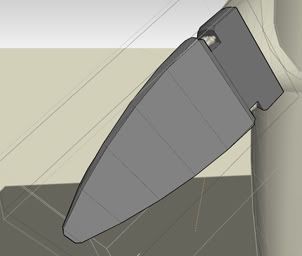
      http://i593.photobucket.com/albums/tt12/ken28875/Sketchup/offset1.jpg

      2-select desired faces

      http://i593.photobucket.com/albums/tt12/ken28875/Sketchup/offset2.jpg

      3-apply plugin

      http://i593.photobucket.com/albums/tt12/ken28875/Sketchup/offset3.jpg

      posted in Plugins
      K
      ken28875
    • RE: Concept Art - City Street...

      Hi Andy,

      Pretty cool render.

      Nice to see a fellow concept artist using Sketchup in this forum.

      All the best,

      _KN

      posted in Gallery
      K
      ken28875
    • RE: [Plugin] Default Layer | Tag Geometry

      Wow, cool. Thanks, TIG.

      I was really in need of that plugin.

      I sometimes group/ungroup/explode my geometries and some will go into another layer rather than the layer 0. I loss some of the geometries due to being in a hidden layer after deleting a group.

      This plugin will be quite useful.

      Thanks again for your time and great plugins.

      Best,

      _KN

      posted in Plugins
      K
      ken28875
    • RE: Where are the Auto-save files?

      Thank you, Sir. πŸ‘

      posted in SketchUp Discussions
      K
      ken28875
    • RE: Where are the Auto-save files?

      @tig said:

      I made a tool 'Archiver' that lets you make 'snapshot' archived copies of the model as you go

      Great! Where can I download that Archiver tool?

      Thanks, TIG.

      _KN

      posted in SketchUp Discussions
      K
      ken28875
    • 1
    • 2
    • 33
    • 34
    • 35
    • 36
    • 37
    • 38
    • 39
    • 35 / 39