sketchucation logo sketchucation
    • Login
    1. Home
    2. jgb
    3. Posts
    Oops, your profile's looking a bit empty! To help us tailor your experience, please fill in key details like your SketchUp version, skill level, operating system, and more. Update and save your info on your profile page today!
    ๐Ÿšจ Skimp | 25% Off until March 30 Buy Now
    Offline
    • Profile
    • Following 0
    • Followers 0
    • Topics 73
    • Posts 803
    • Groups 1

    Posts

    Recent Best Controversial
    • RE: Splat doing an offset

      Thanks ArCAD.

      I've been having crashing problems in SU today in other areas as well. I haven't rebooted the PC to test, as I had some stuff to do and a reboot takes too long.

      As for the white both sides, I have set it that way. A long time ago I just got PO'ed with SU arbitrarily setting face front/back. Anyway, I always set back and front the same texture, when the part is done. If I remember, I also orient faces as well. This part (when it is a solid) will have an aluminum texture.

      As for hidden lines, SU seems to generate these in spades during an intersect operation. Sometimes, when I push a face out, then draw a circle on one, then push it to make a hole, the back side does not intersect properly. The circle shows, but the face has not been intersected. If I do an intersect with the face and the pushed circle, I get hidden lines all over the part, even unselected, un-intersected faces. Drives me nuts, as either I have to undo, then redo the circle push right through the face, or select all hidden lines and delete them.

      If I push through, I then have to intersect again and that often generates the hidden lines again.
      When I delete the hidden lines, often full faces that were OK before just vanish. It's as if the intersect operation literally moves lines around by a smidge, enough to throw out existing faces.

      When the part is finished I do a hidden line removal, so a few may be present during construction.

      Anyway, as for this posted problem, I did the inside perimeter by hand and it worked ok.
      I tried offset on some other face in the same part and no problem.

      posted in SketchUp Discussions
      jgbJ
      jgb
    • Splat doing an offset

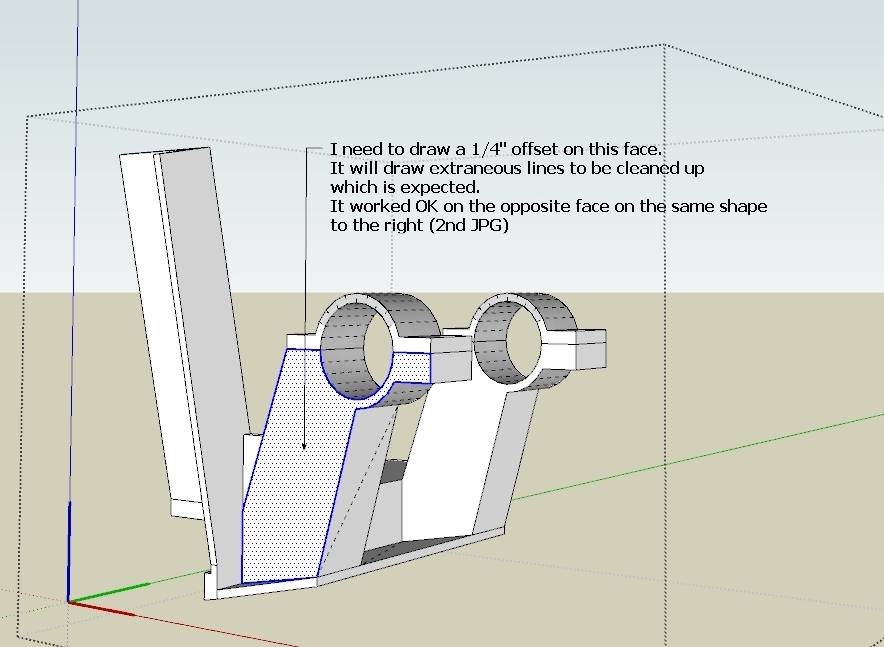
      I have a comp that is Bug-Splatting every time I do an offset. As part of a larger model, I did a 1/4 in offset on a face, which worked as expected, but as soon as I move the cursor; Splat.

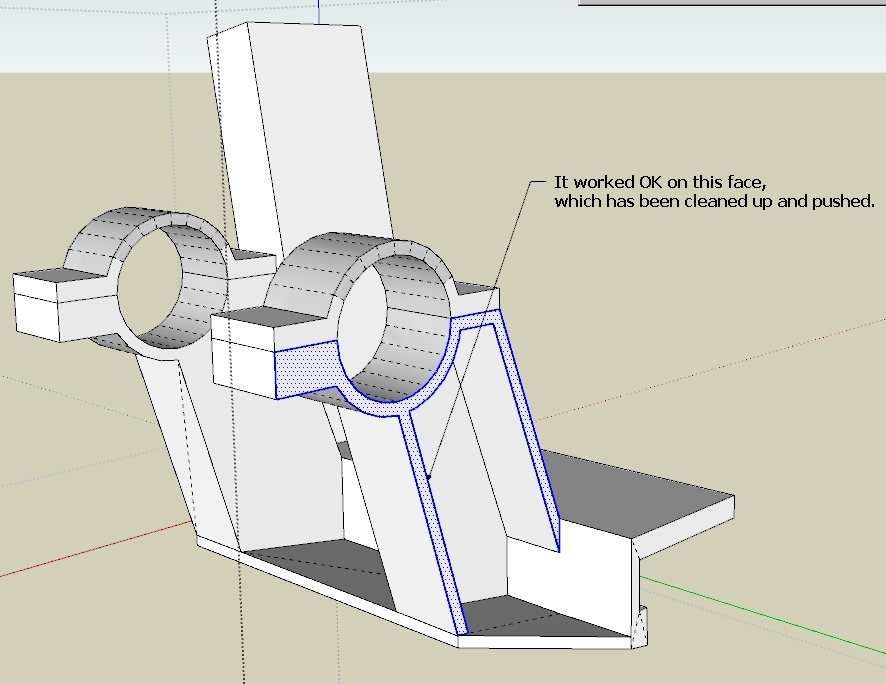
      I did the very same offset on the opposite face successfully yesterday. It needed a bit of cleaning up (expected) in preparation for a push.

      Now when I do the same face on the opposite part, it splats, whether in the model, as a separate copy in the model, or as an isolated comp in its own SU file (attached).

      I'm posting a few annotated JPGs and the isolated problem SKP.

      The Splatting face

      It worked OK on this face yesterday

      The part in a stand-alone SKP.

      posted in SketchUp Discussions sketchup
      jgbJ
      jgb
    • RE: The "Duh!" thread (aka the Doh! thread)

      @unknownuser said:

      Start your array and type 360 for the degrees and hit enter rather than clicking to enter the degrees. Then do your multiplier.

      ๐Ÿ˜ That worked... Many thanks. ๐Ÿ‘ ๐Ÿ‘ ๐Ÿ‘

      TT & Gaieus, thanks as well. That duplicate copy over the original used to be a problem, till I started using a circle with the right # of segments to get around it.

      posted in SketchUp Discussions
      jgbJ
      jgb
    • RE: The "Duh!" thread (aka the Doh! thread)

      @gaieus said:

      @charly2008 said:

      did not know that you can also use the tool to make multiple copies of objects.

      Ah yes, with the Move tool it's called a "Linear array" - but you can also do similar "Radial array" with the Rotate tool

      I've used that a lot, BUT, I can't seem to radial array within a 360 circle. ๐Ÿ˜•
      As I reach 359.999 it jumps to zero degrees, and "/x" returns nothing.

      I know I'm missing something here. โ“

      I usually solve it by first making a circle with the number of segments I want, then radially array the object to a vertex, and multiply (total number wanted less 1), then delete the circle.

      posted in SketchUp Discussions
      jgbJ
      jgb
    • RE: The "Duh!" thread (aka the Doh! thread)

      @tig said:

      I beg to differ. ๐Ÿ˜•
      I can successfully Scale an object to exactly 13" using the " suffix.
      Pick a point to scale it by an arbitrary amount - 1.1 say - commit the scaling - THEN type 13" to apply the desired exact dimension...
      What are your unit-settings ? I have tried virtually every combo and they all let me enter 13" successfully ??

      Saw my error....
      I would scale approx, then enter 13". The 13 would vanish. ๐Ÿ‘Ž

      I need to Left Click after the approx setting, then while the scale box was still active, enter 13", and it worked. ๐Ÿ‘ ๐Ÿ‘ "Minor detail" ๐Ÿ˜ณ

      Brodie; โ˜€ โ˜€ ๐Ÿ‘ ๐Ÿ‘

      Thank you all.

      posted in SketchUp Discussions
      jgbJ
      jgb
    • RE: The "Duh!" thread (aka the Doh! thread)

      Post by Pilou on Wed, 15 Aug 2012 10:57 am
      Just draw a 13 inch segment from a vertex from your object and Scale your object by the line! ๐Ÿ˜‰

      Yeah, I do that, thanks. ๐Ÿ‘

      Post by thomthom on Wed, 15 Aug 2012 10:59 am
      Just scale roughly first - then use the VCB to adjust with accuracy afterwards - typing in the length.

      Can't seem to make it work. I type the value but when I type the " (inch) it erases the value. ๐Ÿ˜ข

      I noticed that when I press the SHIFT key, the VCB shows me the ratios of each axis, which is handy. ๐Ÿ˜ฎ
      You can then adjust the ratios of each axis in the VCB using a comma to separate the % values in the same order as the axis ref to its left. โ˜€

      AND you can post adjust the size to a dimension but only in FEET, not inches. ๐Ÿ˜

      posted in SketchUp Discussions
      jgbJ
      jgb
    • RE: The "Duh!" thread (aka the Doh! thread)

      This is also a question, based on the above.

      Using SCALE, you can just type a percentage value in the VCB. This is handy to set a specific scale factor like 92%. It is also handy to set a scale factor that is between SCALE's preset snap tolerance of .1% so just type 90.15 in the VCB where SCALE snaps only to 90.1% or 90.2% and you need the precision.

      OK, my question, How do I set scale to a dimensional value?
      ie: my object is 12 inches, and I want it to be 13 inches, without doing the percentage math. AND I am holding the CTRL and SHIFT keys down to scale all and from the center. When I release the mouse button to type, my position is lost.

      posted in SketchUp Discussions
      jgbJ
      jgb
    • RE: The "Duh!" thread (aka the Doh! thread)

      @unknownuser said:

      Found a cool one today. ๐Ÿ˜’

      Copy a line over and type 6" to set the distance. Then type *10 to array it 10 times.

      What I already knew was that you can type *8 or *4 or whatever to adjust the number of arrayed items.

      However I just found out that if you then type 3" or 10" it will keep your array but adjust the spacing. Pretty sweet!

      -Brodie

      I just wish you found this last week, when I needed it. ๐Ÿ˜†

      posted in SketchUp Discussions
      jgbJ
      jgb
    • RE: Trimble is having SketchUp pay its way!

      @unknownuser said:

      Agreed. I am in the process of going almost completely paperless.

      The "paperless office" has about as much chance of success as the paperless toilet! ๐Ÿคฃ ๐Ÿคฃ

      posted in SketchUp Discussions
      jgbJ
      jgb
    • RE: Trimble is having SketchUp pay its way!

      I'm not in any way knocking Trimble's buyout of SU. But for anyone to say that the ability to use SKP's in Trimble's devices as a "direction" of their intent, is not logical.

      You do not need to own the SU engine to use a drawing data file, which we call a SKP.
      You only need to understand how SU structures its data, and any good Ruby magician knows that well.

      It then becomes obvious that Trimble has some other strategic plan to either somehow use the engine in its products (royalty free) or upgrade SU to better suit the community's needs, as well as their own, again without paying royalties and navigating Google's political/bureaucratic landscape.

      Hopefully, upgrading SU in the spirit it has been for a long time, and NOT relegating all of the good new stuff to only the Pro version is the better way. Maybe putting some older Pro only features into new free versions would be an act of good faith on Trimble's part.

      posted in SketchUp Discussions
      jgbJ
      jgb
    • RE: [Plugin][$] Curviloft 2.0a - 31 Mar 24 (Loft & Skinning)

      @unknownuser said:

      I have always thought that this piece was a part of a secret space rocket due the warning text inserted ๐Ÿ˜„

      The sink goes in the rocket cabin. ๐Ÿคฃ

      And I thought I was being clever at hiding its purpose by just extracting the problem part. โ˜€

      posted in Plugins
      jgbJ
      jgb
    • RE: SimFonIA Animation Tools (SAT)

      While writing the tutorial (a bigger job than it seems, especially since I am learning as I write about it) there needs to be some clarification on a few of the previous points I made.

      Point # 1 - The Transformation Processor (as far as Keyframes are concerned) does another important function. If you have 2 or more moving groups and therefore 2 or more KFE lists, the TP also ENABLES or DISABLES any KFE List. This allows you to select which group(s) are moving in that run.

      3 - Toolbar STOP or Quit button. I now realize the REWIND button does exactly that, although it resets back to Time 0 as does the GOTO 0 button in the KFE, the KFE may not be visible during a run.
      I still think a STOP button on the toolbar would be useful if it stopped the object at that point in time (between keyframes) for analysis or to create another keyframe between 2 others and be exactly position accurate when it ran. Tweaking a position midway between 2 keyframs is dicey if you need to place it manually.

      5 & 6 - I need to play with these more to validate the conditions. During the tutorial writeup, what I saw happening in these 2 conditions was not consistent, but they DID happen.

      The Tutorial is up to 12 pages so far, as a MS Word document, with many screen prints (which take up a lot of page space). It's about 2/3 complete with part 1, dealing only with moving groups around the screen. Part 2 will cover moving the camera POV which is akin to SU Scene manager.

      Then I will decide what part 3 will cover. Any suggestions??

      posted in SketchUp Discussions
      jgbJ
      jgb
    • RE: [Plugin][$] Curviloft 2.0a - 31 Mar 24 (Loft & Skinning)

      Fredo; That explanation really opened my eyes. I NEVER knew the toolbar functions were only active in "blackface". I thought they were presets, and that is why it never worked for me.

      One question though, when you added the 4 breakpoints (as also shown by Rich) it skinned when you selected all. This object is an extract from a drawing that had lines emanating straight up/down from each point, effectively each being a breakpoint. Many times in the past, if I had an extraneous line or fragmet in the perimeter selection, CL would go RED and not skin till the line was removed. Yet here you show they are included. When I tried this with the original model (a sink base) selecting 4 lines as breakpoints, again nothing happened.

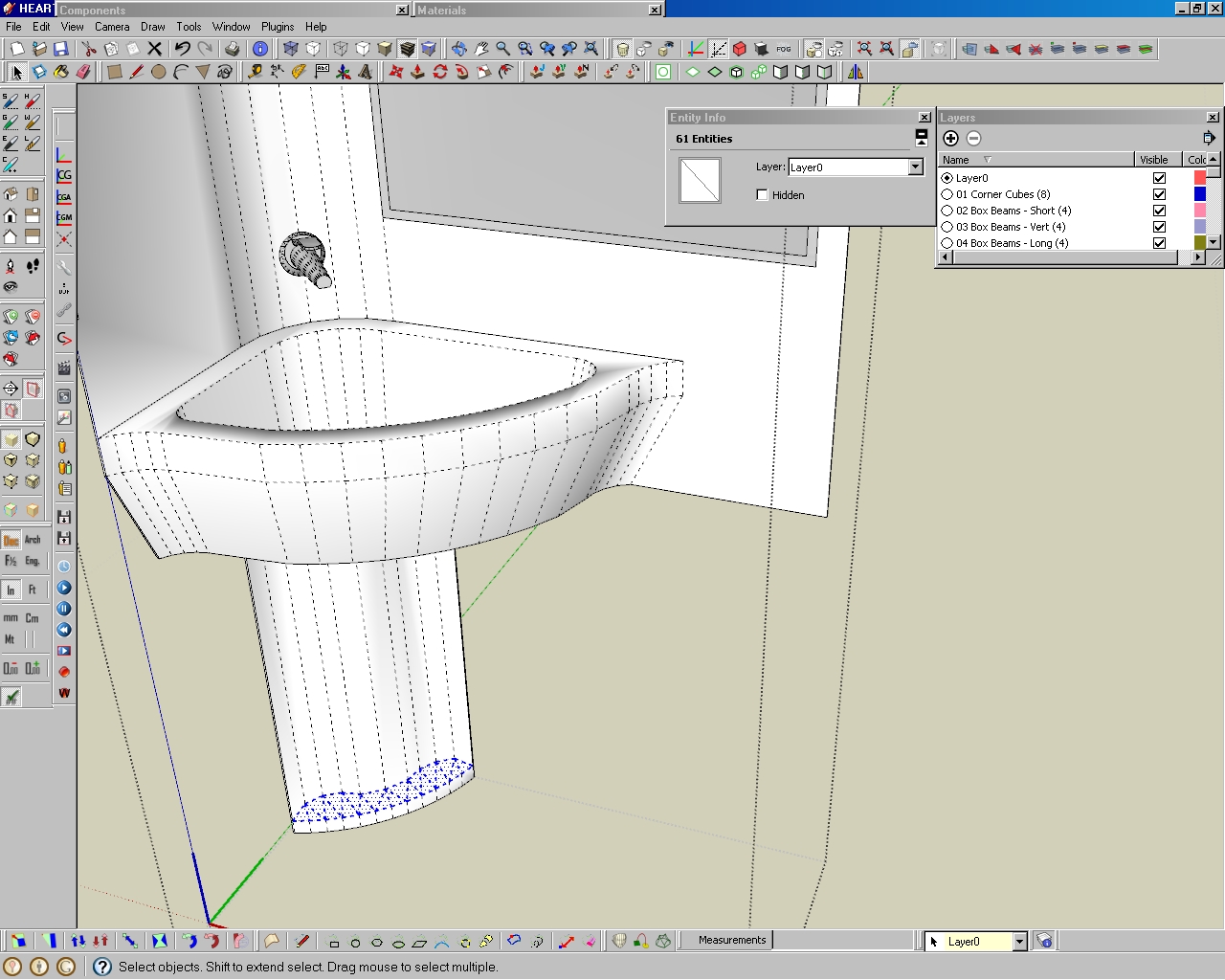
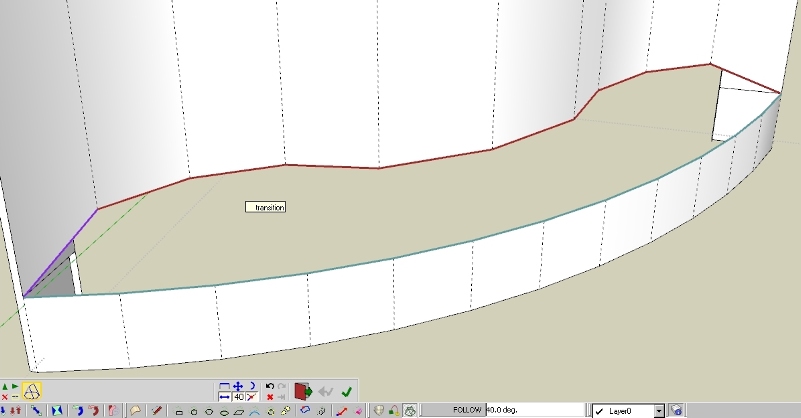
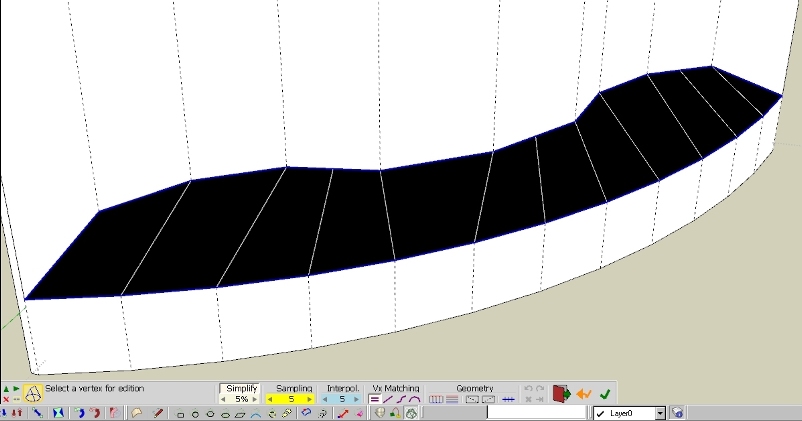
      Here is a series of screenshots of what happened.

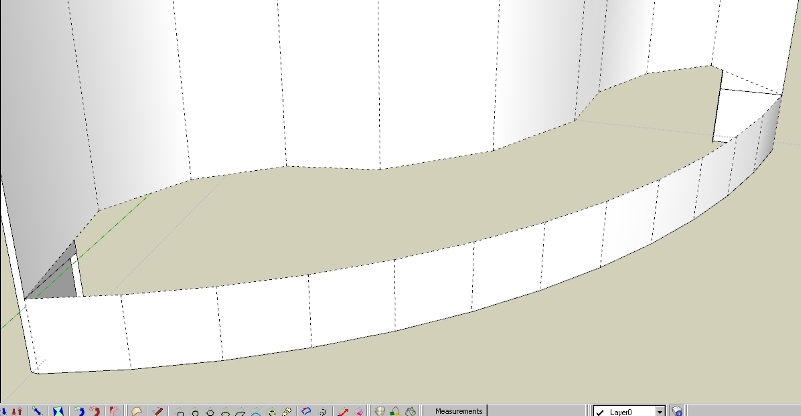
      Overall view of the sink, with the problem area in the base highlighted.
      Overall view of model.

      And a closeup....
      Closeup (cropped) of the problem area.  The skin was manually created.

      Skin area removed to redo solution.
      Skin removed.

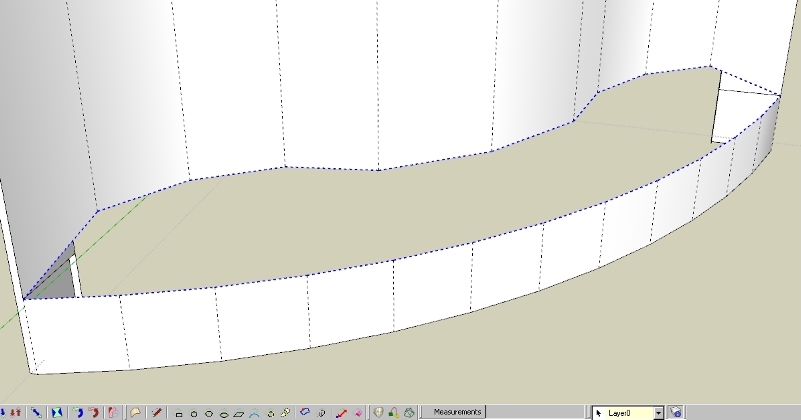
      Perimeter only selected. No skinning. ๐Ÿ‘Ž
      Perimeter only selected.  CL would not skin.

      Added 4 breakpoint lines to perimeter selection. Again, no skinning. ๐Ÿ‘Ž
      Added 4 breakpoint line to perimeter selection.  CL would not skin.

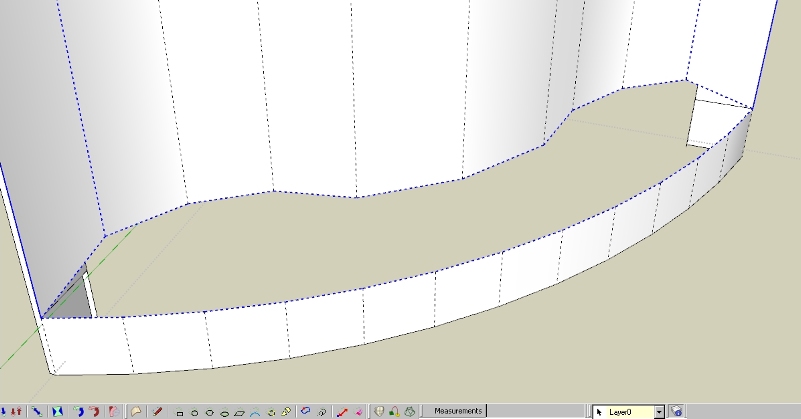
      Selected 3 lines using CL Select, and
      Curviloft selection of 3 line sets.

      VOILA, a skin. ๐Ÿ‘ ๐Ÿ‘ ๐Ÿ‘
      THAT worked!!!

      So now I know a whole lot more about Curviloft, but my question now is why did my selection of breakpoint lines NOT work, but worked for you, and not cause an error with CL โ“ โ“

      posted in Plugins
      jgbJ
      jgb
    • RE: [Plugin][$] Curviloft 2.0a - 31 Mar 24 (Loft & Skinning)

      @rich o brien said:

      @Joel

      Try watching this...

      302 Found

      favicon

      (www.screenr.com)

      Ah IZ simply blown away by this..

      I tried segmenting at the same corners, but it didn't work for me, and now I know why. But this and TT's explanation to Ivreich and Fredos "How-to" reply opened my eyes to why I found CL a bit unresponsive to many of my skinning attempts.

      Simply a lack of a basic tutorial for Curviloft left me without the tools needed to use CL effectively.

      Fredo, that really needs to be addressed. โ— CL is NOT a simple intuitive tool to use.

      posted in Plugins
      jgbJ
      jgb
    • RE: [Plugin][$] Curviloft 2.0a - 31 Mar 24 (Loft & Skinning)

      Pbacot; I did not try segmenting a line because CL does too much segmentation at best, most of which I end up tweaking out (as I mentioned above) to reduce the line count and surface complexity. Here I just needed a "flat" surface quickly, as a temporary separate group while I did some work behind it.

      When it refused to surface I did it manually (triangulating the vertices) as I had no time then to play. Later I extracted the perimeter to see what was wrong, which led to my post.

      My supposition about 2 or more acute angles may be wrong after thinking about it and later I will try a few edits to prove me right or wrong.

      posted in Plugins
      jgbJ
      jgb
    • RE: SimFonIA Animation Tools (SAT)

      Well, it is Wed, mid afternoon. Continuing from where I left off.........

      โžก I loaded "Example 1a.skp" and watched it move. I did the examples suggested in the KFE PDF with ease. I added a few more moves and they worked as well.
      Same with example 1b. But it showed me nothing more than I found out playing with 1a. Example 1c looked exactly the same as 1b. I also tried 2a, 2b and 2c, but ran out of "play" time to master what they were demonstrating. I really need to master "waving around" multiple groups, with independent motion, as this is a major area that I will be exploiting.
      โžก Here's what I found so far with the Keyframe Editor. Some may be attributed to my ignorance of all it can do, but when I try a new S/W app or plugin I expect a certain intuitiveness and consistency of operation. Then I hit the doc's to find out more. In this case, the KFE PDF offered little clarity, up to the point where I was at exercise 2a/b & c (page 12 is where I am here).

      1- From what I've seen so far, the KFE depends on the Transformation Processor for only 1 function, that is "Animation Name" and the TP is "mode sensitive" to the KFE. So if an object is not selected, the TP does NOT display the expected Animation dialog. Took a while to understand this.
      ๐Ÿ’ญ In my mind, that function should be part of the KFE dialog, not a separate dialog. And I would suggest the objects' name be taken from the SU group or components name, to avoid confusion later when there are multiple moving objects.

      2- When an animation finishes, the object deselects and the KFE dialog reverts back to "Camera" mode. This is VERY confusing, when creating or editing a motion sequence.
      ๐Ÿ’ญ The KFE should stay in "Animation" mode and the object should stay selected. When I had 2 groups that coincided at time 0.0 and each had different sequences, it was very difficult to select a specific group to edit, especially re-selecting the group being defined or edited between runs.

      3- There seems to be no way to STOP an animation part way through, only pause. You have to wait for it to finish. Not to big a problem when the trial limits you to 10 seconds, but later when the runs are longer that will be a big problem.
      ๐Ÿ’ญ You need a "Stop/Quit" button on the toolbar. Preferably it should stop where it is and if time 0.0 is wanted, use the "goto" button

      4- There seems to be no easy way to update a time sequence, other than creating a new one with the changes and deleting the old one. For example, changing the time from say, 2.0 to 2.1. Or swapping positions of time 2.0 and 3.0.
      ๐Ÿ’ญ If the Keyframe list were dynamic, I would just change the time (or name, or objects position in SU). Add an "update" icon next to the "delete" icon to make the change. Then the "create/add" keyframe dialog would be just that.

      5- In playing I royally screwed up a long Keyframe list, so I wanted to start over, rather than take the time to try to fix it. Without saving, I reloaded the same file into the session. The object reverted to the last saved position, as expected, but the keyframe list stayed with the messed up sequences.
      ๐Ÿ’ญ The Keyframe list MUST stay current with the last saved SU file version. If not this will lead to problems later when the SU file is edited, or a Bugsplat requires opening the SKB or Autosave files.

      6- This one is a SERIOUS bug. I ran a sequence, letting it end normally. I then modified the cube by extruding 2 sides and adding some structure to it, just for the sake of it. I ran the Keyframe sequence and let it end normally. OK so far.
      I then hit the UNDO button to revert the object back to a cube. The KFE Watermark said "Rewind" then went back to its' normal view, but at the 8.4 second mark which was the end of the sequence, before the timeout at 10 sec.
      ๐Ÿ˜ฒ The UNDO STACK EMPTIED and there was NO UNDOING any of the edits I made to the cube. ๐Ÿ˜ฒ
      And, the 8 sec watermark STAYED onscreen during subsequent runs, with the running watermark running normal. The 8 sec watermark is deletable, but the cleared UNDO stack is a major problem.
      The SU UNDO Stack must be preserved. You can add SAT operations to the stack if you want (the stack is limited to 100 operations) but clearing the stack is a major no-no.

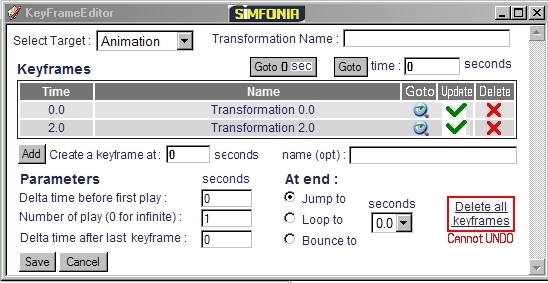
      7- I took a hard look at the KFE dialog box. My main critique is the amount of screen space it occupies. So I made a revised version, taking less space and incorporating my comments #1 and #4.

      I've attached a before/after pair.
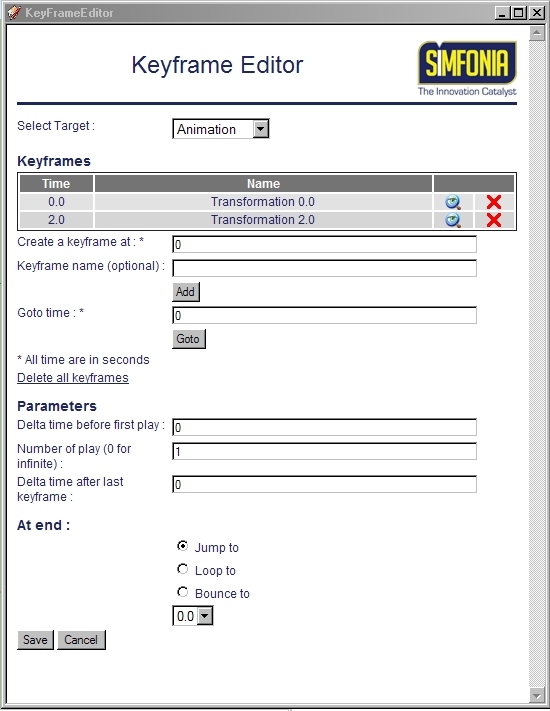
      Standard Keyframe Editor Dialog box

      Keyframe Editor Dialog box, smaller with additions.
      Note the size reduction, and addition of the Transformation Name, the UPDATE Icon, GOTO 0 Sec button and the warning regarding deleting all Keyframes.

      ๐Ÿ’ญ I added the GOTO 0 Sec button because that is a given but I often wanted to return to a defined time repeatedly during a list creation or edit.

      Hopefully tomorrow I can start the Tutorial based on what (little) I have learned so far.

      posted in SketchUp Discussions
      jgbJ
      jgb
    • RE: [Plugin][$] Curviloft 2.0a - 31 Mar 24 (Loft & Skinning)

      @rich o brien said:

      Did you look at how i picked the profiles and rails independently?

      I noticed, but I never had any real success doing that, so I ignored it.

      There is a whole lot about CL that I do not understand, particularly the toolbar. ๐Ÿ˜ž

      Fredo really needs to define what the colors mean (red, magenta, etc) when the perimeter has a problem.
      I tried playing with "errors" (gaps, fragments and double lines) but could not get consistent, if any idea of the feedback from CL. Same with the toolbar, changing parameters seemed to have no effect.
      So now I just select a perimeter and hit either "skin" or "loft" depending.

      On most of my complex surfaces (wing fairings, etc) I usually end up redrawing most of the skin to simplify (line reduction) the result, as I find CL tends to create far more small triangles than necessary, but at least it does a very good job of making the curves, that I know take would hours to tweak if done manually from scratch, having done many before I discovered CL.

      It is one of the few core plugins that I could not live without now.

      posted in Plugins
      jgbJ
      jgb
    • RE: [Plugin][$] Curviloft 2.0a - 31 Mar 24 (Loft & Skinning)

      @rich o brien said:

      You need to add some 'breakers' to allow Curviloft to read your mind.

      If you mean those 4 lines at the vertexes, I just tried that, and Pilou's segment break, and still, no skinning. Don't understand why they did not work for me.

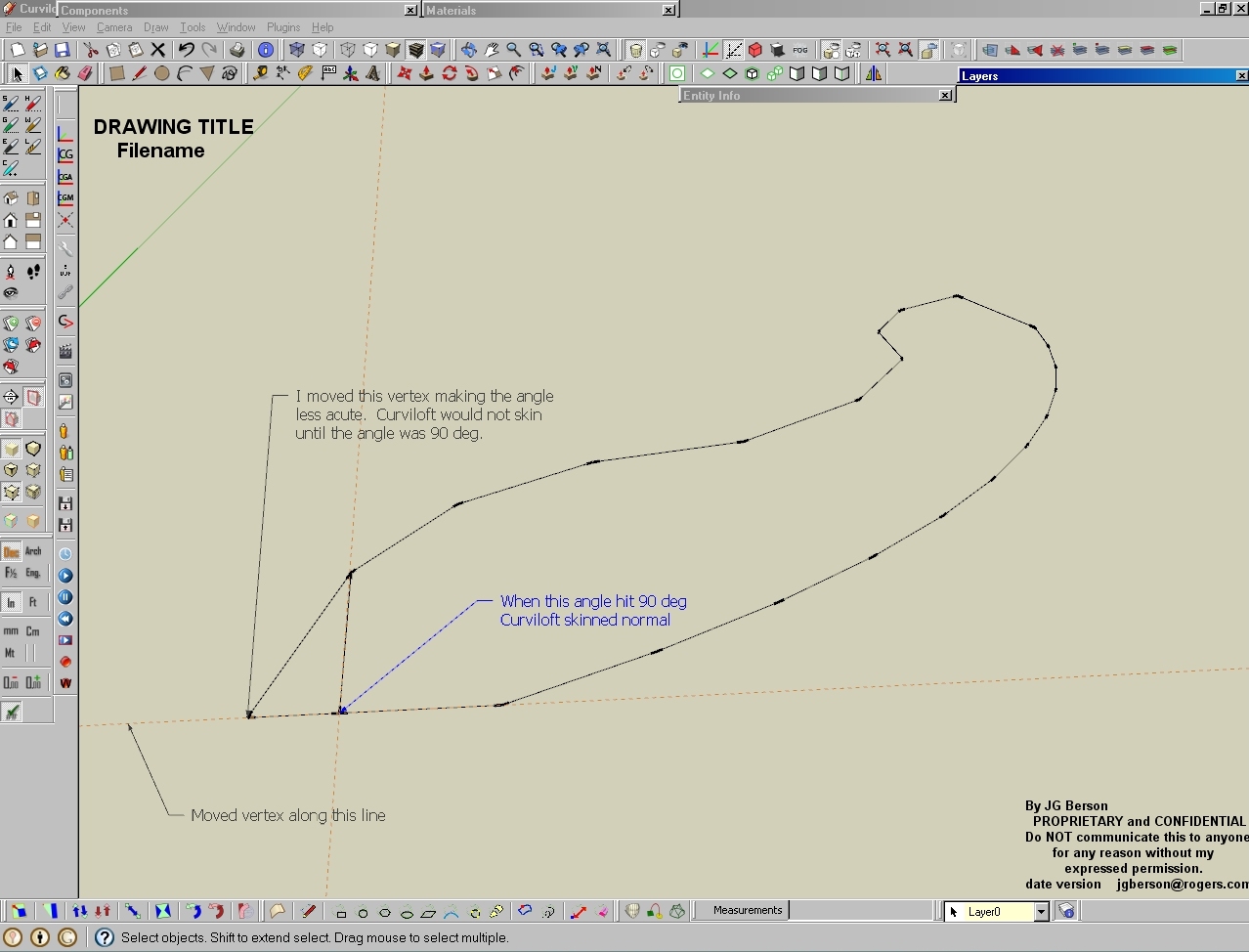
      In that same model, I just did 3 more similar shapes and the same thing happened. But when I joined any 2 vertexes in those constructs, (as well as the original problem), they skinned normally. So I joined 2 vertices at 1 end to form a triangle, and the rest of the construct skinned when selected.

      That made me think Curviloft can't handle 2 or more acute angles. Yep!!!
      I moved 1 end vertex in at varying angles.
      As soon as the angle was 90 deg or more the construct skinned.

      Something for Fredo to look into.

      Making 1 angle non-acute

      posted in Plugins
      jgbJ
      jgb
    • RE: [Plugin][$] Curviloft 2.0a - 31 Mar 24 (Loft & Skinning)

      Strange one here. It's a simple surface to form, I've done way more complex ones.
      When I select all, and hit "Skin" the selects go white and nothing happens. ๐Ÿ˜ฒ

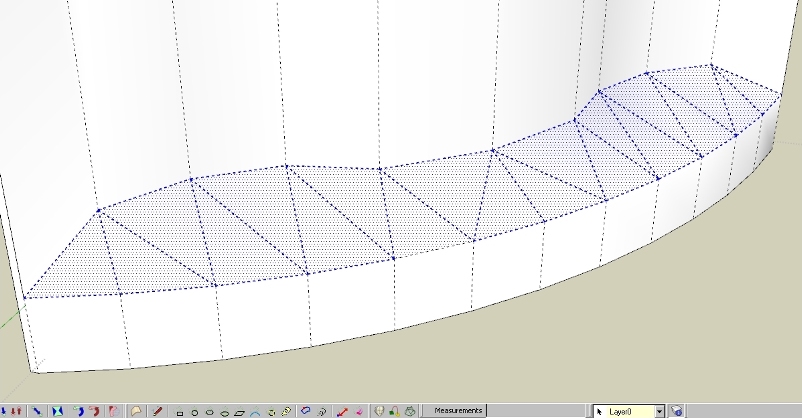
      It does skin manually by joining the vertexes into triangles.
      I have redrawn every line, there are no gaps, no fragments, nothing I can see.

      If I join any 2 vertices, either side will skin. Remove the join and no skin. ๐Ÿ˜•

      What's wrong โ“ โ“

      BTW, at first I thought it may be an interference with the SimFonIA plugin I just loaded.
      But Curviloft worked OK on other more complex surfaces in the same drawing that this shape originated in.

      What's wrong here???

      posted in Plugins
      jgbJ
      jgb
    • RE: SimFonIA Animation Tools (SAT)

      SimFonIA_Team; Thank you for monitoring this thread.

      To all, sorry for the no-show yesterday.
      The "old Battleax" pre-empted my entire day. ๐Ÿคข

      Right now I am looking into what may be an interference of Curviloft and SimFonIA. ๐Ÿ˜ฒ
      Back here real soon.

      It's a problem with my "shape". Posting it to the Curviloft thread.
      Curviloft seems OK with SimFonIA.

      posted in SketchUp Discussions
      jgbJ
      jgb
    • 1
    • 2
    • 16
    • 17
    • 18
    • 19
    • 20
    • 40
    • 41
    • 18 / 41