sketchucation logo sketchucation
    • Login
    1. Home
    2. jgb
    3. Posts
    Oops, your profile's looking a bit empty! To help us tailor your experience, please fill in key details like your SketchUp version, skill level, operating system, and more. Update and save your info on your profile page today!
    ๐Ÿšจ Skimp | 25% Off until March 30 Buy Now
    Offline
    • Profile
    • Following 0
    • Followers 0
    • Topics 73
    • Posts 803
    • Groups 1

    Posts

    Recent Best Controversial
    • RE: How to keep rotating sphere (Buckyball) in Sketchup centered

      I suspect that the ball is not centered in its bounding box cube. If the axis reference is away from any edge, the ball will not rotate on its centroid. It will rotate on the centroid of the bounding box.

      As a solution you can explode the ball and then create a new comp. That will place the ball in the center of the bounding box. Rotation using the Move tool (on any of the 24 rotation pick points) will rotate the ball on its centroid.

      posted in SketchUp Discussions
      jgbJ
      jgb
    • RE: What will SketchUp Free and Pro look like in 2013?

      My $0.02

      I'm a cheap SOB from way back. It is a hobby platform for me in my retirement. So I don't expect to buy SU Pro anytime soon. I don't use quite a lot of current SU Free features anyway, so the extra stuff in Pro would not be of great value to me.

      That being said, a cupla things come to mind.

      I doubt very much Trimble bought SU to sell and profit from SU Pro. I don't even think the sales of SU Pro come anywhere near the expense of keeping SU development alive. Google bought SU not to profit from it directly but as an adjunct to Google Earth, and the ad revenue it would bring. THAT would support SU development. Pro sales would be gravy.

      Keep in mind, Google gives almost all it's stuff away free; search, maps, earth, mapview, streetview, Android, etc. Google SELLS advertising for revenue and makes a killing on that. As a result of giving away their freebies, they make more money than Scrooge McDuck. ๐Ÿ˜† Just visit a Google office anywhere for proof. But Trimble isn't a Google.

      From all the posts pertaining to Trimble's buyout of SU one thing became clear. Trimble is in the business of Geo-Location and sells devices to support that. I've said this before, they want to include the SU engine into their products, and buying SU outright gets around any copyrights, patents, royalties and most important, the right to prioritize work to meet Trimble's needs, not yours nor mine. (bug fixes foremost)

      It does not cost anymore to give away a function limited free version as it does to sell a full function Pro version. How many of us would actually buy a Pro version if free was not available?
      I would hazard a guess that not enough at $500 or $700+ a pop to pay 1 senior analyst for a year.

      How many of us actually buy plugins? Free plugins are the real wizards behind the curtain. Most of the real functionality behind SU now lies in the likes of Curviloft, Tools on Surface, JPP, Solid Inspector/Solver, and a whole lot of others. I'll bet if free went away, most of us would keep V8 alive forever with new plugins to mimic almost anything that the Pro version could offer. And Trimble would not care less if we do.

      And even if we had to buy a Pro version, we would still need the plugins. Google almost never did, (and I suspect Trimble never would either) incorporate an outside developed plugin into the core code and functionality.

      The next SU update will be telling, and even more-so, the one after that. They will define whether Trimble pays the user community any mind as to feature inclusion and bug fixes, versus doing stuff to meet mainly their own agenda.

      Su has another important value to Trimble. Because it is free and many people use it (and Pro) professionally, it behooves Trimble to keep the SU user community "happy" and to educate those that use or could use Trimble's products; that SU and Trimble's products are compatible. That alone will sell bunches of both product and SU Pro.

      posted in SketchUp Discussions
      jgbJ
      jgb
    • Any Plugin to count "Endpoints" in a selection??

      Is there a plugin that will count Endpoints in a selection?

      If 2 lines join, there is only 1 endpoint between them. If there are more than 1 it means the lines do not join.

      Likewise if several faces join at a common vertex, there should only be the 1 endpoint they all share. If there are more than 1 endpoint, then 1 or more faces do not join to make a surface.

      One of the biggest problems I have, and I am sure others share the same pain is isolating faults to make a surface or a solid, or Curviloft. The most common causes are 2 or more co-incident lines. I can select all the lines and that would tell me if I have 2 or more lines between any 2 endpoints, but many times 2 faces seem to join at a vertex, but do not. There may be a tiny gap of less than .001 inch that prevents a surface/solid/Curviloft from forming.

      If there is a plugin or another way to do this, where is it?

      If not, could one of you Ruby Wizards come up with one? ๐Ÿค“
      It should work like a selection lasso and simply count the number of endpoints within the selection.

      That and a simple subsequent selection over the lines that meet at that endpoint will lead me to where the problem is.

      posted in SketchUp Discussions sketchup
      jgbJ
      jgb
    • RE: [Plugin][$] Curviloft 2.0a - 31 Mar 24 (Loft & Skinning)

      @unknownuser said:

      I'll include error detection in a next version.
      Fredo

      ๐Ÿ‘
      (So sorry; Rich)

      posted in Plugins
      jgbJ
      jgb
    • RE: [Plugin][$] Curviloft 2.0a - 31 Mar 24 (Loft & Skinning)

      Thanks again;

      I re-read my OP and I should have been more clear, that the contour was supposed to be flat, based on the fact it was created by a flat intersection. Why it went awry is a mystery.

      I assumed it was flat, or nearly so, as stated, so to go the extra step of making it flat never occurred to me, until it was shown that portions were out of plane.

      As I said before, CL seems to have problems with some almost flat contours. It should not matter if the contour resembles the rocky mountains or the prairies.

      And again, my OP intent was very much more-so to show Fredo a case where CL failed to skin, than to get a solution. And if I had made a mistake in forming the contour, just what was that error and how did you find it. Both of those reasons were far more important than the actual solution.

      Fredo, as far as breakers are concerned, I do use them when CL (on occasion) gives me an inconsistent/weird curve. But this time, there were no pretty colored lines, just a blank non response from CL. And I do get these blank responses from CL even when there are very clear and distinctive sections to a contour.

      I (we all) eagerly await your "Contour Inspector". either as a stand-alone Ruby or as an integral part of Curviloft.

      Tig; I will look into that, thanks.

      Rich, see? only 1 smiley โžก ๐Ÿ˜’ (OK, 2)

      posted in Plugins
      jgbJ
      jgb
    • RE: [Plugin][$] Curviloft 2.0a - 31 Mar 24 (Loft & Skinning)

      Tig, Cotty & Rich

      You all twigged onto the source of the problem with my contour, exclusive of Curviloft.

      You all said I had non co-planar edges, and gave a few solutions to form a face, but none were flat single faces as I needed, as I stated in my original post.

      You all missed the obvious......... Bring the vertices into plane.

      So, knowing that was the solution, (thanks to you all again) I fixed all 4 pairs in less than 20 minutes.

      All I did was delete whatever malformed faces there were, picked a corner that was co-planar with another part of the model, then proceeded, one by one, to move each vertex on the contour perimeter along the green axis to align with that "master" corner. Most were out less than a tenth of an inch, a few as much as an inch.
      Then I selected a vertical, "Face" command and a perfect face formed. ๐Ÿ˜ (Sorry Mod, couldn't resist! ๐Ÿคฃ )

      Then to ease my task on the corresponding sections mating face, I clip-copied the face, moved it along green to the "master corner" and used Solid Inspector to tell me exactly what needed fixin'.

      That still leaves Fredo with the problem of Curviloft vrs. nearly flat contours.

      EDIT: (And I just saw Fredo's reply, sent while I was writing this post, which took me longer to write than the fix took)

      posted in Plugins
      jgbJ
      jgb
    • RE: [Plugin][$] Curviloft 2.0a - 31 Mar 24 (Loft & Skinning)

      Thanks to all, but.......

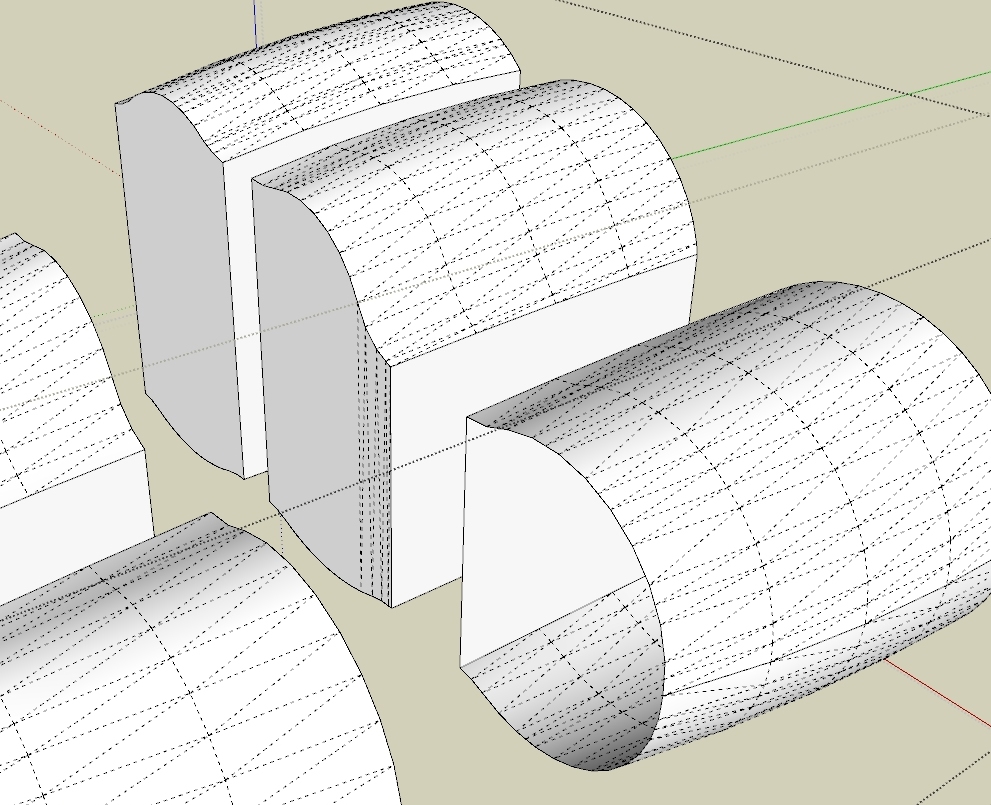
      First of all, the contour is supposed to be flat, but SU Intersect screwed that up a bit. In the JPG there are 3 sections of my Dirigible concept. There are a total of 73 sections, of which 30 center sections are identical. The rest (nose and tail) were formed from a large mesh created by multiple Curviloft constructs, exploded into 1 humongous shell, nose and tail. I then ran flat quad faces (as a group) across and fore/aft through the shells to create the outer skins of each section with intersect. For some really dumb and inexplicable reason, I deleted the intersecting quad faces. I then grouped each section and spread them apart.

      Realizing my error, the next day, obviating any undo, I recreated the flat faces by joining the 4 corners of each top and bottom skin. Of the 43 sections, (actually only 21 due to flipped copies) almost all formed flat faces when the lines were drawn. A few pair needed CL, and they formed a single undivided face (left section in JPG) and only one (center section in JPG) formed with 9 facets.

      But there were 3 pairs of faces that refused to form using CL. Two (pairs of) faces I constructed manually (not shown). But the one on the right refused to face unless I connected almost every vertex, like Cotty did manually. I really need these faces to be a single flat face because they will have a post process to form the internal web structure. I can't have lines dividing the faces.

      Tig, "it took me just a few moments - and of course I care diddly-squat about your project - so surely you could have applied a few of your own brain-cells to come up with a solution to suit your needs..."
      Totally uncalled for.... Of course I can solve this by other means, and for the 3 faces I did, in a few minutes. I tried subdividing the contour into 2 or 3 pieces, and apply CL to each. This almost always works, before I do a manual construct.

      The main reason I posted this problem is for Fredo. CL should NOT refuse to skin a properly connected and clean contour. I know CL has had problems with nearly flat contours, and Fredo looked at this type of failure before when I brought it up here in this forum. It should not matter to CL if the contour looks like the rocky mountains or the prairies. That's what a Beta is for.

      Rich; If the vertices were properly co-planar, the face would form as soon as the 2nd vertical line was drawn, as did in the other 40+ sections. I would not need to resort to Curviloft to make the face.

      And finally.......
      MODERATOR NOTE
      Removed unnecessary and tiresome overuse of smilies/capitalization.

      REALLY??? You will notice that this post contains only a single smiley and 2 all caps.... ๐Ÿคข


      3 sections

      posted in Plugins
      jgbJ
      jgb
    • RE: [Plugin][$] Curviloft 2.0a - 31 Mar 24 (Loft & Skinning)

      Fredo,

      Curviloft will simply not skin this contour.

      It is (or is almost) flat and very similar to about 30 other contours, that skinned with little or no problem where the contours did not flat face with SU's "Face" function.

      I have checked every line for doubles, fragments and gaps (none).
      I have redrawn most of the lines endpoint to endpoint, especially at junctions.

      It will form a face if I manually face it, but not with CL.

      Could you please tell me why it fails and how you found whatever error I made in it?

      [mod=MODERATOR NOTE:3oodv4kq]Removed unnecessary and tiresome overuse of smilies/capitalization.[/mod:3oodv4kq]


      Curviloft fails to face this contour

      posted in Plugins
      jgbJ
      jgb
    • RE: [Plugin][$] Tools On Surface - v2.6a - 01 Apr 24

      @unknownuser said:

      @jgb said:

      Is there at least a plan to fix?

      No immediate plan I am afraid!

      Maybe you can extrude the surface to prolong it and draw the arc over it.

      Possibly, send me the model so that I have a quick look.

      Fredo

      Don't understand what you mean to extrude the surface to prolong it.

      Anyway, I made the curves manually and completed that portion of the model, so posting it will not be of use to you. Next time, I will save a copy of what I'm doing for you.

      Funny thing though, ARC did work on a smaller section over 2 or 3 faces. The difference in size was significant (30 ft did not work, 20 inches did work) and I believe the segment count was different for each.

      Tomorrow I will experiment with sizes & segments to see if there is a pattern. If there is, that should be a clue for you.

      posted in Plugins
      jgbJ
      jgb
    • RE: [Plugin][$] Tools On Surface - v2.6a - 01 Apr 24

      @unknownuser said:

      Joel,

      That's a big deficiency of Tools on Surface and in particular for Arc drawing when the arc is on fully on the surface. I am afraid I have no workaround quickly for that.

      Fredo

      Kinda makes the Arc function a little less than useful, ya think??? ๐Ÿ˜ฎ

      Is there at least a plan to fix?

      posted in Plugins
      jgbJ
      jgb
    • RE: [Plugin][$] Tools On Surface - v2.6a - 01 Apr 24

      Fredo, anybody........

      What am I doing wrong here? โ“ โ“

      I've had this problem before, but solved it in a roundabout way. Messy but it worked. ๐Ÿคข
      It used to work as I recall, then it didn't, but until now I just went on.

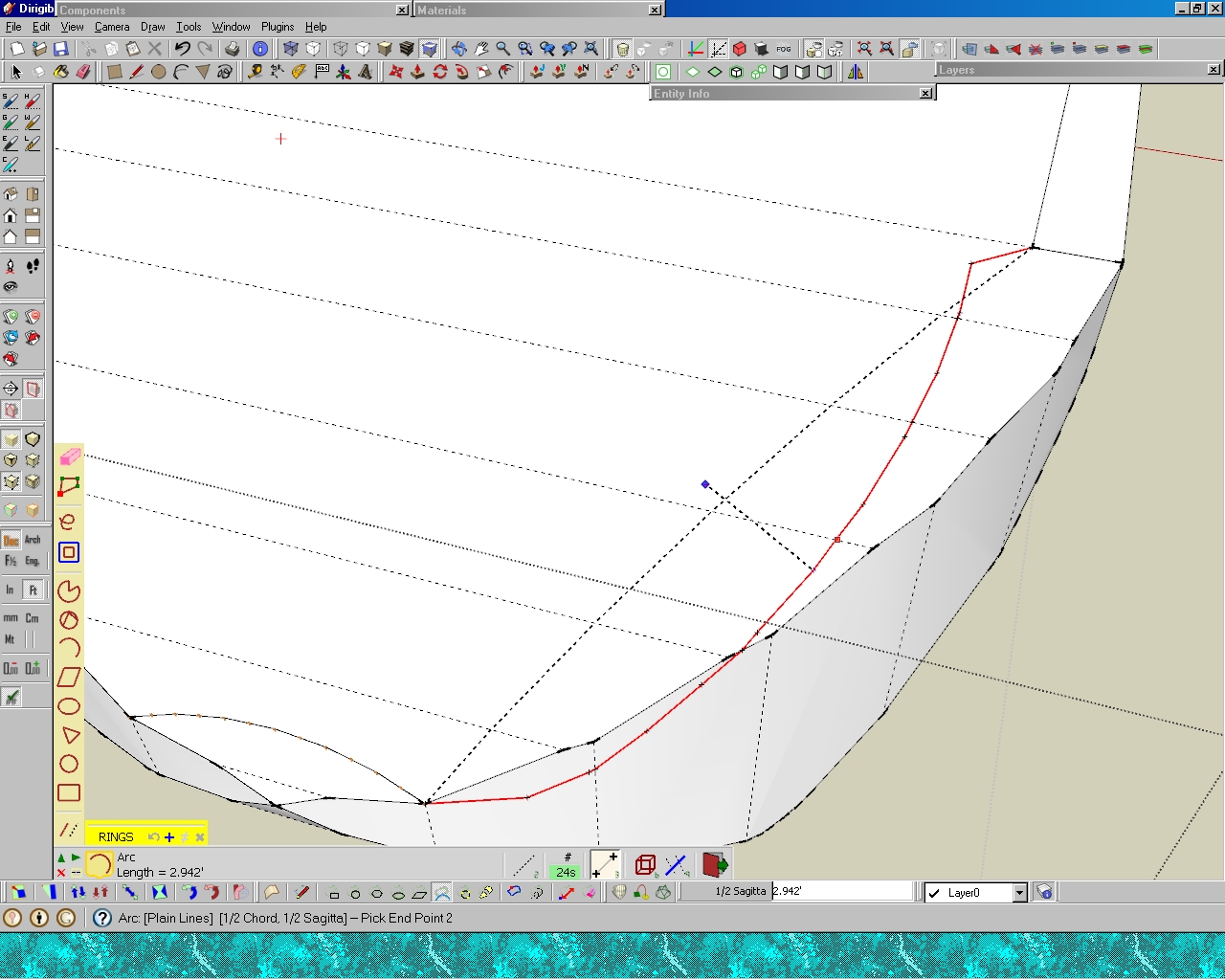
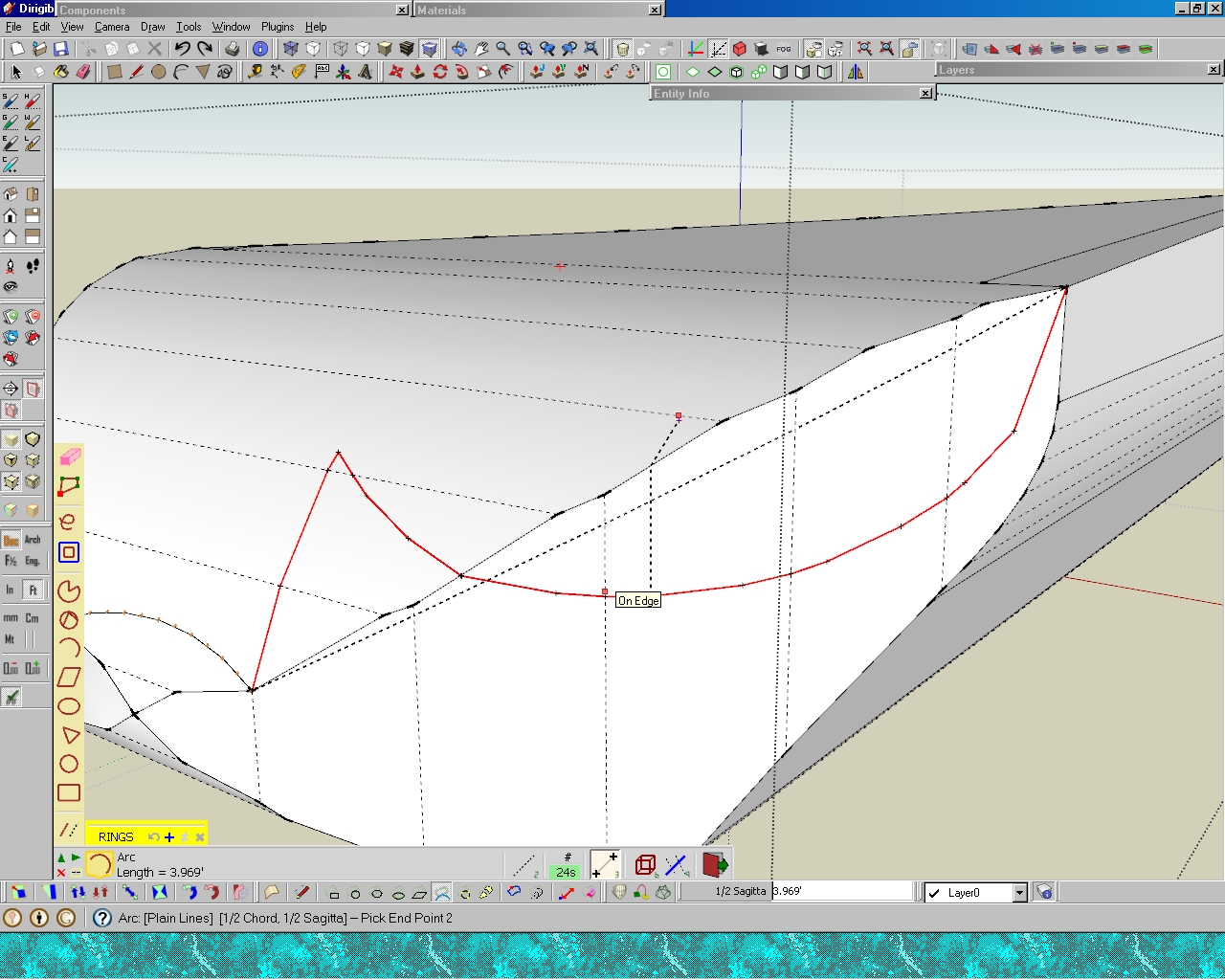
      I am trying to draw an arc on a curved surface. But the end segments of the arc bend away from the arc, (in a consistent manner every time) effectively destroying a nice arc.

      The black dotted precurve is OK, but the red lined curve distorts. I do keep the cursor on the surface or on a line on the surface, but nothing seems to work.

      I'm trying to form a contour for Curviloft to round out the edges of the flight deck on my airship.

      I have 2 complete screen-shots of the problem. If you want a SKP of the object, I'll post it.

      Arc on upper surface failed

      Arc on side surface failed

      posted in Plugins
      jgbJ
      jgb
    • RE: [Plugin][$] Curviloft 2.0a - 31 Mar 24 (Loft & Skinning)

      Thanks Fredo;

      I guess I gotta load and learn your "Tools" plugin. ๐ŸŽ‰ ๐ŸŽ‰

      In this model, I have no intention of making the curves smoother. It is a concept model, and already too detailed from what I had planned. I'm trying to keep the lines count down. It just broached 100,000 and I'm only about 1/3 done. When I approach 350,000 and over, my beast slows down and autosave takes too long for my liking. ๐Ÿคข
      But I can see using additional smoothing in some other models. ๐Ÿ‘ ๐Ÿ‘

      I have some other curves that caused grief with too many lines & faces. I will attempt to recreate the nose section that was generated in about 5 minutes, but took 4 hours to clean up. The tail section took about double that. That said, it would have taken a week or more to generate each without Curviloft, so I'm not dissing CL; just asking if it can be improved a bit.

      posted in Plugins
      jgbJ
      jgb
    • RE: [Plugin][$] Curviloft 2.0a - 31 Mar 24 (Loft & Skinning)

      Finally had the chance to re-post this. The "Ole' Battleax" preempted my yesterday.

      The purpose of this post is to show Fredo where Curviloft creates excess lines and faces within a relatively simple low poly contour.

      The SKP contains 2 bulkheads (out of 12) from my large cargo Airship concept.
      The AFT Bulkhead was one of the more complex ones, so I did it first. ๐Ÿ˜’

      It was a complex set of steps to create a curved fillet between the bulkhead and the hard carbon fiber aerodynamic skin. The curved fillets serve 3 main purposes.
      Spreading the flight loads from the hard skin to the bulkhead,
      Forming a smooth rounded corner where the helium bags meet the structure when filled, and
      Forming a channel for the helium between bags and compressed He storage tanks.

      It requires over 15 steps (in 6 major steps) to create a bulkhead, and the Curviloft skin fillets. Typically a bulkhead will require 30 Curvilft skins, plus a pile of manual development. It now takes over a full day to do one, but 7 of the 12 are the same, so I only have 6 to do. But there are also 13 different additional longitudinal frames to do in a similar fashion. ๐ŸŽ‰

      If Curviloft could optimize the face/line generation, then it would take half that time.

      And it is NOT just the esthetics of the curve at issue here, In many cases, especially in this model, there will be intersections and cuts to formed surfaces where other parts of structure and systems cross or join. Because SU's Intersect creates significant tiny line fragments, co-linear lines, and co-planar faces especially where curves intersect, reducing the CL lines and face count becomes critical because it takes hours to fix that mess.

      In 2 cases in this model alone, I have scrapped parts after it was impossible to fix and tried again, several times. In one case, forming a solid from several intersections of curves, even Solid Solver threw up ๐Ÿคข and totally blew up the object. It took 3 full days to recreate it and make solid manually. ๐Ÿ‘Ž ๐Ÿ‘Ž ๐Ÿ‘Ž

      The bulkhead process is detailed in the SKP, so please use LAYERS to see each one, with annotations.

      There are 2 bulkheads shown, and one, the aft bulkhead is shown step by step how it was created. The examples (#1 - #5) are not exactly as I did the model, as that bulkhead was almost completed when this post first came up. Most of the contour definition lines had been deleted, so I had to partially recreate the initial steps; however #6 and the fwd bulkhead ARE taken directly from the airship model.

      The FWD bulkhead is in RAW condition, equivalent to example #5. Its shape and size are far more consistent with most of the rest of the bulkheads than is the Aft bulkhead.

      The other issue of "Contour Inspector" to highlight sources of generation errors will be addressed later when I (WILL) get another major problem.


      Curviloft excess face generation.

      posted in Plugins
      jgbJ
      jgb
    • RE: [Plugin][$] Curviloft 2.0a - 31 Mar 24 (Loft & Skinning)

      Fredo,

      I haven't forgot this. On Sunday I posted an example SKP with a long explanation of what I did. I just checked back to see if you posted a reply yet, and Lo.... the post has disappeared. ๐Ÿ˜ฒ ๐Ÿ˜ฒ ๐Ÿ˜ฒ

      I'll re-post tomorrow morning. Head is in the wrong space to do it now. ๐Ÿ˜’

      posted in Plugins
      jgbJ
      jgb
    • RE: [Plugin][$] Curviloft 2.0a - 31 Mar 24 (Loft & Skinning)

      @unknownuser said:

      Maybe you culd post or PM a model so that I can see what a Contour Inspector could do to improve the drawing and junctions of lines.

      Fredo

      I can do that. ๐Ÿ˜„

      I have to go back a few versions to give you what I first had to contend with. My current model of an airship has all the fragmented curves fixed (manually) and other than show you the desired end result, you won't find any problems to work with. But I will include them as well. Please give me a few days to set up an SU file with annotated examples.

      posted in Plugins
      jgbJ
      jgb
    • RE: [Plugin][$] Curviloft 2.0a - 31 Mar 24 (Loft & Skinning)

      Fredo; thank you for the explanation. ๐Ÿ‘ ๐Ÿ‘

      The underlying reason I am having so much trouble forming curved surfaces lies NOT with Curviloft. โ˜€

      I create fairings and other curved surfaces for my airplanes (and other stuff). The shape of the fairings edges are totally dependent on the surfaces they mount to. This almost always, requires that I make an intersection with the base surface to a curve that forms the general shape of the fairing. So I have a curve intersecting a curve to get the line that will form a side of my fairing, or the contour that CL will use.

      SU's intersect usually creates a mess of tiny fragments and gaps when 2 curved surfaces intersect. Most of the fragments and lines are around .001-.004 in, impossible to see. In some cases where I had a vertex with 4 lines, after Intersect I end up with at least 1, sometimes as many as 5 fragments attached to the vertex, and dividing any of the original lines. In some cases, a tiny gap forms. I find that doing a left2right select over the vertex will catch the fragments, but not the gaps. Delete all and many faces will disappear. I then delete all but one line to give me (hopefully) an original endpoint, then redraw the triangles. That will cure the gaps as well.

      However, 2 things usually happen when I do that. Some vertices become out of plane and I get a myriad of hidden lines forming on attached faces, or the other end of the intersect line has a fragment that interferes with the forming of the face, forcing a redraw at that vertex, and so-on.

      You can see why finding and fixing those fragments & gaps can take me a long time to do, if I have to literally redraw almost every line that is in contact with the intersected line. ๐Ÿคข

      It's when the intersect seems to be clean and I apply CL to the fairing perimeter, that my trouble starts, because of those fragments and gaps. ๐Ÿ‘Š

      A standalone contour inspector would be very handy, as part of your tools, and as you said, very useful in other SU operations.

      As for your "lonely vertices" tool, I've downloaded it, and will install it, and some other tools, real soon now. ๐ŸŽ‰

      posted in Plugins
      jgbJ
      jgb
    • RE: [Plugin][$] Curviloft 2.0a - 31 Mar 24 (Loft & Skinning)

      Thanks for the reply Fredo. (Pbacot... please see below)

      I realize that having equal vertices on opposite defining curves will reduce the lines count, but most times that may not be possible, especially with 3 sided contours.

      I documented the principles in Curvizard manual --- What is that and where do I find it?

      I've leaned that where some curves change color mid contour, or the selection ends at a vertex mid contour there is a problem, usually, but not always. And by the same token, may mean nothing.

      I still believe that it would be relatively easy to implement highlighting a problem vertex, gap, line fragment or co-incident edge much the way Solid Inspector does.

      Curviloft does find these errors and stops the surface generation, so isolating the error is a non-issue.

      You could then color code the problems with a meaningful color selection. For example:
      A single orange line is a double co-incident line.
      A blue line and adjacent green line means a gap was found between them.
      A red line could be an extraneous line at a vertex.
      The rest of the contour selected stays black.

      These make up almost all of the known (to me) types of errors CL finds during a contour check. It would take literally seconds for me to fix knowing what and where they are, instead of long minutes checking almost every line and vertex in the failed contour, and repeating several times the contour selection.

      Pbacot;
      JGB. Don't tell me you could have used "remove lonely vertices" and didn't?

      Never heard of that.... Please tell me more. โ˜€

      There is a lot in SU I have never used nor even explored, even after 4 1/2 years using and loving SU. I even have a bunch of plug-ins loaded I almost never use, mostly because I forget they are there. ๐Ÿ˜ณ

      posted in Plugins
      jgbJ
      jgb
    • RE: [Plugin][$] Curviloft 2.0a - 31 Mar 24 (Loft & Skinning)

      Fredo

      I've been using and can't live without Curviloft for a long time now. ๐Ÿ˜
      It is one of the very few powerful tools that makes SU a real 3D tool.

      However, I do have some criticisms of stuff myself and others have raised long ago and have not been adequately addressed by you, the designer. ๐Ÿ‘Ž

      Aside from a good tutorial on the myriad of icons presented in the toolbar.
      We really need this to make the best use of Curviloft.

      This last week I was creating a fuselage shape that was about 75% curved fairings that only Curviloft could do. Making them manually would be a months work tweaking the smoothness. Curviloft (skinning) generated the 26 curved surfaces to near perfect shape in no time.

      However, I spent HOURS getting CL to recognize the full contiguous perimeters of many curves. The colours were pretty, but in truth, meaningless, except to say a perimeter problem was detected. Then I have to sleuth out where the problem(s)is/are. I now have a good understanding where some problems probably lie, but in many cases, I have to end up deleting and redrawing much of the perimeter.

      If CL can find an error in a perimeter, a tiny gap, a line fragment somewhere, a co-linear line, etc. WHY CAN'T YOU TELL ME WHERE IT IS???? Solid Inspector ๐Ÿ‘ does an admirable job pinpointing similar errors, so it is doable.

      The next most exasperating thing about CL is the vast number of tiny lines and faces generated in surfaces that have very different numbers of edges in the sides of the perimeter. It seems CL will break even small lines into more small lines just to line up with an endpoint in the opposing side in the perimeter.

      In one large roughly square surface of 4 arcs, where 3 arcs were 12 sided and the 4th was 16, CL generated a surface with over 9,000 lines. In many cases perimeter line segments were divided into 2 and some 4 unequal parts to align with the opposite side. Where the average length of edges in the arcs were about 12 to 18 inches, CL created some segments as short as 1/2 inch. I spent 4 hours manually redrawing almost all of it by deleting multi-segmented but straight lines, redrawing them as 1 line, and reconnecting the endpoints into the mesh. I followed the CL generated curves and ended up with about 1200 lines. In later parts I discovered using CL to redraw the deleted internals after redrawing the multi-segmented lines. Now it takes me about an hour to optimize the curves. And I have a bunch more to create, then optimize.

      YES, CL is far faster and better than doing it manually, but it shouldn't be so laborious to clean up.

      Fredo, I know this would be a tough one to fix, but perhaps a post-process optimizer might do the trick, like Solid Solver does with Solid Inspector.

      These are my 2 (3) biggest bitches about Curviloft. I have a few others, but I suspect they have more to do with my lack of knowing how to play with CL settings (again no tutorial is the culprit) than any coding problems within CL.

      Again, Curviloft is DAMNED GREAT, ๐Ÿ˜ ๐Ÿ˜ but a few things can be done better.

      posted in Plugins
      jgbJ
      jgb
    • RE: [Plugin] SolidSolver

      @pbacot said:

      Thanks TIG. This is something I am looking at daily--ways to make solids.

      Probably an obvious idea to many: I was getting a shape that had way too many interior faces. I decided that with smoothing, I had very few outside surfaces to deal with. So I selected the outside surfaces one by one (double click) and grouped--and had a solid rather quickly, without fussing about the center.

      Your work on this is really appreciated.

      NOT obvious..... A damned good idea. โ˜€ โ˜€ โ˜€

      (good thing I thought of it) ๐Ÿคฃ

      posted in Plugins
      jgbJ
      jgb
    • RE: Can't see my model

      @hellnbak said:

      @jgb said:

              "*To the moon, Alice*." 
      

      Extra points if you can tell me who said that. ๐Ÿ˜†

      Jackie Gleason as Ralph Cramden on "The Honeymooners"

      Welcome to the "seniors club" and an extra 10 points.

      posted in SketchUp Discussions
      jgbJ
      jgb
    • 1
    • 2
    • 14
    • 15
    • 16
    • 17
    • 18
    • 40
    • 41
    • 16 / 41