sketchucation logo sketchucation
    • Login
    1. Home
    2. JClements
    3. Posts
    Oops, your profile's looking a bit empty! To help us tailor your experience, please fill in key details like your SketchUp version, skill level, operating system, and more. Update and save your info on your profile page today!
    🔌 Smart Spline | Fluid way to handle splines for furniture design and complex structures. Download
    Offline
    • Profile
    • Following 0
    • Followers 0
    • Topics 196
    • Posts 918
    • Groups 1

    Posts

    Recent Best Controversial
    • A More Sophisticated Animation Script request

      There is an opportunity (a big one perhaps) where my manager would like to use some of my sketch up models to create animations. The animation would be for a "how it works" promotion for our client and potentially for manuals to be used by maintenance personnel.

      There are existing scripts which are very clever in animating objects via copying component instances along a path and animating cameras along paths. But none do both well enough for what I have in mind.

      What I am looking for is a way to animate the movement of objects and do so in sequence; so for example, CarA drives along a road, CarA stops at intersection, CarB passes across the intersection from left to right, CarA resumes driving forward. The camera might follow CarA from a above along the same path or it could be at a constant point but zoom in and then zoom out when CarA is at the intersection. If the script were to create multiple pages and or layers to simulate the movement of an object and control time, then there would need to be a way to EASILY edit the sequence in which objects are sequenced.

      I realize SU is not meant to be a primary animation tool, but if I could use it to produce an eyecatching "animated storyboard" that might be good enough. Then I am thinking the objects in the model and their respective paths and the camera location and/or camera paths could be exported to a more sophisticated program like 3D studio Max or LightWave for Final Production by a professional animator. This way, costs and time for the final highend animation could be optimized, but the initial development of the animation storyboard could be kept inhouse.

      Soooo ... I was wondering if anyone has anything in development along these lines or something else even more specialized or perhaps be interested doing so if there were "adequate inducements"? . Bottom line the script must be "user friendly" with regards to creating and then updating an animation storyboard.

      You can email me directly if you don't wish to discuss online (JClements at BrwnCald dot com).

      posted in Plugins
      JClementsJ
      JClements
    • Construction Point at Origin can not be done > Why?

      Anyone know why you can't add a construction point directly to the origin [0,0,0]?

      You can create one and move it to the origin and [update]it will be visible as well[update], but not create one directly at the origin. None of the scripts that create cpoints seem to be able to do this either.

      Just curious.

      John

      posted in SketchUp Discussions sketchup
      JClementsJ
      JClements
    • RE: Sine Curve (wave) script?

      Thank you, Jim!

      It works beautifully.

      Regards, John

      posted in Developers' Forum
      JClementsJ
      JClements
    • John 2

      Two variations of a mortar board theme.
      2A
      2B

      posted in Corner Bar
      JClementsJ
      JClements
    • John 1

      Basic text logo using a stylized PushPull tool


      SketchUcation 1.jpg

      posted in Corner Bar
      JClementsJ
      JClements
    • RE: Sine Curve (wave) script?

      Hi Gata.

      I do use the copy along path script and it works nicely. But the trick here is to space (subdivided) equi-distant if you will, along an existing curve. The functions that Fred06 has provided are flexible enough to aid in doing this, plus, re-manipulate/smooth some complex curves.

      posted in Developers' Forum
      JClementsJ
      JClements
    • RE: Queston for Fred06 concerning BezierSpline tools

      Thank you, Fred06.

      This will help me out when I have to place reference points at equi-distances along a path or simplifying existing curves.

      posted in Developers' Forum
      JClementsJ
      JClements
    • RE: Sine Curve (wave) script?

      Jim, yes please. I am sure to use it. 😄

      posted in Developers' Forum
      JClementsJ
      JClements
    • RE: Sine Curve (wave) script?

      Thank you Bob, for the clarification.

      Regards, John

      posted in Developers' Forum
      JClementsJ
      JClements
    • Queston for Fred06 concerning BezierSpline tools

      Part of the toolset includes "Convert to Polyline Divider" which presents a dialog box asking the user for an Interval Length.

      Could there be option for "Number of Intervals" which would divide the selected curve into equal intervals of the number specified?

      posted in Developers' Forum
      JClementsJ
      JClements
    • RE: Sine Curve (wave) script?

      Thanks, all!

      Jim, about the code you posted.

      Is that a snippet from a Ruby script and can it be run from the Ruby console window? Or, could a Sine Script be written that asks user for unit of measure, length and amplitude and maybe the number segments?

      John

      posted in Developers' Forum
      JClementsJ
      JClements
    • RE: Sine Curve (wave) script?

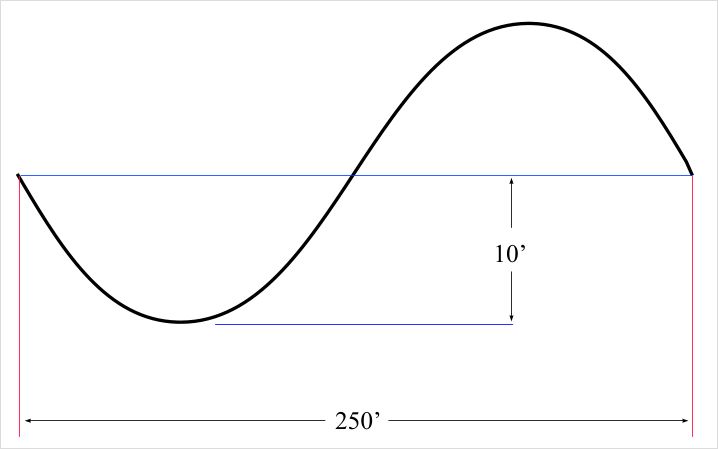
      Thanks for the replies. I tried K-Tools but I am obviously doing something wrong.

      The attached is the wave specs I was given. What should the K-tools parameters be?

      Regards, John


      sine.jpg

      posted in Developers' Forum
      JClementsJ
      JClements
    • RE: Sine Curve (wave) script?

      Tell me if graphit can be used to make a sine curve and, if so, how to do it?

      I am mathematically "impaired".

      J

      posted in Developers' Forum
      JClementsJ
      JClements
    • Sine Curve (wave) script?

      I am working on a project in which structures are aligned and spaced along a path of a Sine Wave.

      Is there a script which takes the required variables (I believe they'd be the length and amplitude of the sine wave) and possible the number of desired segments and draw the appropriate sine wave?

      I believe there was "generic" equation script but I couldn't locate it. If its capable creating a sine wave, I might need some hand holding on how to use it.

      Regards, John

      posted in Developers' Forum
      JClementsJ
      JClements
    • RE: [Plugin] Auto Centerpoint

      Jim,

      This may be a bug.

      When finishing a circle with the second mouse click, I can't make an entry in the VCB to change the radius.

      John

      posted in Plugins
      JClementsJ
      JClements
    • RE: Smooth and divide?

      Thanks.

      posted in Plugins
      JClementsJ
      JClements
    • RE: Smooth and divide?

      Solo,

      I noticed your toolbars. What is the one with the cameras for?

      posted in Plugins
      JClementsJ
      JClements
    • RE: [Plugin] Auto Centerpoint

      Jim, are you sure the link downloads the latest version?

      posted in Plugins
      JClementsJ
      JClements
    • RE: [Plugin] Auto Centerpoint

      @jim said:

      It's trivial for me to put the construction points on their own layer. What if I used CenterPoints as the layer name?

      Or would you want to select a layer each time the extension is enabled?

      Jim, something like "CircleCenterPoints" as a layer name is fine by me. If I want to rename the layer or move the points to another layer later on that is easy enough to do; at least this way the points can be turned on or off irregardless if they are in nested entities or not.

      posted in Plugins
      JClementsJ
      JClements
    • RE: [Plugin] Auto Centerpoint

      Jim, this functionality has been on my wishlist as a "standard" for the circle tool for the last two releases of SU.

      Since the script is loaded as an extension, perhaps you could allow holding the Alt-key on the first click to disable the centerpoint or vice versa (allow the centerpoint to be created only with the Alt-key)?

      I do wish there was an option to automatically assign the construction point to a specified layer so that I can easily turn all my "construction" geometry on or off. Better yet, but I don't think its possible, is to have the extension change the way View > Guides and Edit > Delete Guides operates in the first place. My ideal would be

      View Guides:
      ·Guides
      ·Construction Points
      ·Both

      Delete Guides:
      ·Guides
      ·Construciton Points
      ·Both

      At any rate, a big thank you.

      QUESTION: what does the Singleton.rb in the Ruby subdirectory accomplish?

      posted in Plugins
      JClementsJ
      JClements
    • 1
    • 2
    • 37
    • 38
    • 39
    • 40
    • 41
    • 45
    • 46
    • 39 / 46