sketchucation logo sketchucation
    • Login
    1. Home
    2. JClements
    3. Posts
    Oops, your profile's looking a bit empty! To help us tailor your experience, please fill in key details like your SketchUp version, skill level, operating system, and more. Update and save your info on your profile page today!
    πŸ”Œ Smart Spline | Fluid way to handle splines for furniture design and complex structures. Download
    Offline
    • Profile
    • Following 0
    • Followers 0
    • Topics 196
    • Posts 918
    • Groups 1

    Posts

    Recent Best Controversial
    • File > Export Menu ... Is there way to add a script there

      I just installed the LightWave (version 6) export plugin.

      The ruby originally assigned it to the Tools Menu but I'd like to put in a more logical place for me which would File > Export.

      Is there a syntax for doing this?

      This is as far as I got:

      @unknownuser said:

      if !file_loaded?(FILE)
      add_separator_to_menu($exStrings.GetString("Tools"))
      UI.menu($exStrings.GetString("File")).add_item($exStrings.GetString("Export LWO [lwo_export.rb v006 Alex Young]")){ Shaxam::LwoExporter.menu_entry }
      end

      posted in Developers' Forum
      JClementsJ
      JClements
    • RE: Coming Soon: Scene Groups!

      Rick:

      This sounds like a nice improvement. Will it allow you to do renaming as well (maybe use some of Todd's code πŸ˜„)

      posted in Developers' Forum
      JClementsJ
      JClements
    • Wishlist > a way to analyse the stats on scripts loaded

      I think Ruby scripting is a BIG reason for the continued interest in SU.

      It is my belief that being able to get statistics back regarding loaded scriptswould be very help in evaluating things such as loading times and occuarances of usage. It would provide a way of weeding out slow or less used scripts and probably help script writers in testing scripts during development stages.

      Please see this link for further detail on request:
      http://www.sketchucation.com/forums/scf/viewtopic.php?f=57&t=8720&p=52543#p52543

      posted in SketchUp Feature Requests sketchup
      JClementsJ
      JClements
    • RE: A script to Analyse the loading of scripts?

      Thanks, for the quick reply.

      posted in Developers' Forum
      JClementsJ
      JClements
    • RE: Script to make edges into a curve: needed

      Edison, I think I may a have a workaround for you.

      I am certainly not an expert at dealing with contours, but through recent experimentation and the availabilty of newer scripts this could be what you need.

      You'll will need to check the accuracy of the "re-segmented" contours, however, to see if they are within the tolerances/lever of accuracy you want.

      See the attached .skp for a mini-tutorial. You will need the Weld.rbby Rick Wilson and the BezierSpline script setby Fred06. If you plan to create a terrain from the contours, then I would suggest TIG's Hidden2Layer.rb (version 1.2) script and use it as mentioned here: http://www.sketchucation.com/forums/scf/viewtopic.php?f=57&t=8726 .

      In summary, the procedure is this:
      A. Import the contours.
      B. Triple click on a contour of segments and WELD.
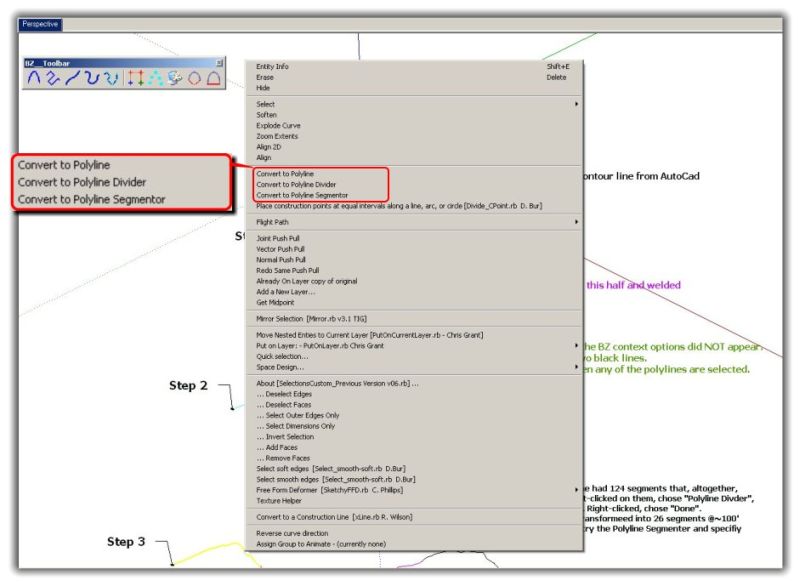
      C. Then right click on it and choose the the BZ context option of PolyLine Divider. Do note that for some reason (I think it has to do with the number of segments), the BZ context options may not be available; in that situation then bisect the weld segments into smaller lengths (see the mini-tutorial, Step 2).
      D. After completing Step 3, then you may want to weld the "segment-reduced" contour path back together into one continuous polyline.Screen Capture of BZ content menuMini-Tutorial for BZ method of segment reduction
      UPDATE: If Weld.rb does not work on all segments of a contour, try a selecting a smaller set of segments. OR, try selecting a few contour elevations (use one of SU's side views to do this), copy and paste them into a new file (or create a component out of them and then do a context menu Save As to create separate .skp), then try to weld, etc., then repeat the process for another set of contours; finally paste these back into one file. Otherwise, have the segments simplified by the surveyor in AutoCad first, or have them subdivide the one DWG file into 4 or more subfiles.

      posted in Developers' Forum
      JClementsJ
      JClements
    • Hidden2Layer v1.2 > Thank you TIG

      TIG: I wanted to say, "thanks".

      I've have a very useful application for your script, one which was probably unintended.

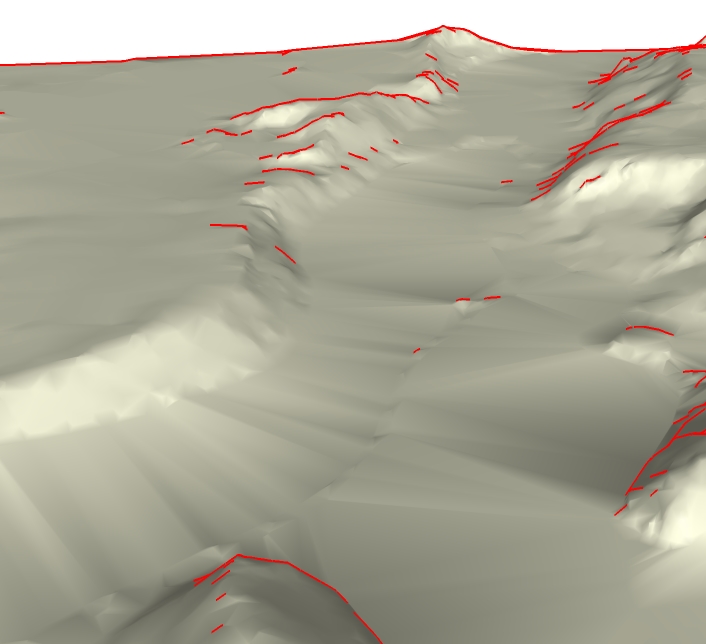
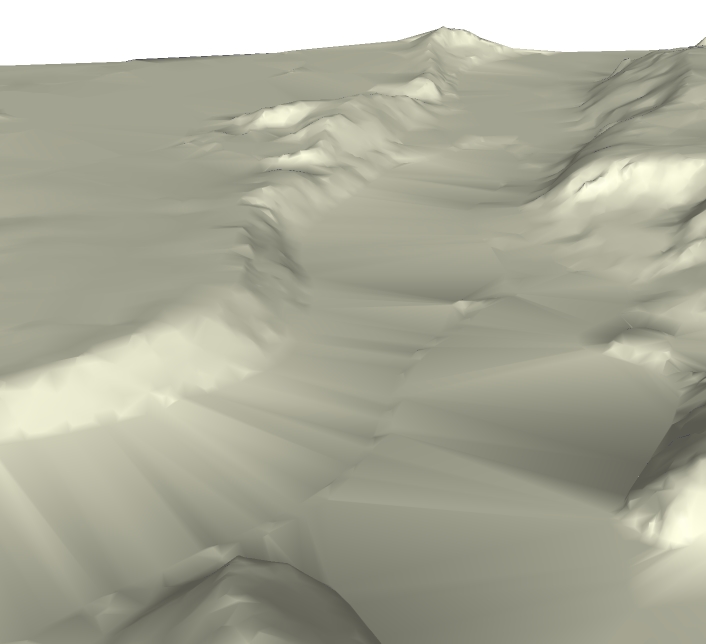
      The attached is a close-up of a terrain map produced by applying Sandbox to imported Autocad contour lines. The area is approximately 5,220' x 5,900' and the SketchUp file was 8.5 Meg.

      As the Before example demostrates with the red edges, SU will display edges of the terrain map depending upon the camera angle. Once you project an aerial photo and place geometry such as lot boundaries and buildings upon it, those edges interfer significantly with the display of the overall scene.

      I adjusted your script so that smooth and soft edges were maintained when moved to a hidden layer. The result is shown in the After example.

      Your script automates a process which, when I originally did it manual method, was very slow and frustrating at times.

      From the standpoint of what I use SketchUp for, about the only thing that I can think of to make your script more flexible would be to have options to allow the user to: 1) choose to keep the edges smooth and soft or not and 2) whether to hide all hidden edges , **just non-**soft/smooth edges, or just soft/smooth edges.

      Regards, John

      Before applying script
      After applying script

      posted in Developers' Forum
      JClementsJ
      JClements
    • A script to Analyse the loading of scripts?

      Is there some way a script could analyse scripts as they are being loaded when SU opens to produce some "useful" statistics?

      For instance: what is being loaded (the script's filename), how long each takes, and the relative time for each compared to the total time. Then display and/or print the results.

      Regards, John

      posted in Developers' Forum
      JClementsJ
      JClements
    • SectionCutFaces.rb v2

      TIG:
      Could the script have an option to make the color of the each edge equivalent to the color attribute of the surface it intersects? I suppose it could be tricky if the surface had different colors assigned to it's front and back face.

      posted in Plugins
      JClementsJ
      JClements
    • RE: Spiral Generator > Free Utility Available

      it is 2d

      posted in Freeware
      JClementsJ
      JClements
    • Spiral Generator

      This is not a ruby script but some of you might be interested in this utility.

      http://www.sketchucation.com/forums/scf/viewtopic.php?f=15&t=8696

      Perhaps there is way to do something similar (the mathematics and interface) in ruby?

      posted in Developers' Forum
      JClementsJ
      JClements
    • Spiral Generator > Free Utility Available

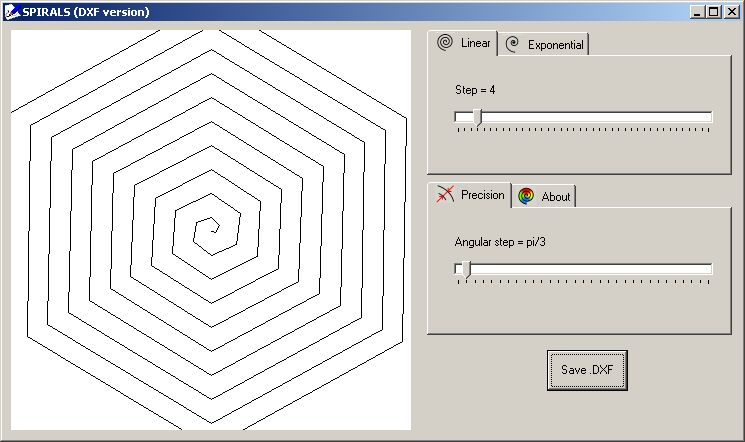
      Dmitry Malutin has created some clever vector pattern generators. They were originally designed for use in Xara and other MS Windows apps. One of his tools is a spiral generator.

      I thought a spiral creator might be useful for SketchUp folks so I asked Dmitry if he could adapt his current tool/utility to create DXF files.

      Dmitry kindly responded and now you can download SPX-DXF.exe from http://xaraxtv.at.tut.by/spx.htm

      Attached is a screen capture of the interface and an .skp file with an example of how a spiral pattern could be used.Screen capture of interface

      If you see other utilities at Dmitry's site which you think would be useful in DXF format, Dmitry might be able to adapt them ... no guarantees that they can, however. The site has email link where you can submit your comments to Dmitry.

      Regard, John


      SpiralsTest.skp

      posted in Freeware
      JClementsJ
      JClements
    • RE: Cut and Paste-in-place from within Component Instances

      Rick, looks like you just beat me to the punch. Thanks anyway. πŸ˜„ and to RV.

      posted in Developers' Forum
      JClementsJ
      JClements
    • RE: Cut and Paste-in-place from within Component Instances

      RV:

      I think you've got a good procedure.

      1- Select the 'original' component

      2- Right-Click, choose "Save As" from the Context Menu and name it 'version 2'

      3- Save current model and open version 2.skp

      4- Select all geometry that needs to remain in 'original' component. Make that selection a component and call it "Original". Select the remaining geometry and make it a a different component with a unique name (lets call it 'PasteMeInPlace') and then edit it and group all the geometry within it. Save the version2.skp file.

      5- Open the first model. Right-click on the component named 'original' and choose Reload from the Context Menu and reload with version 2.skp. Pick Smustard's "Select All Instances" from the Context Menu and then EXPLODE that set of instances.

      6- What remains should be a new version of 'original' and the other geometry which is the component 'PasteMeInPlace'. Select it. Right-click and use Smustard's "Select All Instances" again. You can then EXPLODE all those instances if you want. .....Optionally, you could edit 'PasteMeInPlace' first and ungroup the contents before exploding all of it's instances.

      posted in Developers' Forum
      JClementsJ
      JClements
    • RE: Cut and Paste-in-place from within Component Instances

      Rick it sure would be worth investigating. The use of components has been emphasized and encouraged as the way to go when modeling, but this issue now causes me to think twice before setting up an assembly of components. Anything that could be done to make this a more efficient process would be appreciated.

      Regards, John

      posted in Developers' Forum
      JClementsJ
      JClements
    • RE: Cut and Paste-in-place from within Component Instances

      Yes, father, I will experiment with your suggestion... but give a while to do so.

      😳

      posted in Developers' Forum
      JClementsJ
      JClements
    • An Apparent Face-Intersections View

      I do a lot work with piping and the like. If I have a cylinder passing through another cylinder, sphere, or object with compound surfaces I would like to display edges where the surfaces intersect each other. To do this I have to perform intersections in one form another. It is time consuming, can be tricky, and messy when geometry changes and the intersections have to be redone.

      It seems to me if SketchUp is sophisticated enough to display and control Profiles, the programmers should be able to develop a viewing mode where you turn-on/off the display of "apparent" interections of surfaces. Also have an option where you could assign this property on an object by object basis similar to what can be done with casting and receiving shadows.

      posted in SketchUp Feature Requests sketchup
      JClementsJ
      JClements
    • RE: Cut and Paste-in-place from within Component Instances

      G:

      I'll give this a try in a bit. I think I may have problems, however, due to the way I use layers, for example I have layers for certain elements for each entity, group, etc., such as a layer for construction points-center lines and hidden edges/surfaces. Most all my groups and components contain geometry assigned to those layers.

      posted in Developers' Forum
      JClementsJ
      JClements
    • RE: Cut and Paste-in-place from within Component Instances

      G:
      No, I haven't tried the select memory.

      In one model I had to convert the parent components to a groups, then go into each group and cut and paste in place, etc.

      I suppose could have then (but I didn't think of it at the time or not did I have hour to waste) save the file to a new name. Delete the groups, save and close that file, open the old file, select all the original parent components, CTRL_C copy them, close the old file, open the new, and Paste-in-Place, and then go into the parent component and delete the duplcate geometry ..... UGLY.

      posted in Developers' Forum
      JClementsJ
      JClements
    • Cut and Paste-in-place from within Component Instances

      This project I am working on is becoming more challenging every day.

      The challenge. I have several instances of a component spaced and aligned along, you guessed it. a couple of Sine Wave paths. This "parent" component consists of several sub-components and groups. Alot of effort was spent placing other miscellaneious geometry in model around to each instance of the parent component.

      Today the designer told me that one of the sub-components has been radically redesigned into 3 options. Because of this it can no longer be contained within the parent component; each instance needs to be cut out and placed outside of the parent component in it's same place relative to the model origin.

      Is there a script that can accomplish a "Cut-and-Place" geometry from an instance of a component and then paste-in-place outside of all of the instances?

      posted in Developers' Forum
      JClementsJ
      JClements
    • RE: A More Sophisticated Animation Script request

      Rick, I understand perfectly what you and others are saying about the "eventual/emminent?" release of v7. I did want to test the waters ... if there were some scripts in near "beta" phase, then it might warrant a change in my strategy for the near term.

      posted in Plugins
      JClementsJ
      JClements
    • 1
    • 2
    • 36
    • 37
    • 38
    • 39
    • 40
    • 45
    • 46
    • 38 / 46