Another winner, Jim.
Thanks.
Oops, your profile's looking a bit empty! To help us tailor your experience, please fill in key details like your SketchUp version, skill level, operating system, and more. Update and save your info on your profile page today!
🔌 Smart Spline | Fluid way to handle splines for furniture design and complex structures. Download
 Offline
Posts
-
RE: [Plugin] Tree generator v0.2
http://xaraxtv.at.tut.by/products.htm
The LSVG utility (fractal generator) type approach looks interesting. The author has already modified his spiral generator to produce DXF output for SU users.
It would nice if there was a way for Ruby to create these patterns and to do so using a similar interface.
-
RE: [Plugin] TextTags v1.4
TIG:
I hacked your script so the dialog prompt now reads:
' prompts=["Enter Text: (\n for line feed)","Edit Settings:" '
because I kept forgeting how to add the line feed too. Hope you don't mind.
John
-
RE: [Plugin] Name Group on Creation
Thanks Jim, I changed my shortcut for grouping to your script.
Question: Is it possible to have the Input Box "remember" its last position? Sometimes the input boxes can coverup the area you are working on and I want to move them out of the way.
-
RE: Table cloth made easy [Tutorial]
Great Job.
How many faces did the table cloth end up with?
-
RE: Soap Skin & Bubble expires
Jeez, I tried to make a PayPal contribution and it just put me into a loop. Never had that problem using Smustard' PayPal input screen.
-
RE: Lighting Plugin for Sketchup
About not being able to unpack the zip file.
As far as I can tell the problem exists with the built-in XP windows zip utility, simple as that.
As soon as I downloaded one of the free unzip utilities the file unziped just fine (I used ZipCentral).
-
RE: [Plugin] SU2POV for GSU6
Thanks, Didier, for the feedback.
"..When it is, the component "su2pov_sun" is inserted at the right place, then removed after the export is finished. .."
Very clever programming.
Regards, John
-
RE: [Plugin] SU2POV for GSU6
Didier, thanks for posting the .Rb.
The component lights are now being found, I no longer have to manually import them prior to using the script,and the version level is displayed.
I still have to press the ESCAPE key to initiate creating the lights with mouse clicks, however.
Questions (of course :}

**1-**In your documentaton you mention that the Sun is automatically "shut off" at night. I had assumed that was when the model was Set to Use Sun for Shading, but this happens as well when it is not set for Use Sun for Shading and also when the rendering setting of Lights is set for lights only. Is this what you intended?**2-**I was curious what the default is for when the script is turned to night mode. Is it a prescribed amount of minutes before the sunset time listed in the Shadows Dialog?
**3-**In your documentation you show the Sun actually being rendered in the sky. How is this done, is it automatically placed (per SU's sun position) once the script is run the first time for a model?
-
Can a non-repeating (non-tiling) texture be produced?
Lets say you import a client's logo as texture then project it onto the surface of a cylinder.
The logo tiles itself across the entire surface.
Is there a way progamatically to prevent the bitmap for tiling so it appears only once?
If not, automtically draw new edges around the boundaries of the image and project and intersect those edges onto a surface and apply the logo to the surface formed by the intersection. This what I did manually to produce the attached image.

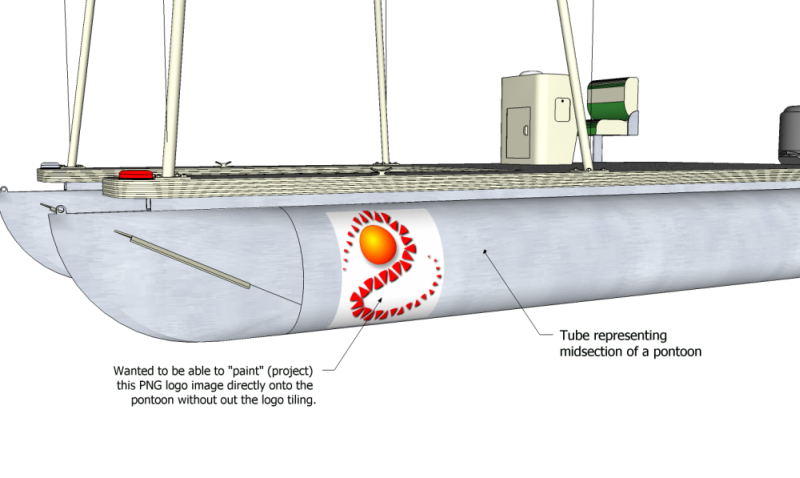
-
RE: [Plugin] SU2POV for GSU6
I tried downloading again and I see no difference in the light tools and no version level in menu description so I can't verify if I am downloading the wrong version.
Can you post the zip here ... at least temporarily until Monday?
-
RE: [Plugin] SU2POV for GSU6
Hi Didier, a brief follow up.
I haven't had a chance to try the new options except the render with Alpha Channel and I do like that a LOT; I still can't believe that SU isn't capable of doing this natively with their PNG expoxt filter.
What I can tell you is that the two light tools do work for me ONLY IF:
- I import each of their two respective .Skps FIRST so they are registered in the model's component library.
- Then, after selecting a tool from your menu, pressing ESC. This allows the scripts to respond to subsequent mouse clicks.
I am not sure if #1 is related to what the user's default component directory is or not or if it has to do with SU's installed location (mine is C:\programs\SketchUp 6...) .
Could you include the script's version number in the end of the script name listed in the Plugins' Menu? That would help identify if the latest version has been installed.
Hopefully, I can be more deligent this weekend and re-try all the settings of your lastest release.
Regards, John
-
RE: [Plugin] SU2POV for GSU6
I thought I did as I downloaded yesterday. Perhaps a bad link exists. That's the benefit of having the version level listed in the menu.

-
RE: Hello from Antics
Gary,
I think you'd really benefit by doing a simple video of how to import an SU model and animate a couple SU objects.
I don't have much time to spend investigating new software, but such a demo would probably do the trick.
An example model could be of a simple house (a cube with a roof), a green flat plane in front to represent the lawn, a car, a driveway along side the house to a street, a street, and person on the front lawn. Show how to import the model, draw a motion-path from the street to the end of the driveway, link the car to the path. After the car is "parked" in the driveway (or while it is traveling along the driveway), show the person on the lawn move towards the car and how to queue this. Finally, a change in position in the camera during or at the end of the animations.
Regards
P.S. I can supply you such a model if need be.
-
RE: Just Released! Subdivide and Smooth
Whaat/Dale:
I purchased Subdivide. I want to thank you for your ingenious scripting and hardwork!
Questions/Observations:
-
Earlier I believe there were some issues with The Sword(aka Zorro)
1a. Will it work properly in Parallel Projection mode?
1b. Is Zorro.rb now redundant and therefore should be removed from the plugins folder?
1c. I see The Sword does not effect geometry outside of a group nor will it register if drawn ON a group. That is a nice refinement. -
Does Subdivide have to the ability to save a copy of the original geometry (say to a hidden layer) prior to a Proxy being created?
-
Is there a way to temporarily hide the subdivided surfaces so that the "controlling" edges or interior surfaces of the proxy can be more easily selected (I'm thinking of the example in one of your videos where an interior plane was created which caused a "crease" in the middle of the subdivided planes).
-
Could there be a help button on the toolbar with options to view either the videos or to view any written documentation that may be available?
-
Is there any info about the smoothing icon/function?
-
I noticed if a "controlling" subsurface face was deleted and later recreated by drawing over an edge, then the Update Subsurface function was required before the new subdivsions would display even if the Auto Update was the default.
-
-
RE: Hello from Antics
"...that should be the end of it"
Not sure what you meant. You're dropping trying out Antics or Antics will change the requirement for all the personal info?
-
RE: [Plugin] SU2POV for GSU6
Note sure is this is a bug or not.
If you change the color of a Point Light component (by painting the selected component without editing the component), then the SU display of ALL Point Lights are changed to that color as well even though the actual color properties of individual Point Lights (as seen in its Entity Info) are different.
++++++++++++++++++++++++++++++++++++++++++++++++++++++++++++++++++++++++++++
Comments:
I understand the script is targeted more towards architectural rendering. My work is primarily illustrating non-architectural models. Many times I turn on "Use Sun for Shading" to control the contrast of surfaces, but do NOT display shadows as shadows often 'hide' smaller, intertwined geometry. If it is possible to turn OFF shadows in the POV rendering (as an option) and there is a broad enough demand for this, I'd like you to consider that in some future release.
Likewise, being able to use Point Lights or Spot Lights to subtly accent a part of a model withOUT displaying the bulb would be handy. Perhaps there could be an option for this in their respective edit dialogs at some later time.
This may go over the "adding too much complexity" threshold, I hope its not the case.

Regards, John
-
RE: 3D Basecamp - "The Best of Ruby" presentation
simplicity, versatility, and utilility >>>> Nudge,Weld, and Pipe Along Path
-
RE: [Plugin] SU2POV for GSU6
Didier:
I DO appreciate your designing the script to keep "keep it simple". It is partcularly useful for "beginners" or "casual" users like myself and I thank you for doing so.
I was a bit frustrated that the Point and Area light scripts didn't work as designed for me but since I can import the light components manually it is not that big of a deal.
I do wish cylindrical (smoothed) surfaces could be handled better since they are prevelent in many of my models, but what the POV renderer does offer will be helpful in certain instances. **Question:**Do you think Fred06's the forthcoming subdivision scripts would be helpful in POV generating better renderings of smoothed surfaces?
-
RE: Lighting Plugin for Sketchup
Neophyte question.
I seems that Area lights and Spot lights are similar. What is the difference between the two?