bearing in mind that most ICF use rigid insulation 
Oops, your profile's looking a bit empty! To help us tailor your experience, please fill in key details like your SketchUp version, skill level, operating system, and more. Update and save your info on your profile page today!
🚨 Skimp | 25% Off until March 30 Buy Now
 Offline
Posts
-
RE: Medeek Wall Plugin
make it configurable at a wall level but based off a global set as a default. some CMU also have metalized surfaces as part of insulation or protection.so might be worthwhile to consider several levels in a given unit - again wall configurable but defaults to a global setting. then if there are specific products to be applied / supplied, modeling those should/would become simpler later on.
-
RE: Old folders
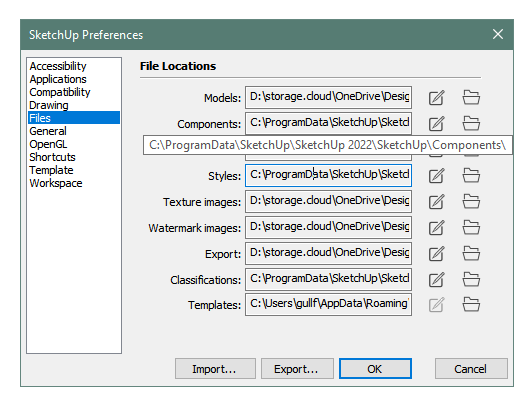
for my roaming content (plugins) i make sure i copy them over to the newest directory, and for my components, materials etc i copy them over to the newest program data folders.
update my preferences -> files
open SU verify the plugins etc are all working, then i mark the second oldest top level folder as "SketchUp 2020.X" in case i missed something, and remove the older ones.
-
RE: Medeek Wall Plugin
some thoughts -- unless the custom material is saved as an SKM, it has the potential to be purged from the memory space and thus not readily available again (unless some other means of caching it - e.g. a persisted JSON of custom materials containing the RGB values - presumably if images are involved, then saving it as an SKM would seem the better option + may be more compatible in terms of management compared to the built-in materials).
(as a note -- i stopped using materials in my own DC because of the purging etc -- so i just got better at organizing the SKM content. some DC have basic color "materials" applied and then i replace them later, most are default material so i can paint them all quickly)
-
RE: How to draw reinforced concrete using su
what level of detail do you need? if it's just exterior - then extruding the beam and column shapes will do it. if you need the full rebar layout internally - that will be more complex. although there are a couple of concrete - rebar type plug-ins which would help.
-
RE: [Plugin][$] ThruPaint - v2.8d - 13 May 25
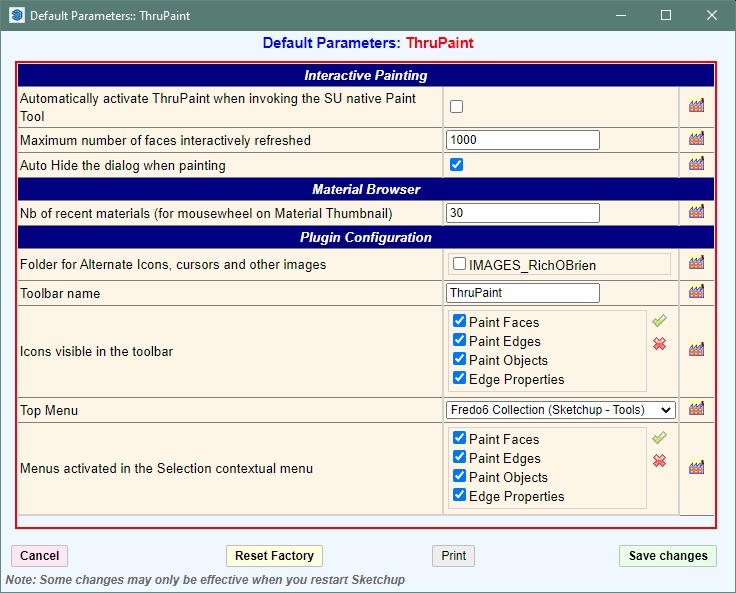
not sure where the IMAGE_RickOBrien folder is or how to change it
also same error with the materials path. it's says the roaming profile path is the default even though the setting in SU is the ProgramData path.
error from console:
Error: #<NoMethodError: undefined method
[]' for nil:NilClass> c:/users/gullf/appdata/roaming/sketchup/sketchup 2022/sketchup/plugins/fredo6_!libfredo6/body_lib6materialbrowser.rbe:660:inblock (2 levels) in folder_sorting_all'
c:/users/gullf/appdata/roaming/sketchup/sketchup 2022/sketchup/plugins/fredo6_!libfredo6/body_lib6materialbrowser.rbe:660:insort!' c:/users/gullf/appdata/roaming/sketchup/sketchup 2022/sketchup/plugins/fredo6_!libfredo6/body_lib6materialbrowser.rbe:660:inblock in folder_sorting_all'
c:/users/gullf/appdata/roaming/sketchup/sketchup 2022/sketchup/plugins/fredo6_!libfredo6/body_lib6materialbrowser.rbe:658:ineach' c:/users/gullf/appdata/roaming/sketchup/sketchup 2022/sketchup/plugins/fredo6_!libfredo6/body_lib6materialbrowser.rbe:658:infolder_sorting_all'
c:/users/gullf/appdata/roaming/sketchup/sketchup 2022/sketchup/plugins/fredo6_!libfredo6/body_lib6materialbrowser.rbe:884:inmatinfo_load_bulk_finish' c:/users/gullf/appdata/roaming/sketchup/sketchup 2022/sketchup/plugins/fredo6_!libfredo6/body_lib6materialbrowser.rbe:875:inmatinfo_load_bulk_start'
c:/users/gullf/appdata/roaming/sketchup/sketchup 2022/sketchup/plugins/fredo6_!libfredo6/body_lib6materialbrowser.rbe:2342:indialog_dom_ready' c:/users/gullf/appdata/roaming/sketchup/sketchup 2022/sketchup/plugins/fredo6_!libfredo6/body_lib6materialbrowser.rbe:2277:indialog_process_events'
c:/users/gullf/appdata/roaming/sketchup/sketchup 2022/sketchup/plugins/fredo6_thrupaint/thrupaintmaindialog.rbe:1064:indialog_callback_exec' c:/users/gullf/appdata/roaming/sketchup/sketchup 2022/sketchup/plugins/fredo6_thrupaint/thrupaintmaindialog.rbe:1056:indialog_callback'
c:/users/gullf/appdata/roaming/sketchup/sketchup 2022/sketchup/plugins/fredo6_!libfredo6/body_lib6chromiumwdlg.rbe:2428:incall' c:/users/gullf/appdata/roaming/sketchup/sketchup 2022/sketchup/plugins/fredo6_!libfredo6/body_lib6chromiumwdlg.rbe:2428:inmaster_callback'
c:/users/gullf/appdata/roaming/sketchup/sketchup 2022/sketchup/plugins/fredo6_!libfredo6/body_lib6chromiumwdlg.rbe:2206:inj_action' c:/users/gullf/appdata/roaming/sketchup/sketchup 2022/sketchup/plugins/fredo6_!libfredo6/body_lib6chromiumwdlg.rbe:2165:inj_callback'
c:/users/gullf/appdata/roaming/sketchup/sketchup 2022/sketchup/plugins/fredo6_!libfredo6/body_lib6chromiumwdlg.rbe:2151:inblock in j_dispatch' c:/users/gullf/appdata/roaming/sketchup/sketchup 2022/sketchup/plugins/fredo6_!libfredo6/body_lib6chromiumwdlg.rbe:2143:ineach'
c:/users/gullf/appdata/roaming/sketchup/sketchup 2022/sketchup/plugins/fredo6_!libfredo6/body_lib6chromiumwdlg.rbe:2143:inj_dispatch' c:/users/gullf/appdata/roaming/sketchup/sketchup 2022/sketchup/plugins/fredo6_!libfredo6/body_lib6chromiumwdlg.rbe:1428:inblock in create_dialog'
Error: #<NoMethodError: undefined method[]' for nil:NilClass> c:/users/gullf/appdata/roaming/sketchup/sketchup 2022/sketchup/plugins/fredo6_!libfredo6/body_lib6materialbrowser.rbe:660:inblock (2 levels) in folder_sorting_all'
c:/users/gullf/appdata/roaming/sketchup/sketchup 2022/sketchup/plugins/fredo6_!libfredo6/body_lib6materialbrowser.rbe:660:insort!' c:/users/gullf/appdata/roaming/sketchup/sketchup 2022/sketchup/plugins/fredo6_!libfredo6/body_lib6materialbrowser.rbe:660:inblock in folder_sorting_all'
c:/users/gullf/appdata/roaming/sketchup/sketchup 2022/sketchup/plugins/fredo6_!libfredo6/body_lib6materialbrowser.rbe:658:ineach' c:/users/gullf/appdata/roaming/sketchup/sketchup 2022/sketchup/plugins/fredo6_!libfredo6/body_lib6materialbrowser.rbe:658:infolder_sorting_all'
c:/users/gullf/appdata/roaming/sketchup/sketchup 2022/sketchup/plugins/fredo6_!libfredo6/body_lib6materialbrowser.rbe:884:inmatinfo_load_bulk_finish' c:/users/gullf/appdata/roaming/sketchup/sketchup 2022/sketchup/plugins/fredo6_!libfredo6/body_lib6materialbrowser.rbe:875:inmatinfo_load_bulk_start'
c:/users/gullf/appdata/roaming/sketchup/sketchup 2022/sketchup/plugins/fredo6_!libfredo6/body_lib6materialbrowser.rbe:2342:indialog_dom_ready' c:/users/gullf/appdata/roaming/sketchup/sketchup 2022/sketchup/plugins/fredo6_!libfredo6/body_lib6materialbrowser.rbe:2277:indialog_process_events'
c:/users/gullf/appdata/roaming/sketchup/sketchup 2022/sketchup/plugins/fredo6_thrupaint/thrupaintmaindialog.rbe:1064:indialog_callback_exec' c:/users/gullf/appdata/roaming/sketchup/sketchup 2022/sketchup/plugins/fredo6_thrupaint/thrupaintmaindialog.rbe:1081:indialog_callback_exec'
c:/users/gullf/appdata/roaming/sketchup/sketchup 2022/sketchup/plugins/fredo6_thrupaint/thrupaintmaindialog.rbe:1056:indialog_callback' c:/users/gullf/appdata/roaming/sketchup/sketchup 2022/sketchup/plugins/fredo6_!libfredo6/body_lib6chromiumwdlg.rbe:646:incall'
c:/users/gullf/appdata/roaming/sketchup/sketchup 2022/sketchup/plugins/fredo6_!libfredo6/body_lib6chromiumwdlg.rbe:646:inwonload_initial_adjust' c:/users/gullf/appdata/roaming/sketchup/sketchup 2022/sketchup/plugins/fredo6_!libfredo6/body_lib6chromiumwdlg.rbe:667:inwonload_sequence'
c:/users/gullf/appdata/roaming/sketchup/sketchup 2022/sketchup/plugins/fredo6_!libfredo6/body_lib6chromiumwdlg.rbe:2261:inmaster_callback' c:/users/gullf/appdata/roaming/sketchup/sketchup 2022/sketchup/plugins/fredo6_!libfredo6/body_lib6chromiumwdlg.rbe:2206:inj_action'
c:/users/gullf/appdata/roaming/sketchup/sketchup 2022/sketchup/plugins/fredo6_!libfredo6/body_lib6chromiumwdlg.rbe:2165:inj_callback' c:/users/gullf/appdata/roaming/sketchup/sketchup 2022/sketchup/plugins/fredo6_!libfredo6/body_lib6chromiumwdlg.rbe:2151:inblock in j_dispatch'
c:/users/gullf/appdata/roaming/sketchup/sketchup 2022/sketchup/plugins/fredo6_!libfredo6/body_lib6chromiumwdlg.rbe:2143:in `each'
...
-
RE: Import he NCS color system from .ase-file in SU
what tool are you using for the color import? color paint? what version?
-
RE: Import he NCS color system from .ase-file in SU
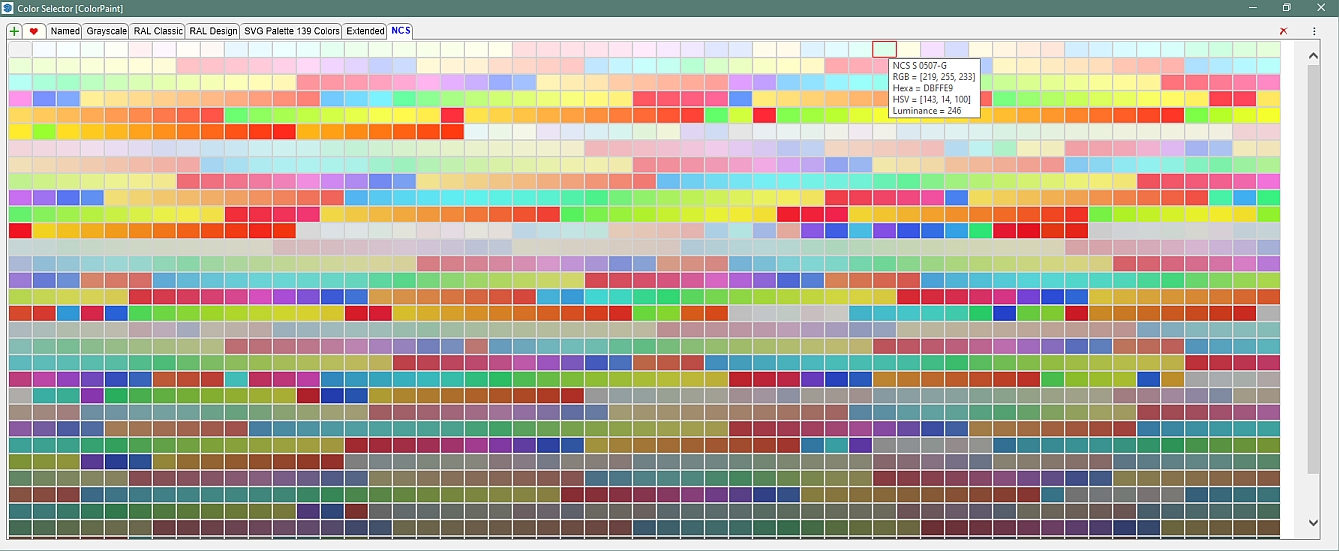
i created a color file which can be imported by Fredo's Color Paint tool. colors are sorted in name order. since rgb leads in the file, sorting on rgb would be easy enough in case you want to see in color order vs name order...
-
RE: Import he NCS color system from .ase-file in SU
i dumped the color list into a spreadsheet and ran the convert code to create the csv i attached to my original message.
-
RE: Import he NCS color system from .ase-file in SU
there are sources for the NCS colors and there are also online and github converters to get to rgb or hex which as Rich has pointed out could be imported from a text file.
e.g. source https://www.paintcolourchart.com/ncs-colors (which shows corresponding rgb, hex)
e.g. https://github.com/m90/ncs-color
-
RE: Medeek Wall Plugin
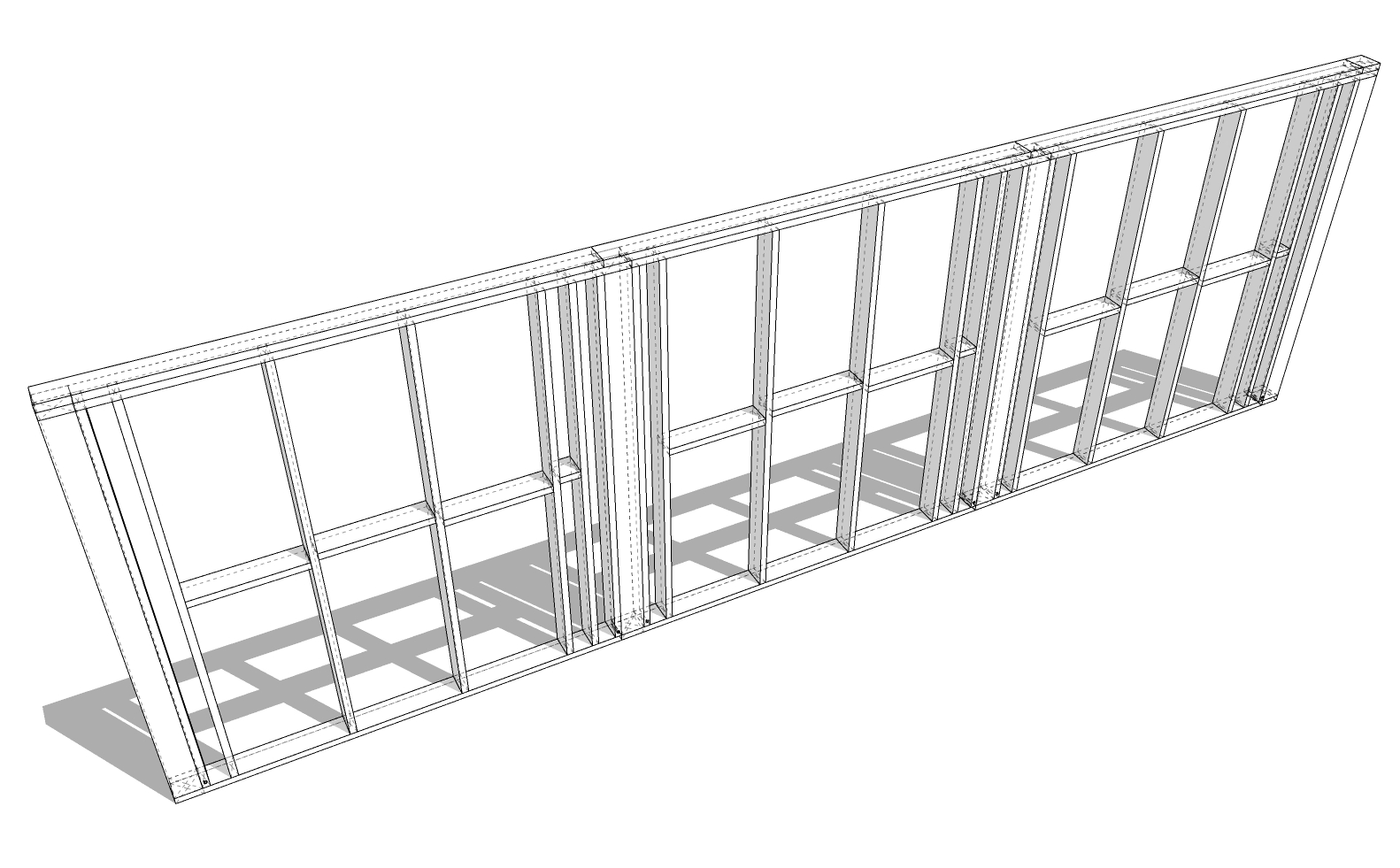
one thought - setting o.c. for column space - e.g. columns on 8' o.c. for a 24' wall could accommodate 4 columns (each end + spaced 8'). as an example, my personal DC wall assemblies, i would make 3 separate sections.
-
RE: A solution for Amazon deliveries
i'd probably done something a bit different - the opening is into the garage or other non-direct home access point - then a fixed size box which once the opening door is shut, a conveyor moves the package out and into the non-home room. video monitor warnings. etc. to try and prevent mischief. as a small edit - re-purpose some robotic vacuum/sweepers to perform the conveyance...
-
RE: Might Be Disturbed
since its b&w, just a butcher knife on the floor - clean - with a rag which looks like it has some dark stains on it...
-
RE: Component wont save with a Tag
maybe it would be better to have a setting where component tags are added into the model or not (default). that way, may components tags could be added as i build up my model. today i simply have all the tags i generally use in my components already part of my default template.
however, if i have a blank template and want to incorporate those tags (and those nested in tag folders), there is no retention of the folders (i.e. tags don't know their parent tag folder) - so that would be a nice fix to add to the list. understood this is likely due to backwards compatibility, but it would be nice for those of us using the latest tools have the logic (and settings) to enable (or not) so we don't have to recreate the folders...
-
RE: 3D Truss Models
nicely done - probably need "sprayed foam" insulation which would be incorporated into the rafters as well as joists + combinations. here in FL it's pretty common to have a layer of pink stuff in the joists against the drywall ceiling, then 1-2 ft of blown-in insulation. newer construction seems to use a lot of sprayed insulation on the rafter/sheathing but still using the pink and/or blown-in on the joists.
-
RE: Medeek Wall Plugin
good idea to leave the deprecated products in place so if someone is drawing an as-is, they can use them to represent it.
wondering how complex it is to add new/old components - if this is something only you can do, or if you have some key mapping points on components which could be dropped into the plugin component folder and some text updates to reflect the component anchors, default sizes, rotation point relative to x-y, etc etc. as a means of expanding.
-
RE: Custom Stone Veneer Texture
@l i am said:
For Council any "reasonable representation" of materials should suffice.
agreed, but that assumes rational people in the council... not always a given, and incumbency has its advantages when it comes to making a change of people composing the ruling group...
-
RE: Custom Stone Veneer Texture
@gus r said:
... apparently there's someone at the homeowner's association with nothing better to do.
as i just moved into a neighborhood with an HOA - they want: the plat map, landscape plan, house elevations, topology map, and the actual stone samples (sent or brought to ARC meeting). so i can replace 50ft of crappy plastic edging with actual block... i'd hate to see what they want if i have to add a shrubbery!
this is a site i've been using lately: https://www.sketchuptextureclub.com/
-
RE: Upscaling design
in LO - your view port can have the scale set to fit it on your paper size etc. in SU, you can set the scaling factors in the print dialog where you set the extent parameters.