Please post an example that exhibits this issue.
Oops, your profile's looking a bit empty! To help us tailor your experience, please fill in key details like your SketchUp version, skill level, operating system, and more. Update and save your info on your profile page today!
Urasik Extensions | Lots of new extensions to check out Learn More
G
Offline
Posts
-
RE: Push Pull Tool
-
RE: New Graphics Card .. Now Have Warning!
Joe
I very rarely use 2D export. Instead I use a screen capture program called faststone. Best 20$ US that I've spent in a long time. They have a 30 day free trial. Check it out.
I use it because it can do everything from videos to various image specs and editing.
Essentially it is WYSIWYG. It is Windows only - however - from what I've seen you do have Windows.
-
RE: New Graphics Card .. Now Have Warning!
Sketchup 2016 Pro
Windows 10
-
RE: [Plugin] GKWare Cabinet Maker
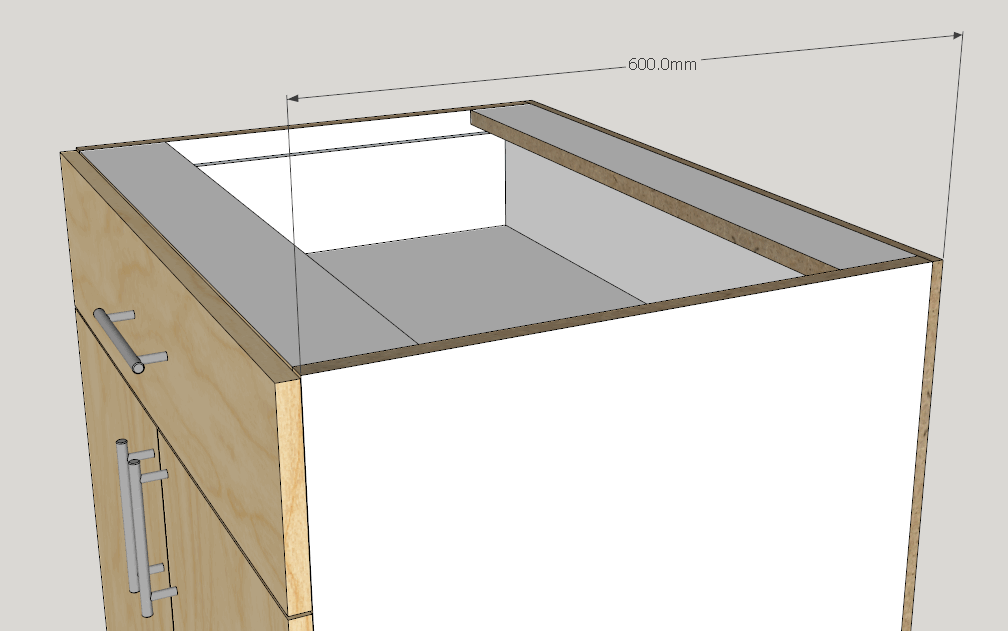
A user was asking how to have cabinets with plant on cabinet backs.
Simple. Set the "Back Offset" to 0 mm and set the "Back Dado / Rabbet" to the same value as the thickness of the case material.
In this case he uses a back thickness of 12 mm and a case thickness of 19 mm. His cabinet depth was set to 600 mm.
Also please note that the parts listing takes care of itself.
-
RE: Nested dynamic components
Yes
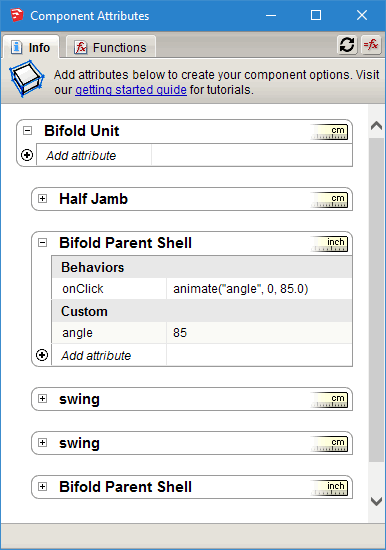
The Mother component has an new variable that you add called Rotation.
Rotation starts out = 0
Click once and Rotation goes to 1
Click again and Rotation goes to 0In a situation where you want more than 2 states - separate them by commas.
So for a 4 state variable where you might open and close the door in increments.
ANIMATESLOW("some variable", 0, 1, 2, 3) -
RE: Z-Fighting on Non-Coplanar Faces
I have never seen this as a bug. It is a limitation of open GL. This is why I put all cabinet backs into their own layer that I can turn on / off.
The other interesting thing is the bleed through effect changes based on viewing angle.
I just wanted to show users what can happen.
-
RE: Z-Fighting on Non-Coplanar Faces
Here is the back side of a corner cabinet. The back itself is 1/8" coated hardboard. The corner of the cabinet is at origin.
Windows 10, Sketchup 2016 Nvidia GForce GTX 660
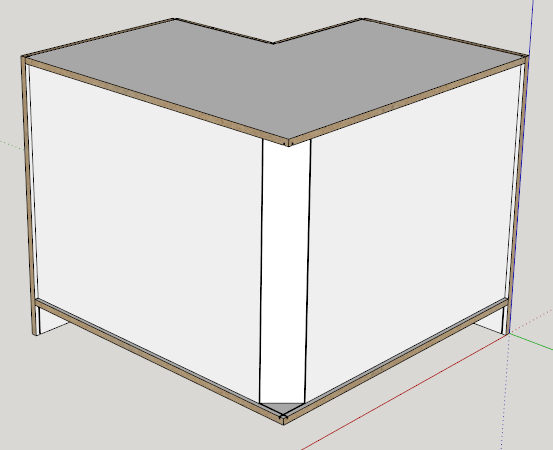
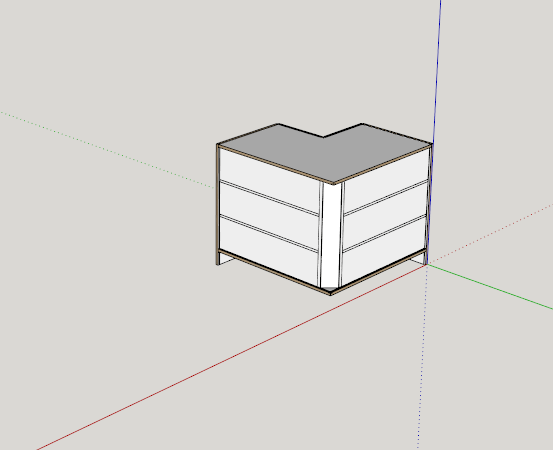
Now I zoom out and the shelves bleed through. The thinner the panel the worse it gets.
-
RE: [Plugin] Window Maker
-
If the material already exists in the model then all you need to do is add it to the colors.txt file. My plugins first check to see if the material exists in the model, if not then it tries to add it from jpg files.
-
I'm not sure what you are saying. Since the profile can be almost anything you want I don't see any issue.
-
Hopefully Sketchup will make that process easier in a future version. Currently a ruby script doesn't even know that layout exists.
-
You don't need a cross section of every single door, wall, window or cabinet. My understanding is that Scalp will make the cross section look solid instead of hollow. I think it would be the perfect tool for the job - at least that is what other architects have told me.
Thankyou for your kind words. All of this stuff keeps evolving.
-
-
RE: [Plugin] Window Maker
-
Currently my cabmaker plugin gives you edit capabilities by selecting the cabinet and right click and choose edit cabinet from the menu. Then you get the same web dialog and you can edit almost anything. I will consider creating a scale tool observer, allowing you to edit width and height of windows, cabinets and doors.
-
I haven't considered curved glass at this time. Please provide me with examples of curved windows that you require.
-
You can add / edit jpg images and my plugin will add your choices into the model and will map the size of the image by reading an entry from textures.txt file. Please note that the grain direction for the images is always vertical. I always create parts of the door / window / cabinet vertically and then move and rotate them into position. This strategy eliminates the need to have horizontal textures which helps keep the size of the model down.
-
Here is an example of a mitered door from my door maker plugin. As you can see the joints are reasonably realistic.
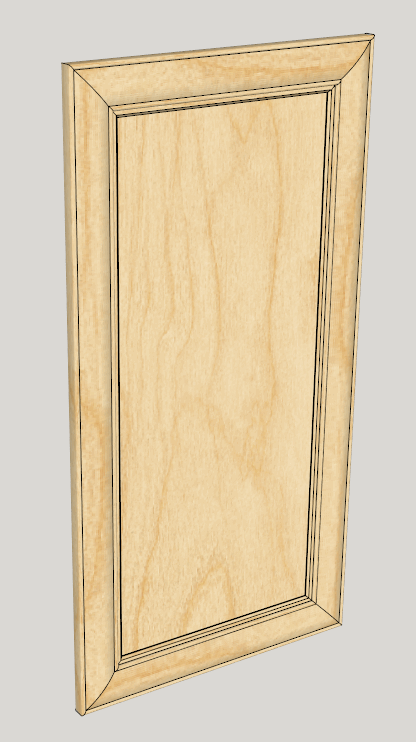
I made this profile - you can add your own.

-
Inserting schedules into layout is mostly a layout issue. From what I have read most users work with rtf files. Currently my reports are csv. If html works better then I may provide html reports, you would be able to edit the css file and have some control that way. I could be wrong but to my knowledge layout only allows rtf.
-
The architects that I have spoken with all use Scalp. I think that is an excellent way to obtain this type of detail.
-
-
RE: Nested dynamic components
juju
I haven't got very far with the window plugin. I have been concentrating on a wall plugin - then I'll go back to the window plugin.
-
RE: [Plugin] GKWare Cabinet Maker
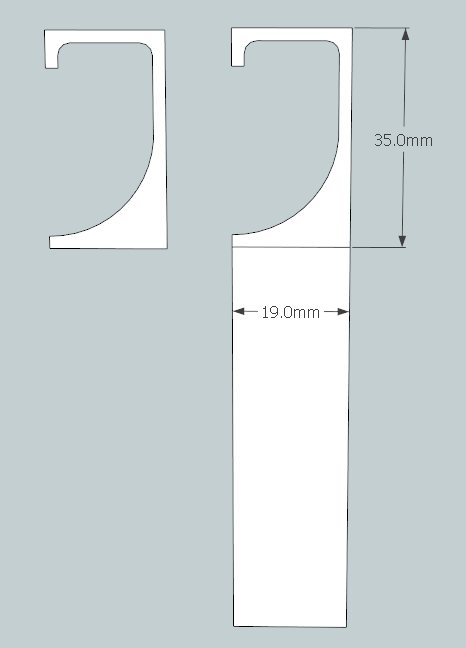
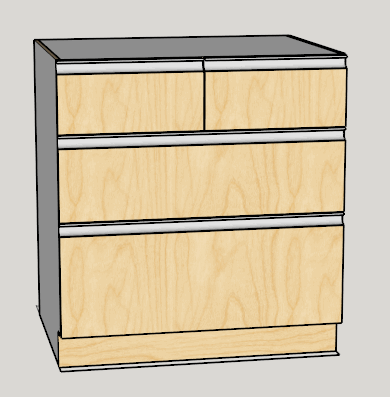
You can now create your own extruded profile and create plain doors or embossed doors with extruded handles.
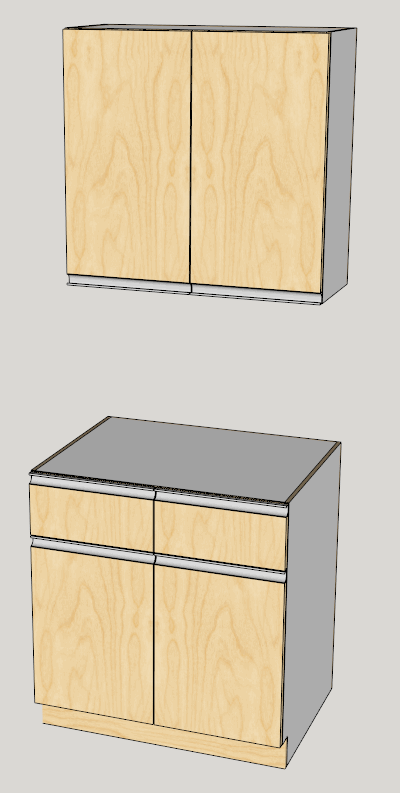
Here is the profile that I've included.
You can also create a top double drawer with a bank of drawers.
-
RE: Starting a new Ruby Tool Extension
Here's my 2 cents
Good that you show start_operation and commit
I think it is easier to teach when things are a bit more formal so I use () parenthesis for all functions.
Also I prefer to instantiate InputPoint in the initialize
Also you may want to pass things into the tool such as language dictionaries etc.
I think showing how to set up a tool bar is a good idea for a tool
Perhaps even a context menu for editing (right click).def initialize() @mouse_ip = Sketchup;;InputPoint.new() path = File.dirname(__FILE__) cursor_icon = File.join(path, 'my_cursor.png') @cursor_id = UI.create_cursor(cursor_icon, 0, 32) # for VCB parsing - need to know the delimiter @delim = ("3,7".to_l rescue false) ? ';' ; ',' end def activate() reset_tool(nil) end def onCancel(reason, view) reset_tool(nil) view.invalidate() end def reset_tool(view) @mouse_ip.clear() if (view) view.tooltip = nil end end def onSetCursor() UI.set_cursor(@cursor_id) end def enableVCB?() return true end def onUserText(text, view) # parse a couple of values end end unless file_loaded?(__FILE__) # best practice to set this early - especially if a timer is involved file_loaded(__FILE__) # add toolbar # add menu end -
RE: Nested dynamic components
Yes for doors, I'm working on windows and on a wall maker.
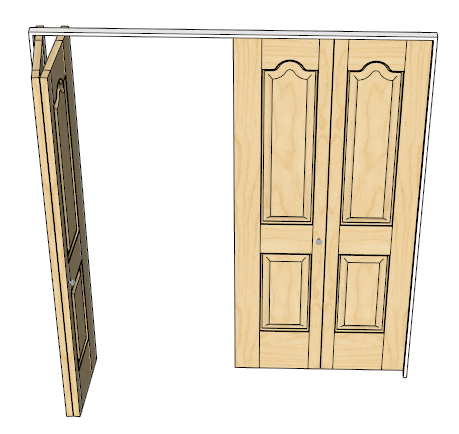
As you probably guessed - that bifold came out of my door maker.
-
RE: Nested dynamic components
It is all Ruby (except for door handles).
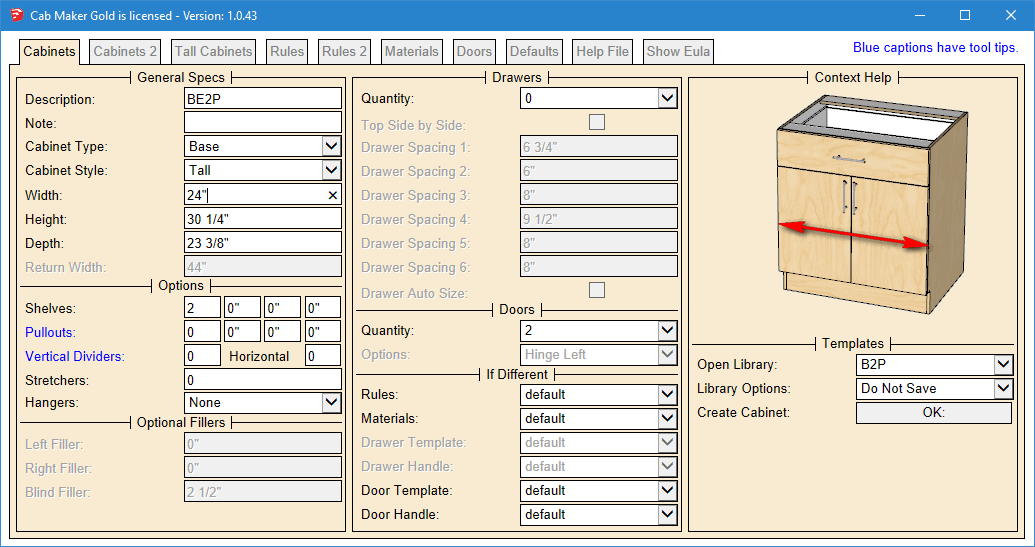
I have web dialogs for parameters. Cab Maker for instance has 8 tabs and around 240 graphics which change for each parameter. Lots of enabling / disabling of parameters depending upon what you select. Choose a library template (just a small text file) and I go read in the data and update the web dialog.
I think it is a much better work flow and the resulting skp is kept down in size. This way you can have 100's of choices for textures but I only load in the ones you want to use. This also means that most of the parameters are virtually infinitely sizeable and can be combined many many ways.
The only place that I use dynamic attributes is for doors opening / closing and drawers opening / closing.
-
RE: Nested dynamic components
Mother!Rotation refers to Rotation variable in Mother (should be named state)
On Click sets Mother!Rotation to either 0 or 1
RotZ formula Rotation*90 will be 0 when the state is 0 or 90 when the state is 1
RotZ in grey panel also references the variable Mother!Rotation and therefore it's value is either 0 or -180Pretty simple actually
-
RE: Nested dynamic components
Have you gone through this
https://help.sketchup.com/en/article/115544
Notice the axis:
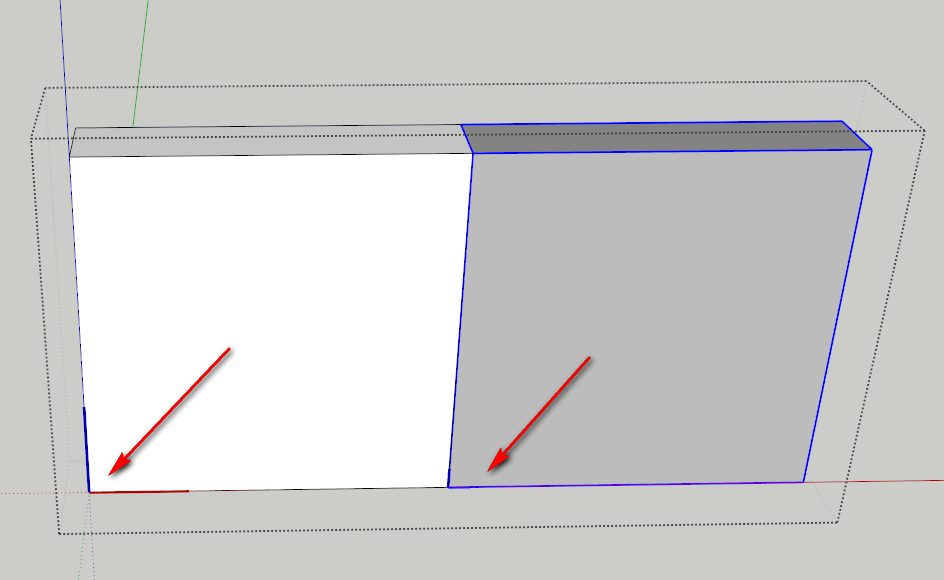
And here is the formula. Think of it this way
The top most component (Mother) gets rotated 90 which rotates both the grey and the white panels.
Then rotate the gray one -180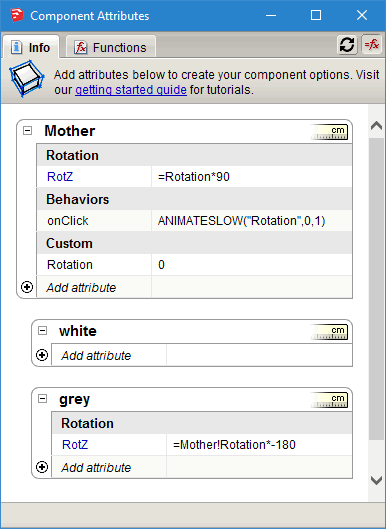
-
RE: Nested dynamic components
JQL
If you copy, paste and rotate this DC and then use interact then it bounces back to the same plane as the original.
You need to nest it one level deeper.
-
RE: Nested dynamic components
You might ask why so many nested levels. The right hand pair of bifolds are a copy (mirrored) of the left hand pair. The axis for the left most panel is the pivot point. So I made sure that it was in the center of the panel (thickness wise) and a couple of inches over from the end. That way the bifold pretty much acts like a real one. The other reason you need to nest at least 1 additional level is so the math survives moving and rotating the entire bifold.
Essentially the nest level that contains the formula isn't affected when I move and rotate the entire door assembly into position.
-
RE: Nested dynamic components
JQL is correct.
For example I have bifold doors that open and close. There is 1 click event for each bifold pair. The click event is performed on 1 bifold panel. The other panel moves in conjunction with the control panel.
These doors are created from scratch using Ruby.