sketchucation logo sketchucation
    • Login
    1. Home
    2. Garry K
    3. Posts
    Oops, your profile's looking a bit empty! To help us tailor your experience, please fill in key details like your SketchUp version, skill level, operating system, and more. Update and save your info on your profile page today!
    Urasik Extensions | Lots of new extensions to check out Learn More
    G
    Offline
    • Profile
    • Following 0
    • Followers 0
    • Topics 33
    • Posts 976
    • Groups 2

    Posts

    Recent Best Controversial
    • RE: 3D Truss Models

      Sorry Nathaniel,

      I'm with Julu on this.

      In my 34 years of programming - this type of short circuiting general accepted practice more often than not gets programmers into trouble.

      I know I've done it myself - and sometimes I've gotten away with it - and sometimes I've created problems for users. Even alienating a single user due to frustration is simply not worth it !!!

      So naughty naughty it is !!!

      posted in Plugins
      G
      Garry K
    • RE: [Plugin] GKWare Cabinet Maker

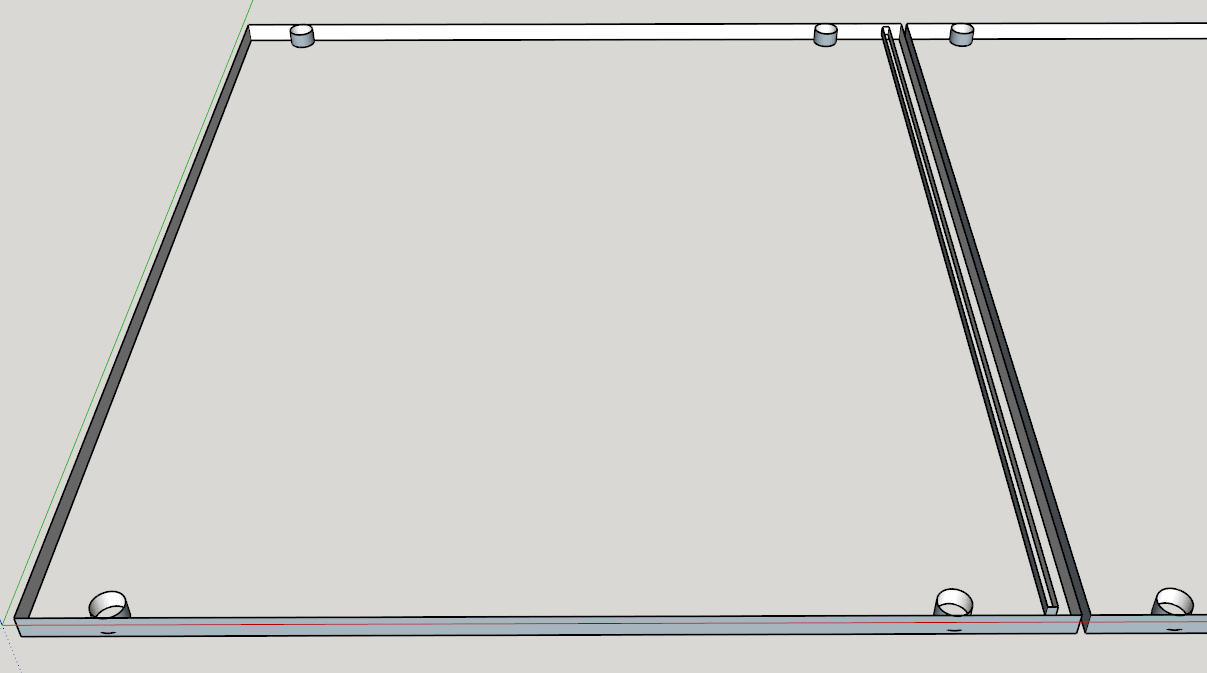
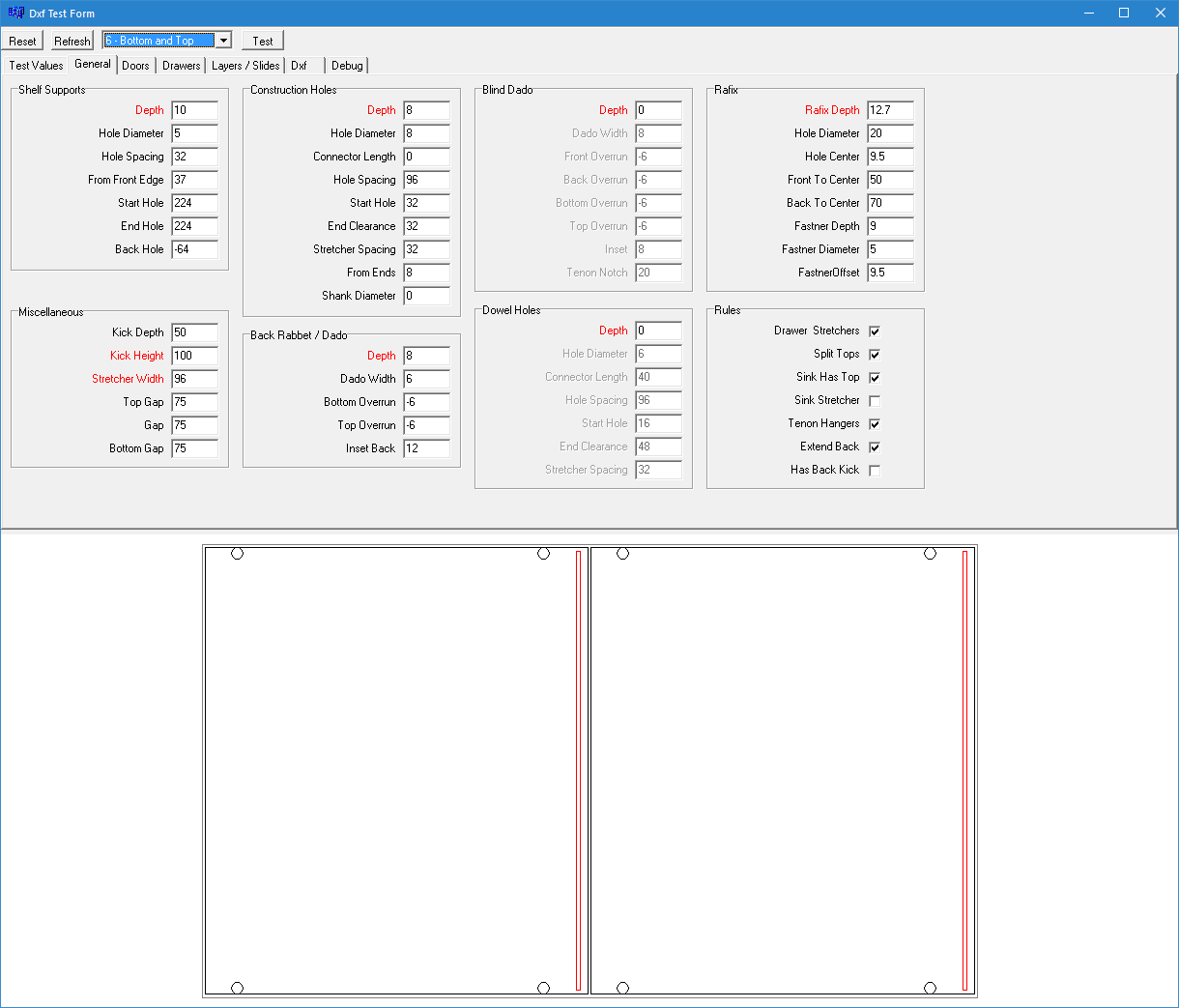
      Here is the setup for a top and bottom with a dado for 6 mm thick back. Also setup for Rafix.

      Rafix Top and Bottom.png

      Imported DXF into Sketchup

      DXF Rafix Top and Bottom.png

      posted in Plugins
      G
      Garry K
    • RE: [Plugin] GKWare Cabinet Maker

      This is a dxf file which I imported into sketchup. Then I added some dimensions.
      CutMaster pro setup controls all the details of the drilling (machining).

      Cup hinge mounting plates usually have 2 wings with mounting holes that are 32mm on center and 37mm from the center to the front edge of the side panels. You set these values in CutMaster DXF Options.

      If you usually work in inches you can temporarily set your units to millimeters while you are setting up your DXF options. This allows you to set all the values to your hardware manufacturer's specifications.

      Please note that door edging is currently set to 0mm. The software will adjust for door edging
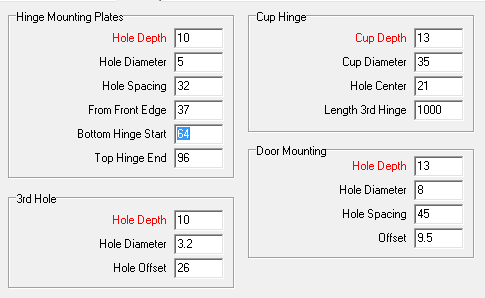
      dxf door setup.png

      In this case I set distance to first hole as 64mm and I set the hole spacing for mounting plates at 32mm. I set the distance to the top hole for the top hinge at 96mm (just for show). The bottom gap is set to 0mm and the top gap is set to 3mm. This results in the 80mm to center of the bottom cup hole and 109mm to the center of the top hole. I've also set door height for 3rd hole as 1000mm resulting in a 3rd hinge for these 2 doors.
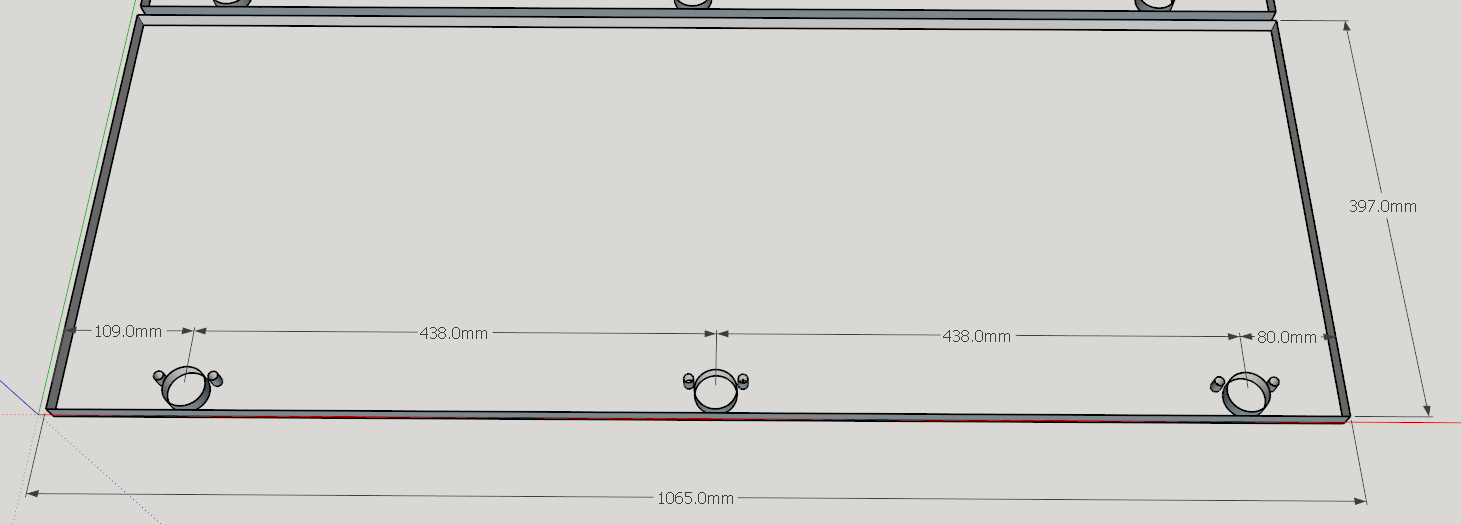
      dxf for door.png

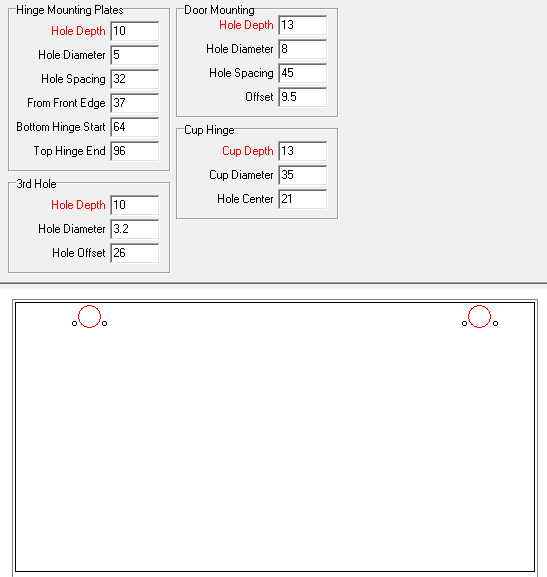
      In this detail there are more dimensions. The cup hinge diameter is 35mm and is 21mm from the edge of the door and is 13 mm deep. The 4 values for the door mounting holes are also clearly illustrated.
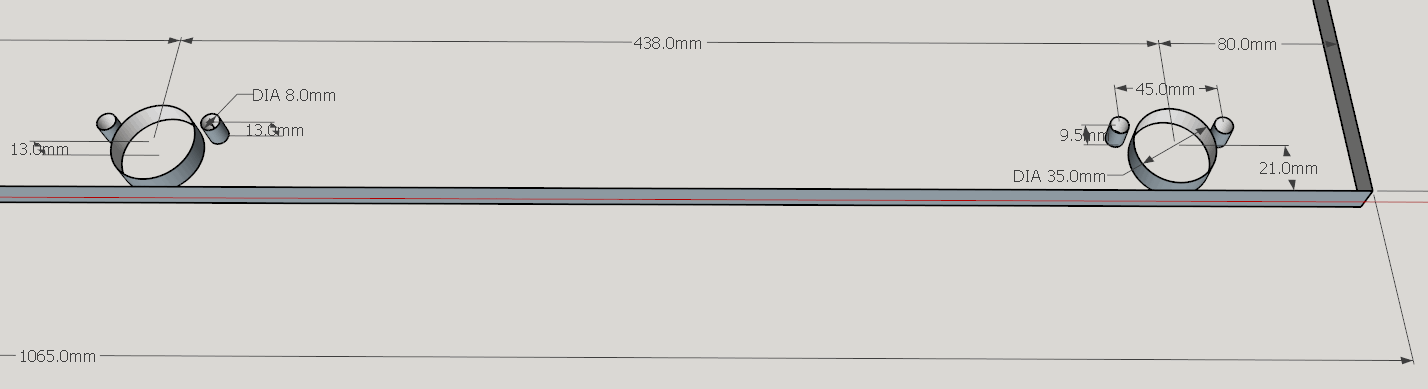
      hinge details.png

      posted in Plugins
      G
      Garry K
    • RE: [Plugin] GKWare Cabinet Maker

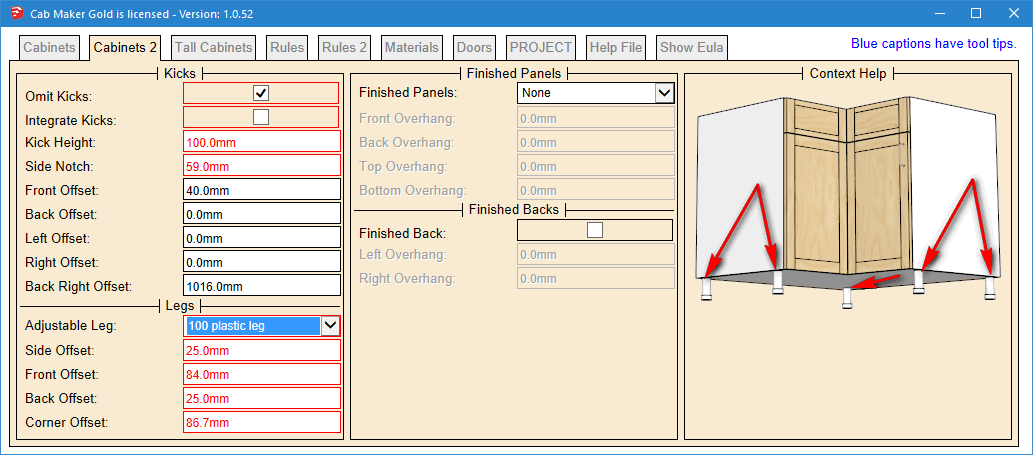
      Version 1.0.52 ready for download

      Added cabinet levelers. You can now have legs with or without kicks.
      You control the leg and the placement by setting offsets from cabinet edge to center of leg.
      If you don't want legs you just choose "No Leg"

      __Cabinets 2 Tab.png

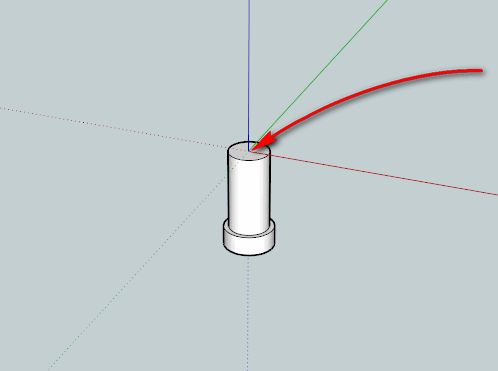
      Legs are stored in GKWare_CabMaker\legs\ folder and are skp files.
      Make sure you place the leg so that the top center is at the ORIGIN.

      100mm plastic leg.png

      posted in Plugins
      G
      Garry K
    • RE: [Plugin] GKWare Cabinet Maker

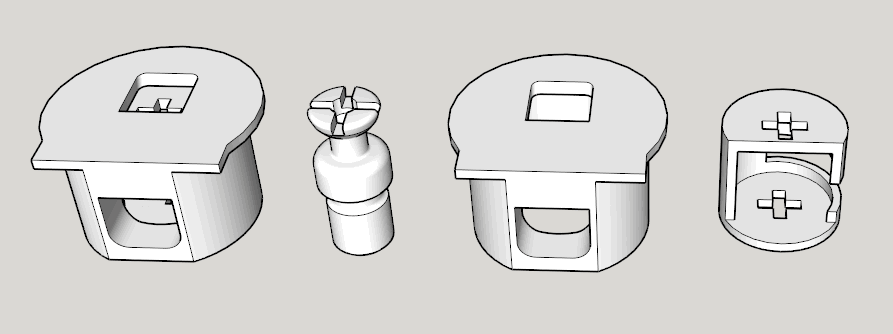
      Nice little connector


      rafix.png

      posted in Plugins
      G
      Garry K
    • RE: [Plugin] GKWare Cabinet Maker

      So I see that the diameter is 20 mm and the center is 9.5 mm from the edge and is 12.7 mm deep for 16mm thick top or 14.2 mm deep for 19 mm top.

      For this connector to line up properly the 5 mm hole in the side panel needs to be offset from the top edge (center) based on top thickness - 9.5 mm.

      How much play (if any) is there. Would you be using a couple or 3 dowels to align everything?

      posted in Plugins
      G
      Garry K
    • RE: Sketchup CNC

      Are you looking for a tool to create a dxf file or are you looking for G-Code complete with tool paths?

      posted in Woodworking
      G
      Garry K
    • RE: [Plugin] GKWare Cabinet Maker

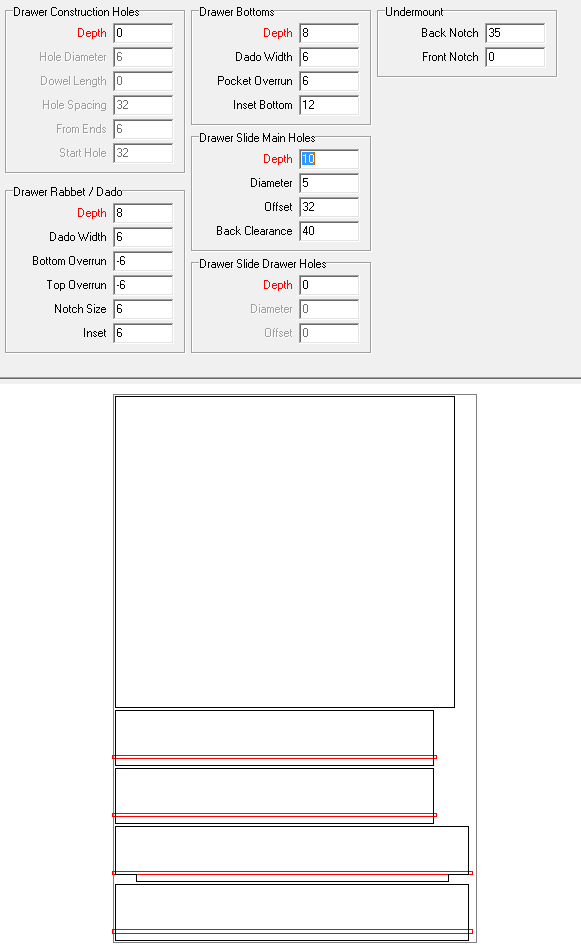
      Here are some of the parameters for Drawer boxes.
      You can have construction holes for the drawers or rabbeted drawers.
      This example shows a notch on both ends of the back for an undermount drawer slide.

      dxf drawer parts.png

      posted in Plugins
      G
      Garry K
    • RE: [Plugin] GKWare Cabinet Maker

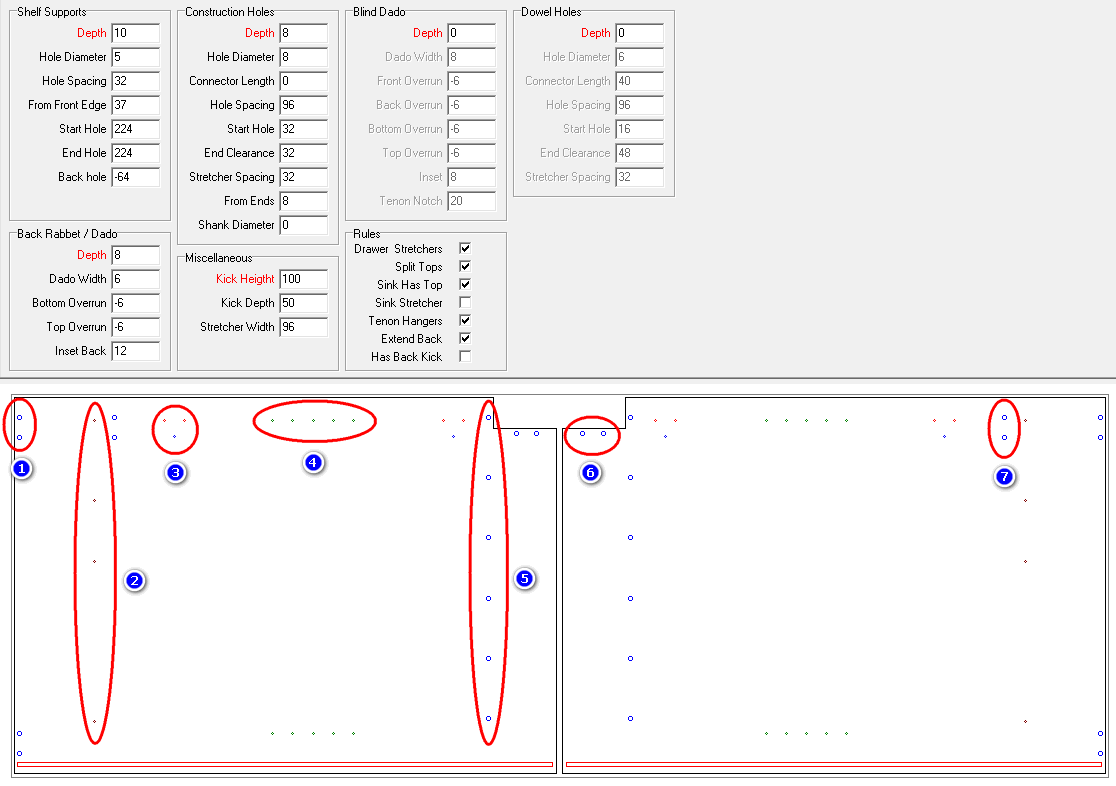
      I'm getting close with the DXF file export in CutMaster Gold.

      1. construction holes for a split top (can be full top)
      2. holes for mounting drawer slides
      3. holes for hinge mounting plates
      4. holes for adjustable shelves
      5. construction holes for cabinet bottoms
      6. construction holes for front kick
      7. optional construction holes for optional stretchers

      dxf side drilling.png

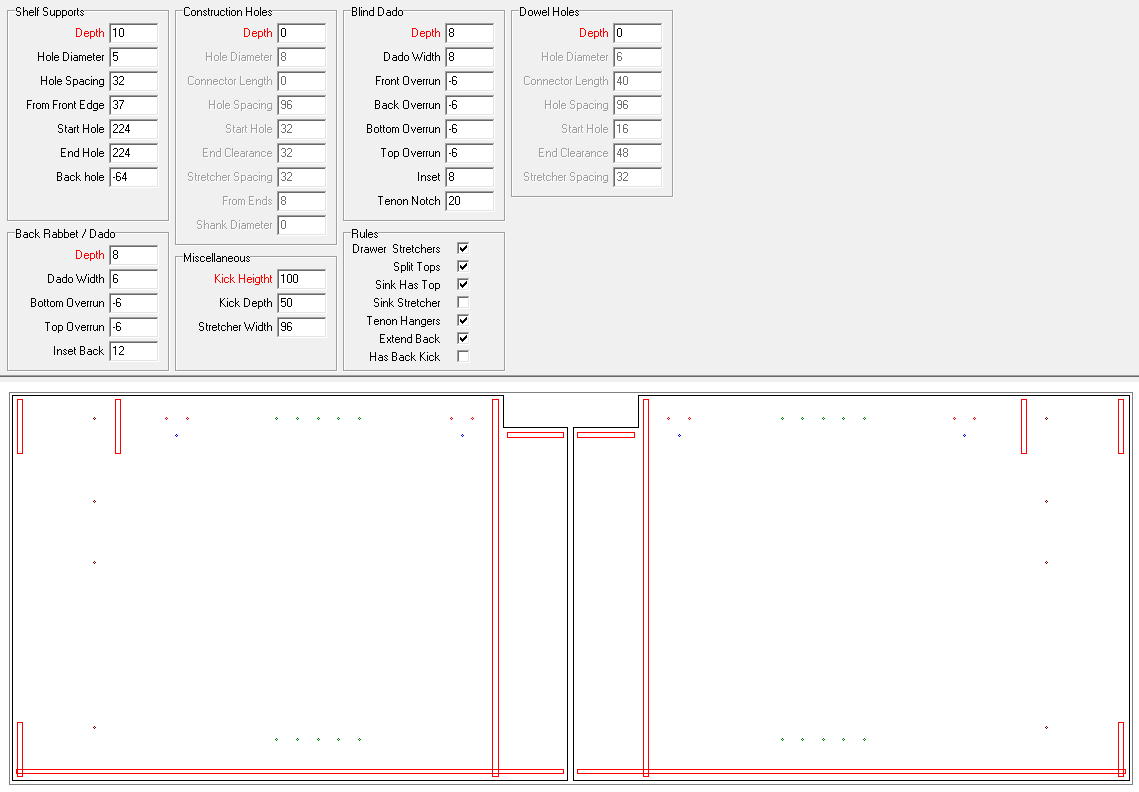
      Or pocket routing for blind dados

      dxf pocket doors.png

      And drilling for cup hinges including drilling for hinge fastners

      dxf door hinges.png

      posted in Plugins
      G
      Garry K
    • RE: SketchUp 2017 Wishlist

      I think it is about leveraging a software. I agree that Dynamic Components do increase file size and slow down loading etc. That is why I don't use them. I do leverage Dynamic components for Doors and Drawer opening.

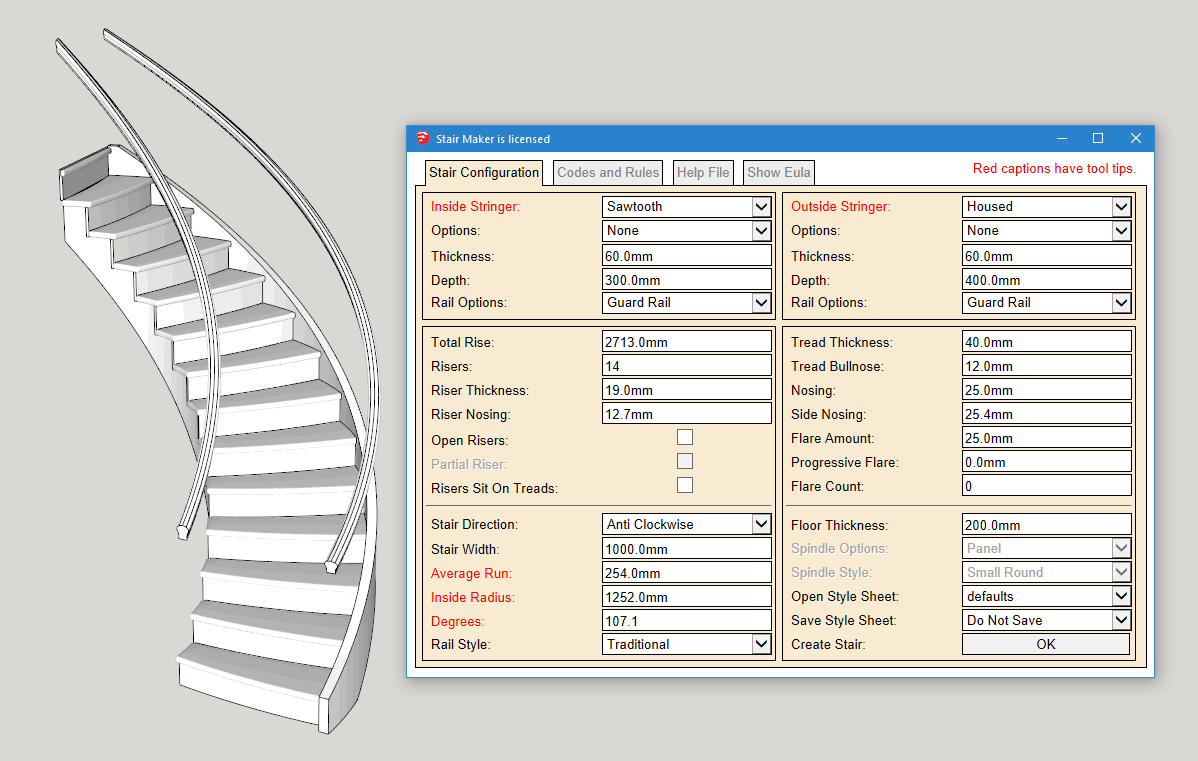
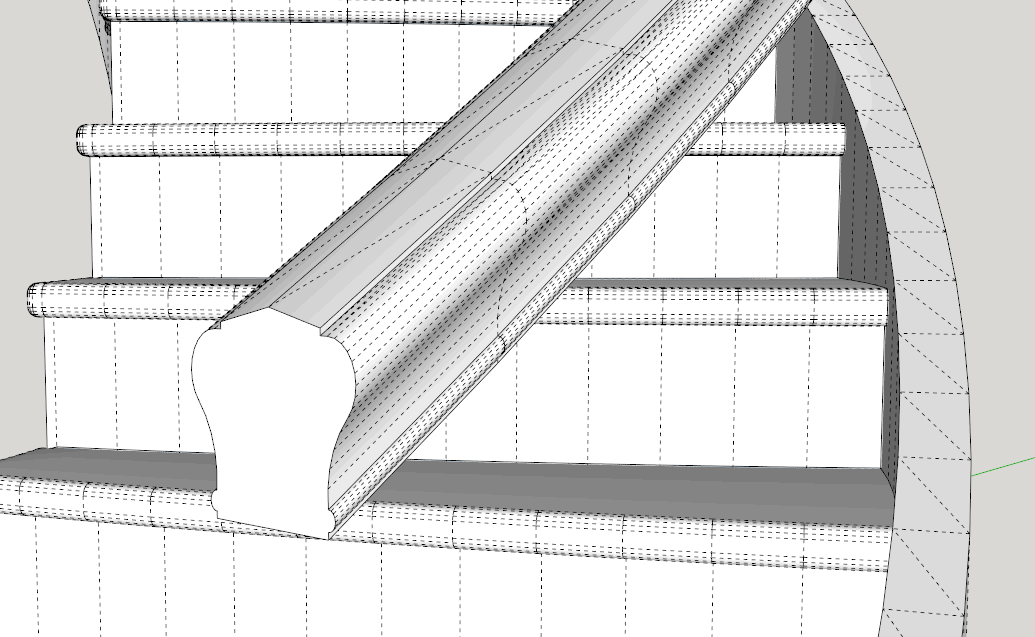
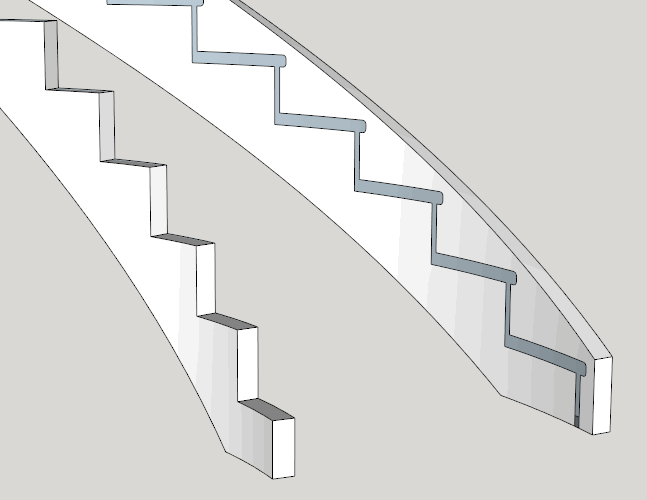
      Here is a Stair - lots of curves - built with my Stair Maker - ruby code. The Stair comes out at 1440 KB which I think is reasonable.


      Curves.png


      hidden.png


      stringers.png


      stair.skp

      posted in SketchUp Feature Requests
      G
      Garry K
    • RE: [Plugin] GKWare Cabinet Maker

      Version 1.0.51 now available

      It is now easier for Mac OSX users to distinguish between disabled and enabled controls and their labels. Disabled labels and controls are now grayed out.

      posted in Plugins
      G
      Garry K
    • RE: [Plugin] GKWare Cabinet Maker

      Anyone interested in helping out with language translation files?

      I'm happy with English and French.
      Russian gets updated from time to time.

      More work needed on German, Polish, Portuguese and United Kingdom

      I would like to see Spanish, Japanese, Korean, Traditional Chinese and Simplified Chinese

      posted in Plugins
      G
      Garry K
    • RE: [Plugin] GKWare Cabinet Maker

      CabMaker Version 1.0.50 is now available for download

      1. Added Horizontal Handles on PROJECT tab in Door Section.
      2. Made changes to the naming on the web dialog.
      3. Updated language files.
      4. For Mac OSX fixed checkboxes in web dialog. Check boxes for rules now have a red border. Also fixed checkbox focus event for context sensitive help images.
      5. Added mouse hover for text boxes, check boxes and drop downs. This is for users who prefer working mainly with the mouse.
      posted in Plugins
      G
      Garry K
    • RE: [Plugin] GKWare Cabinet Maker

      CutMaster version 2.0.1.22 is now available from my website. (Windows ONLY)

      1. Changed Database to SQLite
      2. Requires free SQLite ODBC driver
      3. Added edging editor (Gold)
      4. Added joinery editor (Gold)
      5. Now loads last job at startup
      6. Batch Optimization wasn't happening on Open Job or Import. Fixed.
      7. Layout wasn't preserved between sessions. Fixed.
      8. Import routine now handles different field delimiters and handles commas with numbers
      9. With Metric units the Summary report can optionally show meters instead of feet
      10. With Metric units material usage can optionally show meters instead of feet
      11. Now Storing cost as pennies etc. You must now enter pennies etc.

      CutMaster requires SQLite ODBC driver. Werner has free drivers which I use. There is a 32 bit version and a 64 bit version. Both are available from my web site and there is a link to Werner's ODBC page.

      SQLite Expert Personal is a richly featured Database manager and is free for both personal and commercial use. I have also put a link from my web site to the SQLite Expert web site.

      Next I will update the user manual and add in language support. After that I will complete the DXF Section.

      posted in Plugins
      G
      Garry K
    • RE: [Plugin] GKWare Cabinet Maker

      Version 1.0.49 is now available.

      Where sides are sandwiched between top and bottom we are now edging the right and left edges of the top and bottom
      Tall cabinet top section handle not honoring defaults tab. Fixed.
      New Version info was not translating. Fixed.
      Pullouts for tall cabinets with frame construction were wrong size. Fixed.
      Tall Upper cabinets top and mid section doors not aligned. Fixed.

      posted in Plugins
      G
      Garry K
    • RE: Storing Bounding Points

      I like to keep my data in a structure and I like to save structures to disk and / or store them as a complete record in a dictionary.

      So you can either parse the file / or parse the dictionary in the same exact way.

      Actually very simple and extremely future proof as they are key pairs. New versions that introduce new fields (elements) need only provide a reasonable default.

      I can provide you with examples if you want to PM me.

      posted in Developers' Forum
      G
      Garry K
    • RE: [Plugin] GKWare Cabinet Maker

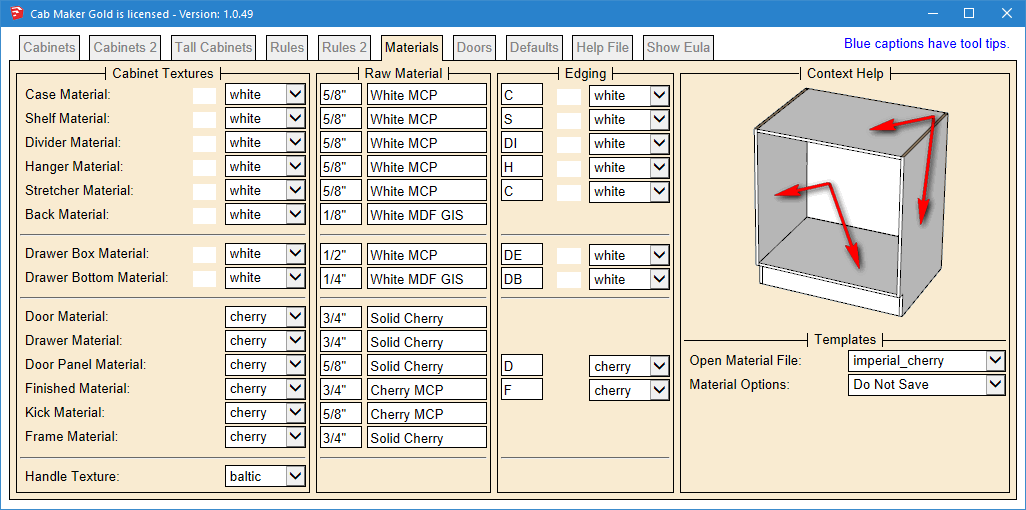
      The Web dialog interface now includes edging information. I have also fixed a number of small bugs.

      Added quantity to cabinets for reporting. This adjusts the parts list quantities for cabinets.
      Added more fields to parts list for Cutmaster Gold.
      Added short codes and textures for edging.
      Cabinet description were being randomly updated in a batch based on selection order. Fixed.
      Defaults tab was not being stored with model. Fixed.
      Finished panels created issues when Fillers had non zero value. Fixed.


      __Materials Tab.png

      posted in Plugins
      G
      Garry K
    • RE: [Plugin] GKWare Cabinet Maker

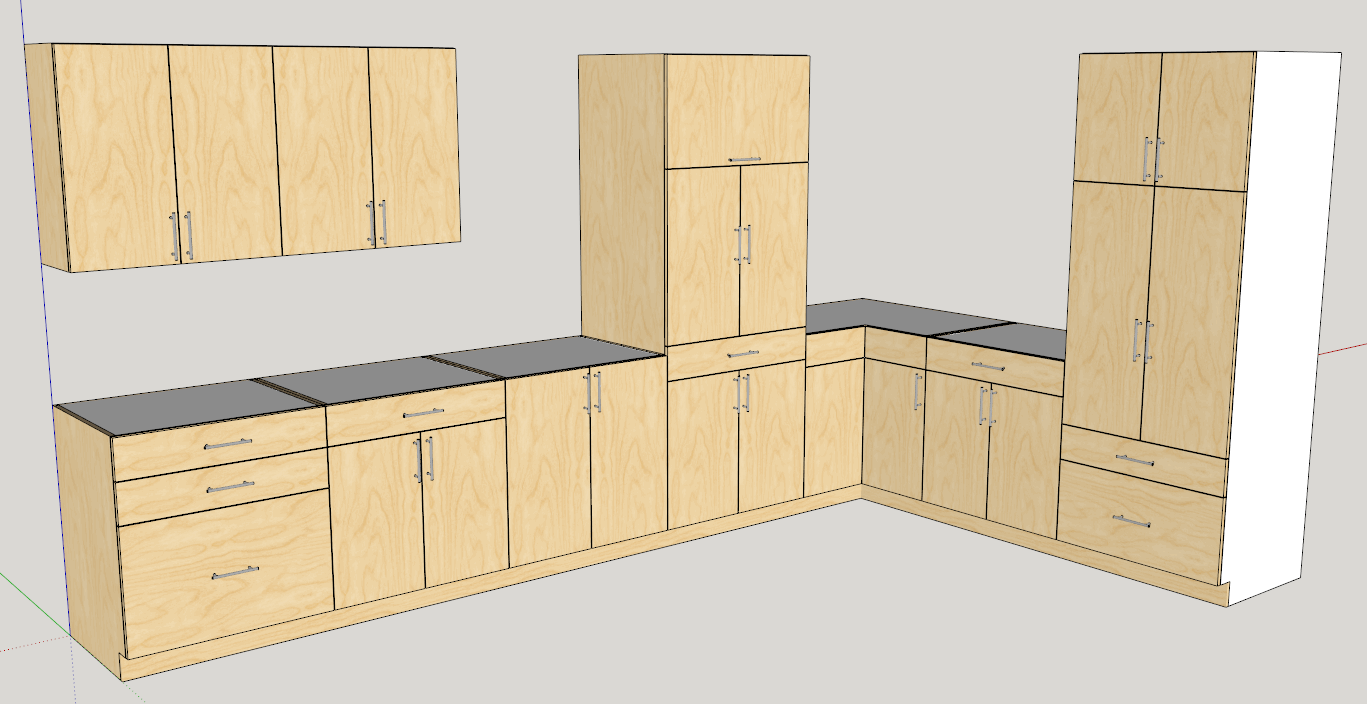
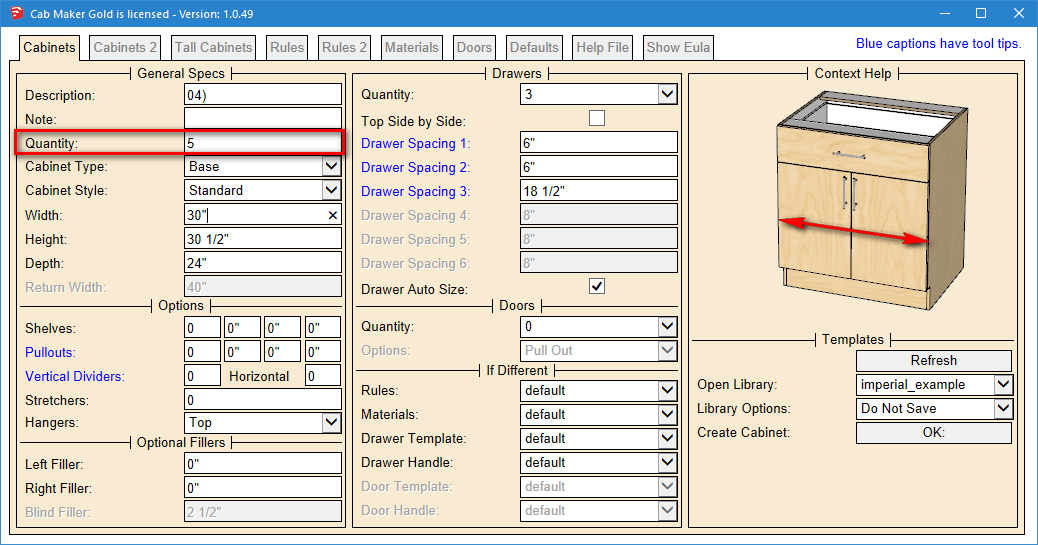
      Working on the next version. The major changes are adding Quantity for each cabinet so that your cutting lists automatically adjust.

      cabinets.png

      The quantity field will automatically default to 1

      cab_tab.png

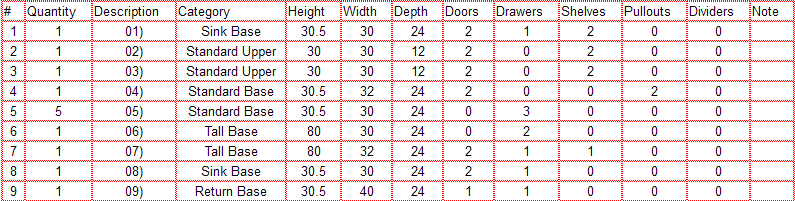
      Here is the Cabinet listing. Notice that I changed the quantity to 5 for the Drawer bank on the left hand side.

      Cabinet Listing.png

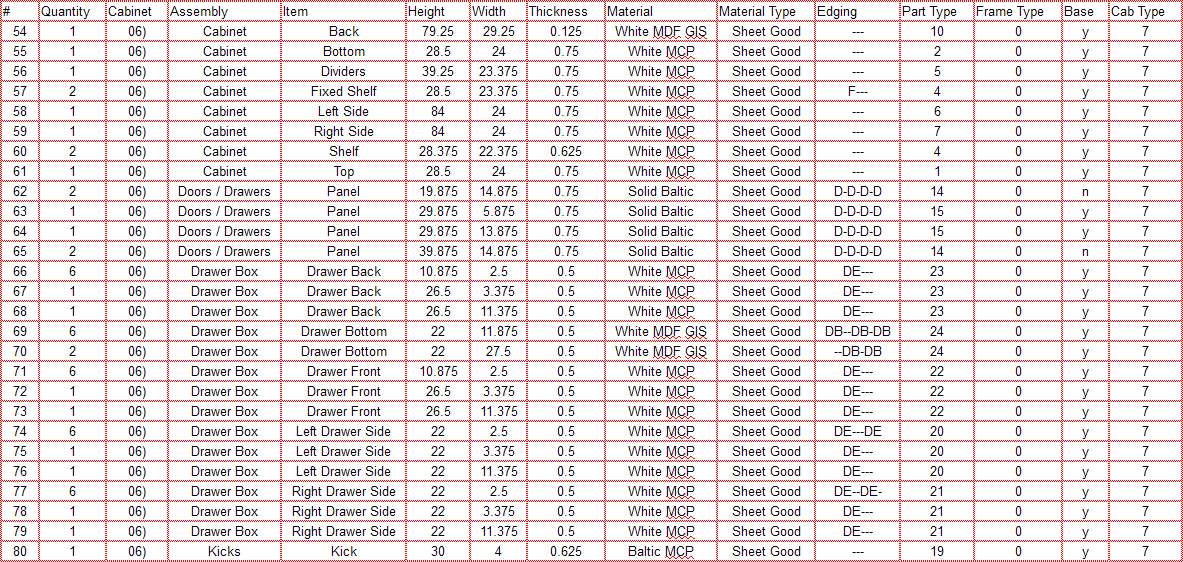
      The new parts listing has additional fields so that Cutmaster Gold knows how to deal with the machining and edging. We are going to use short codes for edging and you can set these on your Material tab. Cutmaster will also have these short codes and you can give different colors and different edging thickness to each of the short codes. Cutmaster Gold will automatically adjust the panel width and length for edging thickness. You will also see different line colors that represent the edging.

      The Part Type, Cab Type, Base and Frame Type fields are sent to cutmaster Gold so that it will know what to do with machining - drilling etc.

      Parts Listing.png

      posted in Plugins
      G
      Garry K
    • RE: [Plugin] GKWare Cabinet Maker

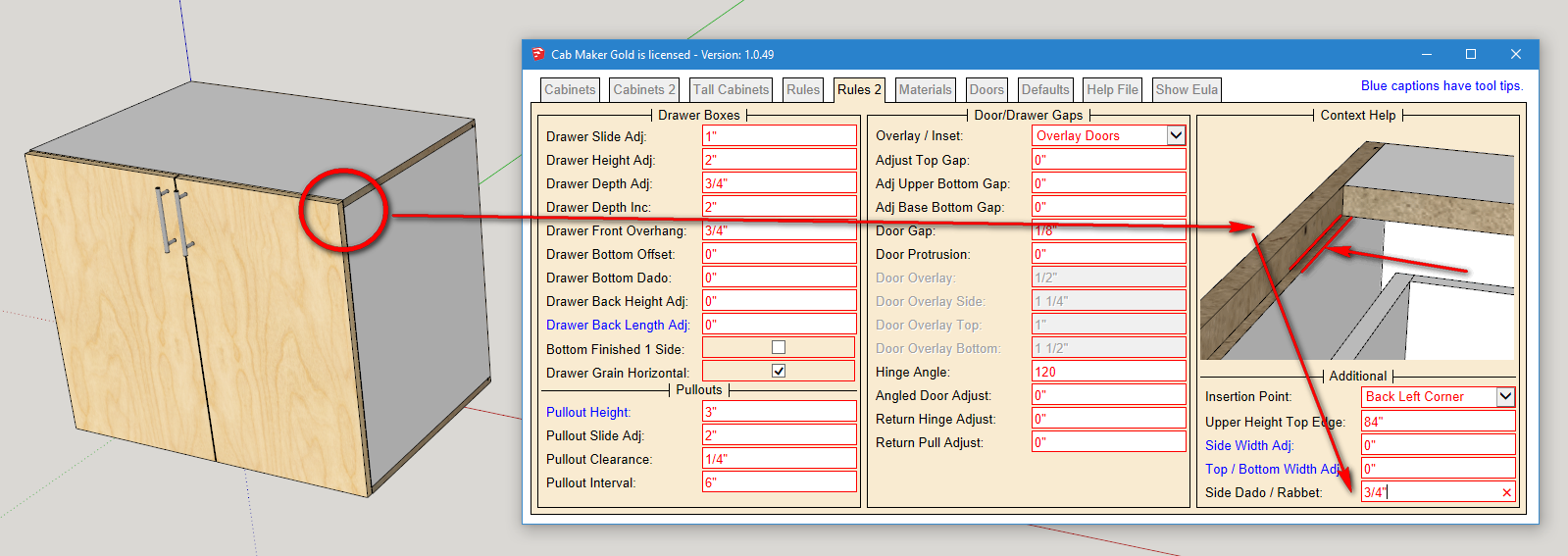
      You can do this if you want.

      Set the "Side Dado / Rabbet" to the same value as the case thickness.
      Does not work with Integrated Kicks.

      sandwich gables.png

      posted in Plugins
      G
      Garry K
    • RE: [Plugin] GKWare Cabinet Maker

      Hinge holes for sure.

      CutMaster Gold will come out in several weeks with some of the final features. I will add in more over the next couple of months.

      Edging is first. Then will come DXF. DXF will start out with Construction holes (usually 8 mm dowels) and with system holes (usually 5 mm drilling on 32 mm centers). Next will be the routing for backs etc.

      posted in Plugins
      G
      Garry K
    • 1
    • 2
    • 14
    • 15
    • 16
    • 17
    • 18
    • 48
    • 49
    • 16 / 49