Actually, I think I solved the syntax errors but the script doesn't seem to do what I would like to have happen. Thanks anyway, TIG.
Dave
 D
Offline
D
Offline
Actually, I think I solved the syntax errors but the script doesn't seem to do what I would like to have happen. Thanks anyway, TIG.
Dave
It looks very much like part of our medical oxygen system at work. The oxygen is liquid as it comes out of the Dewar and cools the plumbing as it vaporizes before it goes to the first stage of regulation. Of course our system is much larger than the one in the picture.
Cool! Thank you sir.
Unfortunately I got the following error on SU startup.
"Error Loading File default_all_layers.rb
C:/PROGRA~1/Google/GOOGLE~3/Plugins/default_all_layers.rb:41: syntax error
C:/PROGRA~1/Google/GOOGLE~3/Plugins/default_all_layers.rb:43: syntax error
end#if
^"
Alright. Lay face down on the floor with your arms outstretched... Oh wait. Wrong kind of search. 
Actually, I am wondering if there is a could be written a script which, when activated would drill through all groups and components and move all geometry (edges and faces) to Layer 0. It seems lately in my tutoring that I am getting a lot of models from newer users who have screwed up and associated some geometry with layers other than Layer 0. Frequently the geometry is on a layer other than the layer associated with the group/component that the geometry is in. Obviously this creates problems when one starts to hide these layers. It is very tedious to go through each group and component to straighten this out.
So, is it already written? Or is it easy to write? I'm thinking that it could be a click and its done sort of thing. No need for choices or options.
@nick w said:
I feel like the sky, lighting, overall tone is a little drab. Nothing wrong with that in and of itself, I just like a happy sky
Very nice work.
my two cents
And some "happy trees". 
Nice work Irsuser.
@didier bur said:
One thing more on my to do list... I can't even remember them all... I wish I had a true todo list as a file on my computer...
Maybe you could write a plugin for that.
It is an rb file. If you've managed to save it as a TXT file, rename it and change txt to rb.
Actually, I should apologize. That doesn't appear to link to the version I was thinking of. Here's that link. You may need to sign up on the Google Pro Group to access it. Open the ZIP file and extract the files to the Plugins folder.
There is a plugin already, several actually, that will give you a cutlist output to a CSV file. THey are designed to give volume as board feet which is the common method in the US. It would be a simple matter to add a conversion column to an Excel spreadsheet to calculate M^3 from BdFt. I suppose the script could be modified to give you M^3 instead but I am not smart enough for that. 
I think this is the current version. (3.3) http://www.crai.archi.fr/RubyLibraryDepot/Ruby/CutListAndMaterials.rb
Putting together found stuff. Don't know how useful this would be to anyone. It's a pretty big file so I'll either send it to those who request it or post it here if desired and if it fits.
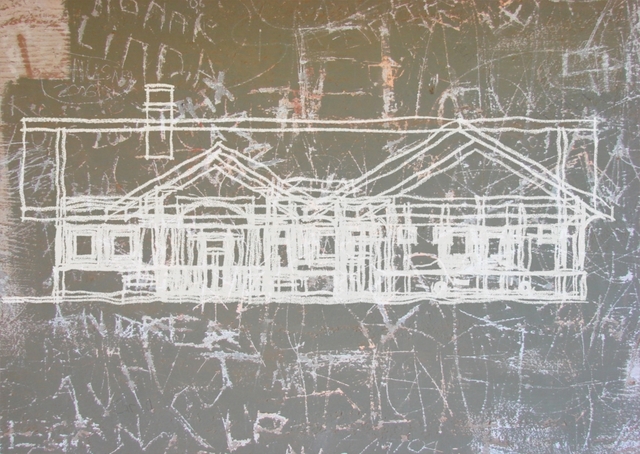
Larger version here.
thank you. Maybe not the right forum but since I wasn't posting a style file at the time, I thought this more appropriate. No one complained so I figured I was alright. 
Check the Styles forum now. I posted the style albeit with a different line style.
Here's a style I made with an old linen background. It's a little flat as a straight export from SU but for simplcity's sake I just use Picasa and Auto Contrast. It seems to suit better. Looks like backlit fabric then anyway.
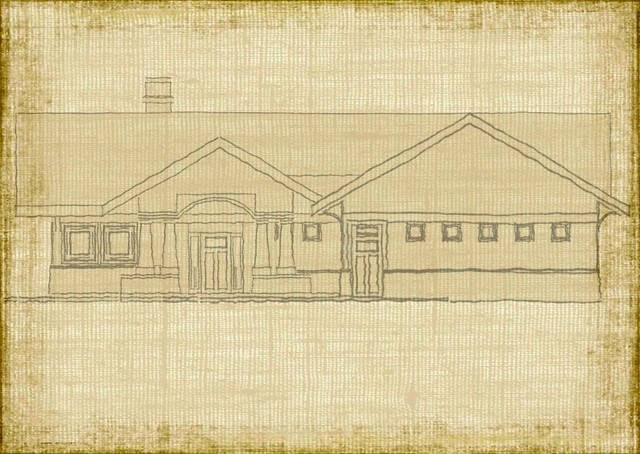
Thanks TIG. You beat me to it.
Mike, do you still want me to do that for you?
Mike, if you were to do what you want, you'd end up with a massive file. I would work out one segment of the intertwined "wires" on a portion of a cylinder of the proper radius. Then I would it a component and make a radial array of it. Hide the end line segments and it'll look pretty good.
If you want to send me the model you have there, I'll make a demo for you.
Dave
How about this one from Smustard?
Thank Gai, I ended up sending it to him as a TXT file. I told him to open it in WordPad and save it with rb as the extension. It worked but now, when he opens SU he gets the following error message.
"Error Loading File BEZIER.rb
C:/Program Files/Google/Google SketchUp 6/Plugins/BEZIER.rb:1: Invalid char \377' in expression C:/Program Files/Google/Google SketchUp 6/Plugins/BEZIER.rb:1: Invalid char \376' in expression"
I'm not quite sure where to look for the problem. He says he downloaded the file again from Didier's site and gets the same message.
I know he should have Fredo's kit but at this point I think we'll be happy to get this simple script loaded with no errors. Then he can move up.
Cheers,
Dave
Yeah, we went through all that. He still can't get it to go. Oh, and he has all the boxes under extensions checked.
Not me. I have a friend and SketchUp newbie with whom I've been e-mailing. He's having trouble getting his first downloaded plugin to work. He wants Bezier.rb. He initially downloaded it from Didier's site but when asked for the file type to save, saved it as MHTML. Of course that didn't work and he contacted me. I had in rename it to .rb with no luck. I had him delete the file from the Plugins menu and download it again making sure to save it with the .rb extension. No joy. I sent it to him as a TXT file and had him save that and rename it. No luck. Even after changing the name he says it is showing now as a TXT file.
So any ideas? Does he need to throw his computer away and start over? All I know at this point is he's using a PC.
Thanks in advance.