Oops, your profile's looking a bit empty! To help us tailor your experience, please fill in key details like your SketchUp version, skill level, operating system, and more. Update and save your info on your profile page today!
Check out Febhouse | New extensions for Shadow Analysis in SketchUp Download
D
Offline
Posts
-
RE: SketchUp 2013 ;)
-
RE: SketchUp 2013 ;)
@jpalm32 said:
And I'm sick of people being sick of people that have real gripes.
This is not a cult!
People have a opinons. Don't like it? Move on yourself!
I mentioned SU printing is like being back on an IBM PC in the 80's and got jumped on also.
This "update sucks"
IMO!So why don't you voice your 'real gripes' in a constructive manner? How is your or anybody else's whining helping the situation?
It feels like hanging with toddlers on a plane in here. Grow up already.
-
RE: Anybody recognize this decal?
Image on the ball looks like a swan to me.
-
RE: SketchUp 2013 ;)
@arail1 said:
I think the negative comments are a good thing. Trimble needs to fully understand what their SketchUp customers want and expect going forward and this is the place for them to hear it.
By all means, let the team know what you don't like, but why not keep it constructive rather than negative?
-
RE: SketchUp 2013 ;)
I simply don't get the hostility in this thread.
The big features in this release are Layout improvements and the Extension Warehouse. Do you negative nancys really not see what a BIG FREAKING DEAL the Extensions warehouse is?? And just because you don't personally use Layout doesn't mean countless other folks don't appreciate the update.
When was the last time you got really excited about something Sketchup related? Likely is was some kind of plugin - Thea, Maxwell, Fredo's TopoShaper, Sketchucation's Plugin Store. The Extensions Warehouse (EW) is just going to make these kind of things more visible and more frequent. Ever since the last Basecamp, Trimble made it clear that they're committed to enabling plugin authors.
Think of the Apple App store or Google Play and the thousands of options available on your smartphone...now bring that same environment, energy, and excitement to create the next big thing to Sketchup. Sketchup becomes a platform for plugin devs to launch apps that allow the rest of us to make awesome stuff.
I'm all for letting the team know what we want...we've been demanding a better plugin system for years, and now we have it. I'm delighted! Sure there's room for improvement - SCF's Plugin Store is better in some ways. So lets tell the team what we want and let them do their job.
If Sketchup isn't working for you, move on! I for one am sick of the endless whining of a few grouches.
-
RE: Reasons why to go on SU 2013 ...
@rich o brien said:
If you don't update you'll be paying full welly next year if it's something that floats your boat.
Are you sure?
On the 2013 FAQ page it says:
@unknownuser said:
What happens if I decide to skip a year in this program?
SketchUp Pro commercial licenses never expire, so skipping a year of the program doesn’t affect your use of SketchUp Pro at all. However, if you do decide to skip a year, you can expect a modest reinstatement fee should you choose to renew your upgrade, maintenance, and support program.
So from that I infer that you'd pay $95 + some...it wouldn't make sense for them to charge more than 2x the annual fee ($95+95).
-
RE: SketchUp 2013 ;)
@unknownuser said:
@d12dozr said:
Will the new "Extensions Warehouse" notify you when there is a plugin update available?
Yes.
When you start SketchUp, you'll see a yellow "reload" icon on the Extension Warehouse toolbar if there are fresh versions. Then your "My Extensions" page will have update buttons for the new ones.
Hopefully, this'll make it much easier for developers to push out improvements.
Sweet!

@marvins_dad said:
For the "Make" version (thinking home) will .stl be available?...mainly doing 3d printing at the house these days.
Yes, its a free plugin. Bonus, it's available thru the awesome new Extensions Warehouse!

-
RE: SketchUp 2013 ;)
Will the new "Extensions Warehouse" notify you when there is a plugin update available?
-
RE: Blanked out Submit button in Reply editor
Happens to me in FF
-
RE: RoundCorner filling in voids with 3d printing
RoundCorner sometimes fills in internal faces, but you can just delete those faces manually before exporting. Its a known bug that is apparently hard to fix.
If you still have trouble, you can upload the file here or PM it to me and I'll take a look.
-
RE: "Side by side configuration is incorrect"
Yes!
Thanks for pitching in, guys.

-
RE: "Side by side configuration is incorrect"
Uninstall & reinstalling Sketchup appears to have fixed the "Side by Side" problem. Woot!
-
RE: "Side by side configuration is incorrect"
Sorry for the confusion Thom...this is a separate problem from the one I asked about on Github. This one is more serious...I can't even open Sketchup!

-
RE: "Side by side configuration is incorrect"
No, how's that done?
Edit: I'm not a fan of CCleaner or any of those other programs if that's what you mean.
-
RE: "Side by side configuration is incorrect"
Yes, I tried both things suggested in that answer...no luck.
-
"Side by side configuration is incorrect"
So I installed Sketchup on a new PC today, everything was fine, all my plugins installed no problem.
[Windows 8, latest version of Sketchup]
Somewhere along the line, something got messed up and now when I try to start Sketchup I get this message:
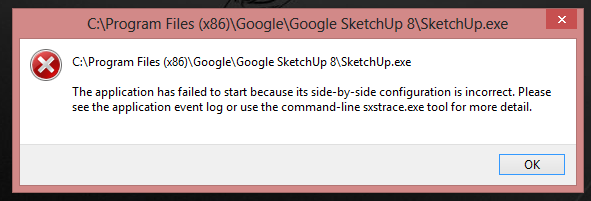
I don't think its any of the plugins, because I renamed the plugins folder to "Plugins1" to disable it, and the problem persists. Searching around online suggests something is messed up with the Visual C++ service packs. I installed several of them to no avail.
Any other ideas?
-
RE: Boston!
While I'm all for getting the bad guy, I like my freedom, and it worries me this will be used as an excuse to take away more of it.
-
RE: 3D Printing tips for sketchup models
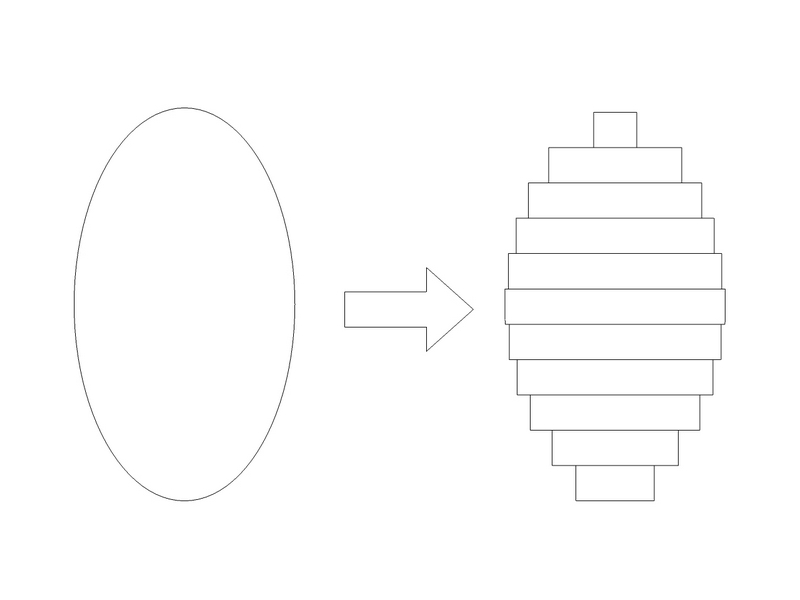
Anything smaller than the printer resolution will not show in the final print.
Kind of like this:
-
RE: 3D Printing tips for sketchup models
@slimdog said:
...
One other question now that I am looking at the spec for the machine. I see it the filament is 1.75mm. When I am modeling things should I keep in mind that 1.75mm is the smallest wall size I can have on a print? What happens when I model a cube for instance and want it to have a 1mm wall thickness all around? Probably not possible?Thanks for your help
SThe nozzle diameter (and layer resolution) is what controls the minimum detail...the filament is the raw material which gets heated up and extruded thru the nozzle, so filament size isn't related in any way to detail size.
Make sense?
