Hi andeciuala,
I think you've doen a very good job. Very neat effects. Photoshop I assume? Good job!
Oops, your profile's looking a bit empty! To help us tailor your experience, please fill in key details like your SketchUp version, skill level, operating system, and more. Update and save your info on your profile page today!
Sketchucation Tools 5.0.7 | Licensing improvements and bug fixes Learn More
C
Offline
Posts
-
RE: Hi there just a kitchen to study
-
RE: PhotoMatch in SU7.0Pro
Thanks for both of your replies guys. I guess I need to play around to see which method works best for me....I'll keep you both posted.
Cheers,
Jeff -
RE: PhotoMatch in SU7.0Pro
So....is that a no? You can't render a photomatch?
Thanks,
Jeff -
RE: PhotoMatch in SU7.0Pro
Firstly, the building looks great in the scene. Great job! I'm curious....once a photomatch is done, can you then render it from that scene?
Cheers,
Jeff -
RE: Windows and Mac...are the Ruby the same for both?
Thanks for everyones input. I'll pass it on to my friend.
-
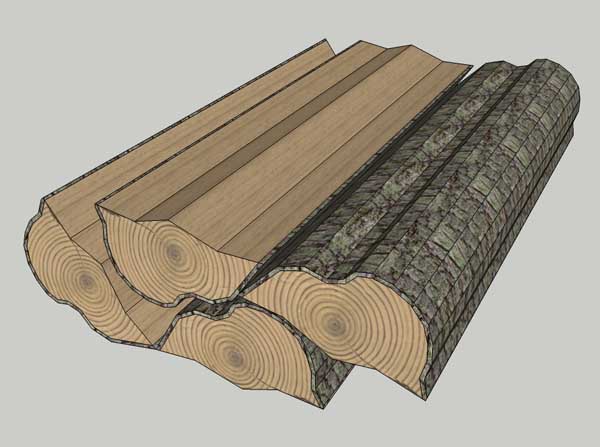
RE: Firewood and axe
Hi Mannie,
Here is some firewood i just made. I just downloaded some textures for the other pages here...is this what your thinking?
-
RE: [Plugin][$] Tools On Surface - v2.6a - 01 Apr 24
Hi Peeps,
Do I have to delete the old toolbar icons first before I drop the new incons done by Cadfather into the TOS dir?
Thanks,
Jeff -
RE: Help with Copy Along Path....
Well it seems to be fine if you do it along the horizontal plane. So....I guess it's a matter of making a multi-directional copy /follow by making all the pcs on the horizonal plane then pc them all together. Just not as hady. Oh well...thanks for your input guys.
Cheers,
Jeff -
RE: Help with Copy Along Path....
well....I mean when you make the part a component, you have to make sure you pay attentionto the axis of the component.

-
RE: Help with Copy Along Path....
It seems to what i want as far as layout and spacing as long as it's on the horizontal plane. You do have to have the part 90 deg. turned to how you actually want it to copy tho. Weird!
Jeff -
RE: Help with Copy Along Path....
Thanks Solo,
Kinda got it but have a look. I changed axis on left one....one on right and top is what i'd like. What do you think?
Thanks

-
RE: Help with Copy Along Path....
Been playing around and it seems to work on horizontal plane no prob....anyone else find this?
-
RE: Help with Copy Along Path....
Ok...downloaded the weld ruby. Made a group and tried making component. Didn't work....I'm sad now. Any other ideas?
Jeff -
RE: Windows and Mac...are the Ruby the same for both?
Thanks Remus! Appreciate the speedy reply.
Jeff -
Windows and Mac...are the Ruby the same for both?
Hi there,
I'm wondering if I can copy my plugins folder off my PC and copy it into a Mac Plugins folder?Thanks,
Jeff
-
Help with Copy Along Path....
Hello gang,
I am trying to use the copy to path tool but as seen in the screen shot, it's not doing what I'd like. Any ideas peeps?Thanks,
Jeff

-
RE: Solo Town
Hey Pete,
They all look great. Now once again my mind has been paused with which render Program to purchase. I assume that Vue is geared towards exterior renderings? I noticed the one you did of the Coke and Pot, it looks very good. Which Vue is the one you use? Thanks for your input.Cheers, Jeff
-
RE: PhotoMatch in SU7.0Pro
Ya....My thought was with using textures like ThomThom said. I've never used Photomatch before but have used Photos as texture. Maybe it's time to try it....
Cheers, Jeff -
RE: PhotoMatch in SU7.0Pro
Wondering....when one brings a set size of photo into SU to photomatch, does the file size increase as you scale the photo up to fit to the model? If so, then maybe that is why. Just a thought. Do you have Photoshop? If so like mentioned earlier, just open the photo and resave without doing any changes but slide the quality/filesize slider to the left.....like I had to even say that. Good luck....
Cheers,
Jeff
