sketchucation logo sketchucation
    • Login
    1. Home
    2. Bob James
    3. Posts
    Oops, your profile's looking a bit empty! To help us tailor your experience, please fill in key details like your SketchUp version, skill level, operating system, and more. Update and save your info on your profile page today!
    ⚠️ Important | Libfredo 15.6b introduces important bugfixes for Fredo's Extensions Update
    Offline
    • Profile
    • Following 0
    • Followers 0
    • Topics 66
    • Posts 1,110
    • Groups 1

    Posts

    Recent Best Controversial
    • RE: [Plugin] Layers Panel 1.2.1

      @jiminy-billy-bob said:

      Did you try to delete everything related to Layers Panel in your plugins folder, and perform a clean install ?

      Yes, and the error pops up during the installation!

      @jiminy-billy-bob said:

      About the scene issue, did you check that the auto-update option is disabled ?

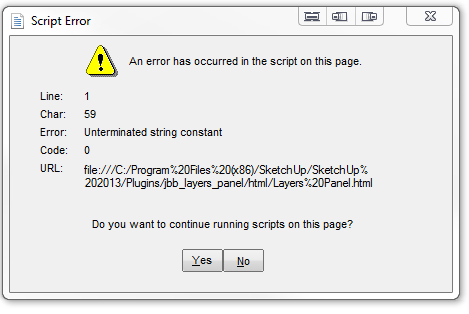
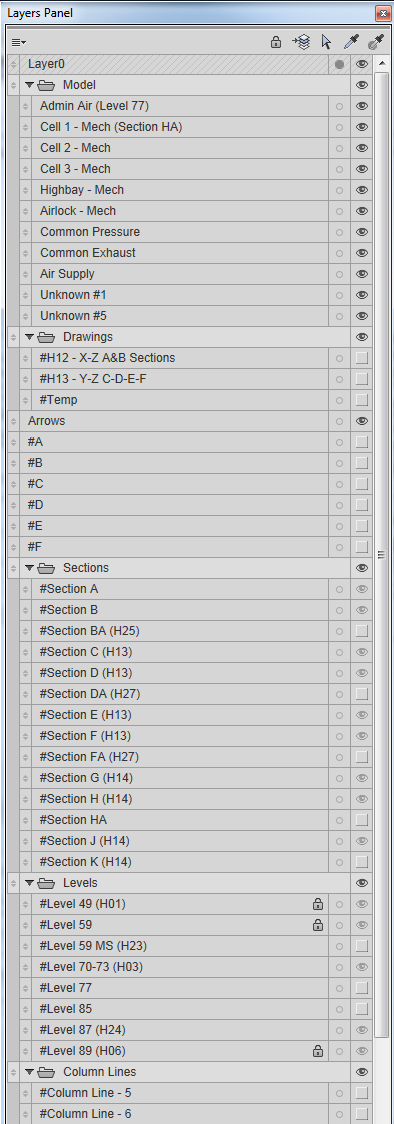
      It was enabled. I disabled it, closed and reopened SU and the scenes are saved (hooray), but I get the Char:59 error each time I switch scenes. By the way, I have to click "Yes" and then the dialog box comes up again and I have to click "Yes" a second time.

      posted in Plugins
      Bob JamesB
      Bob James
    • RE: [Plugin] Layers Panel 1.2.1

      @tt_su said:

      What IE version do you have installed?

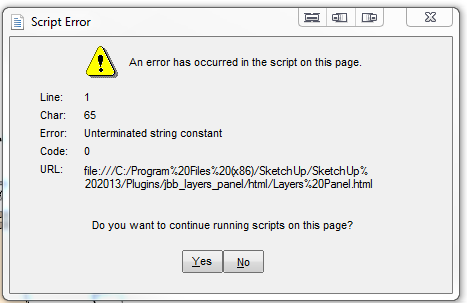
      Also the Ctrl-X/Ctrl-Z dialog box has a different Char:59 instead of 65

      By the way: closing and opening Layer Panel gives the Char:59 version of the error.


      IE10.PNG


      Layer Panel 0.9.-2PNG.PNG


      Panel 2.PNG

      posted in Plugins
      Bob JamesB
      Bob James
    • RE: [Plugin] Layers Panel 1.2.1

      @tt_su said:

      Any model_ Or a specific model?

      Any model

      @jiminy-billy-bob said:

      "Still", you mean you had this issue before 0.9 ?

      Yes. And when I change the condition or existence of layers in SU Layers it does not "track" into Layers Panel.

      @jiminy-billy-bob said:

      Does it happen everytime ? Only when opening a model, not when opening the dialog ?

      Yes. On two different computers: home and work (Win7)

      β€’It also pops up when using Ctrl-Z to restore a Ctrl-X.
      β€’It also still disrupts the layers associated with a scene: if I change the layer combination in a scene and the go back to a different scene the layers in that previous scene have been lost. When I disable Layers Panel the problem goes away (repeatable experience over many models and both machines)

      posted in Plugins
      Bob JamesB
      Bob James
    • RE: [Plugin] Layers Panel 1.2.1

      After loading the latest version I still get this upon opening a model.


      Layer Panel 0.9.PNG

      posted in Plugins
      Bob JamesB
      Bob James
    • RE: Changing UI / Toolbar colours

      Thanks, Dave: Not worth the effort πŸ˜„

      posted in Newbie Forum
      Bob JamesB
      Bob James
    • RE: Changing UI / Toolbar colours

      @box said:

      You have to change the style of your Operating System, it can't be done in Sketchup.

      I did that, but nothing I did changed the toolbars. What did I miss?

      posted in Newbie Forum
      Bob JamesB
      Bob James
    • RE: Changing UI / Toolbar colours

      How did you get the SU toolbars to change?

      posted in Newbie Forum
      Bob JamesB
      Bob James
    • RE: Happy Birthday, Rich O Brien...

      Amazing! Another birthday. It must be all that clean living. πŸ˜’

      Happy Birthday πŸ‘

      posted in Corner Bar
      Bob JamesB
      Bob James
    • RE: 3skeng Pipe Modelling Plugin - Any Further Developments ???

      @raineysky said:

      Bump. Sigh 😞 .....

      When I tried it there was only metric units so it was, unfortunately, of no use to me.
      I reallycould use it for my facility models.

      posted in Plugins
      Bob JamesB
      Bob James
    • RE: [Plugin] Layers Panel 1.2.1

      A scene is created with a set of layers active.
      Go to another scene and add or remove layers that are active in that second scene
      Go back to the first scene and the layers originally active in that scene are no longer active.
      I reported this several weeks ago. I had to stop using the plugin because of it. I loaded the 0.7 version recently and the problem came back as it was before.

      posted in Plugins
      Bob JamesB
      Bob James
    • RE: [Plugin] Layers Panel 1.2.1

      @unknownuser said:

      But I will add a shortcut to isolate a layer (in its local group, and another shortcut for all the way down to the root

      Great!

      By the way: I still have the problem with retaining layers in scenes. Any progress on this?

      posted in Plugins
      Bob JamesB
      Bob James
    • RE: [Plugin] RichSection V0.5.8 UPDATED march 2015

      @pgarmyn said:

      Until March 2013, everybody can have the full 'DEMO'

      Maybe March 2014? 😎

      posted in Plugins
      Bob JamesB
      Bob James
    • RE: [Plugin] Layers Panel 1.2.1

      Still some problems (for me) with this amazing plugin:

      1. Turn off group
      2. Turn on one layer in the group
      3. All of the layers in the group turns on
      posted in Plugins
      Bob JamesB
      Bob James
    • RE: [Plugin] RichSection V0.5.8 UPDATED march 2015

      😲

      posted in Plugins
      Bob JamesB
      Bob James
    • RE: Print Shortcuts found

      Thanks, Dave. I use the zoom-to-selection icon a lot. I have a SpaceMouse at work and in complicated models I sometimes "spacemouse" myself to the place that I've lost contact with the object I'm working on. I just hit zoom-to-selection and get back on track. Since I use it so much I definitely wanted it as a key on my X-Keys programmable keyboard.

      Thank you very much for your help.

      posted in SketchUp Discussions
      Bob JamesB
      Bob James
    • RE: Print Shortcuts found

      I bought an X-Keys programmable keyboard and had to make shortcuts for all of the commands I wanted to make into key selections. This really helped. πŸ‘

      Interestingly, I have a plugin called "options.rb" which has two plugins on its toolbar called "center selected" and "zoom selection extents". They both work fine, but when I try to find them to create a shortcut I cannot find either of them!!

      If an object is selected it will zoom to that object: if no object is selected it will zoom to the model extents just like the SU version (Camera/Zoom Extents).
      To make matters more elusive, both of these plugins exist in C:\Program Files (x86)\SketchUp\SketchUp 2013\Plugins\Toolbars\Files\Sketchup\commands

      This is the zoomExtents.rb:

      cmd = UI::Command.new("CameraZoom") {
      if Sketchup.active_model.selection.length <= 0
      Sketchup.send_action "viewZoomExtents:"
      else
      Sketchup.send_action "selectionZoomExt:"
      end
      }
      cmd.large_icon = "../images/zoomExtents_lg.png"
      cmd.small_icon = "../images/zoomExtents_sm.png"
      cmd.tooltip = "Zoom Selection/Extents"
      cmd.status_bar_text = "Zoom to selection, or model Extents if no selection."
      cmd.menu_text = "Zoom Extents"
      #cmd.set_validation_proc { tool_validation_proc("CameraZoomWindowTool") }
      @cmd = cmd

      But the tool tip for the Camera/Zoom Extents doesn't say that. It says, "Zoom the camera in or out to show the extent of the model". ❓ ❓

      Can anyone tell me how to make the two plugins in the Command file active? (Putting them into the Plugins folder doesn't do it.)


      posted in SketchUp Discussions
      Bob JamesB
      Bob James
    • RE: Upgrade advice

      @solo said:

      it is faster than Win 7

      What do you base that on, Pete? I have it on my laptop and really don't like the interface and have a program loaded to avoid it as much as possible.
      However, if it would help with SU/Thea......

      posted in SketchUp Discussions
      Bob JamesB
      Bob James
    • RE: Basketball court.

      The center of the hoop should only be 63" in from the out-of-bounds line and the base cannot be inside the playing field. πŸ˜„

      posted in WIP
      Bob JamesB
      Bob James
    • RE: 3DConnexion now Sponsors. We are free raffling 24 devices!

      My hand is quivering over my holster: ready to draw πŸŽ‰

      posted in Extensions & Applications Discussions
      Bob JamesB
      Bob James
    • RE: 1001 Bit Tools Crashing

      I had the same problem, but upgraded to the newest version and it works fine

      posted in Extensions & Applications Discussions
      Bob JamesB
      Bob James
    • 1 / 1