sketchucation logo sketchucation
    • Login
    1. Home
    2. Anton_S
    3. Posts
    Oops, your profile's looking a bit empty! To help us tailor your experience, please fill in key details like your SketchUp version, skill level, operating system, and more. Update and save your info on your profile page today!
    πŸ”Œ Smart Spline | Fluid way to handle splines for furniture design and complex structures. Download
    A
    Offline
    • Profile
    • Following 0
    • Followers 7
    • Topics 52
    • Posts 1,261
    • Groups 2

    Posts

    Recent Best Controversial
    • RE: [Plugin] ClothWorks v1.8.0 - 28 Apr 2024

      @rl.amorato said:

      Hi Guys, I was wondering if clothworks would be able to wrap around an object, instead of draping over something. Kinda like the reference image attached. Thanks!

      I have tried putting something like this together and it seems like it can be done, well, specifically, with a newer version of ClothWorks, which is still under development.

      I have attached an image and a link to SKP file listing and displaying the key steps.
      Wrapped.png
      https://drive.google.com/open?id=1X-39luoZWwYqP9O-j6zSt4GrTtC3YVAZ

      Anton

      posted in Plugins
      A
      Anton_S
    • RE: [Plugin] ClothWorks v1.8.0 - 28 Apr 2024

      @unexpectediteminbaggingarea said:

      Hi,

      I have the latest version, 1.1.1 for Mac but the license still keeps deactivating every time I re-start SketchUp.
      Is there a fix for this yet?
      Thank you.

      Hello,

      Are you using the latest SketchUcationTools, version 3.1.5? If not, please upgrade as it could fix the issue.

      Link Preview Image
      Plugin Store Download | SketchUcation

      Extending SketchUp has never been easier with a suite of tools that make installing and disabling plugins and extensions a one click operation.

      favicon

      (sketchucation.com)

      Anton

      posted in Plugins
      A
      Anton_S
    • RE: [Plugin] ClothWorks v1.8.0 - 28 Apr 2024

      @slodka said:

      I want to reset all my seats,but I can't use PM,so I leave a message here.

      Hi, I reset your seats. Please refer to page 4, Known Issue section in the Licencing Manual, for resetting on your side.

      Also, consider updating to latest SketchUcationTools v3.1.5, which potentially, addresses the licensing issues on Mac OS X: https://sketchucation.com/pluginstore?pln=SketchUcationTools

      posted in Plugins
      A
      Anton_S
    • RE: [Plugin] ClothWorks v1.8.0 - 28 Apr 2024

      Hello Ahmed,

      I will address the 2nd and 3rd issues in the next release. Thanks for including the keyword "distance", which stimulated an idea of how to fix it.

      About the licensing CCleaner issue, I refereed to SketchUcation guys, and they said the circumstances that cause it are unclear at the moment, but it is being looked into.

      Thanks,

      Anton

      posted in Plugins
      A
      Anton_S
    • RE: MSPhysics 1.0.3 (16 October 2017)

      @faust07 said:

      Hi Anton,
      A question for functions of a next version of MSPhysics:
      Could it be possible to store transformations (translation, rotation, scaling) and manipulations off visibility on nested groups in the replay record data?
      At present, these changes can be retained during an MSP session, played back and exported as a movie (frames), but disappear after saving, closing and reloading the replay data.
      Here is an example of manipulating the visibility of embedded groups to achieve the effect of winking, if you want to test it.
      Thanks!

      As far as I recall, you can already do that. In MSPhysics Replay Settings menu you can enable material record, style record, and other stuff. By default, only the camera and transformations are recorded.

      Once you enable the recording, you will have to re-record, so that new data is recorded in your animation.

      posted in Plugins
      A
      Anton_S
    • RE: MSPhysics 1.0.3 (16 October 2017)

      @ropefelt said:

      Can I use this plugin to simulate nails in wood? I can't figure out which joint to use.

      Yes you can, but the nails will not leave a hole in the wood. Just connect the nails to a piston joint and control them with a slider controller. Also, make sure the board or the nails are set to non-collidable.

      posted in Plugins
      A
      Anton_S
    • RE: MSPhysics 1.0.3 (16 October 2017)

      @oheimala said:

      I have an issue with floathing items. I work as a professional with floating docks, and the MSP simulation in water is something I would really love to use; actually a perfect tool for me. But.. when making a pontoon with several materials, the simulation will give strange results. I believe there is a some kind of bug.

      As attached is a simplified concrete pontoon of two parts: a shell of concrete and a float of styrofoam. When dropped to float, you see four different scenarios happen and none of them is accurate. From my point of view it would be easy if the simulation could work without calculation; just simply specifying the parts density, group them and let them float.

      The shell must consist from five separate subgroups, that is from four wall groups and one base/ceiling group. The top level group should be assigned Compound shape. That way, the collision shape generated will reflect the actual one. If you enable collision wireframe in simulation, you will see what is going on. So if you convexify subgroups, your resulting simulation would be realistic and the density you assign will reflect the density of material properly.

      posted in Plugins
      A
      Anton_S
    • RE: MSPhysics 1.0.3 (16 October 2017)

      Hello Clue,

      Your hardware is fine. It is MSPhysics plugin that needs succinct improvement and the model you configured for MSPhysics.

      Anton

      posted in Plugins
      A
      Anton_S
    • RE: [Plugin] ClothWorks v1.8.0 - 28 Apr 2024

      Hi Bifterx,

      When you purchased, the email address you specified had a spelling typo, ".conm". I sent your ClothWorks licence to the corrected email address.

      Best,
      Anton

      posted in Plugins
      A
      Anton_S
    • RE: MSPhysics 1.0.3 (16 October 2017)

      @traxxx said:

      To simplify my question : Once simulation is stopped with objects moved, is it obliged that the reference point of the slider joint is changed according to each new position of the objects ?

      Yes, reference point is changed. In MSPhysics, stop simulation option is only when your aim is to have a final view; otherwise, use reset.

      posted in Plugins
      A
      Anton_S
    • RE: MSPhysics 1.0.3 (16 October 2017)

      @cgltkn said:

      Hi Anton,

      I understand your approach on the unreliable nature of "compound from cd" shape. However without it, there isn't a better way to make a front wheels of a car. You can't try to make sub groups of a car mesh, it's a lot of work and "compound" doesn't work as an alternative because in collision wireframe body of the car interferes with the rotating tires.

      Can't you at least leave compound from cd in the selection list with a warning? It would be better if any demanding users should be able to use it.

      Best regards.

      For wheels, use sphere/cylinder shape. Have the parts intersecting the wheel be assigned a non-collidable state. Generally, it is a bad and performance consuming to rely on collision detection. If you examine SketchyPhysics car making tutorials at youtube, you can apply same techniques to MSPhysics.

      posted in Plugins
      A
      Anton_S
    • RE: MSPhysics 1.0.3 (16 October 2017)

      Hello Baumard,

      What you're trying to achieve here is nested joints. There should be a top level slider joint, as you already have. There should also be temporary boxes with hinges inside them; one box per each hinge, located at each axis. The boxes should be set noncollidable. Then the slider is supposed to be connected to the boxes and each hinge to the door. That way the boxes will slide and the doors will rotate.

      Another thing to consider in that case is to user Acurate Joint Solver model or Iterative 64 passes. These options can be adjusted in UI. That way joints will be stiffer.

      Anton

      posted in Plugins
      A
      Anton_S
    • RE: [Plugin] ClothWorks v1.8.0 - 28 Apr 2024

      @valerostudio said:

      Is there a way to have pressure (or have a future feature) where you can have a pillow and drop it on to a sofa or bed? I have played with this in Max a little bit.

      Nice video! Soft bodies are planned for V2.

      posted in Plugins
      A
      Anton_S
    • RE: [Plugin] ClothWorks v1.8.0 - 28 Apr 2024

      @smashor said:

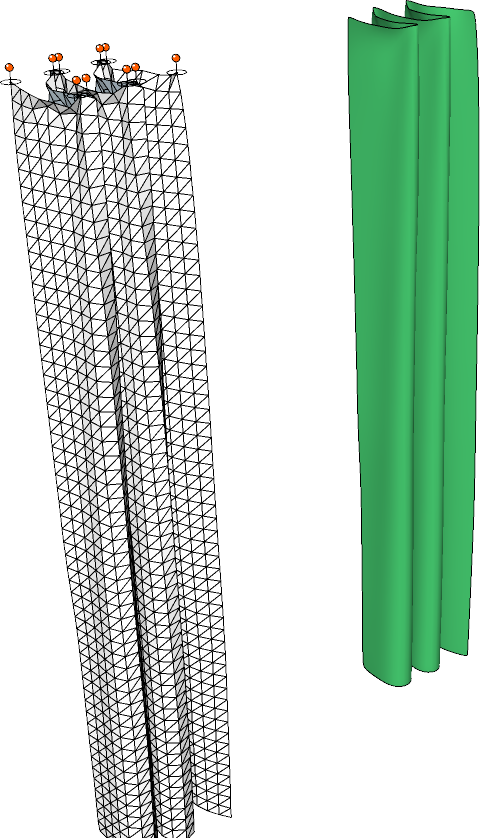
      How can I make this kind of curtain?

      Flat curtains are usually really damp and neglect changing their form.

      You can control the shape by creating pins and moving some forward and some backward.
      The properties should be:

      • Shear Stiffness: 1.0
      • Bend Stifnness: 0.01
      • Damping: 1.0
      • Self-collision: ON

      When you finish simulating, you can set bending to 0.00, so the cloth rests completely.

      After simulation, you can apply loop subdivision and Laplacian smootheninth to better the result, as shown on the green curtain in the image below.
      FlatCurtains.png
      Curtains5.skp

      posted in Plugins
      A
      Anton_S
    • RE: [Plugin] ClothWorks v1.8.0 - 28 Apr 2024

      @sofie9536 said:

      Hello Anton, maybe I missed something, why does ClothWorks ask for the license number every time? (Windows 10)
      Thank you for your help

      Hi, Sofie,

      If you're referring to your licence constantly deactivating, there is an issue with the current version of SketchUcationTools, which I presume would be fixed upon next release cumming soon. We'll see if the issue is fixed then. Other than that, in the meantime, if your licensing seats fill up, let me know via a private message and I will reset them.

      Anton

      posted in Plugins
      A
      Anton_S
    • RE: [Plugin] ClothWorks v1.8.0 - 28 Apr 2024

      @kugelfisch said:

      Hallo Anton!
      I bought you plugin "Clothworks" today (2 hours ago). How long does it usually take for the license to arrive?

      It should arrive right away unless you entered a wrong email. I will send you a private message regarding this.

      posted in Plugins
      A
      Anton_S
    • RE: [Plugin] ClothWorks v1.8.0 - 28 Apr 2024

      @marvsweden said:

      Hey, I'm trying to understand all the settings. I can't see anything about it in the manual. I'm talking about thickness, bend, damper, shear and all that. Am I missing something?

      If you assume that each edge is a linear spring and each two linked edges are an angular spring, then the shearcontrols the linear spring stiffness and bend controls the angular spring stiffness. As for the damping, it controls the drag factor for both type of springs.

      @marvsweden said:

      What are the numbers really, are they linked to the used unit or are they percentage?

      Cloth/collider thickness denotes an offset in mm. Other parameters are more associated to cloth mass ratio.

      @marvsweden said:

      I'm trying to drape an object with a silk cloth and either it falls through the colliders or the thickness makes it sit up above the colliders too much.

      Increase simulation viscosity, before draping, to allow the cloth settle in a less impactive way. That way you can avoid most overlaps.

      @marvsweden said:

      Also from what I understand there is an interplay between the grid size and some of the settings for cloth/collider. Is that right?

      Yes. The smaller the grid spacing, the better is the result, but the less stiffer the cloth becomes. This is something that I have to consider improving in next version.

      To sum it up, the object is to release new version with improved physics and then make tutorials about other ClothWorks options.
      posted in Plugins
      A
      Anton_S
    • RE: [Plugin] ClothWorks v1.8.0 - 28 Apr 2024

      @jorgensen said:

      how do we use the material editor?

      i'm trying to create a curtain that stays almost strait - like a textile with almost no elasticity.

      but it seems that the cloth keeps behaving like it's silk - the curtain extends very much, and 'feels' very light when i push it.

      i have messed around with the material editor, but it does not seem to have any influence on the behavior of the cloth.

      jorgensen

      The material manager is just another way to adjust cloth properties and doesn't have any special things to it other than it can be saved and then used as a preset.

      Does increasing shear stiffness not help? If so, try reducing update timestep, to like 1/520. Reducing update timestep makes cloth stiffer.

      posted in Plugins
      A
      Anton_S
    • RE: [Plugin] ClothWorks v1.8.0 - 28 Apr 2024

      @marvsweden said:

      I don't think converging pins works on MacOS. The handles change while holding the control-key but I can't actually converge them. Anton can you check?

      This has been fixed. Update to version 1.1.1, and use the SHIFT key for converging/diverging.

      posted in Plugins
      A
      Anton_S
    • RE: [Plugin] ClothWorks v1.8.0 - 28 Apr 2024

      @box said:

      A feature request of sorts, more of a think about this and see if it is possible.
      Can you make the shape of the geometry of the pin the thing that does the pinning rather than the bounding box of the pin/pin object.

      The thing with this, the reason I went with bounding boxes is that it is easy to determine if a vertex is inside it. Doing it other way, for complex shapes it's hard. But of course, a simple variant can be created. If you treat all edges of groups as cylinders you can also, in reasonable time, determine which vertices overlap the cylinders. If you want to lock something along an arc, then you would need to assign a some sort of thickness (or edge cylinder radius) to a pin, so it knows how much each edge should capture. But this sort of approach would make this plugin a bit too complicated.

      A feature request was made for Grouped Vertices. I have a really good plan for this feature. So basically, there will be a highlighting tool, where users could adjust the highlighting circle radius, and use it to basically highlight vertices they would want to treat as pins. With a snap option, I'm pretty sure it would be easy to inference highlighting along an arc or any other curve. And of course, a dehighlighting variant of the tool will be added to unhighlight the highlighted vertices. This would be another way to lock vertices without using pins. I think it would be a user friendly in terms of locking vertices along a desired path/shape.

      For now, as a workaround, you can just copy pins along the arc and adjust their scale via (Menu) Extensions->ClothWorks->Edit Pins Scale so they capture the desired amount of vertices. CopyAlongCurve could be used to copy pins along an arc.

      posted in Plugins
      A
      Anton_S
    • 1
    • 2
    • 8
    • 9
    • 10
    • 11
    • 12
    • 63
    • 64
    • 10 / 64