sketchucation logo sketchucation
    • Login
    1. Home
    2. Anton_S
    3. Posts
    Oops, your profile's looking a bit empty! To help us tailor your experience, please fill in key details like your SketchUp version, skill level, operating system, and more. Update and save your info on your profile page today!
    πŸ”Œ Smart Spline | Fluid way to handle splines for furniture design and complex structures. Download
    A
    Offline
    • Profile
    • Following 0
    • Followers 7
    • Topics 52
    • Posts 1,261
    • Groups 2

    Posts

    Recent Best Controversial
    • RE: [Plugin] ClothWorks v1.8.0 - 28 Apr 2024

      @jiminy-billy-bob said:

      Have you considered displaying an openGL preview during the simulation, instead of the full geometry?

      Considering it would instantly double the performance, and more orders of magnitude once you implement multi threading, you should seriously consider it.

      That's a good idea! I'm thinking of adding a cloth quality option. Users will simulate what they draw, regardless of the resolution. But behind the scenes, if the cloth quality is set to more than 1, like 2 or 4, a higher poly version of the user-drawn cloth will be simulated on the physics side (but a lower, user-drawn quality will be rendered). When simulation ends, a higher quality cloth will replace the lower quality. If the user plans to continue simulation, a lower quality will replace the higher quality and then back to a higher quality after simulation... I think this will cope well with current ClothWorks functionalities.

      @jql said:

      Anton, I've downloaded but not tested yet, but ever since seeing this plugin I have wondered if you are not the guy who will create bones structure for sketchup. With clothworks and physics, that's the next most natural step.

      Would indeed be interesting! Always want to see how dinosaurs and real locomotion would behave in SU. If another developer doesn't start this, then...

      posted in Plugins
      A
      Anton_S
    • RE: [Plugin] ClothWorks v1.8.0 - 28 Apr 2024

      @jiminy-billy-bob said:

      Hey Anton, I was wondering today: what's the performance bottleneck? Is it the physics simulation itself, or moving the whole geometry at each frame?

      There are three components to simulation:

      1. Physics computation
      2. Vertex transformations via transform_by_vectors
      3. Dynamic texture UV updating for faces with texture (which can be disabled)

      The transform_by_vectors takes quite a reasonable amount of performance out of this (and I do wrap every frame in its own operation with second parameter set to true). On a draping cylinder sample (with no textures), with transform_by_vectors enabled, the performance is 17 FPS; with transform_by_vectors disabled, the performance is 32 FPS.

      However, the physics computation also takes its chunk out of performance. Assuming transform_by_vectors is off, with physics enabled, the performance is 32 FPS; with physics disabled, the performance 60 FPS.

      The physics computation aspect can and will be improved, if not so much algorithm and optimization-wise, then with multithreading. At the moment, the part of physics that consumes most performance is collision detection and contact processing.

      Thus at the moment there are no bottlenecks but as physics computation performance is improved, transform_by_vectors (and rendering) might become the bottleneck. I would be interested in finding out if SU could optimize this, say avoid updating edge lengths (in case they do) or other things that occur.

      posted in Plugins
      A
      Anton_S
    • RE: [Plugin] ClothWorks v1.8.0 - 28 Apr 2024

      @cas45 said:

      Hi have 3.04.2018 the plugin ClothWork via PayPal, so far no license has been received. Have had the experience to send it immediately. Ask for info Thank you

      Sent you a PM regarding this.

      posted in Plugins
      A
      Anton_S
    • RE: [Plugin] ClothWorks v1.8.0 - 28 Apr 2024

      @rv1974 said:

      it's a simple idea: you'd select a loop (or set of edges, even unconnected) and order it to stay fixed. instead of point pin you get a linear holder. What important is an easy access to those linear holders (for selecting\editing).

      For now, if you assign a pin type to the pole, and if the edges along the pole overlap the bounding box of the pole, they will be locked in place.

      @rich o brien said:

      If you look up Vertex Groups in Blender you can get an idea what RV is asking.

      Maybe you could add a feature that allows the user to make any object behave like a pin.

      So selected edge/s behave the same as a collection of pins.

      I checked the blenders group pins video: https://www.youtube.com/watch?v=yzRS2cCiBnc

      It seems like it would be useful. Added to my TODO list (it would be an easy feature to implement).

      @jiminy-billy-bob said:

      @rv1974 said:

      1. The buying process should be reworked.

      I agree!

      Yeah... The buying process is not so user friendly. It's not the worst start though πŸ’š

      posted in Plugins
      A
      Anton_S
    • RE: [Plugin] ClothWorks v1.8.0 - 28 Apr 2024

      @rv1974 said:

      Can you implement a loop of edges as "linear pin"? Could be useful for long curtains and waterfalls. And maybe for sharp corners too.

      Can you provide more detail with that?

      posted in Plugins
      A
      Anton_S
    • RE: [Plugin] ClothWorks v1.8.0 - 28 Apr 2024

      @rv1974 said:

      Anton, all examples I've seen so far looks like made of 2mm steel sheet. Is there a trick in settings to get much more sharper corners in bending areas (is creasing a good term for this)?

      I don't know actually. Perhaps increasing cloth resolution (applying a grid with smaller spacing), could do the trick with forming sharp corners. I will need to test this around a bit and see if there is a way to achieve the sharp corners.

      posted in Plugins
      A
      Anton_S
    • RE: [Plugin] ClothWorks v1.8.0 - 28 Apr 2024

      @unexpectediteminbaggingarea said:

      I can select the pins during playback in cloth works and I can use the move handles, and when I hold down Control the move handles do switch to expand/contract, but when I click the mouse on any of the handles the whole lot vanishes and the selection is lost.

      Is this a Mac bug??

      Yes, just checked. It's a bug! Will make a maintenance release today.

      Edit: Fixed. Upgrade to 1.1.1: https://sketchucation.com/pluginstore?pln=ClothWorks

      On Mac OS X, use SHIFT key for converging/diverging.

      @3dhouse21 said:

      was super excited to buy.
      But it just does not work for me in SU 2018
      I downloaded it and installed it .. but it does not work either in my 2017 or in 2018
      I followed all the instructions.
      I do not know what could be happening ... sad.

      Could you give more details about what going on?

      1. First of all, are you using Windows or Mac OS X? If on Mac OS X, please upgrade to ClothWorks versions 1.1.0.
      2. If the issues continue to arise (or you're already updated), when you open SketchUp, do you get any load errors?
      3. Is the plugin installed correctly? Do you see the ClothWorks toolbar and is there a ClothWorks menu: (Menu) Extension->ClothWorks ?
      4. When you press play, does the frame increment in the status-bar below? Make sure your cursor is pointing to the viewport window when you check that.
      5. If not, can you Open Ruby Console and see what messages you get when pressing play:
        (Menu) Window -> RubyConsole

      More details about what's not working would be appreciated.

      Thanks

      posted in Plugins
      A
      Anton_S
    • RE: MSPhysics 1.0.3 (16 October 2017)

      Hello mickaellemickael,

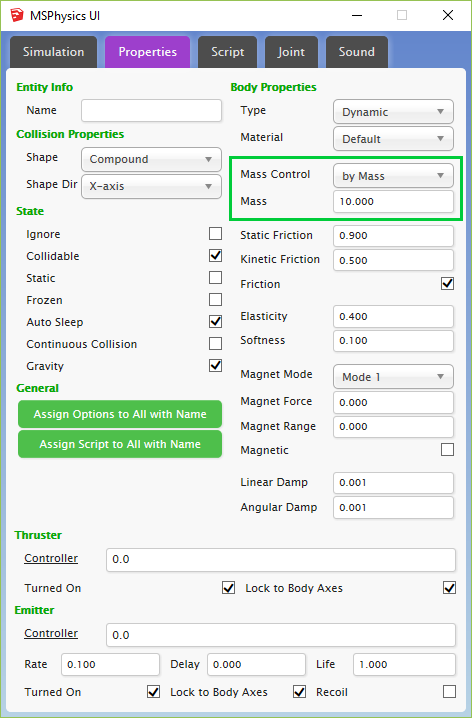
      The collision generated for objects is convex and thus doesn't reflect the real object. Your group must be made up of convex items for the mass to be reflected. You can also assign the mass manually, via the MSPhysics UI by changing the Mass Control mode to Mass and assigning the right mass (in kg).
      Mass Control.png

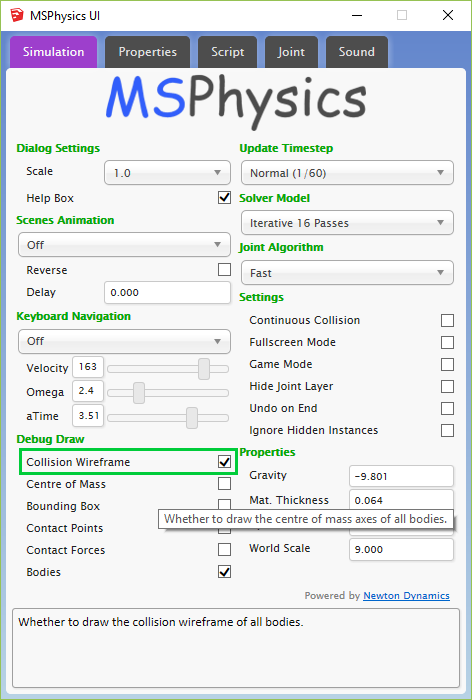
      You can enable collision wireframe for all objects in simulation, which can be found in Debug Draw section of the simulation tab in the MSPhysics UI. This draws the actual collision wireframe generated for the object. You may have to divide the object into convex sub-groups for the most realistic effects (assuming the top-level group is assigned a compound collision).
      Collision Wirefreame.png

      In compound collision (which is assigned to objects by default), all sub-groups and sub-components are treated as convex sub-collisions.

      By meaning convex collision, the collision is wrapped around a shape. Here is an image for example: http://newtondynamics.com/wiki/images/2/24/Convex_shape.jpg

      So with compound collision, you can have many convex collisions clumped together to form a complex dynamic collision.

      Anton

      posted in Plugins
      A
      Anton_S
    • RE: [Plugin] ClothWorks v1.8.0 - 28 Apr 2024

      @huckrorick said:

      I don't know if I'll have time to do a lot with this, but I just bought it because watching what people have done with it, or just playing with it, is more fun than the movies.
      Great work Anton.

      Can you post something that explains a bit of how it works? What are the factors that influence the simulation?

      I was imagining using it in the design of tent structures and hanging structures. Knowing how it works would help in understanding how to use it and how good it would be for such structures.

      Also, the "end" state would be most important in this case.

      In ClothWorks, for objects with cloth property, every vertex is treated as a particle. Every edge is treated as spring. Every two linked faces have a bending spring. Same applies to two linked, faceless edges.

      As Rich said, the higher the resolution you apply to the cloth, the higher quality result. Performance aspect will be addressed in next release.

      Speaking of an end state, once you perform simulation and apply loop subdivision to the cloth, performing simulation over a subdivided cloth will have the cloth behave differently. So, generally, simulation shouldn't be performed on a post-subdivided cloth object.

      Also, a small tutorial about tents will come later. Basically, you can make it by creating six pins at a rectangular cloth, with four at cloth corners and two at middle, and raising the two middle pins in simulation (Movable Pins) feature. Ropes (linked edges) could be attached too to make it look as if the ropes are supporting the tent.

      posted in Plugins
      A
      Anton_S
    • RE: [Plugin] ClothWorks v1.8.0 - 28 Apr 2024

      @box said:

      Here's a bit of a mix with SUbD to make a rudimentary bed.

      Box... One word. Clever! Just clever!

      posted in Plugins
      A
      Anton_S
    • RE: [Plugin] ClothWorks v1.8.0 - 28 Apr 2024

      @smashor said:

      How can I create wrinkles? Like in a piece of cloth in a chair or bed, something like that

      Drop cloth at an angle. Say, 60 degrees with the horizontal. Could produce wrinkles. Then apply loop subdivision and follow with a couple iterations of Laplacian smoothing to eliminte self-overlaps and of course better the result.

      Edit: But yes, easy way to add waves and wrinkles will be added in the next release.

      posted in Plugins
      A
      Anton_S
    • RE: [Plugin] ClothWorks v1.8.0 - 28 Apr 2024

      @david harned said:

      Hi Anton, Dave Harned here, friend of Pete Stoppel. Congratulations on Clothworks; phenomenal piece of work!

      Thank you, Dave! This plugin needs improvement but overtime with a few releases it will be perfect.

      @david harned said:

      I can't seem to figure out how to drape a cloth so that it tucks into crevices fully, like a slip cover falling down "into" a sofa. I suspect the solution is to form a basic slip cover as opposed to draping a flat cloth, but wanted to ask.

      Drop cloth at an angle with the horizontal, so that more surface are of the cloth covers the part being draped. That way there will be more cloth in an area. Another thing you can do is initially drop cloth with high stiffness and then change it to low stiffness. That way it will reach the corners.

      @david harned said:

      Kind of related to that ... could you envision a way to use Clothworks to make ocean waves? I would kill for the ability to create realistic waves hitting a beach, but so far I can't seem to manage it in SU. I tried draping cloth over "humps" that I've "Skattered" over a surface, but I haven't quite been able to achieve what I'm trying to.

      It is not possible to do waves yet.

      The demand for waves and wrinkles is high. It seems that waves and wrinkles are in the same area, so adding one could fulfill the other. I will include this functionality in one of the next releases, which could be used to add linear/radial wave/wrinkle effect to the cloth. Shouldn't be to difficult (if not simple) to code.

      posted in Plugins
      A
      Anton_S
    • RE: [Plugin] ClothWorks v1.8.0 - 28 Apr 2024

      Announcing version 1.1.0: https://sketchucation.com/pluginstore?pln=ClothWorks

      1. Fixed toolbar and dialogs on Mac OS X. Now dialogs are no longer displayed as modal dialogs and toolbars can be updated.
      2. Improved UI slider performance when simulation is active.
      3. Added a feature to split edges. Now in addition to Weld Edges option there is a Split Edges option, allowing you to assign maximum spacing.
      posted in Plugins
      A
      Anton_S
    • RE: [Plugin] ClothWorks v1.8.0 - 28 Apr 2024

      @boofredlay said:

      @solo said:

      I want to create chains following a path, I use copy along path normally to get chain links to follow a line, I used to use 'Rope fall' to create the path line but that is too slow and the author is AWOL does not answer his emails. So, will there be a way to drape a line? (I do not need a mesh, just a line so I can either copy along or use follow me if I want a rope.).

      Yep.

      Draw a line, divide it and drape.

      And if you apply Loop Subdivision to the simulated edges group, the edges would subdivide just like cloth.

      posted in Plugins
      A
      Anton_S
    • RE: [Plugin] ClothWorks v1.8.0 - 28 Apr 2024

      @jo-ke said:

      I have problems with textures. what did I wrong?

      @box said:

      Make sure the texture is applied to the faces not the group.

      In addition to Box's response, to apply a texture to a simulated cloth, follow the step below:

      1. Select the simulated cloth
      2. Click on the undrape icon. This should reset the layout of the cloth
      3. Enter the context of the cloth
      4. Apply a desired texture directly to the front and/or back faces
      5. Exit the context of the cloth
      6. Click on the toggle draped icon again to renew the layout of the cloth

      Here is the part of the Draping Sphere video performing these steps (starts at 1:25):
      https://youtu.be/u-DZ17Nls9k?t=1m25s

      posted in Plugins
      A
      Anton_S
    • RE: [Plugin] ClothWorks v1.8.0 - 28 Apr 2024

      @solo said:

      Divide works on a simple line, but what about a more complex line, divide is not an option, is there a plugin to divide multiple attached lines?

      I may have to add this as a workflow feature. Should be very simple.

      posted in Plugins
      A
      Anton_S
    • RE: [Plugin] ClothWorks v1.8.0 - 28 Apr 2024

      @hornoxx said:

      ... with ClothWorks you can catch a lot of animals - but not a fish - a bug? πŸ˜„ πŸ˜„ πŸ˜„

      Haven't checked but fish can be one of Known Limits and Limitations. And of course, I'm going to improve contact generation in a major release, which could fix the issue. We'll see.

      posted in Plugins
      A
      Anton_S
    • RE: [Plugin] ClothWorks v1.8.0 - 28 Apr 2024

      @cowboyathome said:

      This plugin is amazing and easy to use!

      Amazing results!

      posted in Plugins
      A
      Anton_S
    • RE: [Plugin] ClothWorks v1.8.0 - 28 Apr 2024

      I wrote my own physics engine for ClothWorks works. MSPhysics uses NewtonDynamics, which doesn't support cloth or soft bodies at the moment. Though, I will definitely include rigid dynamic bodies into this.

      posted in Plugins
      A
      Anton_S
    • RE: [Plugin] ClothWorks v1.8.0 - 28 Apr 2024

      @armeios said:

      Hello Anton, thanks for your great work.

      Do you plan the possibility of assigning internal pressure to an object?

      For example to simulate an inflatable?

      Currently, you can apply fake pressure by controlling the scale slider in ClothWorks UI.

      posted in Plugins
      A
      Anton_S
    • 1 / 1