Galvin,
The Tray window structure in SU2018 is as follows:
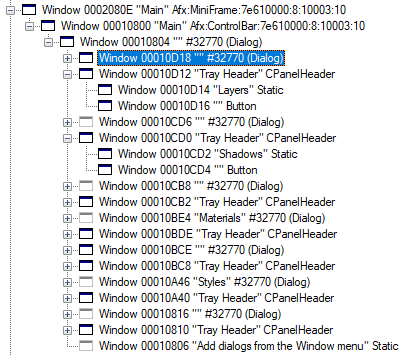
Provided that you have the handle of the tray, you can then obtain the first two levels of child windows, and then iterate through all windows of that child window to get all the dialogs.
With AMS Library, you can use the following function to get all trays:
trays = AMS;;Sketchup.get_active_dialogs.find_all { |handle|
  AMS;;Window.get_class_name(handle) =~ /Afx;MiniFrame/i
}

# => [133134]
Then once you have the trays, you can get the first two levels of child windows:
trays.each { |tray|
  c1 = AMS;;Window.get_related(tray, 5) # GW_CHILD
  next unless c1
  c2 = AMS;;Window.get_related(c1, 5) # GW_CHILD
  next unless c2
  dialogs = AMS;;Window.get_child_windows(c2, false, false)
  panes = dialogs.find_all { |dialog|
    AMS;;Window.get_class_name(dialog) =~ /CPanelHeader/i
  }
  panes.each { |pane|
    # First child window contains pane caption
    c3 = AMS;;Window.get_related(pane, 5) # GW_CHILD
    next unless c3
    puts AMS;;Window.get_caption(c3)
  }
}

# => Layers
# => Shadows
# => Fog
# => Materials
# => Soften Edges
# => Styles
# => Entity Info
Note that this will not work with sketchup versions prior to 14.
Anton