Thanks for the heads up!
I've added an annotation on the video noting the different key for Windows.
Adam
 Offline
Thanks for the heads up!
I've added an annotation on the video noting the different key for Windows.
Adam
Edited post to link to 1280x720 HD version.
This is the first of a series of video tutorials on using LightUp inside SketchUp.
NB You'll need to choose HD / 720p quality to be able to read the dialogs etc.
This first one covers the basics of placing light sources, IES lights in SketchUp.
This second one covers navigation in TourTool, realtime Post Processing.
EDIT: linked to HD version
EDIT: linked to next in series
@iichiversii said:
Ok that worked Rich, so what was wrong with my PNG ? and what should i have done to make it work?
Perhaps what you've done is export the texture and done "save as" a PNG. Which converts it to a PNG file.
But the embedded Material texture you had before that went red (named "TREE(1).PNG") was actually a jpeg with a misleading extension.
but glad you've resolve it!
Adam
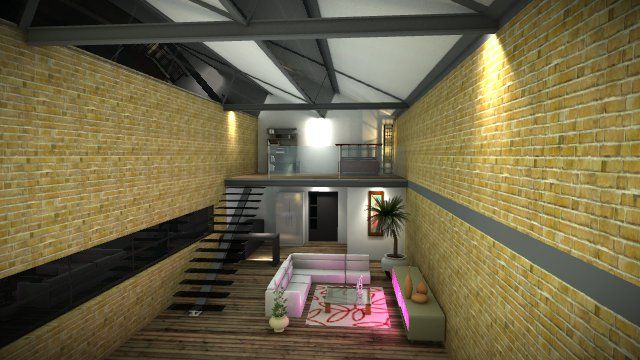
LightUp v2.6h available for Windows and Macintosh
New for v2.6h
%(#808080)[- SpaceNavigator Support
@iichiversii said:
Believe it or not but i taught it was just that png but it happened here too, no transparency on the png
[attachment=0:2seo0zfj]<!-- ia0 -->HOUSE_WIP_LP_lightup(no scene)_2012-11-07_2313.jpg<!-- ia0 -->[/attachment:2seo0zfj]
Hi,
If LightUp cannot read a texture for any reason, it creates a red texture with the pathname of the file it was unable to read written "into" the texture.
LightUp reads most texture formats, but does not support "JPEG Progressive" which is a not widely used variant of the regular JPEG image format. I can see the file has a .png extension, but are you certain its not actually a jpeg?
The solution is to convert it to a supported file format. PNG is well supported by LightUp, as are TGA, BMP,HDR,VTF formats.
Adam
As a bit of fun I wrote a Ruby importer of Quake levels into SketchUp. The importer marks up the ComponentInstances with DynamicComponent animations so the doors and platforms all work within LightUp. Perhaps I should check whether Quake buildings meet today's work lighting Regs.. 
[flash=800,600:3nte3by9]http://www.youtube.com/v/Un0LheJYeEY[/flash:3nte3by9]
LightUp has an automation feature that runs Ruby functions you've attached to your model from various Events during Tourtool. They're stored in an attribute dictionary (called :lightup) on the Model and Components of your SketchUp model - there are quite a few callbacks that are supported.
Try this:
Sketchup.active_model.set_attribute(:lightup, 'onstart', 'puts("Starting at #{Time.new}")')
and/or
Sketchup.active_model.set_attribute(:lightup, 'onstop', 'puts("Taadaa!")')
Using these functions, you could build a sophisticated experience that linked together interactions.
Other hooks are:
onreset: called for a new model
onupdate: called at 15Hz
oncreate: called for Component
onpick: clicked on Component
LightUp (http://light-up.co.uk) will render TGA sequences from your SketchUp Scene animations.
sooo, my problem with <input> loosing the CSS after the Lion upgrade turned out to be programmer-error. 
I'm not sure why I got away with: <input type='text' ...> working before,
yet I actually meant to write: <input type='text' class='text' ...>
which now works fine under 10.7.4 - I'll roll into the next release of LightUp.
So perhaps the 10.7.4 release just tightened up the rules some.
Adam
@aadbuild said:
HI all I have been working on a ruby now for over 4 years, I created it so that I can draw faster and smarter. It is almost finished and I think it will change the way home owners Architects and builder design and create domestic homes whilst creating a bill of quantities, orders and quotation requests (BIM). Now I have a ruby that is very comprehensive that has cost me a lot of money to build for my self. I was wondering if anyone had any advice on the best way to release it or what I should do to protect my intellectual property? I beleive it will revolutionalise the way we draw homes in Sketchup.
Just my 0.02 worth. You need to be clear what you're trying to achieve.
Scrambler won't stop people copying your IP, though it does provide some basic protection to stop people peeking at how you do what you do.
If this is going to be a commercial venture beyond earning some 'beer bucks' money, you do need more than Scrambler.
Adam
I see this as well after latest Lion update.
Its just when invoked from SketchUp - but its not a SketchUp problem because I have the same wrong coloring if I run SketchUp 7 too.
Looks like Lion update broke applying CSS correctly. I have a input.text rule which is no longer applied - my hunch is its something to do with having 'placeholder' attributes.
Adam
@kingsi said:
Hi Adam. Was going to ask these questions via pm but figured they might be of interest to others.
- Sliders were not on the link so could not change time of day
Had some problems with element z-ordering in some browsers. Should now be fixed. Try again.
@kingsi said:
- Does your lightup logo always have to be on the player. For example if I were to use it and have it on my site or offer to embed on clients site would want my logo or theirs (sorry my bad)
When you export, you can set any watermark image you like AND set a website to go to when the user clicks on the watermark. The default is the LightUp logo and a website of http://light-up.co.uk, but you can set both to anything you like when exporting.
@kingsi said:
Apart from that I am loving a. the help you have shown and just as importantly b. the quality of the plugin
Many thanks
Simon
Glad to hear.
Adam
Just to remove any confusion: I was simply demonstrating a feature thats essentially always been there in LightUp.
All I did was write a few extra lines of HTML to have a couple of sliders that talk the LightUp Web plugin.
I have today updated all the web browser plugins to v2.9.9 so that the Physical Sky is also updated as you change the time of day which looks great. The page I showed in the youtube video is here if you want to try it out for real:
http://light-up.co.uk/resources/webplayer/test.html
And of course, if this is useful to you, then please support LightUp by purchasing
No problem. Here's a quick test I did adding sliders to allow you to edit the time of day and date from within the browser using the LightUp plugin.
[flash=640,480:1nu4h0oi]http://www.youtube.com/v/6gLetWJduuU[/flash:1nu4h0oi]
Adam
Steps for exporting from Sketchup and embedding realtime models in your webpages:
http://www.light-up.co.uk/index.php?t=tips

So.. why can't you have a Scene for each sun position / time you want - and the user can choose a Scene and move around the scene freely?
I'll look into adding sliders.
Adam
I've had a quite a few people ask for a way of converting Podium settings in a model to LightUp so they can go between them.
This script copies the material and light source Podium settings in a model to a LightUp form. NB You may need to click on the materials in tourtool to finalize the settings.
Adam
Hi
You can do this by setting a "Realtime Sun" mode in LightUp, set up some Scenes with different times of day and then export as a .luca file.
The free web browser plugin will show all your scenes and animate the sun using your Scenes for your customers.
Here's a quick example:
(Obviously you'd host it on your site with your own info.)
Adam
If you just want the .luca file without all the web page stuff around it - its here:
http://lightup4sketchup.com/resources/webplayer/sun-study.luca
I think you have to see this as a 'positive thing', because Trimble have a wide variety of applications for the SketchUp modelling tech.
Also, notwithstanding the "time to learn Blender" comment, Sketchup remains the fastest way to realize quickly and simply the designs you want to capture - and it could act as a hub for some great workflows.
Adam
Worth running Goldilocks plugin which will generate a list of geometries in your scene based on "Geometry Density".
ie The amount of faces per unit of space. Generally you want roughly the same "Geometry Density" over the whole model.
Countless times I've found an innocent looking piece of "content filler" with wildly over the top polygon counts.
