Posts
-
Using Scenes to switch light rigs
A user was asking about how to switch between lights down and lights up for a screening room model he was developing.
Rather than having to recalc lighting, I thought I'd try using a trick we commonly use in video games by flipping the viewer to a different location (but identical viewing direction).
What I did was make the whole model a Component, duplicate it "next door" and set up Scenes (with no Interpolation) to switch your viewpoint. But with 1 room lit, the other not lit (well lit just by the plasma display).
What it looks like, is you're turning the lights on and off!
I thought the movie was appropriate for us!

-
RE: [Bug] Sketchup.write_default on Mac
As Jeff says, on a Mac its stored as some XML (with a .plist extension)
Why don't you just escape it:
Save it as Sketchup.write_default("MySettings","MyKey", "BΕΔ d".unpack('H')[0])*
Load it as Sketchup.read_default("MySettings","MyKey").to_a.pack('H')*
Tadaa!
-
RE: Calibration ?
The issue is that displays don't respond linearly to increasingly bright pixels in your image (eg gray(0.25) is not half the brightness of gray(0.5) which is not half the brightness of gray(1.0))
To account for this, all displays have some "Gamma Correction" to make the response appear linear.
Regular TV uses a gamma of 2.2
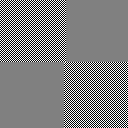
Computer monitors normally have a display of 1.8You should calibrate your displays. A quick way to check if its calibrated is to look at this image below.
The 4 squares should be roughly the same brightness (if you crinkle up your eyes).
Adam
-
RE: Should Trimble write plugins?
What is this Obsession SketchUp users have with 64bit?
Its not going to "make it more stable" or "make it faster".
I don't know who fed you guys this idea, but they should be slapped. And told to stand in the corner.There are some areas of SketchUp internals that (I suspect) could do with some refactoring and would likely result in less memory use and therefore better performance and stability, and with a code base this old, I can well understand the concerns "Team SketchUp" may have with the 'nuke and re-pave' option.
-
RE: Intersect ray and circle in 3D?
The best optimization, is to avoid doing work at all. Work on your algorithm first.
(C++ is a superset of C)
Here's some numbers I've simply plucked out of thin air:
Invoking a C++ method from Ruby costs 500+ instructions.
If the work you do in the method is less than this (calc distance = ~10 instructions), the cost of invocation swamps the cost of evaluation.
Adam
-
RE: Should Trimble write plugins?
Jeff, can you elaborate on why it would be cool?
By their nature, plugins are second-class citizens to a core product.
While its true there is always some jackass software engineer that "invents" the idea that "everything is a plugin" for a particular App, the result is almost always horrible performance and/or brittle software (ie breaks easily).
-
RE: Scale along custom axis
Just for the record..
def scaleAlongVector(v) a = Geom::Vector3d.new(1,0,0) m = Geom::Transformation.new(Geom::Point3d.new, v.cross(a), v.dot(a) ) return m.inverse * Geom::Transformation.scaling(v.length, 1,1) * m endwhere length of v controls how much scaling
-
RE: Camera clipping - still no fix?
@icedkasz said:
Hey guys, I'm working on a project in the mountains. I've made a copy of the file with a bunch of pieces of google maps inserted, so I can figure out the views from the buildings. Problem is, the project bounding box is about a kilometer long. When I try to look out the windows of the house, it gets clipped pretty badly. This forum has had some good tips. I've turned the FOV down from 65 all the way to 10 degrees. It helps a bit, but not to a functional point yet. Are there any fixes to this problem yet? Any sneaky ruby scripts? Or are models with long extents doomed to always have camera clipping issues?
Secondary question - does this belong in the Newbies forum?
Looking at your screenshots again, I think you're seeing something a little different - to do with Components/ Groups. Can you send me the model to check?
BTW The reason reducing FOV "helps" is because the 1/depth being stored in the ZBuffer is becoming more and more "linear" so you're gaining precision - in the limit when its a parallel projection, ZBuffers are simply storing "depth".
Adam
-
RE: Viewshed Analysis in SketchUp
@ryangarnett said:
Thanks Adam, that is great. Will it work if I add objects to the terrain, such as buildings or trees?
Sure, anything you like.
Suggest you just get a free demo of LightUp and give it a whirl.
Adam
-
RE: SketchUp Engine
Yes.
But on a Mac, use Activity Monitor and click "Sample" to see this.
-
RE: Camera clipping - still no fix?
You're not understanding how 3D graphics "works" - its not specific to OpenGL - its how ZBuffers work - and they work identically in OpenGL or D3D or anything else.
ZBuffers are used to store the depth of every pixel on the display relative to the viewer (NB Gaieus, this is why putting around the origin or in positive XY makes no difference whatsoever).
Graphics hardware generally limits the precision of the ZBuffer to 24 bits.
However, in order to display a 3D world on a 2D display, 3d software needs to perform a "Perspective Projection" which has the side effect of making a linear move away from the camera view in World space, a non-linear move in Projection space. What does all that mean?
Well, firstly what is actually stored in 1/depth, and what flows from that is that near to the viewer you get lots of precision and far away you get less and less. This is why a coplanar Picture on a wall might be fine close up but gradually degenerates into a buzzing mess as you recede.
In order to ensure you get maximum precision, most 3d software will control the ratio of near clipping to far clipping to ensure that it fits inside those 24 bits of precision.
So having a far clip of 10000.0 and a near clip of 1.0 gives a ratio of 10000:1 which can be represented by the 24 bit ZBuffer. Bringing the near clip in to 0.01 gives a ratio of 1000000:1 which its going to struggle.
SketchUp adjust the far clip to ensure you get maximum precision - but in the case of huge mountain range, you're going to have problems with this approach.
If you enable Fog, and use the cut-off slider to limit visibility, its possible SketchUp takes the minimum of Fog distance and Far clip which would give you manual control.
If it doesn't do this already, it should - and Adam should get a decent bottle of claret.

Adam

-
RE: SketchUp Engine
Yes. Alchemy tried to compete with RenderWare back in the day of PS2 - without much success.
However, a company subsequently used their engine to create a realtime globe mapping app that eventually caught the eye of Google. Google purchased the app and tech to build what was to become Google Earth.
My problem with Alchemy is the same as it was back then, which it is very heavy weight for realtime graphics where you want stuff really lean'n'mean - try sampling SketchUp sometime and gasp at the call stack depth with hundreds of methods calls.
Adam
-
RE: Viewshed Analysis in SketchUp
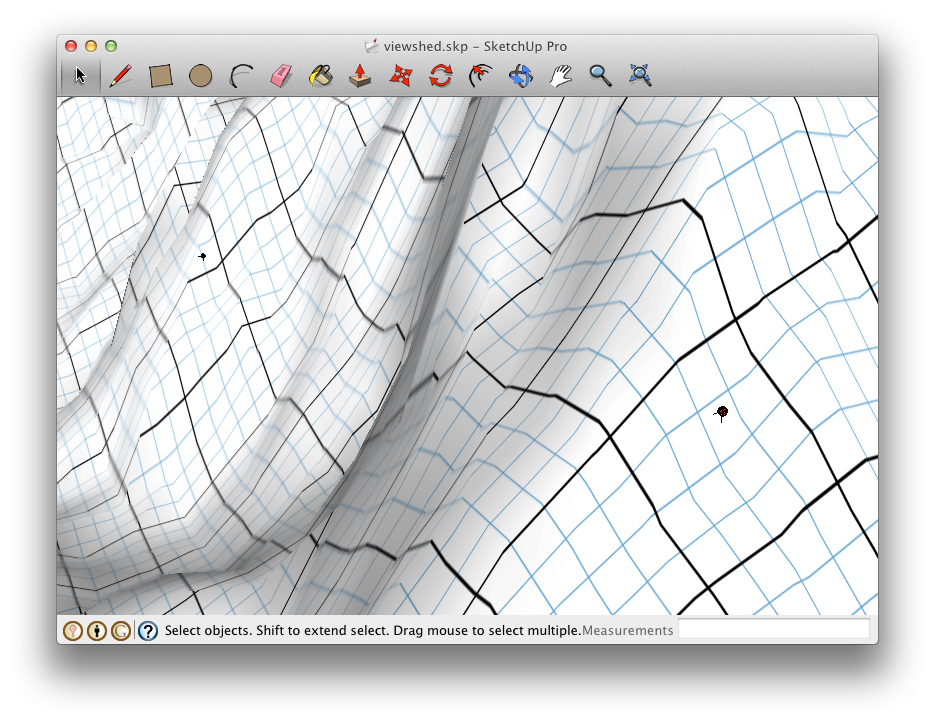
Why don't you just use LightUp and set a powerful PointLight at each viewshed location.
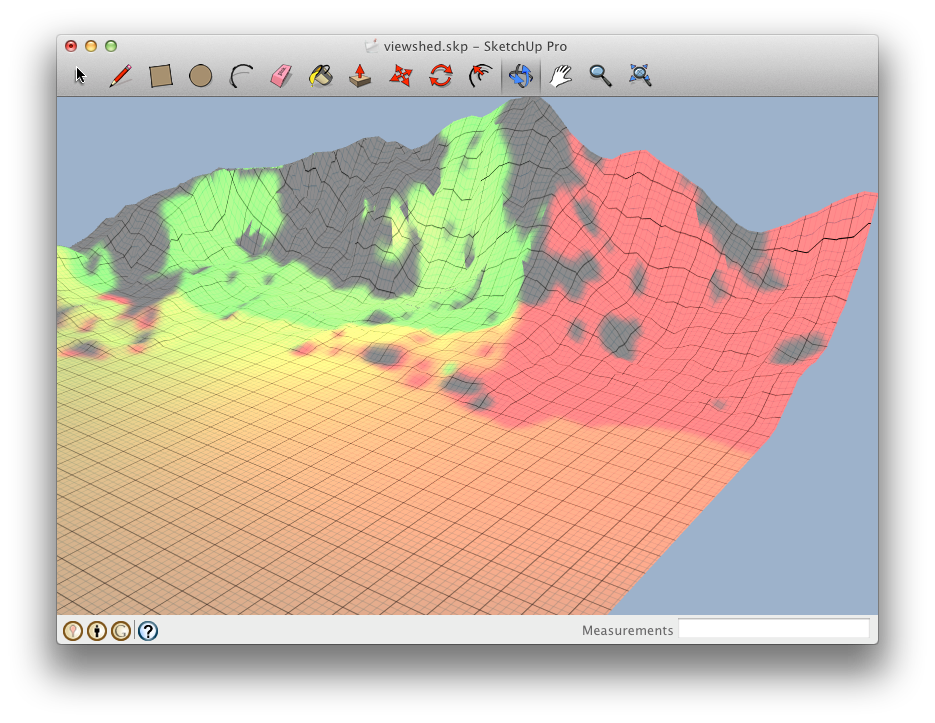
You can even color-code them and the places which can see both locations will be a blend of colors.
Eg First location uses Red, second location uses Green. Places that can see both will be yellow.
Job done in under 1 second.

A large terrain with a couple of locations marked with PointLight components.

And the result:

-
RE: Templar Town tour
Yes, its LightUp using realtime sun with AO. Collision + Gravity enabled to stop walking through walls.
Adam
-
Templar Town tour
Saw this great SketchUp model by LordGood and had to give it a whirl. Its around 75 MB, but inside the SketchUp window runs smoothly at 30Hz - unfortunately the screen capture software can't keep up, so the frame rate of the video isn't anything like reality.
NB Watch in HD!
-
RE: Antialiasing?
@jo-ke said:
What can I do.
Sometimes my SU modell is too heavy, that the renderengine (twilight render) has no more memory free to do the antaliasing.
How can this be done in postpro?
Can Photoshop do that?here's an example, the raw renderoutput:
Just render at 16x your target resolution and use a high quality (eg Gaussian) filter to downsample in PS / PSP / whatever.
Adam
-
RE: [Tutorial] SketchUp Ruby C Extension
@thomthom said:
I take it that the OS Ruby versions is much newer now - and IΒ΄d have to link the build to something other than the OS Ruby?
No, a Plugin resolves the symbols on load.
@thomthom said:
Also, when compiling a C Extension under Mountain Lion - how backwards compatible will it be?
As much as you ask for it to be: eg -mmacosx-version-min=10.4 will ensure it runs on 10.4 and up.
@thomthom said:
I should add some warning about the -Ox flag that it might cause problems - since it's very aggressive optimization.
Just to correct this. The optimization does not produce 'wrong code' per se. Its that it commonly will remove leaf function stack frames to increase performance, meaning Ruby's GC can't find a reference to a Object and it gets marked for collection. So ensure you keep references and you'll be fine.
-
LightUp Essentials: Materials
NB You'll need to choose HD / 720p quality to be able to read the dialogs etc.
This covers setting up Materials for lighting and editing during realtime.
This covers using SketchUp Images to avoid z-fighting and flickering