sketchucation logo sketchucation
    • Login
    Oops, your profile's looking a bit empty! To help us tailor your experience, please fill in key details like your SketchUp version, skill level, operating system, and more. Update and save your info on your profile page today!
    ⚠️ Update | Sketchucation Tools 5.0.8 released with licensing improvements and bugfixes Download

    Push and pull tool

    Scheduled Pinned Locked Moved Newbie Forum
    sketchup
    19 Posts 12 Posters 4.5k Views 12 Watching
    Loading More Posts
    • Oldest to Newest
    • Newest to Oldest
    • Most Votes
    Reply
    • Reply as topic
    Log in to reply
    This topic has been deleted. Only users with topic management privileges can see it.
    • S
      sorgesu
      last edited by

      You could also select all the top surfaces that you would have wished to push pull up, use the MOVE tool instead of the push pull and tap the "up" arrow key which will lock all the movement to the z axis direction. MOVe Up 12'. all the attached geometry will follow as it does the push pull tool.

      Susan Sorger
      Former Seller Hand Rendered Entourage
      Former Canadian Authorized Training Centre, SketchUp

      1 Reply Last reply
      Reply Quote 0
      • GaieusG
        Gaieus
        last edited by

        Susan, this would only work if those "objects" he is mentioning would already have some thickness. If they are true "outlines" only (i.e. 2D faces), all of them would just be lifted into the air.

        Gai...

        1 Reply Last reply
        Reply Quote 0
        • S
          sorgesu
          last edited by

          TRUE. WAS ASSUMING. silly.

          Susan Sorger
          Former Seller Hand Rendered Entourage
          Former Canadian Authorized Training Centre, SketchUp

          1 Reply Last reply
          Reply Quote 0
          • Jean LemireJ
            Jean Lemire
            last edited by

            I folks.

            See attached SU file for ideas.

            Pulling multiple shapes.skp

            Jean (Johnny) Lemire from Repentigny, Quebec, Canada.

            1 Reply Last reply
            Reply Quote 0
            • Wo3DanW
              Wo3Dan
              last edited by

              @jean lemire said:

              I folks.

              See attached SU file for ideas.

              Jean,

              Once again you proved to obtain a solution with basic SU tools, great!!
              We tend to forget the possibilities of more 'complex' ++ or +/- selections with Crtl and Shift.
              Thanks for sharing.

              (Wo3Dan)

              1 Reply Last reply
              Reply Quote 0
              • GaieusG
                Gaieus
                last edited by

                Very witty, Jean!
                😄

                Gai...

                1 Reply Last reply
                Reply Quote 0
                • EdsonE
                  Edson
                  last edited by

                  this a great tut, jean. very useful indeed.

                  gai, we should move jean's tuts to the tutorials section, don't you think so?

                  edson mahfuz, architect| porto alegre • brasil
                  http://www.mahfuz.arq.br

                  1 Reply Last reply
                  Reply Quote 0
                  • GaieusG
                    Gaieus
                    last edited by

                    @unknownuser said:

                    this a great tut, jean. very useful indeed.

                    gai, we should move jean's tuts to the tutorials section, don't you think so?

                    I agree, Edson!
                    And don't forget that both you and Jean are mods who can easily do this!
                    😄

                    Gai...

                    1 Reply Last reply
                    Reply Quote 0
                    • EdsonE
                      Edson
                      last edited by

                      no, i do not forget that. i am just not sure how to do it.

                      edson mahfuz, architect| porto alegre • brasil
                      http://www.mahfuz.arq.br

                      1 Reply Last reply
                      Reply Quote 0
                      • GaieusG
                        Gaieus
                        last edited by

                        Hm...

                        It's quite easy, Edson! See here:
                        http://www.sketchucation.com/forums/scf/viewtopic.php?f=20&t=756

                        😄

                        Gai...

                        1 Reply Last reply
                        Reply Quote 0
                        • EdsonE
                          Edson
                          last edited by

                          gotcha.

                          edson mahfuz, architect| porto alegre • brasil
                          http://www.mahfuz.arq.br

                          1 Reply Last reply
                          Reply Quote 0
                          • TIGT
                            TIG Moderator
                            last edited by

                            I wrote a random pushpull script ages ago - it's still available free on Didier's site and elsewhere...

                            IF you make the max. and min. variation in the 'range' then it push/pulls the selected faces by the same amount in one go...

                            Its function with a range and allowing random or stepped amounts of push/pulling gives similar results to the 'Grebble' script that's under discussion in other threads...

                            TIG

                            1 Reply Last reply
                            Reply Quote 0
                            • S
                              SchreiberBike
                              last edited by

                              Jean (Johnny) Lemire,

                              You have a gift for making what seems impossible easy.

                              Thanks!

                              1 Reply Last reply
                              Reply Quote 0
                              • bradB
                                brad
                                last edited by

                                Hi All,

                                You could also used the attached Ruby script.

                                Description:
                                Push pull faces along a vector given with 2 clicks, in any direction.

                                Instruction/Usage:
                                Install:Just drop it in Plugins folder.
                                Menu: Context

                                Hope that helps.


                                pushpull_tool.rb

                                Brad
                                SketchUp QA

                                1 Reply Last reply
                                Reply Quote 0
                                • EdsonE
                                  Edson
                                  last edited by

                                  thanks, brad. indeed, it allows one to push-pull in directions the straight tool will not allow. i played with it for a short while and came across some unexpected results, like being able to copy a face along one of its sides (see attached).

                                  i wonder if anyone who has been using it for some time can tell us some practical ways to use it.
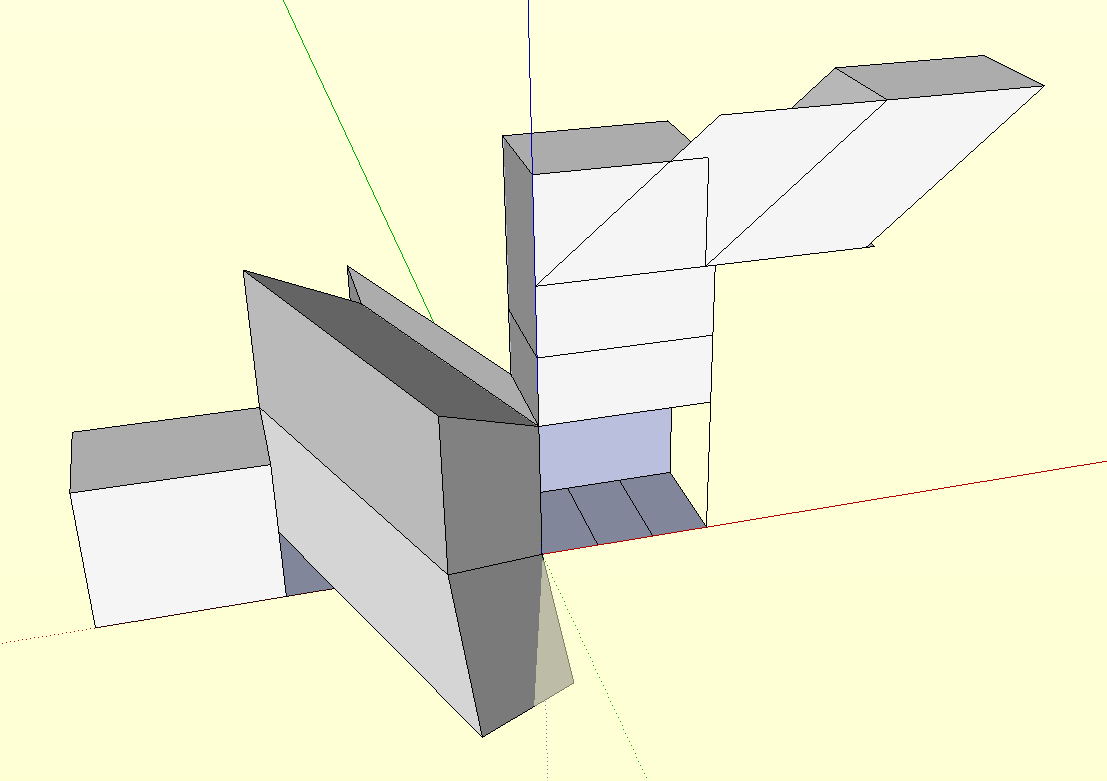

                                  Picture 20.png

                                  edson mahfuz, architect| porto alegre • brasil
                                  http://www.mahfuz.arq.br

                                  1 Reply Last reply
                                  Reply Quote 0
                                  • FletchF
                                    Fletch
                                    last edited by

                                    why not just use the "push/pull multiple faces" ruby for this? That's what I use 😉

                                    Fletch
                                    3D Modeling addict. Former owner/developer of Twilight Render. sleepinggiantvisual.com

                                    1 Reply Last reply
                                    Reply Quote 0

                                    Hello! It looks like you're interested in this conversation, but you don't have an account yet.

                                    Getting fed up of having to scroll through the same posts each visit? When you register for an account, you'll always come back to exactly where you were before, and choose to be notified of new replies (either via email, or push notification). You'll also be able to save bookmarks and upvote posts to show your appreciation to other community members.

                                    With your input, this post could be even better 💗

                                    Register Login
                                    • 1 / 1
                                    • First post
                                      Last post
                                    Buy SketchPlus
                                    Buy SUbD
                                    Buy WrapR
                                    Buy eBook
                                    Buy Modelur
                                    Buy Vertex Tools
                                    Buy SketchCuisine
                                    Buy FormFonts

                                    Advertisement