sketchucation logo sketchucation
    • 登入
    Oops, your profile's looking a bit empty! To help us tailor your experience, please fill in key details like your SketchUp version, skill level, operating system, and more. Update and save your info on your profile page today!
    🔌 Smart Spline | Fluid way to handle splines for furniture design and complex structures. Download

    [Tutorial > Modeling] Arch in a curved wall.

    已排程 已置頂 已鎖定 已移動 SketchUp Tutorials
    sketchup
    32 貼文 14 Posters 11.7k 瀏覽 14 Watching
    正在載入更多貼文
    • 從舊到新
    • 從新到舊
    • 最多點贊
    回覆
    • 在新貼文中回覆
    登入後回覆
    此主題已被刪除。只有擁有主題管理權限的使用者可以查看。
    • boofredlayB 離線
      boofredlay
      最後由 編輯

      Here is a tut I created for modelling an arch in a curved wall.
      I have to do a number of these on a project next week (hopefully)
      and I wanted to see if I could do it. So here is my stab.
      I used an extreme example. The arches I will be doing will
      be a bit more subtle.

      http://www.sketchucation.com/forums/scf/sas/Tutorials/ArcToArch.jpg

      Download tutorial here.

      http://www.coroflot.com/boofredlay

      1 條回覆 最後回覆 回覆 引用 0
      • GaieusG 離線
        Gaieus
        最後由 編輯

        Nice one, Eric, really!
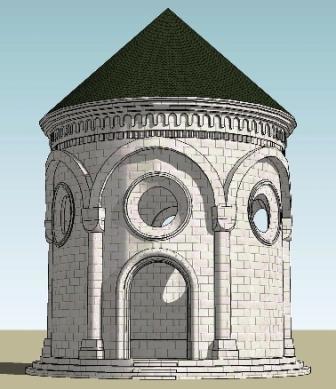
        A little different approach though but I also had to modell something with curved arches (please, don't look at the "non-arched" material of the arches now 😄 )


        mauzoleum1.jpg

        Gai...

        1 條回覆 最後回覆 回覆 引用 0
        • boofredlayB 離線
          boofredlay
          最後由 編輯

          That's beautiful Gaieus.

          http://www.coroflot.com/boofredlay

          1 條回覆 最後回覆 回覆 引用 0
          • T 離線
            titmas
            最後由 編輯

            Eric,
            That was easy, thanks.
            the only tedious step was to 'soften/smooth' the stitching, I had to right click each stitch, one at a time, and select 'soften'. is there easier/quicker way?

            http://www.sketchucation.com/forums/scf/sas/test/ArcToArch model.png

            1 條回覆 最後回覆 回覆 引用 0
            • GaieusG 離線
              Gaieus
              最後由 編輯

              Just simply use the Ctrl+Eraser tool to do a "smear" of softening edges on a surface by hand.
              (Plus make sure you have the same faces facing outside - in your pic there are front and back (white and blue) faces mixed).

              Gai...

              1 條回覆 最後回覆 回覆 引用 0
              • GaieusG 離線
                Gaieus
                最後由 編輯

                Well, James, that's another way of saying the same...
                😮

                Gai...

                1 條回覆 最後回覆 回覆 引用 0
                • GaieusG 離線
                  Gaieus
                  最後由 編輯

                  Oh, sorry James, I didn't mean to!

                  But at least Sean can make sure that the same info from two sources must work.
                  😄

                  Gai...

                  1 條回覆 最後回覆 回覆 引用 0
                  • T 離線
                    titmas
                    最後由 編輯

                    titmas, just hold down the ctl key while erasing. This will smooth the edges very quickly.

                    Oh wait... did someone already say that 😮

                    1 條回覆 最後回覆 回覆 引用 0
                    • GaieusG 離線
                      Gaieus
                      最後由 編輯

                      thanks, that was helpful.

                      Gai...

                      1 條回覆 最後回覆 回覆 引用 0
                      • Paul RussamP 離線
                        Paul Russam
                        最後由 編輯

                        We need an emote for 'bangs head of desk'

                        I never knew we could do this in SU, I've been selecting faces and picking soften/smooth edges from the context menu. 😮

                        This is what I love about SU and here, always something new or a new way to do something.

                        Paul Russam
                        English doesn't borrow from other languages. It follows them down dark allies, knocks them over, and goes through their pockets for loose grammar.

                        1 條回覆 最後回覆 回覆 引用 0
                        • GaieusG 離線
                          Gaieus
                          最後由 編輯

                          Hehe...
                          I learn so many things every day... 😄

                          Additionally, the modification keys (in Win) for the Eraser tool:

                          Ctrl+Eraser = soften
                          Shift+Eraser = hide
                          You can soften a hidden line with this but cannot turn a softened line into hidden.

                          Ctrl+Shift+Eraser = unsoften / turn a softened line hidden (works only with hidden geometry on of course)

                          Gai...

                          1 條回覆 最後回覆 回覆 引用 0
                          • N 離線
                            not registered yet
                            最後由 編輯

                            I seem to be having a problem with Step (Scene) 7.

                            I draw my arc then attempt to push/pull through the face but I am getting an "Offset limited to ~7 3/8" message.

                            Any suggestions?

                            Thanks much.

                            Marc

                            (Elmarq)

                            1 條回覆 最後回覆 回覆 引用 0
                            • boofredlayB 離線
                              boofredlay
                              最後由 編輯

                              Welcome Marc.

                              Go ahead and push it to that offset limit. Then push it again and it should go through. If not, push it to that limit then hold ctl while pushing again, creating a copy. This should go through.

                              Let me know if it works.

                              http://www.coroflot.com/boofredlay

                              1 條回覆 最後回覆 回覆 引用 0
                              • GaieusG 離線
                                Gaieus
                                最後由 編輯

                                Also, if you group either the curved face or the arch, it will not "report" this limit (in the latter case you need to edit it to be able to P/P). You can then explode the group and intersect.

                                Gai...

                                1 條回覆 最後回覆 回覆 引用 0
                                • N 離線
                                  not registered yet
                                  最後由 編輯

                                  Thanks for the tips! That did the trick.

                                  Marc

                                  (Elmarq)

                                  1 條回覆 最後回覆 回覆 引用 0
                                  • P 離線
                                    PKast
                                    最後由 編輯

                                    There was a good tip recently that relates to this tutorial. By using the "from Countours" tool from the "sandbox group" you can quickly and automatically stitch the area at the bottom of the arch.

                                    Select the two arcs that define the curve, select the "from Contours" tool and the curves become stitched. Clean up the excess stitching, and finish by smoothing the surface.

                                    1 條回覆 最後回覆 回覆 引用 0
                                    • K 離線
                                      Katies29f
                                      最後由 編輯

                                      I cannot download this tutorial the link is busted

                                      1 條回覆 最後回覆 回覆 引用 0
                                      • GaieusG 離線
                                        Gaieus
                                        最後由 編輯

                                        @katies29f said:

                                        I cannot download this tutorial the link is busted

                                        Yes we had some problem yesterday but it's fixed now.

                                        Gai...

                                        1 條回覆 最後回覆 回覆 引用 0
                                        • J 離線
                                          Julius
                                          最後由 編輯

                                          very useful tutorial, but...how did you stitch together in scene 11?

                                          1 條回覆 最後回覆 回覆 引用 0
                                          • zx10r_GazZ 離線
                                            zx10r_Gaz
                                            最後由 編輯

                                            @not registered yet said:

                                            I seem to be having a problem with Step (Scene) 7.

                                            I draw my arc then attempt to push/pull through the face but I am getting an "Offset limited to ~7 3/8" message.

                                            Any suggestions?

                                            Thanks much.

                                            Marc

                                            (Elmarq)

                                            Hello Marc,

                                            I think you will encounter this problem if you do not delete the "construction lines" from the arch to where you draw your arc. Delete these before you push/pull and it will work fine.

                                            Gaz...

                                            1 條回覆 最後回覆 回覆 引用 0
                                            • 1
                                            • 2
                                            • 1 / 2
                                            • 第一個貼文
                                              最後的貼文
                                            Buy SketchPlus
                                            Buy SUbD
                                            Buy WrapR
                                            Buy eBook
                                            Buy Modelur
                                            Buy Vertex Tools
                                            Buy SketchCuisine
                                            Buy FormFonts

                                            Advertisement