sketchucation logo sketchucation
    • 登入
    Oops, your profile's looking a bit empty! To help us tailor your experience, please fill in key details like your SketchUp version, skill level, operating system, and more. Update and save your info on your profile page today!
    🔌 Smart Spline | Fluid way to handle splines for furniture design and complex structures. Download

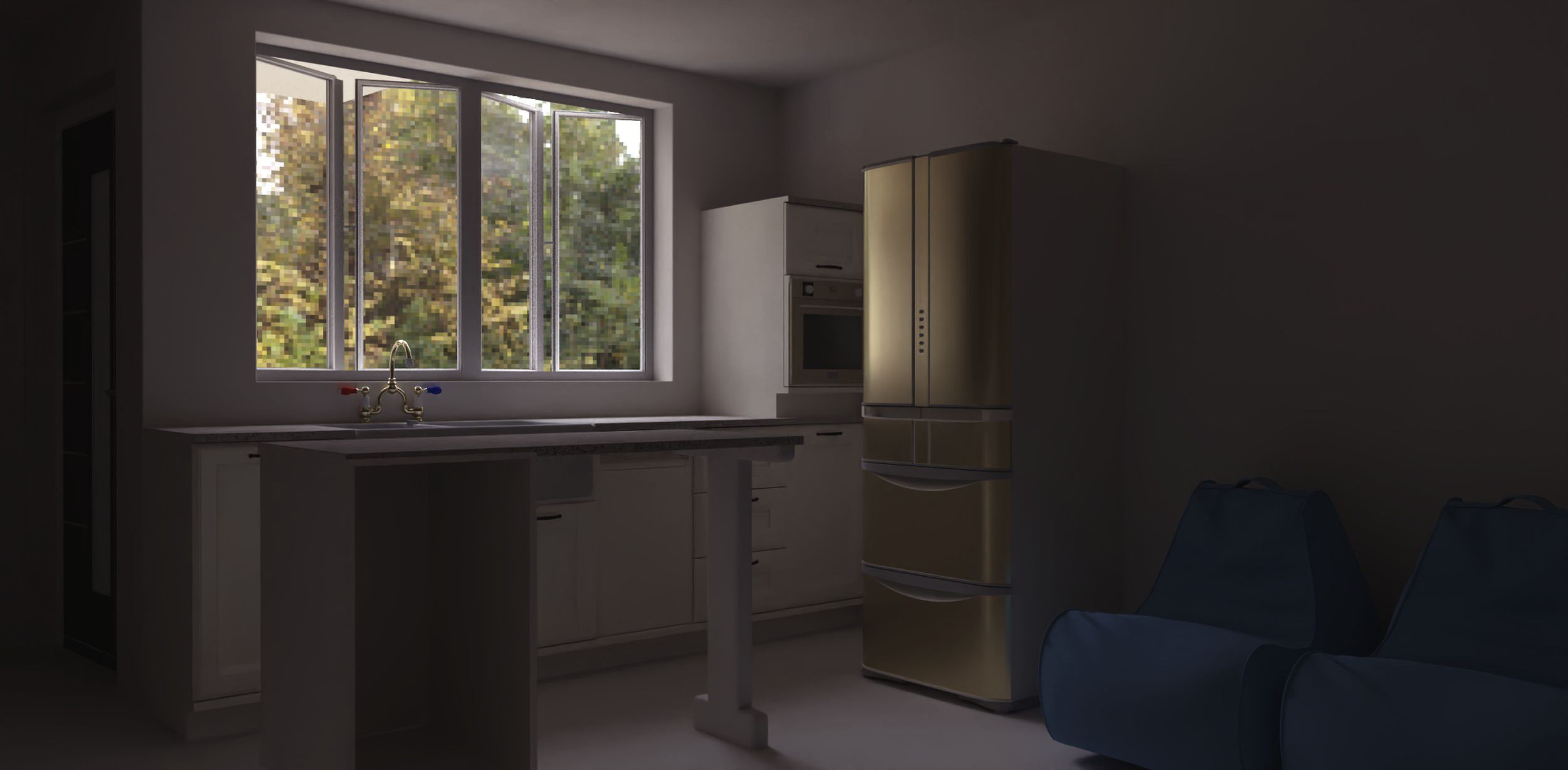
    Rayscaper, My trip down the road to adjumacation.
    已排程 已置頂 已鎖定 已移動 WIP
    176 貼文 8 Posters 12.8k 瀏覽 7 Watching
    正在載入更多貼文
    • 從舊到新
    • 從新到舊
    • 最多點贊
    回覆
    • 在新貼文中回覆
    登入後回覆
    此主題已被刪除。只有擁有主題管理權限的使用者可以查看。
    • P 離線
      pixelcruncher Extension Creator @Mike Amos
      最後由 編輯

      Nice render Mike!

      For some reason when selecting gpu render, this pc reverts from 2748 x 1048 to 1000 x 1000 pixel size.

      Can you reproduce this consistently? Smells like a bug.

      Well, I had a thunk to add a reading light over the desk, balance. I still do not have it yet but, I am looking.

      Maybe this is something I can help with? Is the light just not rendering, or are you having trouble configuring the light?

      Cheers,
      Thomas

      I'm the developer of Rayscaper: https://rayscaper.com/ - Fast and easy rendering for SketchUp.

      Mike AmosM 2 條回覆 最後回覆 回覆 引用 0
      • Mike AmosM 離線
        Mike Amos @pixelcruncher
        最後由 編輯

        @pixelcruncher

        Well, difficult to say if there is any illumination from the unit, it has a fake emitter and two directional lights which are pointing in the correct direction. Still getting myself oriented with these lights.

        Absentia mortis praesentiam vitae probat, vita autem est argumentum constantiae.

        1 條回覆 最後回覆 回覆 引用 0
        • Mike AmosM 離線
          Mike Amos @pixelcruncher
          最後由 編輯

          @pixelcruncher

          Essentially the balance issues make it difficult for me to see where the illumination level is do I will have to render a scene or two with just the lamps I have made and adjust from there.

          Absentia mortis praesentiam vitae probat, vita autem est argumentum constantiae.

          Mike AmosM 1 條回覆 最後回覆 回覆 引用 0
          • Mike AmosM 離線
            Mike Amos @Mike Amos
            最後由 編輯

            @Mike-Amos

            Weird this, one spotlight and one directional light along with the fake emitter surface.

            I ramped up the directional light alone to 100.00 watts. OK, distance that this illumination appears at needs adjusting. I then reduce the power levels to zero watts and the illumination does not change. I will close Rayscaper and open it again, see what happens.

            Absentia mortis praesentiam vitae probat, vita autem est argumentum constantiae.

            Mike AmosM 1 條回覆 最後回覆 回覆 引用 0
            • Mike AmosM 離線
              Mike Amos @Mike Amos
              最後由 編輯

              @Mike-Amos

              OK, part of the reasons for a simple black screen rather than a render is that for some reason, there were TWO 'ghost white' textures/colours imported. Only one of which had any reference to 'glass'.

              Nice to find that.

              Even at 200w the cone of light is not apparent from the now 2 x spotlights.

              Absentia mortis praesentiam vitae probat, vita autem est argumentum constantiae.

              Mike AmosM 1 條回覆 最後回覆 回覆 引用 0
              • Mike AmosM 離線
                Mike Amos @Mike Amos
                最後由 編輯

                @Mike-Amos

                OK, the properties assigned to materials etc in Rayscaper are not surviving shutdown and restart on this pc. Memory? 32gig and a decent graphics card suggests not.
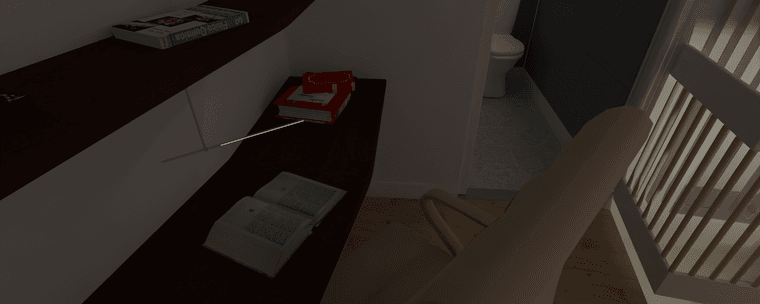
                Boxing 7 500 Sampless 42m gpu.png

                Absentia mortis praesentiam vitae probat, vita autem est argumentum constantiae.

                Rich O BrienR 1 條回覆 最後回覆 回覆 引用 0
                • Rich O BrienR 離線
                  Rich O Brien Moderator @Mike Amos
                  最後由 編輯

                  @Mike-Amos I believe there's issues when there's a mix of emission materials.

                  There's also some odd behaviour whereby an emission value will decide to not emit light until you reset it.

                  I'd wait for a fix around lights

                  Download the free D'oh Book for SketchUp 📖

                  Rich O BrienR 1 條回覆 最後回覆 回覆 引用 0
                  • Rich O BrienR 離線
                    Rich O Brien Moderator @Rich O Brien
                    最後由 編輯

                    @Mike-Amos

                    Here a little scene to see the values I used to light scene:
                    watchmen-emit-scene_2020.skp
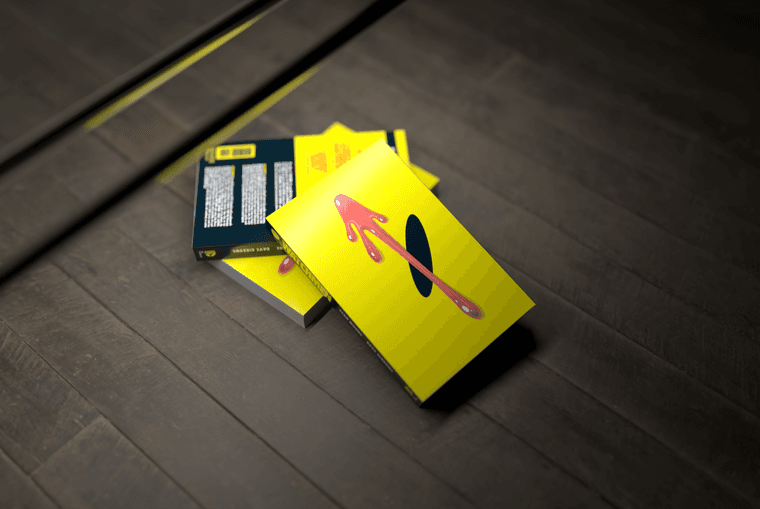
                    watchen-emit.png

                    I'd be interested in your render times. This is 30s for me on GPU

                    Download the free D'oh Book for SketchUp 📖

                    Mike AmosM 1 條回覆 最後回覆 回覆 引用 0
                    • Mike AmosM 離線
                      Mike Amos @Rich O Brien
                      最後由 編輯

                      @Rich-O-Brien

                      With Sketchup v2022, instant crash, no bugsplat.

                      Absentia mortis praesentiam vitae probat, vita autem est argumentum constantiae.

                      Mike AmosM 1 條回覆 最後回覆 回覆 引用 0
                      • Mike AmosM 離線
                        Mike Amos @Mike Amos
                        最後由 編輯

                        @Mike-Amos

                        Tried again. Rendered but took 17m 31 for this.

                        Big Fat.png

                        Absentia mortis praesentiam vitae probat, vita autem est argumentum constantiae.

                        Mike AmosM 1 條回覆 最後回覆 回覆 引用 0
                        • Mike AmosM 離線
                          Mike Amos @Mike Amos
                          最後由 編輯

                          @Mike-Amos

                          Just to point out that this is the old pc which is getting on a bit.

                          Absentia mortis praesentiam vitae probat, vita autem est argumentum constantiae.

                          1 條回覆 最後回覆 回覆 引用 0
                          • P 離線
                            pixelcruncher Extension Creator
                            最後由 pixelcruncher 編輯

                            Hey @Mike-Amos

                            Some screenshots would be helpful to follow along!

                            Weird this, one spotlight and one directional light along with the fake emitter surface.

                            I ramped up the directional light alone to 100.00 watts. OK, distance that this illumination appears at needs adjusting. I then reduce the power levels to zero watts and the illumination does not change. I will close Rayscaper and open it again, see what happens.

                            Mike, can you reproduce this consistently? If so, I'd like to check it out with your scene on my computer.

                            OK, part of the reasons for a simple black screen rather than a render is that for some reason, there were TWO 'ghost white' textures/colours imported. Only one of which had any reference to 'glass'.

                            Do you mind posting a screenshot of what you mean by ghost textures?

                            OK, the properties assigned to materials etc in Rayscaper are not surviving shutdown and restart on this pc. Memory? 32gig and a decent graphics card suggests not.

                            I wouldn't blame your PC 🙂 Rayscaper is still beta, so bugs are possible!

                            As @Rich-O-Brien pointed out, there is some odd behavior with lights. He reported it earlier, and requires a fix. Lights should behave better on CPU, but yeah wait times are a lot longer...

                            Tried again. Rendered but took 17m 31 for this.

                            Is this @Rich-O-Brien 's scene or yours? Do you mind mailing me the scene thomas@rayscaper.com?

                            Cheers,
                            Thomas

                            I'm the developer of Rayscaper: https://rayscaper.com/ - Fast and easy rendering for SketchUp.

                            Mike AmosM 1 條回覆 最後回覆 回覆 引用 0
                            • Mike AmosM 離線
                              Mike Amos @pixelcruncher
                              最後由 編輯

                              @pixelcruncher

                              1. No, does not reproduce, random over several renders.

                              2. Ghost textures, where the same texture is apparent more than once in the materials list. Ghost white is a colour I use exclusively for glass. If as in this instance, the light fitting is imported, the material is listed twice or more and treated as a seperate instance. Only one of which had a glass setting.

                              2a. I believe this is a bug where imported models have the same material as the main model. The model (Light) itself is probably unrealistic so I will adjust and try again.

                              1. This is the scene Rich posted. I am going to recheck this over the weekend, possibly another example of imported models not being assigned a mat finish or possibly not surviving a save of the file.

                              Absentia mortis praesentiam vitae probat, vita autem est argumentum constantiae.

                              Mike AmosM P 2 條回覆 最後回覆 回覆 引用 0
                              • Mike AmosM 離線
                                Mike Amos @Mike Amos
                                最後由 編輯

                                @Mike-Amos

                                As I thought, the scene as opened is a blank canvas. All mats are 100% opaque and no emiters.

                                Absentia mortis praesentiam vitae probat, vita autem est argumentum constantiae.

                                Mike AmosM 1 條回覆 最後回覆 回覆 引用 0
                                • Mike AmosM 離線
                                  Mike Amos @Mike Amos
                                  最後由 Mike Amos 編輯

                                  @Mike-Amos

                                  Made mat 003 an emiter and this ran over 4m 20s.

                                  There are lines here not apparent in the render window, geometry? Yep, when I selected the view Rich set the geometry (Hidden lines etc) was switched on by Sketchup. Old bug.
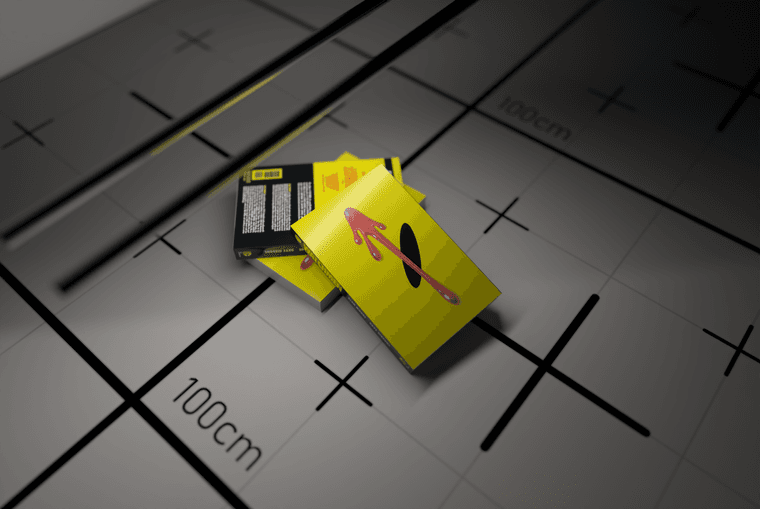
                                  Rich Tea Test 4m 20s.png

                                  Absentia mortis praesentiam vitae probat, vita autem est argumentum constantiae.

                                  Mike AmosM 1 條回覆 最後回覆 回覆 引用 0
                                  • Mike AmosM 離線
                                    Mike Amos @Mike Amos
                                    最後由 Mike Amos 編輯

                                    @Mike-Amos

                                    An observation, I looked at mat 003 and emission which I set to colour, had been switched OFF. I did not shut the render window this time round.

                                    I shut the render window because I cannot minimise it without minimising Sketchup first, it would be nice to be able to minimise Rayscaper independantly.

                                    This scene just rendered at 3m 42s with emision set to colour and power at 1.00.

                                    Absentia mortis praesentiam vitae probat, vita autem est argumentum constantiae.

                                    1 條回覆 最後回覆 回覆 引用 0
                                    • P 離線
                                      pixelcruncher Extension Creator @Mike Amos
                                      最後由 編輯

                                      @Mike-Amos

                                      No, does not reproduce, random over several renders.

                                      That sucks, will keep an eye out for this.

                                      Ghost textures, where the same texture is apparent more than once in the materials list. Ghost white is a colour I use exclusively for glass. If as in this instance, the light fitting is imported, the material is listed twice or more and treated as a seperate instance. Only one of which had a glass setting.

                                      Could you send the latest iteration of your scene? It will help me better understand why the material is listed twice.

                                      2a. I believe this is a bug where imported models have the same material as the main model. The model (Light) itself is probably unrealistic so I will adjust and try again.

                                      I'm not following on this one, can you provide a small test scene? Or instructions to reproduce so I can understand the expected behavior?

                                      As I thought, the scene as opened is a blank canvas. All mats are 100% opaque and no emiters.

                                      Apologies, but not following which scene you are talking about.

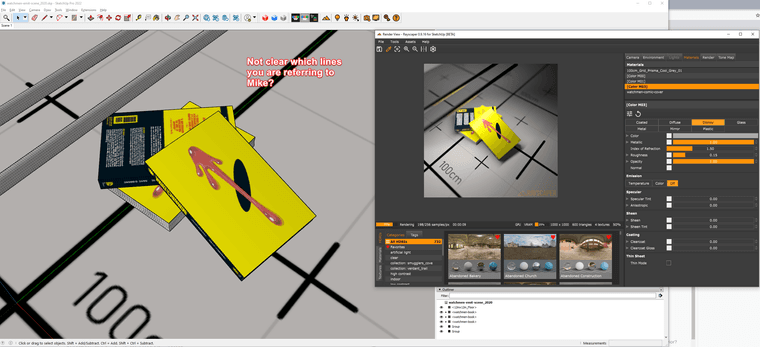
                                      There are lines here not apparent in the render window, geometry?

                                      Which lines in the model, I have it open here but I'm not sure I understand:
                                      cd5610fe-194c-460a-bc69-62b49b513d72-image.png

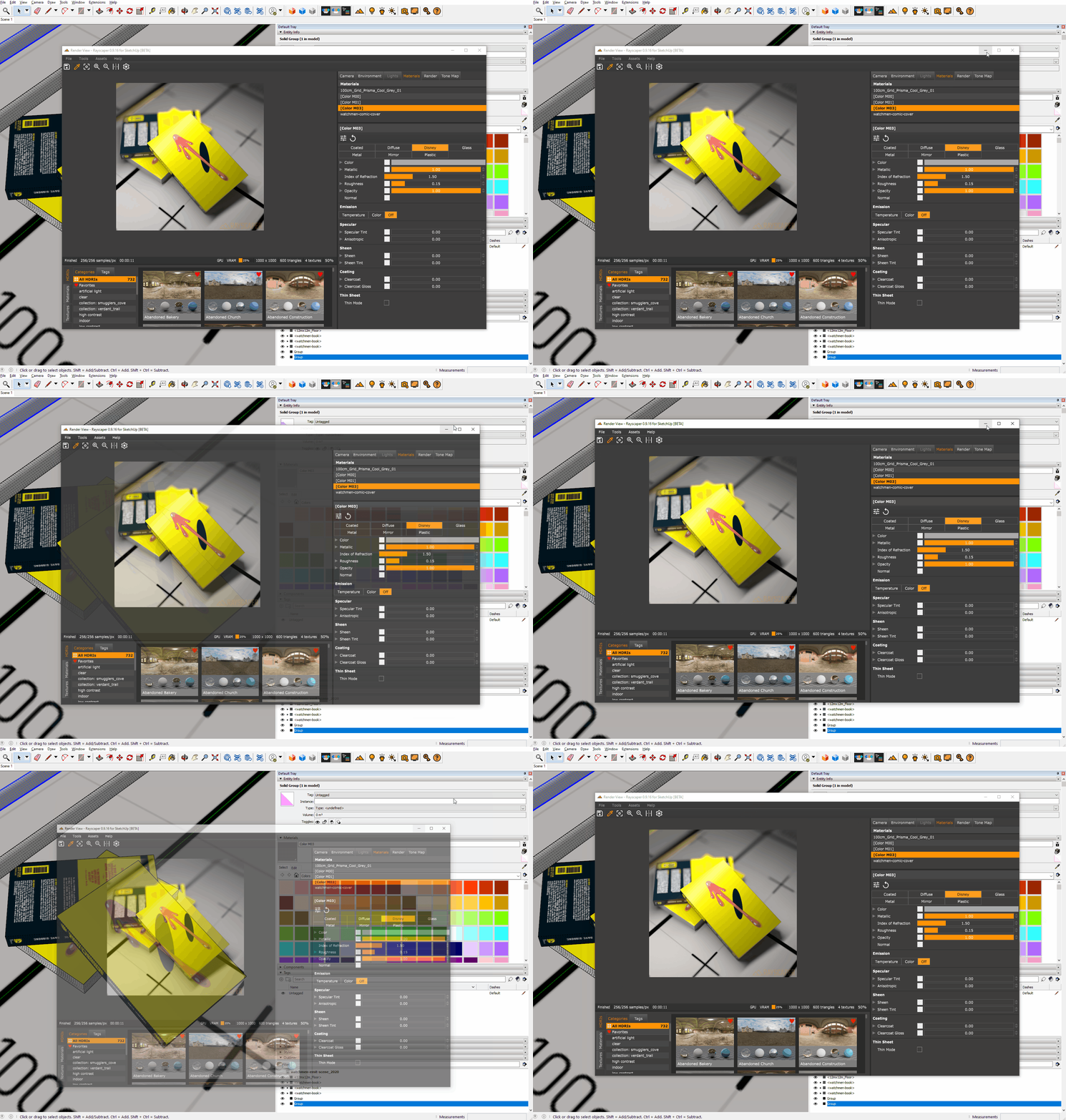
                                      I shut the render window because I cannot minimise it without minimising Sketchup first, it would be nice to be able to minimise Rayscaper independantly.

                                      Is this the behavior you are referring to?
                                      minimize-bug.gif

                                      If so, yes that is annoying and is new to me. I will put it on my list.

                                      I'm the developer of Rayscaper: https://rayscaper.com/ - Fast and easy rendering for SketchUp.

                                      P 1 條回覆 最後回覆 回覆 引用 0
                                      • P 離線
                                        pixelcruncher Extension Creator @pixelcruncher
                                        最後由 編輯

                                        @Mike-Amos - Something I learned from @Rich-O-Brien. There's a great tool called ShareX (https://getsharex.com/). You can use it to quickly capture and annotate screenshots. A screenshots with an arrow, circle or other annotation immediately helps me understand what the problem is. Text is harder for me to dissect issues with Rayscaper.

                                        Cheers,
                                        Thomas

                                        I'm the developer of Rayscaper: https://rayscaper.com/ - Fast and easy rendering for SketchUp.

                                        Mike AmosM 1 條回覆 最後回覆 回覆 引用 0
                                        • Mike AmosM 離線
                                          Mike Amos @pixelcruncher
                                          最後由 編輯

                                          @pixelcruncher

                                          I am going to have a look at that but it seems most of the problems are based around lost settings for colour/texture/material between openings of Rayscaper.

                                          The issue of Rayscaper not minimising is nothing new for me here.

                                          The led lights in the kistchen of the my home renders was due to the glass cover of the unit becoming opaque. No way light gets through that. and later render has demonstrated this by castnig a shadow of the light fixture.

                                          I believe this is nothing serious and only a matter of time. I know you are getting this right mate. Thanks for making this soon to be great program.

                                          Absentia mortis praesentiam vitae probat, vita autem est argumentum constantiae.

                                          P 1 條回覆 最後回覆 回覆 引用 1
                                          • P 離線
                                            pixelcruncher Extension Creator @Mike Amos
                                            最後由 編輯

                                            @Mike-Amos

                                            I am going to have a look at that but it seems most of the problems are based around lost settings for colour/texture/material between openings of Rayscaper.

                                            Thanks for reporting. If there are easy-to-reproduce examples, please send them my way. I appreciate the help.

                                            I believe this is nothing serious and only a matter of time. I know you are getting this right mate. Thanks for making this soon to be great program.

                                            I appreciate your support, Mike!

                                            Cheers,
                                            Thomas

                                            I'm the developer of Rayscaper: https://rayscaper.com/ - Fast and easy rendering for SketchUp.

                                            Mike AmosM 1 條回覆 最後回覆 回覆 引用 0
                                            • 1
                                            • 2
                                            • 3
                                            • 4
                                            • 5
                                            • 6
                                            • 7
                                            • 8
                                            • 9
                                            • 4 / 9
                                            • 第一個貼文
                                              最後的貼文
                                            Buy SketchPlus
                                            Buy SUbD
                                            Buy WrapR
                                            Buy eBook
                                            Buy Modelur
                                            Buy Vertex Tools
                                            Buy SketchCuisine
                                            Buy FormFonts

                                            Advertisement